

Old Mac, New Mac
Kel Taylor - 2000.04.24
Computers are climbing up the steep wall of technology much faster than the average consumer or professional can keep up. We can always wait a few months and something better will be out at a lower price - then wait a few more months and something even better will be available.
A computer just isn't a good investment as far as dollar value is concerned. That's why computer users must concentrate on their productivity, and we all know that people can be much more productive on Macs, even "old" ones.
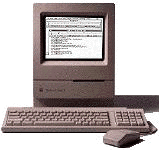 Even after a computer is declared
"obsolete," it can still have many useful and productive functions. I
currently have a Performa
200 with an old grayscale HP ScanJet and a StyleWriter II working
together as a copy machine, a database of all my customers, a business
card and form printer, and a label maker, among other things. I know it
sounds crude and rugged, but the little Mac gets the job done, and very
well. I don't remember the last time the thing crashed or froze. Once I
got it set up, I've had virtually no problems with it.
Even after a computer is declared
"obsolete," it can still have many useful and productive functions. I
currently have a Performa
200 with an old grayscale HP ScanJet and a StyleWriter II working
together as a copy machine, a database of all my customers, a business
card and form printer, and a label maker, among other things. I know it
sounds crude and rugged, but the little Mac gets the job done, and very
well. I don't remember the last time the thing crashed or froze. Once I
got it set up, I've had virtually no problems with it.
I keep the Performa close to my PowerBook 540c. Just plug the serial cable into the printer/modem port, and I have a small AppleTalk network. I transfer files and data using AppleShare to keep them in sync. The whole system has worked perfectly for the past two years, and I wouldn't call it obsolete in the least, nor would I try to upgrade it. There's nothing that an upgrade would help it do better, and there's nothing else I want to do with it, so an upgrade would just be silly.
The Performa 200 system is for the small auto detailing business I operate out in my makeshift office (used to be a garage). There is a more advanced Mac inside the house. The Power Mac G3 desktop, purchased in March 1998, has been my companion through think and thin. Sure, I've had to reinstall the System more than once, and it's had its share of crashes, but there was nothing I ever had to call tech support about - which most PC users can't say if something ever goes haywire on their computers. The G3 and I have been through a lot together, and I can't say I'll ever part with it. I employ its processor in MP3s, video game emulators, QuickTime movies, school papers, Star Craft, and Palm III hotsyncing.
It's a pretty powerful machine, especially for its time. It does show its age in some ways. The hard disk is extremely fragmented, and the processor is too slow to play the latest 3D games such as Rainbow Six - not that I care much for 3D computer games anyway. The 4 GB hard disk only has about two hundred megabytes left, and I've had to go on a trashing spree more than once to free even that much space. The beige G3 was and still is an excellent piece of machinery, and it can do everything it could the first day I started it up, but without USB (which I could get with a PCI card) it won't be able to adapt to the times for much longer.
Upon realizing this, I knew it would be best to equip myself with new technology for college at Texas A&M. So, what do I choose? A G4? An iMac DV? An iBook, perhaps the Special Edition? A new FireWire equipped PowerBook? A PC?
Well, scratch that last one for sure. Since I'm going to be using it
for college, I need it with me as much as possible, especially on the
weekends at home. That narrows it down to the PowerBook or the iBook.
I'm more of a consumer than a professional, so the iBook wins. But
wait, which iBook? I couldn't go with the tangerine (orange is the
school color of Texas A&M's rival, the University of Texas) and the
blueberry is a bit fruity for me.  Plus, as fast as a 300 MHz G3 can run, a 366 MHz will handle
future applications better. So my choice is the iBook Special
Edition.
Plus, as fast as a 300 MHz G3 can run, a 366 MHz will handle
future applications better. So my choice is the iBook Special
Edition.
As you know, it is a beauty, quite possibly the most elegant computer ever made. I had a room full of Windows-users crowded around me at the moment I popped the lid. It was like a opened a package of M&Ms or something. Even the most anti-Mac friend I have couldn't wait to get his fingers on it. The graphite color scheme is the key. Along with the silver, it makes a perfect eye-sweetener.
Now don't let me get carried away; you can't judge an iBook by its cover. As mentioned, it packs a more powerful processor than the tangerine and blueberry iBooks, which is sure to help OS X flow smoother when it debuts. The extra $200 for 66 MHz more may sound like a rip-off, and I thought it was at first, but it will come in handy in the future. This iBook must last me four years of college with nothing more major than a RAM upgrade or two, and I believe it will. This, of course, is only the first installment of the college computer system I will have at Texas A&M beginning this Fall. I plan to get a base level G4, whatever configuration it might be, by Christmas or sooner. If money is too tight to get the G4, I will opt for the iMac DV, although I don't see that happening right now. Seems strange that my sister paid the same amount for the Performa 200 as I probably will the "supercomputing" G4.
Technology is moving fast. Do your best to keep up, but don't forget or underestimate what a good old Mac can do. Whatever you do, don't let your old Macs go to waste. They can do the same things they did when you first fell in love with them. If it means turning a compact original style Mac into a Macquarium just to get some use out of it, go for it. At least it will be doing something besides collecting dust. They are still good computers, no matter how old or obsolete they may seem.
Recent Content on Low End Mac
- World Book Encyclopedia 2012 DVD, Tommy Thomas, Reviews, 2013.03.05. "You may be asking yourself, in an age of Wikipedia and instant information, is World Book still relevant?"
- Vintage Computer Festival SouthEast, April 20-21, 2013, Simon Royal, Mac Spectrum, 2013.02.25. Old Apple gear and old PCs.
Latest Deals on Low End Mac
About LEM Support Usage Privacy Contact
Follow Low End Mac on Twitter
Join Low End Mac on Facebook
Favorite Sites
MacSurfer
Cult of Mac
Shrine of Apple
MacInTouch
MyAppleMenu
InfoMac
The Mac Observer
Accelerate Your Mac
RetroMacCast
The Vintage Mac Museum
Deal Brothers
DealMac
Mac2Sell
Mac Driver Museum
JAG's House
System 6 Heaven
System 7 Today
the pickle's Low-End Mac FAQ
Affiliates
Amazon.com
The iTunes Store
PC Connection Express
Macgo Blu-ray Player
Parallels Desktop for Mac
eBay

