
Best Tools forthe Job
The Ultimate Writing Machine: Quiet and Free of Interruptions
- 2007.09.20 -Tip Jar
There has been a lot of discussion on Low End Mac and a few otherMac sites about minimalist word processors and writing applications.Just this week Low End Mac posted an article about how an old Mac IIsi is agreat writing machine, while elsewhere there were some reviews onmodern OS X and Windows writing programs that either offer afeature-diluted approach to writing or a DOS-like black screen and noother distractions. Others have written about how they prefer Text Editfor most word processing and its predecessors, TeachText andSimpleText, or for the powerful text editor as word processor option,TextWrangler or the expensive (and powerful) BBEdit.
...using the same application as those I'msharing with is not optional, it is essential....
I do a lot of writing, most of it professional, and I am forced touse MS Word versions 97 through 2004 or WordPerfect 8+, depending onwhich court I am dealing with. I've found that using the sameapplication as those I'm sharing with is not optional, it is essential,and a primary reason why Linux is not an option for me and why I haveto spend so much money on Word and WordPerfect licenses instead of opensource or alternative applications.
Of course, legal work is specialized, with specialized documentformatting that breaks in almost any conversion or import/exportconverter - and even in different versions of the same application. Forinstance, until recently I had to maintain WordPerfect for Windowsversion 6 in order to natively read and write WordPerfect for DOSfiles, which my local United States Attorney's office stubbornly clungto.
Distraction Free Writing
For personal writing, however, there are far more choices, and thepriorities are different. For stories, articles, letters, and whateverelse does not need absolute file format compatibility with institutionsand agencies, you can use just about any application capable ofgenerating text and saving it as a file. For complex formatting you caneven write in a text editor and then paste your text into yourheavy-duty word processor, where you add your footnotes, create atables of contents, and do other formatting wizardry to create yourfinal product.
Is there any merit in a distraction-free application for creativewriting? Are there advantages in using a simple text editor or otherprogram without toolbars and the like to write the great Americannovel?
I'm not sure that you have to spend money on such an application andfind the thought of doing so something of a waste, but not because Idon't agree that modern computers and applications can be distracting,but rather because you already have wonderful applications that servethe same purpose as these new distraction-free writing tools, offerjust as little distraction, and save their output in the mostcompatible format of all.
Free Software
Yes, I'm talking about the simple text editor that came with yourcomputer. I love TextWrangler, buton an OS X Mac I still open Text Edit when it comes time to writea short story (something I do frequently). On a classic Mac I useTeachText or SimpleText, depending on the OS version, and on Windowsthere is good old Notepad.
These simple and elegant applications are just the first step todistraction free computing, and they may not be enough. Of course, amodern clean-screen application won't be enough, either, because thereis the ever-present temptation to minimize the application and succombto the distractions.
Disable Distraction-ware
What distractions am I referring to? Well, there is email, instantmessaging, music, alarms, calendar reminders, software update notices,and a host of other stuff that depends on what applications areinstalled on your computer. Instant messaging applications are probablythe worst offenders here, with many offering options to start upautomatically with your computer and to log on automatically wheneveryou are connected to the internet. It doesn't matter if you use iChatAV, some version of Microsoft Live, Yahoo, or ICQ: If you hear a chimeor see a bouncing or flashing icon, you will want to read themessage.
My solution is to make sure that all instant message programs areconfigured not to startup automatically, and to shut them downwhen I don't specifically want to use them.
The same goes for email and calendar, though both iCal and Microsoft(Entourage and Outlook do the same) will bug you even if theapplication isn't running. I then go one better and turn off mywireless network, which is enough to stop most applications and the OSfrom checking with the mothership for updates.
With all other applications close, the network disconnected, and myvery simple text editor running, there are very few distractions, butagain, it's hard to get things just right.
Eliminate Screen Clutter
Generally, I prefer to make my document window not more than about9" wide, which keeps text lines readable and gives me a visual idea ofhow long my paragraphs actually are. With the window full-screen,especially on a widescreen monitor, you end up with single lines oftext that represent three or more lines when printed to paper ordisplayed in a conventional document. It's also hard to read super-longtext lines. Make sure that the word-wrap feature is enabled if yourprogram requires it (Windows users, that means you), and finally putyour tall and skinny window in the middle of your wider display.
If you have a busy desktop with lots of icons on it, you might tryopening a second text window, stretching it to full screen, and thenputting your actual masterpiece in progress in front of it. Thiscreates a plain white background for you, hiding all of thedistractions of your normal computing environment. [Editor's note: MacOS X users might want to consider Screenshot Helper, afree app that can use whatever color background you find leastdistracting - or the desktop picture of your choice. dk]
A Dedicated Writing Machine
Another appealing option when you really want to write some seriouswords with absolutely no chance of interruption is to dedicate a secondcomputer strickly to that purpose. OS matters little, but there arecertain hardware features you should try to find, some of which haven'texisted in years.
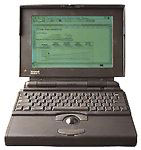 First, youwant this computer to be as quiet as possible. If it has built-inspeakers, make sure to turn the volume all the way down. Many oldercomputer also have very noisy hard drives. In the last few years of myold PowerBook 145B the drive got so noisythat I stopped using the computer. When I came upon a quieter SCSIdrive and installed it, the computer once again became my primarywriting machine.
With modern computers, be aware of the number and sound of the fans- and if they are even required. On a desktop, running a slowerprocessor may allow you to disable noisy case fans. On a laptop, youcan configure reduced power modes designed for saving battery life.Even when plugged in, such settings often keep fans from turning on andgive you quieter computing.
Older computers make great secondary machines for writing, andsometimes they are the absolute best choice. Take LCD displays andtheir usability in bright sunlight. Modern LCDs are all but unreadablein sunlight unless you get a special outdoor model or crank thebacklight way up (if that's even possible). Older monochrome screens,however, are often very clear in direct sun, even with the backlightturned off completely.
The old PowerBook 145B I mentioned above had what was widelyregarded as a horrible screen for its day, but in direct sunlight itwas a real gem. With the backlight off, the processor slowed, andrunning from a persistent RAM disk (I used a utlity called Maxima), I was able to stretcha very impressive 4.5 hours from a single charge of its old-tech NiCadbattery, along with beautiful text rendering in bright light andabsolute silence. I've yet to use a better machine for purewriting.
An added bonus with older machines for writing is that they oftenlack the ability to run modern distraction-ware. Good luck getting aworking instant message client running on System 6 or Windows 3.1. Suchprograms existed at one time, but even if you could find an oldversion, would it work on today's networks? And can you get such acomputer onto the Internet with a fast enough connection?
My Newly Acquired Ultimate Writing Machine
I've longed for such a machine in recent months, and readingarticles such as the recent one about the IIsi has sent me to eBay looking for a new toy. AsI went through the older Mac PowerBook models (I am not a fan ofdesktop computers) looking at the merits of older machines and theirused values, I ended up buying something right out of memory lane. Yup,a PowerBook 145B described as in "mint" condition. We shall see, butanother auction got me a set of System 7.1 install disks, while a thirdnetted a copy of Word 4.0 (which runs completely in RAM). Now to find adisk or image for Maxima and a new battery, then I'll be back insilent, outdoor writing heaven. 
Andrew J Fishkin, Esq, is a laptop using attorney in Los Angeles, CA.
Today's Links
- Mac of the Day: PowerBook 500 Series, introduced 1994.05.16. 'Blackbird' includes a 25 to 33 MHz 68040 along with smart batteries and grayscale or color displays.
- Support Low End Mac
Recent Content
About LEM Support Usage Privacy Contact
Follow Low End Mac on Twitter
Join Low End Mac on Facebook
Favorite Sites
MacSurfer
Cult of Mac
Shrine of Apple
MacInTouch
MyAppleMenu
InfoMac
The Mac Observer
Accelerate Your Mac
RetroMacCast
The Vintage Mac Museum
Deal Brothers
DealMac
Mac2Sell
Mac Driver Museum
JAG's House
System 6 Heaven
System 7 Today
the pickle's Low-End Mac FAQ
Affiliates
Amazon.com
The iTunes Store
PC Connection Express
Macgo Blu-ray Player
Parallels Desktop for Mac
eBay

