
The Mobile Mac
The Best OS for Your Hardware: Linux, Windows, or OS X?
- 2006.12.13 -Tip Jar
There are two types of computer users. Some just turn thecomputer on, do their thing, and then turn it off, not caring atall about the hardware and software they're using. Others are veryparticular, choosing both their hardware and software for a varietyof carefully considered reasons and doing our best to maximize itsefficiency, power, or entertainment value.
The first group tends to use whatever operating system comes ontheir computer for its entire useful life. These are not thepeople you saw waiting in line to buy retail versions of "Tiger" onrelease day. They don't upgrade memory or hard drives, and theywill only a see a new version or different OS when it comes time tobuy new computer.
These people don't read computer-oriented websites - and thatincludes Low End Mac.
This article is for the second group, of which we are allmembers.
Computer hobbyists and professionals share the goal ofmaximizing the capabilities of their hardware and software, eventhough they often do so for very different reasons. For thesepeople, operating systems, while not sexy or fun, are the startingpoint to "getting it right".
With a new computer, it's not often an issue, as the new machinecomes with the newest OS, and everything is roses. It's the olderequipment or older applications that sometimes send us back toolder OS versions - or even completely different platforms.
Minimum Hardware Requirements
Back when OS X first came out, it was, to be blunt,underwhelming in its performance on most contemporary Mac hardware.Yes, Mac OS X 10.0.0 would run on a PCI Power Mac with a 604eprocessor and 128 MB of RAM, but it was dog slow even on a fast G3- and bordered on unusable on the older PCI Power Macs.
Of course, the whole reason for OS X's existence is that theclassic Mac OS was past its prime, with many users needing a modernOS with protected memory and true preemptive multitasking.OS 9 wasn't that system, and OS X wasn't suitable foranything but the very latest (and most expensive) hardware.
I remember reading many articles in those days about versions ofLinux for PowerPC Macs.
PC users faced the same problem a year earlier when Windows 2000was released. Windows 2000 would run on most PCs of the time, butit was expensive even for upgrade versions and required a lot ofmemory for the day. Again, Linux gained many converts from peoplefed up with the instability of DOS-based Windows who didn't want topay for the hardware (or software) to run Windows 2000.
Those same factors remain today. There is a lot of discussionamong the writers at Low End Mac about which version of the classicMac OS or OS X would make the best fit for a given older Mac.When we buy a new computer, many of us recycle our older ones to afriend or relative, or we set up the old machine for less demandingtasks or to serve as a backup. I've maintained two laptops for mypersonal use since 1996, and it's kept me productive throughcrashes, both of the software and the 3' drop to the floorvariety.
How do you match an older computer to an OS version that willmaximize its capabilities?
A good place to start is with the recommended minimum hardwarespecifications. Apple, Microsoft, and most Linux distributions givea pretty accurate requirements list that, if followed, will give asatisfactory user experience. Apple set the bar for Tiger (MacOS X 10.4) at Macs that came with onboard FireWire, whilePanther set it to those with onboard USB.
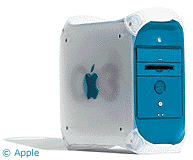 No, FireWire and USB ports havelittle relation to OS performance, but they do mimic Apple'shardware chronology, with USB ports coming out with the original iMac and FireWire withBlue and White G3. I've usedTiger on a Blue and White G3, and the experience was quitepleasant.
This isn't a perfect approach, as machines like the 400 MHz Lombard PowerBook are"officially" not up to Tiger's specs, but once installed (sometrickery is required - I moved the drive from another Mac) it worksjust fine, about the same as that officially supported Blue andWhite.
Microsoft is much the same as Apple in listing hardwarerequirements. Windows 2000 requires a 133 MHz Pentium, whileWindows XP bumped that to a 233 MHz Pentium II.
We don't know what Apple will require for Leopard, but rumor isthat a Power PC G4 will be the minimum price of admission, whichisn't far out of line with Microsoft's requirements for WindowsVista, which requires an 800 MHz Pentium III. I've run Vista (RC2)on an 800 MHz Pentium III - a laptop no less - and it is fast andstable, though most of the eye candy doesn't work.
Eye Candy
This brings me to the main issue at stake with most OS upgrades,eye candy. Eye candy is not only the fancy ripple effect on a Macwith a modern video card that delights you every time you drop awidget into your dashboard; it's also the thumbnail views ofmovies, the Genie effect when minimizing a window or application,and those beautiful anti-aliased fonts.
OS X has a lot of eye candy, and much of it has pretty beefyhardware requirements. Use a Mac with an older or unsupported videocard, and you lose some of the eye candy.
It's eye candy that wows people at the Apple Store, and it'soften the eye candy that makes people plunk down their credit cardfor the next OS upgrade.
What many users don't realize is that newerOS versions can be vastly accelerated by disabling some of that eyecandy.
What many users don't realize is that newer OS versions can bevastly accelerated by disabling some of that eye candy. Last year Ihad a 400 MHz Lombard PowerBook (it finally died a few months ago)that ran Tiger and Office 2004 without any issues. It bootedquickly and was very stable. Of course, if I used Expose orDashboard, it was dog slow, and I had all of the dock animationsdisabled. It looked very low-tech, but it allowed a 7-year-oldlaptop to remain productive on a modern and stable OS version.
Windows is the same story. Vista beta testing aside (I never usea beta of anything for real work), XP SP2 runs just fine on olderhardware, as will Vista when the final version is available nextmonth. I've run Windows XP Professional SP2 on a 300 MHz Pentium IIlaptop with 512 MB of RAM and, except for a 45 second boot time, itruns beautifully on general office productivity applications. No,it won't play TV shows in iTunes, and DVD movies stutter, but Wordlaunches quickly and, while slow to launch (10-15 seconds),Firefox is veryresponsive once open.
Don't Downgrade to an Older, Unsupported OS
It is often tempting to install an older OS to boostperformance. Panther (OS X 10.3) was faster than Tiger on thatLombard PowerBook, for example, but there are benefits to stayingup-to-date. There are features that, even if slow on olderhardware, are still useful (Expose, Spotlight).
More important, however, is security. Tiger, as the currentversion of OS X, is patched regularly and more closely watchedby Apple. I'm sure Panther is still a secure OS, but Tiger isprobably even more so.
For Windows, it's even more critical to use a current version.Many people still use Windows 95 or 98 on their older hardwarebecause it's a very fast operating system. Fast is nice, butneither of those operating systems are still supported by Microsoft- and even when supported they had gaping security holes. Windows2000, XP, and Vista are the only versions of Windows with regularsecurity updates, and thus they are the only versions that shouldbe used anywhere near the Internet.
Older Macs are much faster in OS 9, but you are giving up thesame security and stability benefits as Windows users who downgradefrom 2000/XP to 95/98. The price for that speed is just too high,in my opinion.
The Very Low End
If your hardware is too slow for Windows 2000 or OS X, thenyou really only have two choices: Be super-careful or switch toLinux. Being super-careful means no constant Internet connectionunless you are behind a robust firewall (if you can afford afirewall, you can afford a faster computer) or not using thatmachine on the Internet at all.
There is nothing wrong with installing Windows 95 on a machineused for older games if that machine is not on theInternet.
The better option is Linux. I'm not a Linux expert by anystretch, and I know that modern distributions when fully installedrequire the same hefty hardware as OS X and Windows do. Whatmany don't know, however, is that you can install a modern (meaningsecure) Linux operating system and leave off most of the fancyinterface elements.
Gnome and KDE are the most common user interfaces for Linux, andboth are pretty demanding, but there are far more minimalistinterfaces available that are a better match to older hardware. Itried Xubuntu, a distributionwithout the high-end graphics, on that old 300 MHz Pentium IIlaptop and was very pleased with its performance, which was fasterthan Windows 2000 on that machine.
What I Use
I currently use or maintain four Macs, three PCs (plus threemore temporary PCs), and am preparing to upgrade my office networkto run from a dedicated server on a domain (the subject of a futurearticle). The oldest and slowest is a 750 MHz Pentium III laptop,and the newest is a 1.66 GHz Core Duo tablet, with all of the Macstoward the high end (1.0 and 1.5 GHz G4 and 2.1 GHz G5) of theperformance scale.
My Macs are all running Tiger, even though two of them do notsupport CoreImage. Idepend on my Macs every day and just will not trust mymission-critical work to a computer not running a modern, fullypatched and supported operating system.
My PCs run Windows XP SP2 and Windows 2000 SP4. All securityupdates are installed, and I use very aggressive protection fromspam, spyware, viruses, and adware. Again, I would not trust mymission-critical hardware to anything less.
I like eye candy and whiz-bang features as much as anyone else,and on the machines that can handle them, I use many of thesefeatures, but I also believe in maximizing the longevity of myhardware investments. Modern software with resource-heavy featuresdisabled is my favorite way to do that. 
Andrew J Fishkin, Esq, is a laptop using attorney in Los Angeles, CA.
Today's Links
- Mac of the Day: PowerBook 1400, introduced 1996.10.01. Considered by many the best pre-G3 PowerBook with a small footprint and great keyboard.
- Support Low End Mac
Recent Content
About LEM Support Usage Privacy Contact
Follow Low End Mac on Twitter
Join Low End Mac on Facebook
Favorite Sites
MacSurfer
Cult of Mac
Shrine of Apple
MacInTouch
MyAppleMenu
InfoMac
The Mac Observer
Accelerate Your Mac
RetroMacCast
The Vintage Mac Museum
Deal Brothers
DealMac
Mac2Sell
Mac Driver Museum
JAG's House
System 6 Heaven
System 7 Today
the pickle's Low-End Mac FAQ
Affiliates
Amazon.com
The iTunes Store
PC Connection Express
Macgo Blu-ray Player
Parallels Desktop for Mac
eBay

