
The Mobile Mac
Getting Notebook Design 'Just Right'
- 2006.12.05 -Tip Jar
I've been using portable computers since 1993 and have foundover the years that some models really worked for me, while othersdid not. There have been machines so nice as to cause severe envyon mere sight of one at a shop, and some that, once obtained, wereso disappointing that I turned around and sold them before evenmaking the space bar shiny.
Of course, there are different criteria for each user as to whatmakes a laptop (or any product) great, but there are a few thingsthat are largely universal.
I'd like to look at those subjective and objective qualities -and then give a few examples of laptops that have really done itfor me over the years, and of others where some fatal flawrelegated an otherwise excellent machine to junk status.
Keyboard Quality
First and foremost for me is the keyboard. Think about it: Youcarry a laptop for a number of reasons, but unless you view andenter text, most of those reasons could handled with a cheaper andmore convenient device. Be it watching movies or playing games,laptops, while adapted to such tasks, were not designed for themfrom the beginning.
A laptop with a lousy keyboard is simply notthe right tool for generating text.
Laptops were designed to help us remain productive when awayfrom our desks, and with that in mind, the first thing I look at(or, more accurately, touch) is the keyboard. A laptop with a lousykeyboard is simply not the right tool for generating text.
Many laptops have been offered over the years by manymanufacturers that had the features downright, amazing technology,and great prices, but they were ruined by cost-cutting in thekeyboard.
When I bought my first 12"PowerBook in 2003, the 12"iBook had plenty of power for my needs and was considerablymore rugged - but because of the cheap keyboard, I spent 50% moreand bought the PowerBook.
Yes, the feel of the keyboard was worth the extra $500 to me,and it remains the most important consideration when choosing alaptop.
Four Classes of Keyboards
There are four levels, generally, of laptop keyboards. First arethe cheapo Taiwan ODM keyboards, like you will find on the $600Dell or Gateway laptops or the cheap consumer models at your localBest Buy. The keyboard is cheaply made on a plastic base thatflexes when you strike a key with any more than the gentlest oftouches. Keys rely on membranes only for their actuation, ratherthan the more expensive scissor-and-spring mechanisms orscissor-guided membranes on the better units. The keys themselvesare of cheap plastic, with poor arrangement of function keys.
Next are the "good" quality keyboards, membrane keys withscissor mechanisms to guide them, semi-rigid bases, and a bit ofthought put into the layout of the keys.
Next come the "premium" keyboards, such as you will find on thealuminum PowerBooks and MacBook Pro. These are also scissor andmembrane keyboards, though the base is extremely rigid. The onlything separating these keyboards from perfection is usually a minorflaw. In the aluminum PowerBooks that I loved so much, the flaw wasfunction keys that were too small and too close to the number keysto be comfortable. Otherwise, it was keyboard Nirvana.
The "best" of all are the keyboards like those on the oldWallstreet PowerBooks, somemodels of IBM ThinkPad, and mid-1990s Toshibas. These keyboards dideverything right, with excellent key feel, rigid bases, andintelligent layout. I put the current Apple MacBook in this category as well,though the strange appearance puts some users off.
For me, I'll buy a computer with a "premium" or "best" keyboard,but never with a "cheap" or "good" keyboard. It's that important.(That iBook, by the way, fell into the "good" category.)
The Display
After the keyboard, the next thing I look at is the screen. Thisis clearly where most people will disagree, as the size and type ofscreen defines the very character of the laptop.
Travel-friendly machines will have small screens that make themunacceptable for those who work in graphics. A 17" widescreen maybe just the thing for video or multiple documents, but it's uselessfor a travel machine. Still, there is much that the graphic artistand the frequent-flyer can agree on.
Matte or Glossy?
This is a difficult choice and one that is getting moredifficult as glossy screens improve. I remember the first time Isaw a glossy laptop a few years ago, it was a Compaq with a 15.4"widescreen display that was all-but useless in most indoor andoutdoor lighting. It was amazing in a darkened room for watchingmovies, but turn on any light source and the reflection of thatlight source was all you would see. Things are much better now.
I had a MacBook for a little while and found its glossy screen adelight to work with. Yes, there was more glare than on theconventional matte screens I'm used to, but there was also asignificant improvement in color saturation and the depth ofblacks, which is important for text work. I still prefer a mattedisplay, but only because one of my workspaces (my den at home) ishigh-glare for about an hour in the morning as the sun passesthrough the unblocked window.
Resolution
The next aspect of the screen that matters is resolution, whichis different, though related to size. Most Web pages are optimizedfor XGA (1024 pixels wide by 768 pixels tall). This is theabsolute minimum resolution that is tolerable for use today.Higher resolution is nice for increasing productivity, but it hasthe downside of making text and icons appear smaller on thescreen.
Think of it this way: The MacBook's 13.3" screen has similarresolution to the 2005-model of 15" PowerBook, meaning bothcomputers show approximately the same number of dots in theirdifferently sized LCDs. To show the same number of dots, those dotsare smaller and closer together on the MacBook. This createssmoother fonts, though fonts that are smaller may be difficult toread.
The other example comes in the iBook series: Both the 12" and14" iBooks had the same XGA resolution, meaning that the images andletters on the screen of the 14" iBook were larger, though those onthe 12" model were smoother.
Resolution, like size, is a very personal, and very importantdecision. "I used to have an IBM ThinkPad with a 14" SXGA+ (1440 x1050) screen at the same time as I owned a 12" PowerBook with XGA(1024 x 768). The IBM had a larger screen, but by default lettersand images were larger and easier to see on the 12" Apple, whilebeing smoother and sharper (though smaller) on the IBM. Of course,where the XGA panel was filled with a single document, I had roomon the SXGA+ panel to put a second document next to it, and thiswas not a widescreen.
Size
Your screen choice will play a very large role in determiningthe other size characteristics of your laptop, so if you want asmall and light laptop, you will have to suffer with a smallscreen. If you want a monster-screen video powerhouse, it will bebig and heavy.
Life's tough, but the laws of physics cannot be broken(yet).
Look and Feel
The final factor for me in determining whether I will love orhate a given machine is the highly subject look and feel category.There is no hard and fast formula for what works and what doesn't,and it varies a lot by user.
I remember when the titanium PowerBooks came out and everyonefell in love with their look. Everyone, that is, except me. Ithought that while very thin, they still had an unfinished, clunkylook, especially in the hinges and sides. Clearly the market tellsus that the TiBook was a great design that many bought for looksalone, but such is the nature of subjective opinion that it cannotbe applied by any standard other than your own.
For me, good design means simplicity, quality materials, goodfit and finish, and - most important - a function-oriented ratherthan style-first design. Those old TiBooks clearly satisfied all ofthose requirements; I just didn't like the look.
Great Laptop Designs
Okay, so you know what I look for and how I look for it, whatare some examples of great laptop design (for me - this issubjective, after all)?
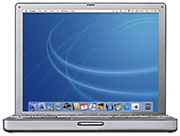 Tostart, the 12" PowerBook. This was and remains my favorite laptopcomputer design ever. It has its flaws, to be sure, but the designis just right. It looks and feels more like a Swiss watch than alaptop and has an excellent keyboard, though only an okayscreen.
What I really liked was how Apple was able to take such a smallcase (smaller than many 3 lb. ultralights) and make it afull-featured computer. Nothing was left out except for a PC cardslot. It even has a terrific three-speaker sound system that's farbetter sounding than such a small computer has any right to. Firstclass.
Another machine that really worked for me was the X-series IBMThinkPad, which, like PowerBooks, I've owned more than one of. Myfavorite in the context of when it was made is the old X20-seriesfrom the year 2000. I still have my 2002 model X22 that my daughteruses for school (along with a G4 Macmini at home).
With a battery clipped to its base, the X22 is somewhat heavyand very thick, but on its own it weighs only 3.3 lb., is the samesize as the 12" PowerBook, and has what may just be the bestkeyboard ever put on a computer, period. Even today it's abeautiful machine.
Again in the context of when it was made, the old ToshibaPortegé 650CT from 1996 is another great design that I havevery fond memories of. Today this 133 MHz Pentium-powered computerwith its SVGA (800 x 600) screen is almost unusable (but stillsurprisingly good for typing), but in its day it was quite arevelation.
I was working for Apple at the time, and as part of Pre-salessupport we had a lab full of not only Apple machines, but theircompetition as well, including a Portegé 650CT. Compared tothe PowerBook 5300ce in the lab nextto it, the Portegé was much smaller and lighter, had a muchbetter keyboard, and a larger, brighter, and sharper screen withthe same resolution.
It lacked the 5300ce's drive bay, but at only 5 lb. it was a lotlighter, and it ran for a full four hours on its battery. Mostimportant, however, were the two things I look most at, keyboardand screen. The Portegé 650 had a gorgeous 11" screen thatis still gorgeous by today's standards.
Amazingly for a machine released in the mid 90s, the computeritself was barely larger than the screen, much like modernportables - and unlike its competition that had massive plasticbezels surrounding their undersized LCD displays. That it also hadan outstanding scissor and spring keyboard simply made this a veryluxurious machine to use, despite its tiny dimensions.
Finally I'd like to look at the granddaddy of good laptopdesign, the 100-series PowerBook. I owned a PowerBook 145b from 1993 to 1998, with itserving as my only computer for the first two of those years. Notmany 1991 designs (the 145b was essentially a combination ofPowerBook 140 and 170 bits) could be used as a primary computereven by the standards of 1991, but those early PowerBooks not onlycould, but were better than many contemporary desktops.
Again it was all about keyboard and screen. The 100-serieskeyboards were not the best mechanisms, but they were built onstiff bases and introduced the palmrest and forward-mountedpointing device design that we take for granted today. The screenwasn't great either, but it was good enough and was readableoutdoors without the backlight.
What I've noticed these past 13 years is that some companiesjust "get" good design, others haven't got a clue, and some haveoccasional flashes of brilliance, occasional flashes of idiocy, anda whole lot of boring though functional designs in between.
IBM (now Lenovo), at least since the ThinkPad line came out, isprobably the best in terms of hardware. They've had a few goofs,but at least in their premium lines the quality is always topnotch,keyboards and screens are always outstanding, and the designsstress function over style, which is probably why an 8-year-oldThinkPad 600 looks almost the same as a brand-new ThinkPad T60.
...everything is clearly designed by peoplewho actually use the stuff.
Apple and Toshiba, unlike IBM, are kind of a mixed bag on laptopdesign. Toshiba makes some real junk in their consumer line, buttends to put a lot of thought into their professionalPortegé and Tecra business lines. They aren't pretty andwon't win any style awards, but everything is clearly designed bypeople who actually use the stuff.
Apple errs on the other side from Toshiba, often placing styleabove function. Apple portables are almost always beautiful, or atleast interesting, but often had functional deficiencies on accountof their beautiful designs. TiBook hinges and paint were known tofail, while those outrageous clamshell iBooks were hobbled with asmall, low resolution screen. The aluminum and titanium computersare slim and light for their size and look terrific, but replacingthe hard drive or optical drive is a major project, and none ofthem can accept a second battery.
So the next time you go laptop shopping, do yourself a favor andfocus on the keyboard and the screen. Look at the materials andassembly. You'll not only be more productive, but get a lot moreenjoyment from a laptop that satisfies your own subjectivestandards.
Now where is that 11" outdoor XGA touchscreen MacBook Pro I'vebeen dreaming of? 
Further Reading
Andrew J Fishkin, Esq, is a laptop using attorney in Los Angeles, CA.
Today's Links
- Mac of the Day: PowerBook 500 Series, introduced 1994.05.16. 'Blackbird' includes a 25 to 33 MHz 68040 along with smart batteries and grayscale or color displays.
- Support Low End Mac
Recent Content
About LEM Support Usage Privacy Contact
Follow Low End Mac on Twitter
Join Low End Mac on Facebook
Favorite Sites
MacSurfer
Cult of Mac
Shrine of Apple
MacInTouch
MyAppleMenu
InfoMac
The Mac Observer
Accelerate Your Mac
RetroMacCast
The Vintage Mac Museum
Deal Brothers
DealMac
Mac2Sell
Mac Driver Museum
JAG's House
System 6 Heaven
System 7 Today
the pickle's Low-End Mac FAQ
Affiliates
Amazon.com
The iTunes Store
PC Connection Express
Macgo Blu-ray Player
Parallels Desktop for Mac
eBay

