
The Mobile Mac
Windows, PowerPC Macs, or Intel Macs for the Law Office?
- 2006.02.21 -Tip Jar
With Apple's transition to Intel processors in the new iMac and the 15" MacBook Pro, thisis a very difficult time to choose which Mac to buy - or whether to buyone at all.
Normally, that isn't a very big deal, as chances are you eitheralready have a Mac that will keep on working as well as always whileyou let the whole transition thing work itself out, or you're using aPC and can simply postpone your switch until things are more clear inApple-land.
There are, however, situations where buying now makes a lot ofsense.
I'm in the process of starting my own law firm, and rather than putup with all of the viruses and malware faced by Windows-usingbusinesses, I decided from the very beginning that my law practicewould be run on Macs. As I am opening my doors next month and stocks ofPowerPC Macs are dwindling fast, I really had to make the decision now.I can easily see other Mac users in the same dilemma - if a machinefails or a new employee is added to an existing network, you might justneed a new Mac today, instead of in June or July when we know moreabout the future Macintel releases and which programs are available asuniversal binaries.
Back to my law office. I need two machines from the start - a laptopfor highly mobile me, and a desktop for my office manager. In a fewmonths I'll be adding a paralegal, and I'll need a second desktop atthat time. The office manager (my wife) will be doing light secretarialwork, accounting, and scheduling.
The Right Desktop Mac
Microsoft Office 2004 is a must, QuickBooks Pro 2006 for theaccounting, and the jury is still out on scheduling, with Office'sEntourage and OS X iCal both strong possibilities, QuickBooks hasa schedule module, or perhaps a law-firm-specific application likeLawStream (expensive). Either way, the desktop Mac that I buy for theoffice today must be stable enough for absolutely mission-criticalapplications such as finance, be fast enough and have enough memory formultitasking, and have a large enough hard drive to be the centralrepository for everything (we're too small to need a server yet).
This was the most difficult decision, with the choice between Inteland PowerPC (PPC) first, and then, if PPC, whether to go cheap with aMac mini with a view toupgrading it later, midrange with an iMac G5 or look at the verylong term and spring for a Power Mac G5.
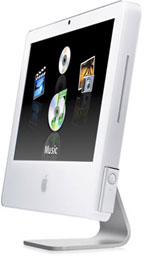 The processor choice wasthe most difficult part of the decision, as I decided fairly quickly onan iMac as much for appearance as for its attributes. The iMac, ineither Intel or PPC, presents a very clean and modern appearance that Ibelieve tells potential clients that my firm is up-to-date.
With Intel, I was looking at a 17" for $1,299, while the sweet spotwith PowerPC was the 20" G5 at $1,499. In the end, it came down to thebeauty of the 20" display coupled with the fact that the applications Iwill use today are all optimized for the PowerPC G5.
While universal binaries are no-doubt just around the corner, the G5will continue to do a fine job for at least three or so years, and whenit finally is obsolete, it will still make a great machine for aparalegal to browse the Web and draft documents on.
The Right Portable Mac
For the laptop, the choice was far, far easier. I like small andlight laptops, and there is no small model with the Intel chip.Normally I would want the latest and greatest, and having the iSightcamera built-in was extremely appealing to me, but I just reconcilemyself to lugging around a 15" laptop all day, every day.
I looked long and hard to find a remaining 12" PowerBook with the Combodrive (discontinued back in October) and smaller hard drive, butultimately had to just spend the extra money and get the SuperDrivemodel with the larger drive. Neither feature really mattered to me forwhat I will use this for (the iMac has a dual layer SuperDrive, and Idon't plan on storing my music or video collection on the hard drive),but the 12" screen size is much better for my use.
I actually seriously considered the 12" iBook, which has everybit as much useable performance in the applications I'll use (primarilyOffice and QuickBooks), but I just didn't like the feel of thekeyboard, and it looks bulky next to the PowerBook.
It felt rather strange spending almost $3,000 on last year'sall-but-discontinued technology, but unlike a home machine, I thinkit's just a better idea right now to put my business on tried-and-truetechnology. The G5 iMac with iSight is actually a bit too new to have areliability record, but the previous G5 iMac did well, and there are noreal horror stories yet with this model.
The 12" PowerBook G4 has been essentially unchanged since early2004, when the early 867 MHz models were upgraded to a cooler-runningdesign at 1.0 GHz. Since then, changes have been subtle, and these havebeen among the most reliable computers in the Apple lineup.
Switching from Windows to Mac
Now for the good news. Switching from a Windows machine to a Mac isa lot easier than it was the last time I did it three years ago. Backthen, I had to beg and plead to get an IMAP email account - and thenpainstakingly upload messages from my MS Outlook email archives on thePC and download them into Mail on the Mac.
Today its much easier. I used Mozilla Thunderbird, which I alreadyhad on Windows for my personal email account, and imported all of myOutlook archive folders. Simply add the ".mbox" suffix to each mailboxfile in Thunderbird's settings and then import them directly into Mailor Entourage. It was very easy and took all of 20 minutes to importover six year's worth of email.
Documents moved right over the network, and my calendar was easilyimported via my BlackBerry, which - unlike as recently as two monthsago - now synchronizes for free (that used to be an expensivethird-party solution).
In the end, I'll end up going Macintel down the road, just like mostpeople will. Were I buying an iMac for my home or if I liked slightlylarger laptops, I'd have bought an Intel machine today.
For an office computer, however, I went with the known solution,while for the laptop, I am a firm believer in "less is more". I'llleave the beta-testing of specific applications under Rosetta to othersand wait until another computer is needed in my office before I takethe Intel plunge. By then, hopefully, there will be universal binaryupdates to both QuickBooks and Microsoft Office - or they will bothhave a solid track record for reliable operation under Rosetta withminimal slowdown.
Until then, the Apple products that we knew and loved last yearremain every bit as powerful and capable as they always were - theyjust aren't the latest and greatest anymore. 
Andrew J Fishkin, Esq, is a laptop using attorney in Los Angeles, CA.
Today's Links
- Mac of the Day: PowerBook 500 Series, introduced 1994.05.16. 'Blackbird' includes a 25 to 33 MHz 68040 along with smart batteries and grayscale or color displays.
- Support Low End Mac
Recent Content
About LEM Support Usage Privacy Contact
Follow Low End Mac on Twitter
Join Low End Mac on Facebook
Favorite Sites
MacSurfer
Cult of Mac
Shrine of Apple
MacInTouch
MyAppleMenu
InfoMac
The Mac Observer
Accelerate Your Mac
RetroMacCast
The Vintage Mac Museum
Deal Brothers
DealMac
Mac2Sell
Mac Driver Museum
JAG's House
System 6 Heaven
System 7 Today
the pickle's Low-End Mac FAQ
Affiliates
Amazon.com
The iTunes Store
PC Connection Express
Macgo Blu-ray Player
Parallels Desktop for Mac
eBay

