
Mac Happens
How to Add Memory, Replace the Hard Drive, and Use a Second Display with Your eMac
Evan Kleiman - 2005.02.01
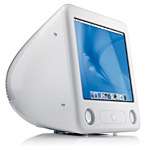
The eMac has been one of the most affordable Macs in history. While the Mac mini is considerably cheaper, those who don't have a spare USB mouse and keyboard and monitor sitting around can end up with quite a costly computer.
For those of us who still want an all-in-one Mac or already have an eMac they don't quite yet want to part with, this little white wonder is perfect.
While they are both equally hard to open, the eMac can be upgraded for less than the Mac mini, which uses 2.5" laptop hard drives as opposed to the more common 3.5" hard drives.
The question remains: How can one upgrade the eMac?
Memory
Always the easiest way to make any Mac faster and more capable is by adding memory. The current eMac only comes with a measly 256 MB of PC2700 333 MHz DDR SDRAM. This is enough to run a few applications at a time without a problem or slowdown.
I recommend at least 512 MB, and adding anything over another 512 MB will further improve the experience. 768 MB or even more will improve startup time, application launching, and overall speed.
 Installing memory is
very easy. All you need to do is unscrew the user access door at
the bottom of the computer and insert the stick of RAM. (I'd
provide pictures of my recent memory upgrade had I not recently
dropped my Canon SD10.)
Installing memory is
very easy. All you need to do is unscrew the user access door at
the bottom of the computer and insert the stick of RAM. (I'd
provide pictures of my recent memory upgrade had I not recently
dropped my Canon SD10.)
There are only two slots for memory in the eMac, and the stock 256 MB module occupies one. Two 512 MB sticks used place to achieve one gig. The stock stick can still get some pretty good money on eBay if you remove it.
Current memory prices, according to ramseeker, are US$34-55 for 256 MB, US$66-99 for 512 MB, and US$132-235 for 1 GB modules (the current eMac supports 1 GB modules; earlier eMacs only support 512 MB and smaller modules).
Hard Drive
Depending on the model you bought, your eMac has either a 40 GB or 80 GB 5400 rpm hard drive. Most people who do any sort of movie editing or have large music collections need more than this.
Most hard drives on the market today spin at 7200 rpm and have an 8 MB cache. A drive such as this inside your computer can significantly increase performance
Installing a hard drive in an eMac isn't easy. Dan Knight has talked about taking pictures of the hard drive install in his second eMac. If I ever get around to getting my camera fixed and finally installing my (currently external) 250 GB drive in the eMac, I'll take pictures.
In the meantime, the Apple Take Apart guide for first generation eMacs and for second and third generation eMacs are very helpful.
Current prices are about 50 cents per gigabyte, if you can find a decent deal. And, of course, the bigger the drive the better.
Dual Monitors
Dual monitors on an eMac? Is this possible? Yes! Using a common Apple VGA display adapter, which can be had for under US$10 on eBay or $19 from The Apple Store - be sure to pick the right one for your model - and the Screen Spanning Doctor you can stretch your screen to the VGA monitor of your choice (second- and third-generation eMacs only - not compatible with original eMac).
The adapter plugs into the port used for screen mirroring on the eMac, but with this invaluable - and free - little program, you can use a second monitors with screen spanning on the eMac.
In the end, it's important to remember that there's a certain aspect of danger when performing do-it-yourself upgrades. Always remember to take care, especially when working around the CRT inside the computer. It's important to keep yourself and your computer safe.
As far as more information goes, the Apple
eMac Upgrade Guide is a great resource for information and
pictures showing how to upgrade your eMac. Now get out there and
make the most of your low-end Mac. 
About LEM Support Usage Privacy Contact
Follow Low End Mac on Twitter
Join Low End Mac on Facebook
Favorite Sites
MacSurfer
Cult of Mac
Shrine of Apple
MacInTouch
MyAppleMenu
InfoMac
The Mac Observer
Accelerate Your Mac
RetroMacCast
The Vintage Mac Museum
Deal Brothers
DealMac
Mac2Sell
Mac Driver Museum
JAG's House
System 6 Heaven
System 7 Today
the pickle's Low-End Mac FAQ
Affiliates
Amazon.com
The iTunes Store
PC Connection Express
Macgo Blu-ray Player
Parallels Desktop for Mac
eBay

