
Mac Happens
How and Why I Use an eMac, iBook, and Power Mac G3
Evan Kleiman - 2004.12.01
I'm a big fan of "what I use" articles on the Net. It's nice tohear people talk about computers and what not, but I often wonderwhat computers they use. If you're anything like me, you wonderthis, too.
Today I'll tell you a bit about my computer set up.
Since I'm a college student who goes home many weekends, mycomputer set up must work with this schedule. My main computer isan eMac 1.25. For themoney, it's the best Mac anyone can get right now.
I have a 250 GB hard drive hooked up in a USB 2.0 enclosure thatis made out of the same plastic as the eMac. Continuing with thiscolor scheme, I have the white JBL Creature Iis. These are both thecoolest looking and best sounding speakers I've ever experienced.For their size, the sound quality is awesome - much better than thestock speakers in the eMac.
The extra 250 GB is a perfect compliment to the 40 GB inside. Itwould be much less cost-effective to open the computer and installit, so I decided to go external. This way I can keep all of mymedia and system applications separate. (On another note, all Ineed to do is flip the power switch to conceal all of my MP3s. Thiscan be very useful.) Right now I only have the stock 256 MB of RAM,but I plan to increase this soon.
Had I not broken it upon install, I would also have an AirPortExtreme card in the eMac. This would let me work around the schoolnetwork's shortcomings and share my wired connection wirelesslywith my other computer, an iBookG3. I bought the iBook at the same time as I bought the eMac,knowing I would want a lower end low-end Mac to bring to class anduse around campus, and this is exactly what I got.
I didn't think I'd be able to use a laptop full time, so I madethe decision to get two computers. The iBook is clearly not much ofa powerhouse with an 800 MHz G3 and 128 MB of RAM, especiallycompared to the eMac. But for my purposes and use, it is theperfect companion computer.
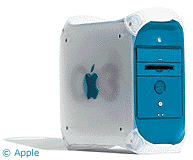 My computers at home are a littledifferent. On my desk at home I have a B&W G3/400 that has served mefaithfully for several years now without much of a problem. I'veupped the RAM to 392 MB and added a Zip drive, as well asoverclocking it from 350 MHz. The overclocking didn't have much ofan effect but was more of a project for an article. However, it ispretty easy.
My sister uses a lime iMac266 that I upgraded to after using an SE/30 (back when I first startedwriting for LEM almost five years ago). Yes, the SE/30 is stillkicking.
We also have two PCs built from scrap parts floating around onthe network, connected wirelessly.
As far as software goes, I run OS X 10.3.6 on all mymachines. I normally use the Microsoft Office suite of applicationsas opposed to the bundled AppleWorks. I mainly do this to keep upwith the rest of the school, which is very Microsoft-oriented.
My browser of choice is FireFox.While I find the current release much less stable than the previousones, I still prefer it to other browsers. My game du jour isStepMania.If you are a DDRfreak like me, I suggest you check it out.
For file sharing, I like to keep it simple and stick withLimeWire and thedefault BitTorrentclient.
At home I used Apple Remote Desktop to control the network I'veset up and remotely install software. This really is a great littlepiece of software for managing a network, but it would me much moreuseful if I could use it to administer my computers at school fromhome and vice-versa. (VNC fails to work here, another pitfall ofthe crippled network at Temple in effort to increase security.)
Temple requires any user on its network to install SymantecAnti-Virus, whether Mac or PC. This "wonderful" program has blockedany possible viruses on the eMac and iBook. Of course, in fiveyears using my iMac and G3, I never had an antivirus installed onthem and never had a virus. Looks like Temple should have takensome of Jeff Adkins' adviceinstead of buying such a large piece of software for the entirestudent body.
My desktopsnapshots have been featured atResExcellence.
Toy-wise, I only have a few. I recently bought an open-box blueiPod mini on a Best Buy Black Friday deal for US$150. I bought thedock and armband with it and must say it is the greatest singleinvestment I've ever made.
For digital photos, I have a white Canon PowerShot SD10. Whileit's by no means a professional camera, its small size and sleekstyle make it perfect for everyday picture taking. I read its 256MB SD card with a PNY USB 2.0 reader.
Lastly, I have a 512 SanDisk Cruzer-mini that I got on sale onBlack Friday for US$50 with a US$20 rebate.
This is my current set up. While I've owned closed to nine Macs,I could never pick my favorite and am sure I'll be adding to thecollection as the years go on. 
About LEM Support Usage Privacy Contact
Follow Low End Mac on Twitter
Join Low End Mac on Facebook
Favorite Sites
MacSurfer
Cult of Mac
Shrine of Apple
MacInTouch
MyAppleMenu
InfoMac
The Mac Observer
Accelerate Your Mac
RetroMacCast
The Vintage Mac Museum
Deal Brothers
DealMac
Mac2Sell
Mac Driver Museum
JAG's House
System 6 Heaven
System 7 Today
the pickle's Low-End Mac FAQ
Affiliates
Amazon.com
The iTunes Store
PC Connection Express
Macgo Blu-ray Player
Parallels Desktop for Mac
eBay

