
The Efficient Mac User
Replacing Entourage: Apple's Address Book More Powerful than You Might Think
- 2006.01.19 - Tip Jar
Let me take a moment to say, "Happy 20th Birthday, Mac Plus! I remember you fondly."
After my article about Apple's Mail (see Making Mac Mail Work for You), I received some interest in hearing about the rest of my Entourage transition. How has iCal served me? What do I think about Address Book? Is there anything missing?
I'll eventually address all of the functions of Entourage and how I'm replacing them. Let me start by taking a look at Apple's Address Book.
On the outset, there doesn't seem to be much to Address Book - and why should there be? An address book is an address book, right? It seems like the essential function of Address Book, just like half a dozen alternatives, is to store basic contact information. It would be pretty difficult to mess this up.
Entourage offers more than this; I'll freely grant that Entourage does indeed provide a robust contact manager. But don't mistake Address Book's simple form as an implication that it's substantially less than Entourage offers. In fact, Address Book offers contact management that meets - and in some ways exceeds - the capabilities of Entourage.
Basic Functions
For starters, Address Book's interface is clean and easy-to-use. Information is displayed clearly, and the layout is straightforward - yet "complete" in that I have everything I need in view.
 The main window
is nicely arranged so that it's not hard to find what I'm looking
for if I don't already see it. And it's fast and easy to change the
"view" from just looking at cards to looking at the entire contents
of a group - two basic buttons in the upper left corner allow this
with a click.
The main window
is nicely arranged so that it's not hard to find what I'm looking
for if I don't already see it. And it's fast and easy to change the
"view" from just looking at cards to looking at the entire contents
of a group - two basic buttons in the upper left corner allow this
with a click.
It's also easy to add contacts or groups and edit a contact's information. A glance lets me know that I have to invoke "edit" mode for a contact - something that was trickier to figure out in Entourage.
Creating a new group or Smart Group is also easy, although Smart Groups are not explicitly button-driven in creation: You must either use the File menu, the Actions menu (which does appear as a button on the window), or a hotkey combination.
Smart Groups (Address Book 4 only) are great, since they utilize Spotlight within the application to add any contact that meets the specified criteria. This can be a simple field search - everyone I serve on a committee with gets a Note with the committee's name on their card, and a Smart Group automatically updates the list for email or phone purposes.
Or it can be a complex, multi-criteria search: I have a group set up to show me everyone whose birthday is in the next five days, whose email address I have, and who I have not marked that I have acknowledged their birthday this year. Such a dynamic search - since the dates and (if I'm doing my part) the acknowledgments change often - would be very difficult to do without a Smart Group.
Third-Party Additions
One alternative to setting up this particular search, which works interactively with Address Book, is Yuhui Balasingam-Chow's Birthday Reminder 3.0.1, which also has other functions for keeping the birthday engine churning).
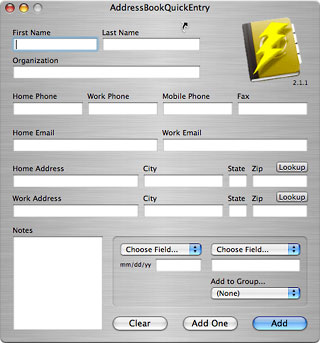 Some have suggested that the New Card interface is
cumbersome and not Mac-like. If you agree with this, you may like
Ron Daniel's AddressBookQuickEntry,
a stand-alone application that provides a straightforward interface
for entering new contacts. While it doesn't provide access to all
of the fields that I use, I do like this program's "Add to Group"
and "Add One" features (the latter automatically quits
AddressBookQuickEntry once the contact is added).
Some have suggested that the New Card interface is
cumbersome and not Mac-like. If you agree with this, you may like
Ron Daniel's AddressBookQuickEntry,
a stand-alone application that provides a straightforward interface
for entering new contacts. While it doesn't provide access to all
of the fields that I use, I do like this program's "Add to Group"
and "Add One" features (the latter automatically quits
AddressBookQuickEntry once the contact is added).
Another helpful utility for adding content is the open-source Address Actions, which will add any highlighted text into Address Book. This program adds a command to the Services menu to give you quick access from any application. My sister recently emailed me someone else's email address, which was easy to add to my Address Book through Address Actions.
Address Book's print dialog is sufficient for many people's needs: Printing envelopes, mailing labels, and basic address lists is very easy. An option for printing pocket address books is also included; tweaking paper size and playing with configurations may be required to get the most of this option. (Versions of Address Book prior to 4.0 have less printing options.)
If there are printing options you need that aren't provided, check out Address Book Reports, which provides some good printing options for printing Address Book data in non-typical ways.
It is also easy to import and export entries. When I was switching from Entourage, it was a drag-and-drop procedure: I literally dragged the contacts out of Entourage and into Address Book.
While Address Book only offers native exporting to VCards, there are some third-party options for other exports: AddressBooktoCSV exports records into comma-separated files for Gmail compatibility (and, I suppose, any other application that supports CSV formats). Also check out Addressbook2pine and AdiumBook for exporting to Pine and Adium, and HTMLize AddressBook for creating HTML versions of your contacts.
"Hidden" Features
There is more than meets the eye with Address Book. One of the things I love about this application is the added feature-set in the field titles. A single left-click on any field presents a contextual menu of options, some of which are quite powerful. (A single right-click on the data in the field usually accomplishes the same thing.)
For example, click on a phone number's label (e.g., home, work, etc.) and select "large type" - this will blow up the phone number to fill the screen. Very helpful if the phone is across the room. Clicking on "spouse" will give you the option of viewing his/her card. And a click on a link - such as an email address or a website - will allow you to act on that link, i.e., send an email or go to that page.
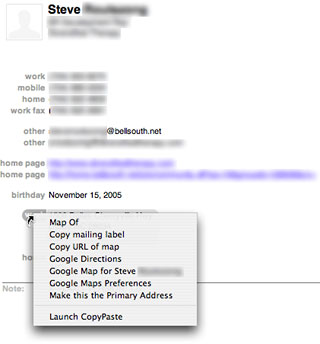 I'll
grant you that many of these are basic, but you can add plugins to
give this feature-set more function. I have a Google Maps plug-in
that will generate a Google Map of any address through this
contextual menu. Another plug-in will calculate the age - to the
day - based on any birthday that's in my Address Book (obviously
this requires that the year be included!). And another will let me
set primary addresses, email addresses, and phone numbers for my
contacts.
I'll
grant you that many of these are basic, but you can add plugins to
give this feature-set more function. I have a Google Maps plug-in
that will generate a Google Map of any address through this
contextual menu. Another plug-in will calculate the age - to the
day - based on any birthday that's in my Address Book (obviously
this requires that the year be included!). And another will let me
set primary addresses, email addresses, and phone numbers for my
contacts.
(A note: You can also set primary email addresses through the "Edit Distribution List..." command in the Edit menu. But the plug-in makes it faster and easier, and I can set primaries on mailing addresses and phone numbers in addition to email addresses.)
A search for "Address Book plugins" at MacUpdate, VersionTracker, or SoftPedia will turn up a handful of useful additions.
Another feature that is helpful but lesser known is the Card menu's "Look for Duplicate Entries..." command. This will find cards with the same name but different information and merge them. (There's also an option in the Card menu to simply "Merge Selected Cards", which is a more manual but interactive way to accomplish the same goal.)
But wait, there's more! Next week I'll touch on some of the more advanced elements of Address Book, including its integration with other applications; its ability to actively connect with other computers, databases, and networks; and a look at the Address Book Dashboard widget.
There is a lot of power in Address Book. I was surprised to find
how much there is to it, and you will be, too. 
If you find Ed's articles helpful, please consider making a donation to his tip jar.
About LEM Support Usage Privacy Contact
Follow Low End Mac on Twitter
Join Low End Mac on Facebook
Favorite Sites
MacSurfer
Cult of Mac
Shrine of Apple
MacInTouch
MyAppleMenu
InfoMac
The Mac Observer
Accelerate Your Mac
RetroMacCast
The Vintage Mac Museum
Deal Brothers
DealMac
Mac2Sell
Mac Driver Museum
JAG's House
System 6 Heaven
System 7 Today
the pickle's Low-End Mac FAQ
Affiliates
Amazon.com
The iTunes Store
PC Connection Express
Macgo Blu-ray Player
Parallels Desktop for Mac
eBay

