
Low End Mac Reader Specials
TypeStyler For Mac OS X is Now Shipping! Download The Free Fully Functional 60 Day Tryout at www.typestyler.com
OWC: We Make DIY Upgrading Easy! Maximize your Apple MacBook / MacBook Pro. Up to 8.0GB Memory, up to 1.0TB HD & More. Easy Guide + Free, Detailed Installation Videos. Click here
Don't install Parallels to play poker online! Poker Mac will show you how
to download and install a native Mac poker application such as Full
Tilt Poker Mac.
Laptop Hardware Provided by TechRestore - Overnight Mac & iPod Repairs.
Compare products like desktop computers, apple laptops, apple macs, and LCD Monitors side by side! All the information and reviews to make the best purchasing decision for new mobile phones, sat nav systems, or MP3 players. The Ciao online shopping community makes searching products easy for you.
Linux to Mac
An RSS News Reader with the Power of Google
- 2008.08.20 - Tip Jar
Popularity: ![]()
![]()
![]()
Rating: 
There are many ways to browse the Web. If you're an information addict like me, many of the sites you visit are updated frequently. Actually visiting each site multiple times a day is inefficient and slow. Really Simple Syndication (RSS) offers a way to track new content as it appears, and the Google Reader packs powerful features into a completely browser-based RSS reader.
RSS Redux
RSS readers are not new. Neither are web-based RSS readers. In fact,
OS X comes with a more than competent RSS reader in the form of
Safari. If you visit any website that publishes an RSS feed - a file
that indexes new content for RSS subscribers - Safari will alert you to
that fact by showing an RSS icon (
) in the
URL bar. (Most browsers use the standard RSS feed icon:
) By clicking on the icon, you can view the site content
through its feeds, and even bookmark the feed.
Although Safari makes a pleasant RSS reader, it is not optimized for the task. If you are serious news hound, it may not be your best choice.
Being browser-based, the Google Reader can be accessed from any computer and any web browser. It uses AJAX (Asynchronous JavaScript and XML) techniques to highlight news stories as they appear on the sites to which you are subscribed. It updates RSS news feeds automatically in the background.
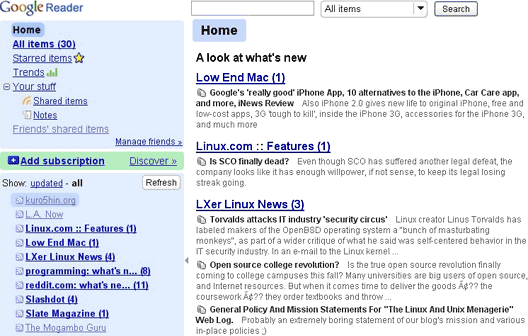
You can see a list of all your subscriptions on the left side of the window with the number of new articles at each site. On the right side is a reading pane where article summaries are read (most recent first) with links to the full articles. In the reading pane, you can see all articles for all sites, all articles for individual sites, or new articles from all or individual sites.
The Google Reader also offers a feature to email articles, tag articles, and share them with friends. Sharing is done through a unique Google assigned URL that must be provided to friends before they can be viewed. Finally, there are a couple of handy features like the "Mark all read" and "Refresh" buttons.
Finding Feeds
Google Reader offers two convenient ways to find and subscribe to RSS feeds. The first is by using the "Add Subscription" box. You can either type the URL of the feed directly into the box or enter a search term and Google will give you list of feeds to select.
The second way is by using the Discover link. The Discover option provides recommendations for new feeds by comparing your interests with the feeds of users similar to you. The Discover feature has turned up some interesting sites for me.
Trends and Statistics
Following the Trends link, you can see how many articles you have read at each site, the percentage read, how many items read/day and other metadata about your news habits. You can also see how many items per day on average are being added to each site, and the "Most obscure" tab on the Trends page shows how many other users have subscribed to the each of your feeds.
More News Is Good News
For me the main attraction of Google Reader is the portability and
power of Google Reader, browser independence, and ease of use. When I
first tried it some time ago, it was a little rough, but the hard edges
appear to be gone. It has fed my information addiction steadily for
last couple of months.
Free RSS Readers for Mac OS X
Most modern browsers have built-in RSS readers, but a freestanding or web-based RSS reader lets you switch browsers without losing your subscriptions. Following is just a sampling of freeware RSS apps for Macs.
Keith Winston is a recent Mac convert after five years of Linux on the desktop. He also writes for Linux.com and created CommandLineMac to focus on the Unix-y power of the Mac. If you find Keith's articles helpful, please consider making a donation to his tip jar.
Recent Linux to Mac Columns
- Automount OS X Home Directories Using OpenLDAP and Linux, 09.28. It's possible to get an OS X Mac to automatically mount a Linux server using OpenLDAP. The tricky part is finding all the steps needed to make it work.
- Introduction to Autofs in Mac OS X, 07.01. "Autofs is often used in enterprise environments to set up network-based home directories and other network mounts for users at login."
- Automating FTP on the Mac, 03.04. There's no shortage of GUI FTP programs, but using the Terminal gives you tools to automate file transfer sessions.
- 3 reasons to run virtualized Linux, 05.22. Reasons to run Linux under virtualization include duplicating your development environment, X11 programs that don't work well in OS X, and exploring different GUI concepts.
- More in the Linux to Mac index.
Links for the Day
- Mac of the Day: 17" iMac G4/800 MHz, July 2002 - The iMac 'grows up' with a 17" 1440 x 900 display.
- Group of the Day: LisaList supports Lisa users.
- November 8 in LEM history: 99: OS 9: I think I like it - 01: The simplified Mac life - Soured on Windows - Flea market Mac - 02: Little room for improvement in new 'Books - Combo drive upgrade for iceBooks - 04: Re-Porter - 05: Fix the old iMac or buy a Mac mini? - Apple's Copland project - 06: MacBook Core 2 - MacBook value equation - Cheap is as cheap does - 07: Problems with Classic mode in Tiger - The G4 Power Mac that won't run Leopard
- Support Low End Mac
Recent Content on Low End Mac
- Quad-Core CPU Makes Sense in MacBook Pro, OS X 10.6 Causing Overheating, Overseas Power, and More, The 'Book Review, 11.06. Also Late 2009 MacBook reviewed, how to add RAM to new MacBook, 18.4in Acer notebook used Intel i7, and SanDisk SSD chosen for Sony VAIO X.
- Dumping Macs for Google Apps, SSD in iMac, Late 2009 iMac Performance Problems, and More, Mac News Review, 11.06. /newsrev/09mnr/1106.html
- WiFi Paranoia, iMac-O-Lantern, Magic Mouse Does Click, Free Clipboard Managers, and More, Charles W. Moore, Miscellaneous Ramblings, 11.05. Also strange time stamps, problem with ColorIt on Intel Mac, and the story behind OS X 10.5.4 install discs.
- IDE Is Dead; Long Live SATA!, Dan Knight, Mac Musings, 11.04. SATA has displaced parallel ATA. While IDE hard drives haven't disappeared, the best deals are in SATA hard drives.
- QuickTime X in Snow Leopard Imports, Trims, and Publishes Video Quickly and Easily, Alan Zisman, Zis Mac, 11.04. The long, slow process of importing video into iMovie to edit it, then render it to another format, is history as QuickTime X does that much more quickly.
- More links in our archive.
Recent Deals
- Best Mac Pro Deals, 11.03. Used 2.66 GHz 4-core, $1,300; 3.0 8-core. $2,299; refurb 2.66 4-core Nehalem, $2,149; 2.93, $2,549; 2.26 8-core, $2,799; 2.93, $4,999.
- Best iPhone Deals, 11.03. New 8 GB iPhone 3G, $$99; refurb 16 GB 3GS, $149; new, $199; 32 GB, $299.
- Best 12" PowerBook G4 Deals, 11.03. Used 867 MHz SperDrive, $348; 1 GHz, $499; 1.33 Combo, $298; SD, $559; 1.5 Combo, $448; SuperDrive, $589.
- Best Power Mac G3 and PCI Video Card Deals, 11.02. Used beige 300 MHz, $25; G4/366, $49; blue & white 350, $80; 400, $90; 450, $105; PCI video cards from $15; shipping additional.
- Best Power Mac G4 and AGP Video Card Deals, 11.02. Used 400 MHz, $50; 733 MHz, $69; 933 MHz, $209; 1.25 GHz dual, $299.
- Best 15" MacBook Pro Deals, 11.02. Used 2.0 GHz, $800; 2.2, $900; 2.4, $1,000; refurb 2.53, $1,449; 2.66, $1,699; 2.8, $1,949; 3.06, $2,169; new 2.53, $1,579; 2.66, $1,799; more.
- Best Mac mini Deals, 10.30. Used 1.33 GHz G4 mini, $379; 1.42, $389; 1.5, $419; 1.83 GHz Core Duo, $350; Core 2, $439; new 2.26 GHz nVidia, $580; 2.53 GHz, $770; Server, $990.
- Best G4 iBook Deals, 10.30. Used 12" 1.07 GHz Combo, $225; 1.33 GHz, $298; 14" 1 GHz, $349; 1.33 GHz, $398; 1.42 GHz SuperDrive, $498.
- Best Classic Mac OS Deals, 10.30. System 6.0.8 floppies, $10; 7.1, $12; 7.5, $20; 7.5 CD, $4; 7.6 $13; 8.1, $11; 8.5, $20; 8.6, $90; 9.0, $20; 9.2.2, $30.
- More deals in our archive.
About LEM | Support | Usage | Privacy | Contacts
Navigation
Used Mac Dealers
Apple History
Video Cards
Email Lists
Favorite Sites
MacSurfer
MacMinute
MacInTouch
MyAppleMenu
InfoMac
Macs Only!
The Mac Observer
Accelerate Your Mac
RetroMacCast
PB Central
MacWindows
The Vintage Mac
Museum
DealMac
DealsOnTheWeb
Mac2Sell
ramseeker
Mac Driver Museum
JAG's House
System
6 Heaven
System 7 Today
the pickle's Low-End
Mac FAQ
Abandonware
Petition
Mac vs. PC Info
Affiliates
The Apple
Store
Mac
Connection
B&H
MacMall
TechRestore
ExperCom
Crucial
Memory
batteries.com
Advertise
MacMinute
MacInTouch
MyAppleMenu
InfoMac
Macs Only!
The Mac Observer
Accelerate Your Mac
RetroMacCast
PB Central
MacWindows
The Vintage Mac
Museum
DealMac
DealsOnTheWeb
Mac2Sell
ramseeker
Mac Driver Museum
JAG's House
System 6 Heaven
System 7 Today
the pickle's Low-End
Mac FAQ
Abandonware
Petition
Mac vs. PC Info
Mac Connection
B&H
MacMall
TechRestore
ExperCom
Crucial Memory
batteries.com

