
Classic Macsin the Intel Age
Bringing a 233 MHz iMac into the Mac OS X Age
- 2008.07.15 -Tip Jar
In one of my early articles on Low End May, My First iMac, I sharedthe story of how I got my first very own Macintosh and how I fell inlove with it.
Today we're talking about that same iMac again.
At the end of My First iMac, I wrote, "Anyway, that iMac now sitsright next to my eMac doing pretty much nothing. I hope to install MacOS 9 later this week and get the ol' girl running."
I didn't do it later that week. In fact, that's about when I got mysecond B&W G3, so Ispent a lot of time playing around with Mac OS 9.2.2 and Mac OS X10.2 on it. When I finished playing with the G3 about a week later, Imust have forgotten about the iMac.
But a few days ago, I remembered. I decided I'd get going andresurrect this Mac.
I pressed the power button. "Bong!"
Then nothing. No hard drive noise, no display, nothing. So I openedup the iMac and found that the VRAM stick was missing. Hmm. I must havetaken it out for some reason, and now I couldn't find it.
No problem. For my eMac hot rodding project, I used two parts Isalvaged from a Dumpster Dell: the hard drive and the SuperDrive.Before I killed the DD however (i.e., put it back in the dumpster), Ipulled the crappy old ATI Rage card from it, hoping that it would someday become useful. And it did.
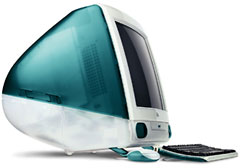 Well, not the card itself,but the VRAM stick. I put it in the iMac and booted once again. "Bong!Welcome to Mac OS." Mac OS 8.1 booted happily on the 233 MHz iMac andSystem Profiler revealed a 3 GB hard drive and 32 MB of RAM. ForMac OS X or 9, that's not close to enough.
Here's where the eMac comes into the picture. Its original 40 GBdrive was unused, and after 2 hours of open heart surgery on the iMac,I managed to install it. Phew. Steve Jobs sure didn't want us tinkeringwith this computer.
Booting from the iMac's original install discs (Mac OS 8.1), the 40GB drive showed up on the desktop. I formatted it and shut down theiMac.
Finally, I took a 128 MB stick from a ThinkPad 600X and installedit, giving the iMac a total of 160 MB RAM (128 + the built-in 32).
Now the iMac was upgraded, and I booted from a Mac OS 9.1 CD. Itinstalled, and now my first iMac was back on track again - and it runsvery nicely.
The processor (233 MHz G3) is, sadly, a little slow, so I can't useit for heavier tasks like Photoshop and certain games. However it's agreat machine for web browsing and writing. I also play the kind of oldgames I play on my B&Ws on it - like System Shock and DukeNukem.
I wanted to try Mac OS X on it. In a previous article, Mac OS X 10.2 'Jaguar' canUnleash the Power of G3 iBooks, I said that Jaguar was the best OSfor G3s, so I installed it. It was surprisingly snappy on this iMac,and everything ran quickly. Even with just 160 MB, Jaguar wasgreat.
I can run those old games in Classic Mode, but I prefer to bootdirectly into Mac OS 9; it gives me a nice Classic Mac feelingthat Mac OS X will never provide.
Now I love this Mac even more then when I first got it. It'sawesome. And even though 233 MHz is far from impressive, it does thejob. The only flaw I can find on the iMac is the relatively slow busspeed.
By the way, the 3 GB drive came to use again as a spare drivein my B&W G3.
An old iMac can do more and be more useful than you might think. 
Join us on Facebook, follow us on Twitter or Google+, or subscribe to our RSS news feed
If you find Carl's articles helpful, please consider making a donation to his tip jar.
Today's Links
- Mac of the Day: PowerBook 1400, introduced 1996.10.01. Considered by many the best pre-G3 PowerBook with a small footprint and great keyboard.
- Support Low End Mac
Recent Content
About LEM Support Usage Privacy Contact
Follow Low End Mac on Twitter
Join Low End Mac on Facebook
Favorite Sites
MacSurfer
Cult of Mac
Shrine of Apple
MacInTouch
MyAppleMenu
InfoMac
The Mac Observer
Accelerate Your Mac
RetroMacCast
The Vintage Mac Museum
Deal Brothers
DealMac
Mac2Sell
Mac Driver Museum
JAG's House
System 6 Heaven
System 7 Today
the pickle's Low-End Mac FAQ
Affiliates
Amazon.com
The iTunes Store
PC Connection Express
Macgo Blu-ray Player
Parallels Desktop for Mac
eBay

