
'Book Value
Targus Chill Mat for Mac
Charles Moore - 2010.01.18 - Tip Jar
Rating: 
I tend to like Targus products, which are typically well-designed, solidly constructed, and often innovative. Targus' "for Mac" line of computer accessories is pitched as "designed and built for a Mac, and nothing else." Most of these products could work fine with PC machines as well, but the Mac-centric focus is appreciated.
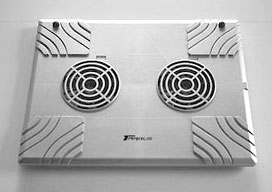
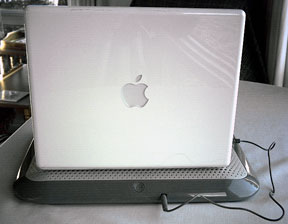
Original Targus Chill Mac.
When I first reviewed Targus' Chill Mat nearly five years ago, it was a utilitarian-looking device that did its job efficiently enough, but it wouldn't win any beauty contests or industrial design awards. The original Chill Mat was a rectangular slab of hard ABS plastic with a matte metallic finish and two embedded large-diameter, slow-turning cooling fans that drew heated air away from the laptop mounted on it, exhausting them through a wide, rear-facing port. However, it did work well cooling down my 17" PowerBook on hot days under heavy processor load, and was quiet as well, which was much in its favor.
Consequently, when I learned that Targus had completely restyled and reengineered the Chill Mat as part of its "for Mac" fleet, I was interested to check out what had been changed.
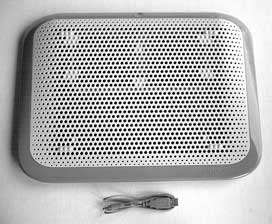 Well, the Chill Mat is still rectangular (albeit now with
rounded corners) and still incorporates two USB-powered internal fans,
but pretty much everything else is clean-slate different.
Well, the Chill Mat is still rectangular (albeit now with
rounded corners) and still incorporates two USB-powered internal fans,
but pretty much everything else is clean-slate different.
Instead of hard plastic top and bottom surfaces, the new Targus Chill Mat for Mac is faced top and bottom with soft, breathable nylon mesh that will be comfortably gentle to your laptop's bottom and to your own lap or other support surface upon which it rests, protecting them from scratching and chafing as well as insulating from and reducing heat.
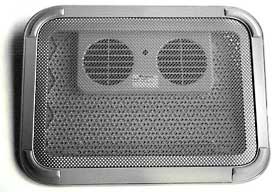 Happily the Chill Mat still does an efficient job of cooling
your laptop, keeping your thighs effectively insulated from heat, and
providing a stable work platform.
Happily the Chill Mat still does an efficient job of cooling
your laptop, keeping your thighs effectively insulated from heat, and
providing a stable work platform.
As part of Targus' "for Mac" series of laptop computer accessories, the Chill Mat now wears the "for Mac" signature glossy "Lunar Grey" livery instead of the older Chill Mat's drab and industrial-looking matte silver finish.
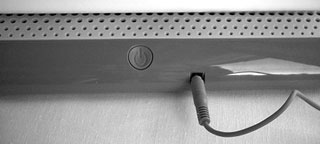 In terms of looks, it's no contest between the old and the new:
The "for Mac" unit is a much more aesthetically attractive product,
with its mirror-smooth plastic finish which, aside from a Targus logo,
is clean except for a pushbutton on/off switch at the center of the
back upper housing and the nylon mesh support surfaces. In terms of
portability and quietness, however, the comparison is more
equivocal.
In terms of looks, it's no contest between the old and the new:
The "for Mac" unit is a much more aesthetically attractive product,
with its mirror-smooth plastic finish which, aside from a Targus logo,
is clean except for a pushbutton on/off switch at the center of the
back upper housing and the nylon mesh support surfaces. In terms of
portability and quietness, however, the comparison is more
equivocal.
 The second generation Chill Mat is significantly noisier than
the original one, which was so whisper-quiet that the hard drives of
some of my laptops effectively drowned it out. Not so with the new
design. I wouldn't call its fans "loud" exactly, but you really do
notice the sound they make when they're running. I'm not sure why this
would be, since they look to be about the same size and shape has the
ones in the old model.
The second generation Chill Mat is significantly noisier than
the original one, which was so whisper-quiet that the hard drives of
some of my laptops effectively drowned it out. Not so with the new
design. I wouldn't call its fans "loud" exactly, but you really do
notice the sound they make when they're running. I'm not sure why this
would be, since they look to be about the same size and shape has the
ones in the old model.
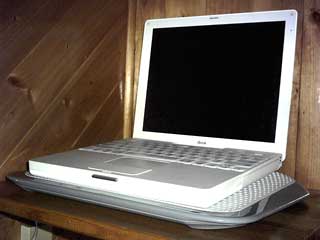
 The old Chill Mat was flat and quite thin in section, orienting
the computer parallel to the support surface, but the new model's upper
body is slightly tilted so that the notebook rests angled higher at the
back, a configuration many users prefer, although it's actually
ergonomically incorrect. The tilted design makes the new Chill Mat
substantially thicker than the old one, and therefore more cumbersome
to store and carry.
The old Chill Mat was flat and quite thin in section, orienting
the computer parallel to the support surface, but the new model's upper
body is slightly tilted so that the notebook rests angled higher at the
back, a configuration many users prefer, although it's actually
ergonomically incorrect. The tilted design makes the new Chill Mat
substantially thicker than the old one, and therefore more cumbersome
to store and carry.
Measuring 15.16" x 11.22" x 1.45" and weighing 1.6 lb., the new
Chill Mat is about 20% larger overall than the preceding model,
reflecting an increase in widescreen notebook footprints these days,
and it can comfortably accommodate all Apple laptop models including
the 17" MacBook Pro and PowerBook.
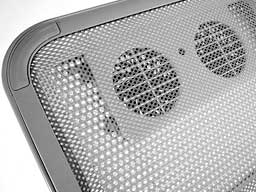
 Another change - the "for Mac" model's two, single-speed
internal cooling fans now push cooling air upward toward the bottom of
the computer rather than drawing heated air away, as was the case with
the older unit. Power for the fans is supplied by one of the computer's
USB ports via a supplied 28" USB cable that plugs into a port on the
back of the Chill Mat. The fans don't draw a whole lot of power and are
claimed to diminish a battery charge life by roughly 15 minutes - and
that's no issue at all when plugged in to wall current.
Another change - the "for Mac" model's two, single-speed
internal cooling fans now push cooling air upward toward the bottom of
the computer rather than drawing heated air away, as was the case with
the older unit. Power for the fans is supplied by one of the computer's
USB ports via a supplied 28" USB cable that plugs into a port on the
back of the Chill Mat. The fans don't draw a whole lot of power and are
claimed to diminish a battery charge life by roughly 15 minutes - and
that's no issue at all when plugged in to wall current.
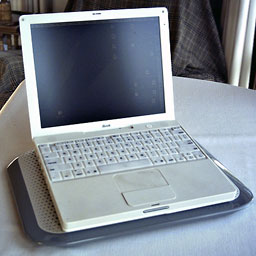 From a functional standpoint, the Targus Chill Mat for Mac
fulfills its intended roles. The cooling fans can lower the operating
temperature of the notebook in situ significantly, and when used in lap
desk mode, it's much more comfortable than operating the laptop
directly on your thighs - for enhanced comfort and stability as well as
thermal benefits. It does what it's intended to do well and looks great
doing it. The new "For Mac" styling is smart and tasteful, and the
standard of finish is much higher than with the original product.
From a functional standpoint, the Targus Chill Mat for Mac
fulfills its intended roles. The cooling fans can lower the operating
temperature of the notebook in situ significantly, and when used in lap
desk mode, it's much more comfortable than operating the laptop
directly on your thighs - for enhanced comfort and stability as well as
thermal benefits. It does what it's intended to do well and looks great
doing it. The new "For Mac" styling is smart and tasteful, and the
standard of finish is much higher than with the original product.
Aside from its greater bulk, which does make the new Chill Mat considerably less amenable to storage and carriage in a computer bag or backpack than the old one was, my main criticism is the noisier fans - but they're not nearly as loud as an internal laptop fan at high RPM.
Low End Mac Rating 3 out of 4
The Targus Chill Mat for Mac lists for $49.99 and is covered by a one year warranty.
Link: Targus Chill Mat for Mac
Join us on Facebook, follow us on Twitter or Google+, or subscribe to our RSS news feed
Charles Moore has been a freelance journalist since 1987 and began writing for Mac websites in May 1998. His The Road Warrior column was a regular feature on MacOpinion, he is news editor at Applelinks.com and a columnist at MacPrices.net. If you find his articles helpful, please consider making a donation to his tip jar.
Links for the Day
- Mac of the Day: PowerBook 1400, introduced 1996.10.01. Considered by many the best pre-G3 PowerBook with a small footprint and great keyboard.
- Support Low End Mac
Recent Content
About LEM Support Usage Privacy Contact
Follow Low End Mac on Twitter
Join Low End Mac on Facebook
Favorite Sites
MacSurfer
Cult of Mac
Shrine of Apple
MacInTouch
MyAppleMenu
InfoMac
The Mac Observer
Accelerate Your Mac
RetroMacCast
The Vintage Mac Museum
Deal Brothers
DealMac
Mac2Sell
Mac Driver Museum
JAG's House
System 6 Heaven
System 7 Today
the pickle's Low-End Mac FAQ
Affiliates
Amazon.com
The iTunes Store
PC Connection Express
Macgo Blu-ray Player
Parallels Desktop for Mac
eBay

