
'Book Value
The Importance of Feel to the Computing Experience
Charles Moore - 2009.04.21 - Tip Jar
Pismos also have a broad range of connectivity with two each FireWire and USB (1.1) ports, built in Ethernet and modem, removable device expansion bay, and a CardBus slot that supports an array of expandability options, to say nothing of infrared (IrDA) and S-video out.
My Field Computer
However, I think there's more to it than that. Since I switched to a new Unibody MacBook as my primary production computer about six weeks ago, I've been experimenting with using the 17" PowerBook G4 it replaced for the sort of off-desk mobile and utility service that my Pismos have been used for over the past several years, especially since my wife's iBook had a sudden coronary and I handed off one of the hotrod Pismos as a replacement.
The big 17-incher did a superb job for three years as a mostly desktop substitute workhorse, almost literally never missing a beat and doing pretty much everything I asked of it quite well. It never had a day of downtime and has been delightfully reliable, but I have to say that using this laptop in laptop mode is making me appreciate the Pismo even more. It has nothing really do with the BigAl's weight or size and everything to do with feel and tactile responsiveness.
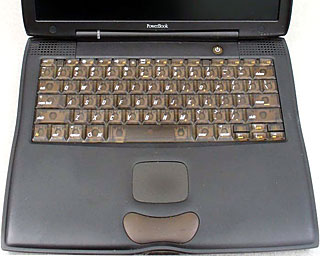 Being philosophically inclined to place "real" materials like
metal (or wood or glass) higher on the desirability scale than
synthetics like plastics, I'm resistant to saying this, but constrained
by realism and honesty to admit that I find the feel of the Pismo's
polycarbonate palm rests and polystyrene key caps much more
comfortable, congenial, and tactilely satisfying than the cold, hard
brushed aluminum surface of the 17" PowerBook. It's just nicer on the
hands.
Being philosophically inclined to place "real" materials like
metal (or wood or glass) higher on the desirability scale than
synthetics like plastics, I'm resistant to saying this, but constrained
by realism and honesty to admit that I find the feel of the Pismo's
polycarbonate palm rests and polystyrene key caps much more
comfortable, congenial, and tactilely satisfying than the cold, hard
brushed aluminum surface of the 17" PowerBook. It's just nicer on the
hands.
I also like the Pismo's keyboard better, although I would rate the PowerBook's much better than average as computer keyboards go.
Trackpads
However, between the two machines' trackpads, it's no contest. I find the aluminum PowerBook's trackpad cranky, obtuse, and frustrating. I should elaborate here that I use the "tappable" feature of my portable's trackpads extensively for select/highlighting, clicking and dragging, and it is in those functions where the 17-incher's trackpad fails miserably. The thing is not nearly as sensitive or, well, tractable as the 'pad in the old Pismos. You have to thump it vigorously to get clicks or click-and-drag to register and unregister, which both slows you down and quickly causes nerve irritation and fatigue in my hands and arms (I have chronic neuritis), whereas the trackpad in the Pismos works almost as an extension of my thoughts, responding to a light touch.
I'll give the AlBook credit for having a quite decent trackpad button - much better than the Pismo's way-too-stiff lozenge-shaped one, but what bugs me is that I end up using it a lot in frustration with the AlBook trackpad's crummy tap response, while I don't really care about the Pismo button's deficiencies that much because I almost never resort to it. My all-time favorite Apple laptop trackpad buttons were the ones in the PowerBook 5300/3400 and the 1400, although those models' trackpads were not terribly wonderful. Apple got trackpads (along with so much else) right in the G3 Series PowerBooks.
It's not only a matter of comfort either. I am substantially more productive on the Pismo, notwithstanding its slower processor (550 MHz G4 vs. 1.33 GHz in the 17-incher) because trackpad tapping (when it works right) is much slicker than button-clicking and holding, and especially when you don't have to double-pump a lot.
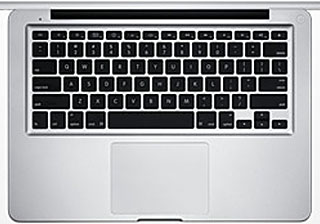 For what it's worth (quite a bit to most users I imagine) the
big, glass, "buttonless" trackpad in the aluminum MacBook is actually
pretty decent for both tap-clicking and mechanical clicking - I got on
to using it right away.
For what it's worth (quite a bit to most users I imagine) the
big, glass, "buttonless" trackpad in the aluminum MacBook is actually
pretty decent for both tap-clicking and mechanical clicking - I got on
to using it right away.
Keyboards
On the other hand, so to speak, I rate the Unibody's "chiclet" keyboard much lower for comfort and feel that the 'boards in either the Pismo or BigAl. Neither is a big issue for me right now, because the MacBook will be spending most of its time - for at least the next few years - on a stand connected to an excellent and super-comfortable Kensington SlimType USB keyboard and Logitech V-550 or Targus Wireless USB mice.
Anyway, while the BigAl PowerBook has some undeniable advantages, such as that gloriously big display and the ability to run OS X 10.5 "Leopard" quite happily, I don't see it getting used nearly as much as my remaining Pismo as long as the latter continues to do what I need it to do as well as it does.
I usually spend three to five hours a day on my "B-team" computers, and feel counts for a lot with that much up close and personal contact, don't you think?
About LEM Support Usage Privacy Contact
Follow Low End Mac on Twitter
Join Low End Mac on Facebook
Favorite Sites
MacSurfer
Cult of Mac
Shrine of Apple
MacInTouch
MyAppleMenu
InfoMac
The Mac Observer
Accelerate Your Mac
RetroMacCast
The Vintage Mac Museum
Deal Brothers
DealMac
Mac2Sell
Mac Driver Museum
JAG's House
System 6 Heaven
System 7 Today
the pickle's Low-End Mac FAQ
Affiliates
Amazon.com
The iTunes Store
PC Connection Express
Macgo Blu-ray Player
Parallels Desktop for Mac
eBay

