
'Book Value
Enduring Pismo Still King of the Mac Laptop Hill
Charles Moore - 2009.07.28 - Tip Jar
I'm one of the Pismo PowerBook's biggest fans, so I really enjoyed reading Leo Titus LeBron's column The Enduring Value of the Pismo PowerBook here on Low End Mac this Monday.
Enduring value indeed. I can't think of a better description, being as we still have two Pismos in active daily service - one my wife's main computer and the other my utility road and mobile machine.
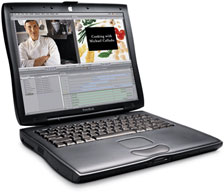
Pismo PowerBook G3
Unibody MacBooks Are Nearly Perfect
I also agree with Leo that the unibody MacBook Pros are pretty close to the perfect notebook. I love my Unibody MacBook, and I hope that it will prove as durable and rugged as the Pismos have, but we'll have to wait and see. My Unibody MacBook is showing promise to possibly challenge the Pismo as my all-time favorite Mac that I've owned, provided it proves as reliable over the medium-to-long stretch as it has through its first five months of service- but we'll wait and see about that a few years down the road.
However, the MacBook spends most of its time as my office desktop workstation tethered to a USB modem, a couple of USB hubs in series connected to a keyboard and assortment of mice, a hard-wired ethernet LAN, a microphone, and a printer.
Tested Tough
Meanwhile, the Pismos have nothing left to prove in the ruggedness and dependability department, being, as Leo suggests, in the same league in those qualities as the Panasonic Toughbooks and IBM/Lenovo ThinkPads. A Pismo filled my desktop substitute needs many years ago now, but it has long since been set free to serve as an actual laptop laptop, and it's still doing a splendid job of it.
PowerBook G4 Drawbacks
Actually, I had anticipated that the 17" PowerBook G4 that preceded the MacBook as my production anchor would take over the Pismo's tasks when it was demoted after three years of excellent service in the desktop substitute role, but it hasn't worked out that way. The biggest reason is its absolutely abominable trackpad, which was never an issue for workstation use, but I would rate it the worst trackpad I've ever endured in a laptop Mac.
I mostly use finger tap gestures rather than the mouse button, and the big AlBook's trackpad maddeningly oscillated between being numbly unresponsive and hypersensitive, unlike the excellent trackpad in the Pismo, which becomes like an extension of my hand that I barely think about in use. Add to that a touch surface texture that has way too much friction for smooth dragging, and you have a recipe for hair-tearing frustration.
I do use the 17-incher for stuff where its extra power makes it a more sensible choice than the Pismo, but now that the hot weather has finally arrived, I have to run it at reduced processor power in order to keep the caterwauling cooling fans quiescent (the Pismo's fan has cut in, briefly, only two or three times this season so far), so I'm only getting about 667 MHz of clock these days anyway, which isn't a whole lot faster than the Pismo's 550 MHz G4. Since the Pismo is running Tiger and the 17" machine Leopard, the difference in feel and responsiveness isn't a whole lot anyway for stuff where the Big Al's much more powerful graphics support doesn't come into play. Incidentally, the 17" PowerBook seems to run as hot in OS X 10.4.11 as it does in 10.5.6, if not hotter.
Pismo vs. TiBook
LeBron recalls that when Steve Jobs unveiled the Titanium PowerBook G4 at Macworld San Francisco on January 9, 2001, he referred to it as the most powerful notebook in the world, featuring both "the power and the sex."
I'll cop to having been initially blown away by the TiBook, titling my initial commentary on the new PowerBook Simply the Coolest Piece of Hardware Apple Has Ever Built and gushing, "I am absolutely blown away by the styling of this machine . . . I think that this new PowerBook is drop dead gorgeous, but then I have always been partial to thin, flat, rectangular shapes."
I still think the TiBook and the G4 PowerBook's look great, but on some sober second thought, my enthusiasm for the new design cooled considerably, and I ended up looking for a leftover Pismo. That proved unsuccessful, but in October 2001, I acquired my first (of three) Pismos as a one-year-old but pristine used unit.
Pismo Value
And I'll enthusiastically join Leo LeBron today in suggesting that for someone looking for an older PowerBook that can still hold its own, looks reasonably modern, and is superbly durable, the PowerBook G3 Pismo - the model the Titanium PowerBook replaced - is the way to go, especially if it's upgraded with a 550 MHz G4 CPU.
Indeed, now nearly a decade after Mr. Jobs unveiled the powerful, sexy TiBook, our faithful old Pismos, albeit somewhat breathed-on with said G4 processor upgrades and DVD-burner SuperDrives added, are still providing performance that blows PC netbooks into the weeds. I'm sure that there are still some TiBooks still in service too, but I don't personally know anyone who had one that didn't break some time ago. Aside from motherboard issues, the TiBooks are relatively fragile and prone to things like their lid hinges fatiguing the case metal and tearing clear.
LeBron notes that the problem with Titanium PowerBooks is that they lack three things: durability, expandability, and easy access to the internals - all of which are high watermark features (or close to it) in Pismos. There's a case to be made for the PowerBook G3 WallStreet with its two PC Card slots and twin removable device expansion bays - the Pismo being half as well endowed in those areas (although it can support two batteries). However the Pismo has FireWire, USB (1.1), and more powerful graphics support, and can support up to 1 GB of RAM - and the WallStreet doesn't/can't, so there's a bit of a saw-off.
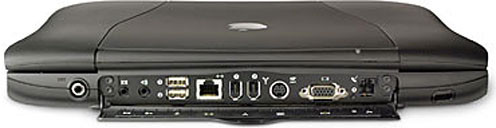
Back of Pismo shows audio, USB, ethernet, FireWire, S-video, VGA, and
modem ports.
I'd even settle for just one of the attributes LeBron cites - dependability - but the happy thing about the Pismo is that it has all three.
The Pismo is also nice to work on, with its relatively easy access to the RAM slots, hard drive bay, and its processor mounted on a quick-change plugin daughtercard.
The unibodies may knock the enduring Pismo off its PowerBook pinnacle in the fullness of time, but for now it's still king of the hill as the best Apple laptop so far.
About LEM Support Usage Privacy Contact
Follow Low End Mac on Twitter
Join Low End Mac on Facebook
Favorite Sites
MacSurfer
Cult of Mac
Shrine of Apple
MacInTouch
MyAppleMenu
InfoMac
The Mac Observer
Accelerate Your Mac
RetroMacCast
The Vintage Mac Museum
Deal Brothers
DealMac
Mac2Sell
Mac Driver Museum
JAG's House
System 6 Heaven
System 7 Today
the pickle's Low-End Mac FAQ
Affiliates
Amazon.com
The iTunes Store
PC Connection Express
Macgo Blu-ray Player
Parallels Desktop for Mac
eBay

