
'Book Value
2 Compact Portable USB 2.0 Hubs
Charles Moore - 2009.01.12 - Tip Jar
With the proliferation of USB devices - and especially now with an apparent phase-out of FireWire support underway in Apple products - the once prosaic and humble USB hub has taken on a greater importance in the Mac computing world.
I/O Challenged 'Books
Indeed, Apple has evidently embraces philosophy of I/O minimalism reaching back to the original clamshell iBook with its one lonely USB port nearly ten years ago, and in a broader context even back to the port-challenged PowerBook 150 in the mid-90s (one serial port, no ADB port).
The poor little MacBook Air also ships was just one USB port, despite the fact that it relies on USB for all of the growing list of usual things plus its optional external optical drive, and a complete absence of built-in ethernet and FireWire ports (ethernet is available though an optional - you guessed it - USB adapter). You can't connect a wired mouse and keyboard simultaneously unless the latter has a USB repeater port, something more and more rarely included on today's crop of compact, thin keyboards, and some wireless input devices require a USB dongle receiver.
Then there are USB mics for those of us who use dictation software or Internet telephony. My Revolabs USB microphone has a USB-connected receiver. Hooking up printers or scanners will have to be via USB unless you have wireless units, as will downloading photos from a digital camera.
Of course, the counter-argument is that the MacBook Air is designed and intended for predominantly wireless connectivity, but in the real world that is still often more an ideal than a practical reality.
Less FireWire
The new Unibody MacBook and 15" Unibody MacBook Pro still have a measly two USB ports, having lost their erstwhile FireWire 400 ports with nothing to compensate (the Pro model still has a FireWire 800 port that can support FireWire 400 devices via an optional adapter), while even lowly PC netbooks selling for $300 manage to include three USB ports. The only Mac notebook as well equipped being the 17" MacBook Pro, and it just lost its FireWire 400 port as well.
Less USB Power
Then there' the revelation that the MacBook and MacBook Pro's two USB ports are not created equal, with only one of them supporting a full powered USB device. Nor is it just MacBooks - I've found that the right USB port on my 1.33 GHz G4 PowerBook, a model that debuted in September 2003, doesn't supply enough juice to spin up one of my external USB 2.0 hard drives (which has a relatively low power demand 4200 RPM 2.5" notebook drive in situ), although my G3 iBook and Pismo PowerBooks seem to have no trouble bus-powering that drive. However, with the PowerBook I'm obliged to hook it up to an external power brick.
Back in August 2007, ZDNet's David Berlind posted a technical article on this topic that's worth checking out if you're interested in the topic.
Berlind notes that while all USB ports offer 5 volts, amperage (i.e.: the volume of power available) can vary substantially, which is an important factor when it comes to bus-powering devices like external hard drives. The standard amperage required by powered devices is 500 milliamps (mA) while unpowered devices require only 100 mA, Some computers - or even different ports in the same computer - sometimes offer more, which means that if your external hard drive won't power up from one USB port on your 'Book, it's worth a shot at least trying it in another before rummaging around for a power brick.
Anyway, the long and short of it is that the most MacBook users are going to need a USB hub, and perhaps more than one. I've been getting along very nicely with an old Keyspan 4-port powered hub in translucent strawberry plastic since the days when that livery contemporaneously harmonized with the fruit-color iMacs of the day, but there have been some innovations in USB hub design and technology over the past decade.
Targus for Mac USB Hub
One of the very newest-design hubs on the market is the Targus for Mac USB Hub, designed especially for Mac users as part of Targus's new "for Mac" family of computer peripherals and accessories.
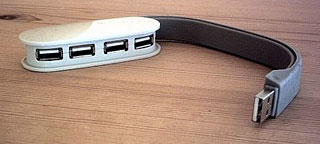 This
hub's main claim to a distinction its its avant garde styling, themed
to match the soft-cornered, ovoid form factors of the Targus for Mac
mice and Bluetooth Presenter products, as well as its wraparound cable
made of a soft material that stores fitted snugly and neatly around the
hub body to protect the USB ports when not in use and when the unit is
carried in a pocket or laptop case, protecting them for damage and
ingress of tiny debris.
This
hub's main claim to a distinction its its avant garde styling, themed
to match the soft-cornered, ovoid form factors of the Targus for Mac
mice and Bluetooth Presenter products, as well as its wraparound cable
made of a soft material that stores fitted snugly and neatly around the
hub body to protect the USB ports when not in use and when the unit is
carried in a pocket or laptop case, protecting them for damage and
ingress of tiny debris.
MInimalist in form and simplicity of engineering, the Targus for Mac USB Hub simply extends a single USB 2.0 port's connectivity from one device to four, with a maximum throughput of 480 Mbps.
The Targus for Mac USB Hub measures 3.5" x 1.75" x 0.75" and weighs a feather-light 1.8 ounces. The wraparound cable unfolds to a maximum of 9", and system requirements specify Mac OS X 10.2 or later, although I don't see why it wouldn't work with any version of the Mac OS that supports USB.
The hub is very sleek-looking and attractive in the Targus for Mac family's signature "Lunar Grey", and the wraparound cable feature is interesting and eliminates tangly cable clutter. The only shortcoming - and it could be significant - is that there is no provision for self-powering, even as an option, so it can only support connection of multiple low current demand peripherals.
However, if self-powering does not factor greatly into your needs and requirements, and especially if you need a nice-looking and convenient USB hub to take with you on the road, this one merits consideration. The finish, and quality of materials and workmanship are first-rate, and the price is competitive at $29.99. It's covered by a one-year limited warranty.
Proporta 4 Port USB Compact Hub
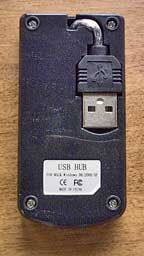 Another 4-port USB that especially very nicely complements the
MacBook Air's compactness and portability is Proporta's
4 Port USB Compact Hub, whose trim dimensions and feather-light
weight let it fit comfortably in a shirt pocket or purse. It also has a
USB male connector small enough to fit comfortably in the MacBook Air's
recessed USB port.
Another 4-port USB that especially very nicely complements the
MacBook Air's compactness and portability is Proporta's
4 Port USB Compact Hub, whose trim dimensions and feather-light
weight let it fit comfortably in a shirt pocket or purse. It also has a
USB male connector small enough to fit comfortably in the MacBook Air's
recessed USB port.
The Proporta hub quite sharp-looking too, with a metallic charcoal finish and a blue indicator LED that glows when the unit is powered up either via bus power or a supported 5V power supply (which must be purchased from a third party).
The Proporta 4 Port USB Compact Hub is about the size and shape of a jumbo pack of chewing gum and has a smaller footprint than a PC Card, although it's thicker. The USB plug, which lives at the end of a very short cable, conveniently and neatly tucks into a dedicated recess in the bottom of the hub housing for storage and transport.
Three of the Proporta hub's four USB ports are arrayed along the right-hand side of the unit, while the fourth lives at the bottom. There is also a socket for a standard 1/8" power supply connector jack at the top (USB plug) end of the housing, although such a power supply is not available from Proporta.
Construction and materials quality appear to be very satisfactory, and no drivers or software installation are needed with a Mac; it's pure plug-and-play.
The Proporta 4-Port USB compact Hub sells for $25.95.
Join us on Facebook, follow us on Twitter or Google+, or subscribe to our RSS news feed
Charles Moore has been a freelance journalist since 1987 and began writing for Mac websites in May 1998. His The Road Warrior column was a regular feature on MacOpinion, he is news editor at Applelinks.com and a columnist at MacPrices.net. If you find his articles helpful, please consider making a donation to his tip jar.
Links for the Day
- Mac of the Day: PowerBook 1400, introduced 1996.10.01. Considered by many the best pre-G3 PowerBook with a small footprint and great keyboard.
- Support Low End Mac
Recent Content
About LEM Support Usage Privacy Contact
Follow Low End Mac on Twitter
Join Low End Mac on Facebook
Favorite Sites
MacSurfer
Cult of Mac
Shrine of Apple
MacInTouch
MyAppleMenu
InfoMac
The Mac Observer
Accelerate Your Mac
RetroMacCast
The Vintage Mac Museum
Deal Brothers
DealMac
Mac2Sell
Mac Driver Museum
JAG's House
System 6 Heaven
System 7 Today
the pickle's Low-End Mac FAQ
Affiliates
Amazon.com
The iTunes Store
PC Connection Express
Macgo Blu-ray Player
Parallels Desktop for Mac
eBay

