
'Book Value
Win the Depreciation Game by Buying on the Low End
Charles Moore - 2008.06.24 - Tip Jar
Your biggest computer expense is depreciation. Here are some ideas on how to minimize it.
One of the baneful things about computers is that they depreciate on a curve whose trajectory resembles that of a falling rock - even worse than cars.
I hate depreciation. That's one reason why, while I've owned more than 50 cars and trucks over the years, I've never bought a new one and never will. Unfortunately, while a 10-year-old automobile can still be excellent, no-compromises transportation (my current fleet of three are actually 19, 18, and 14 years old), a 10-year-old computer is unsuitable for anything but the least demanding tasks. It's the price we pay for a rapidly advancing technology - Moore's Law (no relation) - but I still detest watching the value of anything I buy melt away with every tick of the clock.
On the other hand, it's not nearly as bad as it used to be. Not only do Apple notebooks sell for a lot less initially than they did 10 years ago, they hold their value relatively better. For example, a year ago, a new 15" MacBook Pro was selling for $1,999 and $2,499. Today, those same "Santa Rosa" models are available (when there's stock) from The Apple Store as Apple Certified Refurbished units most recently for $1,449 and $1,699 respectively. That they have respectively depreciated $550 to $800 in one year, or approximately 28% and 33% respectively in their first year, which is fairly alarming - but as I already noted, this is a substantial improvement on yesteryear
With MacBooks, the 2.2 GHz Santa Rosa model introduced in October 2007 is available Apple Certified Refurbished for $999, representing depreciation of just $300 over about nine months and one model upgrade - or about 23%, which illustrates typically better retention of value (not to mention dollar loss) with the lower-priced machine.
Buy on the Low End
I expect you have guessed where I'm going with this: By buying a less expensive computer, you will almost always do better not only in cash numbers but also percentage-wise.
Aside from percentage comparisons, the low-end 'Books have the advantage of starting at a lower price point, which means that not only do they retain a higher proportion of their original cost as resale value. On a $3,000 dollar machine, 60% depreciation over two years amounts to an $1,800 loss in cash value, while on a $2,000 unit, 60% depreciation would be only $1,200 in actual dollars. The upshot is that you could buy a new MacBook, throw it away at the end of about 18 months, and buy another new one and still be ahead compared with buying a new, high-end 15" MacBook Pro and eating the depreciation. When you factor in the resale value of the older unit, it becomes even more compelling.
High-end Apple laptops have been especially rapid depreciators, partly because their prices were arguably inflated to begin with. Early adopters of the high-end WallStreet 292 MHz G3 Series 'Books were paying $5,599 for the privilege in 1998. A year later you could buy a refurbished WallStreet 300 MHz machine for $2,000. That represented a mind-numbing $3,600 (64.3%) depreciation over one year - even worse than the PowerBook 3400c/240's 57.5% freefall in its first 12 months.
What other high-ticket consumer commodity ever depreciated 60 to 70 percent over one year? None that I can think of even comes close.
When I used to sell Mercury outboard motors a little over 25 years ago, there were 7.5 HP model and 9.8 HP models that looked externally identical other than labeling, but the 9.8 sold for several hundred dollars more. One afternoon when business was slow, out of curiosity I decided to compare the microfiche parts lists (no computer databases - or computers back then in the retail marine business) for the two models to see just what the difference was. I was only able to find two or three different part numbers between the two models - the carburetor high-speed jet and either the intake or exhaust manifold or perhaps both (it's been a long time, and I didn't take notes).
Anyway, it was clear that the price difference between the two Mercurys was pure marketing, since the cost of manufacture had to be virtually identical.
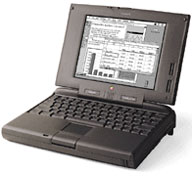 Apple did much the same thing
with the PowerBook 5300. The
top-of-the-line 117 MHz 5300ce originally retailed back in 1995 for a
suck-in-your-breath $6,499, while the middle-of-the-line 5300c/100 with
8 MB of RAM and a 500 MB hard drive listed at $3,699 (the 16 MB of
RAM and 750 MB hard disk version went for $4,499). The passive matrix
color 5300cs was $2,799 (the same price as a full-tilt boogie 17"
MacBook Pro today), and the base grayscale model $2,199. That's a
$4,300 spread between the base 5300 and the top-end.
Apple did much the same thing
with the PowerBook 5300. The
top-of-the-line 117 MHz 5300ce originally retailed back in 1995 for a
suck-in-your-breath $6,499, while the middle-of-the-line 5300c/100 with
8 MB of RAM and a 500 MB hard drive listed at $3,699 (the 16 MB of
RAM and 750 MB hard disk version went for $4,499). The passive matrix
color 5300cs was $2,799 (the same price as a full-tilt boogie 17"
MacBook Pro today), and the base grayscale model $2,199. That's a
$4,300 spread between the base 5300 and the top-end.
For your $4,300 you got four things different: the main one was a 10.4" 800 x 600 active matrix display, but there was also a slightly faster 117 MHz (vs. 100 MHz) processor (however, the base, grayscale 5300 was still faster because of lower processor demands), a larger 1.1 GB hard drive instead of 500 MB, and 24 MB more RAM. This wasn't quite the rip-off that it sounds like by today's standards: The tweaked processor probably didn't cost Apple that much more, but the Super VGA active matrix screen and the extra RAM were very expensive back in 1995.
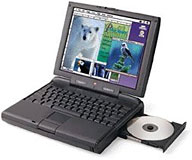 Another example: in
mid-1997 the PowerBook 3400c/240 and 3400c/180 were selling for $5,879
and 3,821 respectively, a difference of $2,058. That two-K and change
bought you a slightly faster processor (MacBench 4 - 337 vs. 293, so
15% faster), and a 3 GB hard drive instead of 1.3 GB. Otherwise
they were essentially identical machines. Two years later, the
difference in price between them refurbished had shrunk to $200.
Another example: in
mid-1997 the PowerBook 3400c/240 and 3400c/180 were selling for $5,879
and 3,821 respectively, a difference of $2,058. That two-K and change
bought you a slightly faster processor (MacBench 4 - 337 vs. 293, so
15% faster), and a 3 GB hard drive instead of 1.3 GB. Otherwise
they were essentially identical machines. Two years later, the
difference in price between them refurbished had shrunk to $200.
I will return to this issue of high-end vs. low-end value in a bit.
The PowerBook 3400c was a pretty nice laptop in its day, but the fact that it was essentially a "stretch" version of the 5300 design-wise, using many of the same plastics, made its astronomical introductory price tag more than a bit hard to swallow. Early adopters of the $6,000 3400/240 MHz, which was for about six months the fastest laptop in the world, were amply justified in feeling that they got hosed with a paper loss of about $4,580 in depreciation over the first 24 months of ownership. The 3400c's street value dropped like a stone when the original PowerBook G3 (a.k.a. 3500) was released (again with an astronomical price) in November 1997.
Apple's laptop prices began to moderate with the introduction of the PowerBook G3 "Lombard" in May 1999 at price points of $2,495 and $3,495, and the original clamshell iBook in July of that year initially at $1,799. The PowerBook price points held steady through the PowerBook G3 Pismo and the early Titanium PowerBooks, then eased to $2,299 and $2,999 for the low-end and high-end models by the last TiBook iterations, settling at near the still-current MacBook Pro levels with the introduction of the 15" aluminum PowerBook s in September 2003 at $1,999 and $2,599.
With the MacBook Pro , the higher-end 15-incher dropped $100 to $2,499, while the entry-level model has held steady. Meanwhile, the 12" G3 and G4 iBooks for a time dropped below the $1,000 threshold to $999, but the lowest-priced Apple notebook crept back up to $1,099 when the Intel-powered MacBooks arrived in May 2006, inarguably adding plenty of new power and value to justify the hike.
As I've noted, starting at a lower price point is probably your single most important strategy to minimize the depreciation bite. One way to do this is to buy a computer with a lower price point like the MacBook, so long as it has the power and features to do what you need to do with it. Actually, the MacBook gives away little to the MacBook Pro in speed unless you need the video support provided by the Pro machine's real graphics accelerator and dedicated video RAM as opposed to the MacBook's somewhat kludgy and compromised integrated video support that annexes 144 MB of system RAM.
When there are two configurations of the same model, such as with the 15" MacBook Pro, buy the low-and configuration, as we saw in the historical examples cited above, usually makes the best economic sense, reasoning that you're getting the same engineering with the low-end unit as in the top-of-the-line version and paying a lot less for it up front as well as not getting clobbered as badly by both capital outlay and depreciation.
Take Advantage of Depreciation
Another moneysaving angle is to make depreciation work for you. The flip-side of the depreciation equation is that you can buy a computer that was the cutting edge a year or two ago - and still has plenty of potential - for a very attractive price today. That works especially well with former high-end models, thanks to their more precipitous rate of depreciation. I paid considerably less than half what the 17" PowerBook I'm typing this article on cost when it was new and king-of-the-hill by purchasing it as a no-longer-cutting-edge Apple Certified Refurbished unit when it was a couple of years old chronologically, although there was no evidence whatsoever that it had ever been used. It's been a rock of dependability for the past 23 months.
Current-model Penryn MacBooks are showing as Apple Certified Refurbished units at $949 and $1,099 for the 2.1 GHz and 2.4 GHz white models, saving you $150 or $200 off the new price, which isn't a while lot, but it does help keep overhead or education costs down.
Early adopters who buy high-end machines - the cutting edge of the cutting edge - have always gotten hosed by depreciation worse that those who go for the more modest low-end versions of the same model.
Another issue to consider, and topically relevant to the waiting game we're in now: One of my offspring bought one of the very last PowerBook Lombard 333 MHz machines in February 2000, and at times regretted not waiting another month and picking up a 400 MHz Pismo with DVD, a 100 MHz system bus, and a full MB of cache for the same money. Perhaps the safest plan is to wait until the new model is introduced before making your final choice, which, as it happens, is the mode I'm in myself at this writing, waiting to see if the next refresh (or possibly major redesign) of the MacBook and MacBook Pro, which will presumably be based on Intel's next generation "Montevina" microarchitecture, shape up before deciding whether I go with one of them or pick up one of the currently current Intel Penryn based machines.
The logic of the latter alternative would be that buying a computer at the end of its production run rather than the beginning usually means that bugs and teething problems that often afflict early production units will have been ironed out.
Further Reading
- That Extra 10%, Dan Knight, Mac Musings, 1998.10.24. "For a slightly less than 10% difference in performance, buyers may pay a huge price premium."
About LEM Support Usage Privacy Contact
Follow Low End Mac on Twitter
Join Low End Mac on Facebook
Favorite Sites
MacSurfer
Cult of Mac
Shrine of Apple
MacInTouch
MyAppleMenu
InfoMac
The Mac Observer
Accelerate Your Mac
RetroMacCast
The Vintage Mac Museum
Deal Brothers
DealMac
Mac2Sell
Mac Driver Museum
JAG's House
System 6 Heaven
System 7 Today
the pickle's Low-End Mac FAQ
Affiliates
Amazon.com
The iTunes Store
PC Connection Express
Macgo Blu-ray Player
Parallels Desktop for Mac
eBay

