
'Book Value
What's the Best Mac OS for Your iBook, PowerBook, or MacBook?
Charles Moore - 2008.08.19 - Tip Jar
Questions I get asked fairly frequently are variations on the general theme of upgrading the operating systems of older Macs to more recent system versions. There is no all-purpose boilerplate answer. The appropriate system to use depends on variables like the speed of your machine, how much RAM you have, what you use the computer for, and how much performance (speed again) you're willing to trade off in order to have the latest bells and whistles.
There is also the matter of support. For example, PowerBooks prior to the G3 Series WallStreet, which was introduced in May 1998, are not supported by OS X, which means that the original 250 MHz PowerBook G3 (3500/Kanga) has the dubious distinction of being the only G3 model Apple ever made that isn't supported by OS X. If you're really determined, you can probably get OS X to install on a Kanga using Ryan Rempel's XPostFacto installer hack for some unsupported Macs, but is it worth the trouble on a Mac limited to 160 MB of RAM? I'm doubtful.
On the Classic Mac OS side, there is Mac OS 9.2.2, which only officially supports the same machines that OS X does. It seems that a lot of people with older Macs are interested in installing OS 9.2.2, and again, there is an installer hack available (OS 9 Helper) that help them to do so. But is it a wise idea? Not always, in my estimation.
The newest officially supported system is often not the ideal one to use.
The newest officially supported system is often not the ideal one to use. For instance, OS 9.1 is supported by the PowerBook 5300, and Duo 2300, but you won't be very happy with the performance on these 100 MHz and 117 MHz PowerPC 603e computers - or for that matter on the 117 MHz PowerBook 1400.
In this column I will outline what Mac OS versions are supported by which PowerBook and iBook models back as far as the 680x0-based 190 and 500 series and offer my suggestions as to which I think is the ideal OS for each model. I'm sure there will be those who disagree with my picks in some cases, but here are my OS picks model by model.
Intel 'Books
All Intel MacBook, MacBook Air, and MacBook Pro models
This one is a no-brainer. Run the latest version of OS X 10.5 "Leopard" (currently version 10.5.4) and be happy.
G4 'Books
Aluminum PowerBook G4 and G4 iBook (1.33 GHz to 1.67 GHz)
Not as much a no-brainer, especially at the lower end of the clock speed range. Leopard is supported decently. The machine I'm typing this on right now is a 1.33 GHz PowerBook G4, and it supports Leopard reasonably well, albeit with less than scintillating performance. OS X 10.4.11 "Tiger" will be more lively and more gracefully supported on these last and fastest G4 'Books, but I find some of the features in Leopard - notably Spaces, Time Machine, and QuickLook - just too cool to live without if I don't have to.
My suggestion here is that if you have 1.25 GB of RAM or better, Leopard is well worth seriously considering. With less memory than that, I would find it too compromised. I have 1.5 GB and wish I had 2 GB in my PowerBook.
Aluminum PowerBook G4 and G4 iBook (867 MHz to 1.25 GHz)
These machines are officially supported by OS X 10.5, but it would not be my ideal choice; I would go with OS X 10.4.11. If you do decide to run Leopard, load up with as much RAM as you can afford.
800 MHz iBook G4
The 800 MHz iBook G4 is the newest 'Book that doesn't make the Leopard cut, although you can hack the installer to make it work. Use OS X 10.4.11.
Titanium PowerBook G4 (667 MHz to 1 GHz)
These are the newest PowerBooks that will dual-boot OS X and OS 9.2.2. I recommend OS X 10.4.11 with at least 512 MB of RAM.
Titanium PowerBook G4 (400 to 550 MHz)
The first two generations of the titanium PowerBook inherited the Pismo's 8 MB of video RAM, so they won't support Quartz Extreme. That limitation noted, go with OS X 10.3.9 "Panther" on the 400 MHz machine and 10.4.11 on the 500 MHz and 550 MHz models.
G3 'Books
Dual USB iBook G3 (500 to 900 MHz)
Max out the RAM at 640 MB and run OS X 10.4.11, or use OS 9.2.2 and you can get along with less memory.
Pismo PowerBook G3 (400 and 500 MHz G3 or 500 to 500 MHz G4 upgraded)
I'm running Mac OS X 10.4.11 on my 550 MHz G4 Pismos (with 640 and 384 MB RAM). These computers are in regular use for production work, and I am quite pleased with Tiger's performance. Note however that OS X Quartz Extreme graphics acceleration is not supported by the Pismo's Rage Mobility 128 graphics card with its paltry 8 MB of video RAM.
I was also pleasantly surprised by how lively Tiger was on the most recently acquired Pismo with the 500 MHz G3 processor it came with (before I installed the 550 MHz G4 upgrade). Performance would be better with a gig of RAM, but I'm satisfied enough with what I've got that I haven't moved on that. For a 400 MHz G3 Pismo I would suggest OS 10.3.9 Panther.
And of course The Classic Mac OS 9s just fly on any Pismo model.
FireWire Clamshell iBook (366 and 466 MHz)
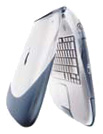 I would go
with Mac OS X 10.3.9 with the 366 MHz unit (even though
it is supported by Tiger) and OS X 10.4.11 with the 466 MHz - or OS 9.2.2 with
either.
I would go
with Mac OS X 10.3.9 with the 366 MHz unit (even though
it is supported by Tiger) and OS X 10.4.11 with the 466 MHz - or OS 9.2.2 with
either.
Early Clamshell iBook (300 and 366 MHz)
These iBooks will support up to OS X 10.3.9, which would be my OS X version of choice, but the 300 MHz model especially will be a lot happier camper in Mac OS 9.2.2.
Lombard PowerBook G3 (400 and 500 MHz)
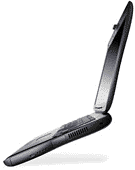 I consider the
Lombard the threshold
machine for reasonable OS X performance unless you have one of the
rare Daystar G4 433 MHz upgrades, in which case I would recommend
OS X 10.3.9. You can run up to OS X 10.3.9 on a 333 MHz
Lombard, but you'll find it pretty sluggish. A 400 MHz unit - or a 500
MHz G3 or a G4 upgraded Lombard - will give you decent OS X
performance in Panther, but the 8 MB of video RAM and mediocre
graphics card in these machines hobbles Finder responsiveness.
I consider the
Lombard the threshold
machine for reasonable OS X performance unless you have one of the
rare Daystar G4 433 MHz upgrades, in which case I would recommend
OS X 10.3.9. You can run up to OS X 10.3.9 on a 333 MHz
Lombard, but you'll find it pretty sluggish. A 400 MHz unit - or a 500
MHz G3 or a G4 upgraded Lombard - will give you decent OS X
performance in Panther, but the 8 MB of video RAM and mediocre
graphics card in these machines hobbles Finder responsiveness.
Mac OS 9.1 or 9.2.2 will give you lots of speed on a Lombard.
WallStreet PowerBook G3 Series (233 to 300 MHz)
WallStreet was available in 233 (no cache), 233 (512 KB cache), 250, 266, 292, and 300 MHz versions, and it could also be upgraded to 500 MHz G3 or G4 power. It is the oldest PowerBook officially supported by OS X (up to OS X 10.2.8 "Jaguar") and will run all Classic Mac OS versions from 8.1 through 9.2.2. My favorite system for my 233 MHz (512 KB cache) WallStreet was OS 9.2.2 .
As for OS X, my personal recommendation would be to stick with the OS 9s unless you have a 500 MHz G3 or a G4 processor upgrade installed on the WallStreet. The 292 MHz and 300 MHz units will give you marginally tolerable performance in OS X if you're very patient Some folks profess to be happy with running X on 233 MHz-266 MHz WallStreets, but I wouldn't be. You will also want to max out your RAM at 512 MB for running X on these machines.
PowerBook G3 3500/Kanga
The original PowerBook G3 is the only G3 Macintosh not officially supported by OS X. OS 9.1 would be my system of choice for this model, or perhaps 9.2.2 with a hack install. XPostFacto should get OS X installed, but I personally would not be interested in running OS X anything slower than a 333 MHz Lombard with at least 512 MB of RAM.
PowerPC 603e 'Books
PowerBook 2400c
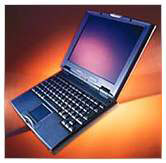 The little,
IBM Japan-designed and built PowerBook 2400 subnotebook had pretty
much the same motherboard architecture as the PowerBook 3400, but it
had its processor mounted on a removable daughter card and was thus
processor upgradeable. G3 upgrades were available for these machines.
Go with Mac OS 8.6, OS 9.1, or OS 9.2.2.
The little,
IBM Japan-designed and built PowerBook 2400 subnotebook had pretty
much the same motherboard architecture as the PowerBook 3400, but it
had its processor mounted on a removable daughter card and was thus
processor upgradeable. G3 upgrades were available for these machines.
Go with Mac OS 8.6, OS 9.1, or OS 9.2.2.
PowerBook 3400c
The 3400 originally shipped with Mac OS 7.6, but these machines will comfortably support OS 8.6 and up to 9.1, any of which will work well provided you have enough RAM installed. You can apparently install OS X on a 3400 using XPostFacto, but I would advise against it. The old 603e just doesn't have the muscle to run OS X decently. However, OS 9.2.2 should run fine via installer hack if you need it for application support.
Note that if you are installing Mac OS 9.1 on a PowerBook 3400 running Mac OS 9.04, you must perform the installation without updating your hard disk drivers or your computer may stop responding during installation. To prevent the Installer from updating your hard disk drivers, click Options in the Install Software panel of the Mac OS 9.1 Installer and deselect the option to update your hard disk drivers.
PowerBook 1400
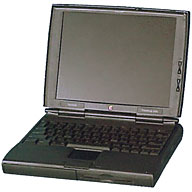 The
1400 was sold in 117, 133, and
166 MHz models and is also processor upgradeable to as fast as a 466
MHz G3, so one can't generalize about the ideal OS version for this
machine, which originally came equipped with System 7.5.5 or 7.6. For
the 117 MHz model, go with OS 8.1 or OS 8.6 (I have both installed on
my 117 MHz 1400 with 40 MB of RAM, but I use OS 8.6 most of the time,
and I think it's the most optimum compromise, although System 8.1 is
faster). The 133 MHz and 166 MHz models work well with OS 8.6, and if
you have your RAM maxed out, you may find that OS 9.0 or 9.1 will work
reasonably well, although I think OS 8.6 is still the best choice,
since the OS 9s want 40 MB of RAM just to support the system, and the
1400 is limited to 64 MB total RAM.
The
1400 was sold in 117, 133, and
166 MHz models and is also processor upgradeable to as fast as a 466
MHz G3, so one can't generalize about the ideal OS version for this
machine, which originally came equipped with System 7.5.5 or 7.6. For
the 117 MHz model, go with OS 8.1 or OS 8.6 (I have both installed on
my 117 MHz 1400 with 40 MB of RAM, but I use OS 8.6 most of the time,
and I think it's the most optimum compromise, although System 8.1 is
faster). The 133 MHz and 166 MHz models work well with OS 8.6, and if
you have your RAM maxed out, you may find that OS 9.0 or 9.1 will work
reasonably well, although I think OS 8.6 is still the best choice,
since the OS 9s want 40 MB of RAM just to support the system, and the
1400 is limited to 64 MB total RAM.
If you have a G3 processor upgrade installed in your 1400, you certainly have the processor speed to support OS 9.1, a but the RAM limitation still applies. If you only run a few applications at a time, OS 9.1 will be satisfactory. If you need more RAM for running applications, stick with OS 8.6 or even OS 8.1.
Incidentally, Password Security is not supported on PowerBook 1400s with Mac OS 9.1. If you have Password Security installed on a PowerBook 1400, you should turn off password protection before installing Mac OS 9.1.
PowerBook 5300
The much maligned PowerBook 5300 came with System 7.5.2, which was the worst build of System 7.5. You should definitely upgrade to System 7.5.3 or 7.5.5 at minimum, and those systems will get you the best speed performance out of a 5300, but this computer will support up to OS 9.1. I would suggest going no higher than OS 8.6 with a 5300, and OS 8.1 will give you the best compromise between speed and features on this model.
System 7.5.5 was largely a bunch of PowerBook 5300 reliability patches added to System 7.5.3 and is recommended as the ideal System 7.5 version for these 'Books. I tried OS 8.5 on our 5300 and was not happy with the performance (note, however, that we only had 24 MB of RAM in that 5300). If you have more RAM in your 5300, you might want to try up to OS 8.6, but I've found that System 7.5.5 or OS 8.1 seem to be the most successful Mac OS X versions for the 5300.
PowerBook Duo 2300
What I noted above for the PowerBook 5300 pretty much applies to the Duo 2300 as well. Introduced along with the PowerBook 5300 and 190, the 2300 was the last of the Duos and inherited much of the internal architecture of the original 68030 Duo models, which hobbled its performance as a PowerPC machine, making it even slower than the 5300, so System 7.5.5 is probably the ideal choice.
68040 'Books
PowerBook 190
The 68040-based 190 was more or less a PowerBook 500 in a PowerBook 5300 case in terms of performance. For the best speed performance, go with System 7.5.3 or System 7.5.5 on these machines, but OS 8.1 will give you support for HFS+ disk formatting and is a decent performer as well.
PowerBook 500 series
The PowerBook 520 and
540, introduced in May 1995, were the first PowerBooks that in my
estimation could serve as one's "only" computer without imposing
substantial compromises. With their 25 MHz and 33 MHz 68LC040
processors, full-size keyboards, comprehensive array of ports, built-in
ethernet, optional built-in modem, and stereo speakers, the 500 offered
unprecedented power, versatility, and connectivity in a PowerBook form
factor. They originally came with System 7.5 installed and will support
up to OS 8.1. I would recommend the same systems as for the 190 series
for the 500s. 
Deals on Mac OS X and the Classic Mac OS
- Best classic Mac OS deals. Best online prices for System 6, 7.1, 7.5.x, Mac OS 7.6, 8.0, 8.1, 8.5, 9.0, 9.2.2, and other versions.
- Best Mac OS X 10.0-10.3 deals. Best online prices for Mac OS X 10.0, 10.1, 10.2, and 10.3.
- Best Mac OS X 10.4 'Tiger' deals. Best online prices for Mac OS X 10.4.
- Best Mac OS X 10.5 'Leopard' deals. Best online prices for Mac OS X 10.5.
About LEM Support Usage Privacy Contact
Follow Low End Mac on Twitter
Join Low End Mac on Facebook
Favorite Sites
MacSurfer
Cult of Mac
Shrine of Apple
MacInTouch
MyAppleMenu
InfoMac
The Mac Observer
Accelerate Your Mac
RetroMacCast
The Vintage Mac Museum
Deal Brothers
DealMac
Mac2Sell
Mac Driver Museum
JAG's House
System 6 Heaven
System 7 Today
the pickle's Low-End Mac FAQ
Affiliates
Amazon.com
The iTunes Store
PC Connection Express
Macgo Blu-ray Player
Parallels Desktop for Mac
eBay

