
Collection Spotlight
Apple's Largely Forgotten QuickTake 150 Digital Camera
- 2009.08.10 - Tip Jar
This week I am going to look at a unique item in my collection. While it is not technically a computer, it does have an Apple logo - and all that Apple charm.
Back in the early 1990s, Apple decided to branch out into peripherals and unique consumer electronic devices. Some of them, such as theW.A.L.T. (Wizzy Active Lifestyle Telephone), Apple Interactive Television Box, and Paladin, never saw the light of day outside of leaked prototypes. Others, such as the QuickTakes, did, and while not successful, proved Apple could go toe-to-toe with major electronics manufacturers.
In some ways, they even paved the way for such industry icons as the iPod.
Apple's Digital Cameras
The QuickTake series was Apple's attempt at a digital camera, and an early one at that. Only 4 models were released in the series: the 100 (the first digital camera below $1,000), the 100 Plus, the 150, and the 200. The first three were nearly identical, designed by Kodak (which had its own version, the DC40), and built by Chinon, while the last was made by Fujifilm and is almost identical to the Fuji DS-7. The first QuickTake was released in 1994, with the last discontinued in 1997, after the second coming of Steve Jobs and his decision to focus on Macs to the exclusion of other product lines.
 Though short-lived and not very popular, they seem to have
gained a cult following in today's retrocomputing scene - and a slight
resurgence in popularity. It even has it's own Camera Finder
on Flickr, though nothing seems to be in it as of now.
Though short-lived and not very popular, they seem to have
gained a cult following in today's retrocomputing scene - and a slight
resurgence in popularity. It even has it's own Camera Finder
on Flickr, though nothing seems to be in it as of now.
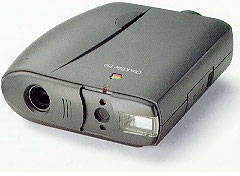
The model I own is the QuickTake 150, which differs from the 100 (but not the 100 Plus) in the fact that it will work with Windows machines and has added support for TIFF, BMP, PCX, and JPEG, in addition to the proprietary QuickTake and PICT formats. It weighs exactly 1 pound, so it's no lightweight by today's standards. It can only shoot at 640 x 480, has a 1 MB EEPROM to store 16 640 x 480 images or 32 320 x 240 images, and looks like a pair of binoculars.
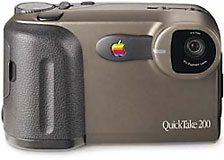 It's not what today's digital cameras look like (that came with
the 200). You have to look through the viewfinder to shoot, as the only
LCD is black and white, and it's only used to show the status of the
device. It runs on three AA batteries, so powering it is no
challenge.
It's not what today's digital cameras look like (that came with
the 200). You have to look through the viewfinder to shoot, as the only
LCD is black and white, and it's only used to show the status of the
device. It runs on three AA batteries, so powering it is no
challenge.
In a uniquely Apple moment, the shutter is covered by a slider mechanism that also acts as a power switch. It even has power saving, shutting off after a few minutes, and it resumes with a push of the capture button.
Along the right side of the camera is a slider that houses the ports. First is a DIN-8 serial port, which works with both Mac and Windows (with the proper cables). The second is a DC power jack, so if your batteries are low, you can run it off the Apple Low Power AC Adapter (which looks just like a PowerBook 100 series adapter, but don't use them on a QuickTake, or you will fry it). Along the top is the capture button, along the front are the viewfinder, flash, and self timer LED.
On the back is the viewfinder and status LCD, which shows you the battery meter, number of pictures on the camera, number of pictures remaining, selected resolution, self timer status, flash mode, and buttons surrounding it to adjust all of the above, with deletion requiring a straightened paper clip. The only option is to delete all pictures - no selection here. Lastly, along the bottom is the product label, tripod mount, and battery door.
Using the QuickTake 150
Taking a picture is really simple. Just adjust your flash, look through the viewfinder, which has a green LED right below letting you know the camera is ready. Hit the shutter, and click!
The self timer is easy too. Just hit it, and the red light comes on for 8 seconds, starts flashing for 2, and your picture is taken. For really close subjects, Apple even included a snap-on close-up lens, which I also happen to have. It clips on, and you can take pictures as close as 4".
Once memory is filled up, go to your Mac or PC, plug in the cable, and run the software. You can make a copy of the images on your computer or move them off the camera. You can even set the date and time, which is only useful for date stamping your images. Though the software will not run in Mac OS X, it will work just fine from Mac OS 9.x down to about 7.1. The Wintel version will run on DOS 3.3 and Windows 3.1 up to XP, so you can even use it on some modern equipment.
Collecting QuickTakes
I would like to get all four models, especially the 200. The only one that seems to be hard to come by is the 100 Plus. You don't hear much about it, and it seems to be quite rare. Apparently, Apple offered a motherboard swap for the original 100s for an unknown price, to make them essentially 150s. They also gave it a new label. It appears that this model was never sold in retail, which makes finding one quite hard.
While it's not going to impress anyone with it's image quality today, it was a marvel back in 1995. However, it was a bit pricey at $700. It seemed to sell well though, as eBay auctions for the 150 are plentiful. You can pick one up quite cheaply now.
Though you won't consider it for any serious photography work, it
makes a great addition to your collection, and even a novelty. It will
turn heads if you take one in public. I take mine with me sometimes,
and when I sling it around my neck, I get quite a few interested
people. Even if you are not an Apple collector, but a vintage camera
collector, this is one novelty that you should check out.

Further Reading
- Retro Apple: The QuickTake 100 Digital Camera, TUAW
- Apple QuickTake 150, TidBITS, 1995.05.08
- QuickTake 150: Specifications, Apple. They say do not use alkaline batteries, but that's what I use in mine, and it works great.
- Link to Macintosh drivers for the QuickTake 150
Join us on Facebook, follow us on Twitter or Google+, or subscribe to our RSS news feed
If you find Leo's articles helpful, please consider making a donation to his tip jar.
Today's Links
- Mac of the Day: Power Mac G5 (Early 2005), (2005.04.27. At 2.7 GHz, the fastest G5 CPU Apple ever used, also 16x SuperDrive and it shipped with OS X 10.4 Tiger.)
- Support Low End Mac
Recent Content
About LEM Support Usage Privacy Contact
Follow Low End Mac on Twitter
Join Low End Mac on Facebook
Favorite Sites
MacSurfer
Cult of Mac
Shrine of Apple
MacInTouch
MyAppleMenu
InfoMac
The Mac Observer
Accelerate Your Mac
RetroMacCast
The Vintage Mac Museum
Deal Brothers
DealMac
Mac2Sell
Mac Driver Museum
JAG's House
System 6 Heaven
System 7 Today
the pickle's Low-End Mac FAQ
Affiliates
Amazon.com
The iTunes Store
PC Connection Express
Macgo Blu-ray Player
Parallels Desktop for Mac
eBay

