
Collection Spotlight
Beige Power Mac G3: Maximum Power Then, Great Value Now
- 2009.08.03 - Tip Jar
In November 1997, as part of a major restructuring at Apple with Steve Jobs at the helm once again, the Beige Power Mac G3 was born. It was revolutionary at the time - the first G3 desktop, and the most powerful personal computer in the world.
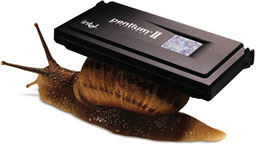 Apple
took on Intel with it, claiming it could eat Pentium IIs for lunch,
and launched a massive ad
campaign to prove it.
Apple
took on Intel with it, claiming it could eat Pentium IIs for lunch,
and launched a massive ad
campaign to prove it.
The machine sold incredibly well. By the time the Blue and White Power Mac G3 was introduced in January 1999, Apple had sold 1.6 million of them. The machine was unique in that it used the same motherboard across three form factors: minitower, desktop, and a unique education-only version called the All-in-One (AIO). I have owned two of these, the minitower and AIO, and coveted a desktop version of this while in elementary school in 1998.
The G3 All-in-One
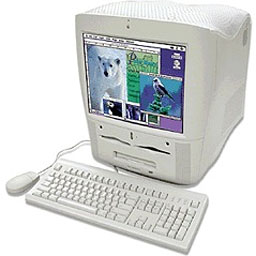
Power Macintosh G3 All-in-One
The AIO was special. It debuted before the iMac and was short lived. It weighed 59.9 pounds, making it the heaviest personal computer Apple has ever produced.1 It features a built-in 15" CRT, and, from the side, it looks like a giant tooth, gaining the nickname "molar Mac" by some. The machine had a Zip 100 drive, 1.44 MB floppy drive, and CD-ROM. The Zip drive was specially designed for Apple, as it runs off a smaller, floppy-type power cable and has a short adapter hooking it to a standard Molex connector.
Personality Cards
The AIO came in 233 and 266 MHz flavors and included a special card, called a personality card, that fit in a 182-pin PERCH slot,2 which included regular audio I/O on the standard "Whisper" card and added composite video and audio I/O, including S-video I/O, with the "Wings" card.
Personality Cards:
- Whisper. Apple part no. 820-0972-A. Audio only.
- Wings. Apple part no. 820-0971-A. Audio and video.
- Bordeaux (rare). Apple part no. 820-0983-A. Most features of Wings plus support for DVD playback.
Apple was playing around with other personality cards, but only one has ever seen the light of day. It included a pair of USB ports, and the only one I know of works perfectly.
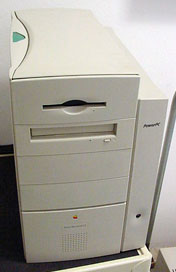 The Minitower
The minitower form factor was the de facto standard for
Apple. It boasted a number of processor speeds, including 233, 266,
300, and 333 MHz versions. The tower featured a special cage that swung
open with the release of a few Bondi blue colored tabs. The
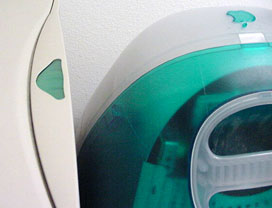
release button for the side hatch is translucent and almost Bondi
blue,3 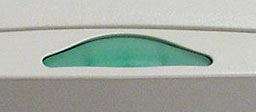 a sign of things to come. It came
with a 4 GB hard drive in the only 3.5" internal drive bay, a
floppy drive in the top 5.25" bay, a CD-ROM in the bay below that, an
optional Zip drive in the third 5.25" bay, and a fourth empty 5.25" bay
for third party drives or devices.
a sign of things to come. It came
with a 4 GB hard drive in the only 3.5" internal drive bay, a
floppy drive in the top 5.25" bay, a CD-ROM in the bay below that, an
optional Zip drive in the third 5.25" bay, and a fourth empty 5.25" bay
for third party drives or devices.
The Desktop
The third and final form factor, the desktop, seems to have been the least popular of the bunch, at least from my experience. This was the last desktop form factor machine Apple produced (at least until the Mac mini, but you can't really set a heavy CRT on top of one of those!). It came in the same "outrigger" case as it's Power Mac 7200 to 7600 predecessors, but it featured a 233, 266, or 300 MHz G3 beating at it's core. The case was quite accessible. Remove the top, lift a lever, and swing the drive cage out of the way to access the expansion slots, RAM, CPU, and the rest of the motherboard.
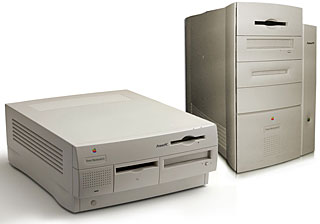 Since all three form factors shared a common motherboard, they
all shared many features. There were 3 PCI slots for holding expansion
cards, the PERCH slot (whose card had a slot on it for an optional 56k
modem), 3 RAM slots that could hold up to 768 MB of RAM using 256 MB
sticks. There was also a ZIF slot for the CPU, which made upgrades
easy, and a jumper block (just like the B&W G3), which allowed for
easy overclocking. These machines were the last desktop Macs using the
"Old World" technology and had their ROM built in.
Since all three form factors shared a common motherboard, they
all shared many features. There were 3 PCI slots for holding expansion
cards, the PERCH slot (whose card had a slot on it for an optional 56k
modem), 3 RAM slots that could hold up to 768 MB of RAM using 256 MB
sticks. There was also a ZIF slot for the CPU, which made upgrades
easy, and a jumper block (just like the B&W G3), which allowed for
easy overclocking. These machines were the last desktop Macs using the
"Old World" technology and had their ROM built in.
There was also a special slot for a custom voltage board. Several versions of this were made, including a unreliable yellow one and the much more desirable green board.
My Beige G3s
What does my collection include?
Well, I have the remains of a dead 266 MHz AIO, which basically includes it's motherboard and drives. It had a bad power supply. It would boot, and the screen came on, but the cable coming from the power supply to the drives was bad - or that portion of the supply was fried. This made booting from any internal drive impossible, unless using another power supply. So, I decided to recycle it. Too bad, as it looked really cool, but it weighed a ton. For some reason, I also kept the yellow voltage card. It has not died yet, but it's there just in case.
My other beige is a much nicer machine. It's the 233 MHz variant, soon to be 266. It has the stock 4 GB hard drive, originally had the standard Personality Card with modem, but now has the AV version. It did serve as my VHS digitizer - and may again someday - but for now it sits with no RAM (gone to the recomissioned B&W), a USB 1.1 card, and an Apple 10/100 ethernet card. It also had a bug in the digitizing, where the audio would become out of sync on bigger rips. Until that gets sorted, I have no use for it, though I wish I did.
Can I recommend a Beige G3? For Mac OS 9, definitely. One of the faster OS 9 boxes around and has a full set of legacy ports, including built in 10-Base T ethernet.
However, when you throw OS X on it, it gets a little weird. Your floppy drive and serial ports are disabled, and you are only officially allowed by Apple to run up to Mac OS X 10.2.8 on it. You have to carefully partition your drive if it is larger than 8 GB.
It makes a great OS 9 gamer and runs old apps great, just don't expect it to work well with OS X. Apple provided OS X support on these machines as an afterthought, not fully testing all the hardware.
Beige G3s are cheap, however, and you have a choice of form factors.
They are heavily upgradable as well.

 The Apple Network
Servers weighed in at 84 lb., but they were designed as servers,
not personal computers. They ran IBM's AIX, a version
of Unix, and the ROMs prevented them from running the Mac OS.
The Apple Network
Servers weighed in at 84 lb., but they were designed as servers,
not personal computers. They ran IBM's AIX, a version
of Unix, and the ROMs prevented them from running the Mac OS.- Apple's description: "PERCH slot : a 182-pin microchannel connector. The PERCH slot is a superset of the PCI specification, and does not accept standard PCI cards. The PERCH slot on the desktop and tower enclosures supports Apple Audio, Audio/Video, and DVD-Video and Audio/Video input/output cards. The All-in-one enclosure does not support the DVD-Video and Audio/Video Card. This note does not provide the electrical specification for the PERCH slot."
- The original iMac, unveiled in May 1998, was Bondi blue.
Photos of blue-green button courtesy of Bill Brown and the Anacortes Senior Center, used by permission.
Join us on Facebook, follow us on Twitter or Google+, or subscribe to our RSS news feed
If you find Leo's articles helpful, please consider making a donation to his tip jar.
Today's Links
- Mac of the Day: PowerBook 1400, introduced 1996.10.01. Considered by many the best pre-G3 PowerBook with a small footprint and great keyboard.
- Support Low End Mac
Recent Content
About LEM Support Usage Privacy Contact
Follow Low End Mac on Twitter
Join Low End Mac on Facebook
Favorite Sites
MacSurfer
Cult of Mac
Shrine of Apple
MacInTouch
MyAppleMenu
InfoMac
The Mac Observer
Accelerate Your Mac
RetroMacCast
The Vintage Mac Museum
Deal Brothers
DealMac
Mac2Sell
Mac Driver Museum
JAG's House
System 6 Heaven
System 7 Today
the pickle's Low-End Mac FAQ
Affiliates
Amazon.com
The iTunes Store
PC Connection Express
Macgo Blu-ray Player
Parallels Desktop for Mac
eBay

