
Digital Fossils
Just Write: Why a PowerBook 2400c Is My Perfect Writing Machine
- 2008.05.27 -Tip Jar
When is a laptop not a laptop? When it's the size of a briefcase andweighs more than a cinderblock, that's when.
Apple's recent release of the MacBook Air acknowledges that,while big screens, monster batteries, and multiple accessory bays areswell things, they can turn a laptop computer into a tabletop computerin a hurry.
What is most interesting about the new Air is that it's simplyApple's reentry into a field that was pioneered by Macintosh in thefirst place.
Apple's Light Notebook History
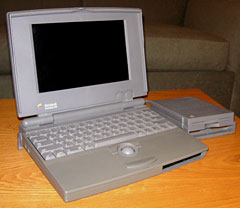
Apple PowerBook 100
Perhaps stung by criticisms of the first "luggable" Mac portables, Apple salvoed backwith the PowerBook 100. Byremoving everything they could get away with, including a floppy drive,and miniaturizing everything else as ruthlessly as possible, thePowerBook 100 was a wispy little thing for the time. Weighing only ahair over five pounds and with the same footprint as a sheet of paper,the new machine was a breakthrough in portable computing; a true "goanywhere" computer.
Time went by, and PowerBooks added features, and grew fat as well,but Apple never forgot that niche. For every new introduction of aregular PowerBook, it seemed there was a corresponding development inthe line of PowerBook Duos, whichhad been launched in 1992. Culminating in the 100 MHz 603e-powered2300c of 1995, the Duosfollowed the same strategy of eschewing a removable media drive orexpansion bay in favor of cramming a computer into as small a case aspossible. Measuring under eleven inches wide and weighing under fivepounds, they managed to make the PB 100 look a little porky bycomparison.
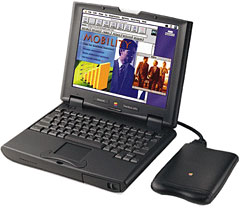 Their successor in the late 1990s was the PowerBook 2400c, code named "Comet".Also powered by a PowerPC 603e CPU - this time running at 180 MHz - the2400c remained tiny of footprint (10.5" x 8.5") and light of weight ata shade under four-and-a-half pounds, battery included. By increasingthe thickness slightly, to 1.9 inches at the deepest spot, the 2400cwas able to one-up the Duo by adding a suite of ports, including SCSI,ADB, and two PCMCIA card slots, which gave it expandability the Duocouldn't match without a dock.
It's 'Just Right'
Having mucked about with a half-dozen older Mac notebooks in search of my ideal writing machine, I'vesettled on my 2400c for a number of reasons:
First is the keyboard. While small, the scaled-down Duo keyboard iswonderfully tactile. It offers much the same feedback as the vauntedWallStreet keyboard andhas a good clean layout, with keys legibly labeled in white on acharcoal background. Its only real shortcoming is the On/Off key'sproximity to the delete key. Thankfully, nothing happens when you miss(of course), but more than once I've stared stupidly at an unmovingcursor as my pinkie frantically stabbed at the wrong key.
Second is how sturdy the overall package is. Built by IBM Japan, thewhole thing has a solid, sturdy, compact feel to it. The screen hingesare stout, and nothing sways or wobbles no matter how frantically myfingers pound the keyboard.
The fact that it's a true laptop was a huge factor in my decision. Ido most of my serious writing on the front porch in a lawn chair. Nodesk or table out here; the machine has to sit in my lap. The clamshell iBook and WallStreet arealso both great writing machines, but they can be something of a burdenwhen you actually have to use them as laptops. The clamshell iBook isbig and heavy by comparison to the 2400c. And to those sins, WallStreetadds that big lid with its "oh-my-word-are-the-hinges-going-to-fail?"excitement and lap-scorching heat radiating from the bottom of itscase.
Then there's the display. The 2400's 10.5" active matrix screenlooks jewel-like: bright and clear. It offers more than enoughresolution and viewable turf for writing. My second most frequentlyused writing machine is my clamshell iBook, and its white plasticsurround glows with an eerie translucent light when I'm sitting in theshade of the front porch and it's backlit by the sunny lawn; thecharcoal frame provided by the lid of the Comet is much lessdistracting, for whatever reason.
Limited Distractions
And oh, yes, "distraction" - the most important point of all for me.Running Mac OS 8.6 gives me just enough functionality without beingdistracting. I can connect to the Internet, sort of, via a WiFi cardand Internet Explorer 5.1. IE 5.1 may be lousy for surfing the Web, ifby "surfing the Web" you mean watching YouTube videos, but it's capableenough to let me email the finished product of a writing binge tomyself.
When writing a blog post on my iBook, I'm writing within the blogsoftware itself. It's always tempting to check my hits for the day onSiteMeter or just go do a quick check on that eBay auction to see if I'm still winning. On the 2400c, I'm writingin Word 2001. No Web, no SiteMeter, no eBay, no blogs, no distractions:just write 'til I'm done, append the file to an email, and deal with itnext time I'm on the main machine. If it's a blog post, I can cut andpaste it from there; if it's a column or article, I can double-check itfor egregious errors on the bigger screen and forward it to where itneeds to go.
So there's the answer to my quest. I was looking for a compact,lightweight, yet rugged machine with a good keyboard, usable speed inthe limited applications I needed, a crisp display, and the ability toget the finished product off the laptop and on the network with aminimum of cable-stringing or network-searching gymnastics. I wantedjust enough connectivity to be productive, without having so much thatI'm distracted.
As it turns out, my decade-old PowerBook 2400c was just right forletting me just write. 
Join us on Facebook, follow us on Twitter or Google+, or subscribe to our RSS news feed
If you find Tamara's articles helpful, please consider making a donation to her tip jar.
Today's Links
- Mac of the Day: Power Mac G5 (Early 2005), (2005.04.27. At 2.7 GHz, the fastest G5 CPU Apple ever used, also 16x SuperDrive and it shipped with OS X 10.4 Tiger.)
- Support Low End Mac
Recent Content
About LEM Support Usage Privacy Contact
Follow Low End Mac on Twitter
Join Low End Mac on Facebook
Favorite Sites
MacSurfer
Cult of Mac
Shrine of Apple
MacInTouch
MyAppleMenu
InfoMac
The Mac Observer
Accelerate Your Mac
RetroMacCast
The Vintage Mac Museum
Deal Brothers
DealMac
Mac2Sell
Mac Driver Museum
JAG's House
System 6 Heaven
System 7 Today
the pickle's Low-End Mac FAQ
Affiliates
Amazon.com
The iTunes Store
PC Connection Express
Macgo Blu-ray Player
Parallels Desktop for Mac
eBay

