
The Usefulness Equation
Modding Your Old Mac to Make It More Useful
- 2008.10.09 - Tip Jar
As our Macs mature and get newer software, they can lose the ability to perform even lightweight tasks with reasonable speed. Upgrading is one way to improve their useful longevity, as I discussed in Know your Mac's Upgrade Options.
However, there is another method: Modification (or "modding") is the practice of reengineering something to your own specifications.
Ambiguous as that definition might be, it really is as simple as that. The viability of your ideas is the limit to what you can do. Think of it as an art form: If there are things about your Mac that you've wanted to change or perhaps just spice it up a bit, this is the way to go.
I do realize the term's reputation. Your modded Mac doesn't have to be painted in bright neon colors with lights hanging out of every orifice in the case and be cooled by six thousand fans.
A good example of lightweight mods are sound enhancements. Some of Apple's models (The Mirrored Drive Door G4s, for example) came with quite loud power supply fans. A 45 minute modification process (which is well documented on Accelerate Your Mac), and the noise is significantly lower.
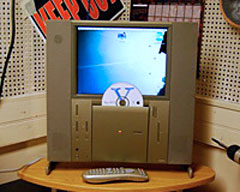
If you're like me, you love the aesthetics of some of your Macs. However, not all machines have the power to maintain themselves for what you need. My favorite method for solving this problem is building a faster Mac inside the vintage Mac's case. For working examples of this process, check out my Twenty First Century Mac and Charles Mangin's "Marvin".
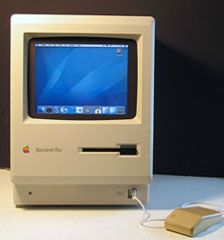
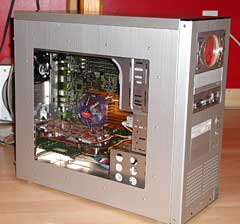 It can be the
opposite: You may hate your Mac's case. (I'm sure there is somebody who
does.) Re-casing is also a popular mod for older desktops. Check out
the Silent ATX
G4 by Todd Anderson.
It can be the
opposite: You may hate your Mac's case. (I'm sure there is somebody who
does.) Re-casing is also a popular mod for older desktops. Check out
the Silent ATX
G4 by Todd Anderson.
Crippled machines make great mod projects. Have a laptop with a cracked screen but don't have the heart to throw it out? Mod it, like Richard Hunt did with his MacMidi. Being that the machine is crippled, your mod's design must fit into certain guidelines to get around the problem. You could easily end up turning an inconvenient problem into a nifty feature.
If you're afraid to touch your expensive Mac Pro (or perfect condition Classic) with a Dremel and screwdriver (I deeply sympathize), I recommend starting with a cheap and easy machine. Wegener Media has Blue & White G3 towers for $9.99 (no hard drive, no optical drive, add shipping). I really don't think there is a better starter machine than the B&W G3. These will most likely be the Rev. 1s, so keep that in mind when purchasing.
Having an inexpensive, expendable machine allows you to jump in with more confidence. You will learn much quicker this way. Theodore Roosevelt said it best: "One thing is sure. We have to do something. We have to do the best we know how at the moment. If it doesn't turn out right, we can modify it as we go along." You can always change your plans if you encounter problems along the way.
As I recommended with system upgrades, it's best to do copious amounts of research before beginning. Also, try writing or drawing your ideas out on paper before exercising them.
 If you are looking for a starting
point or perhaps just want to take a look into some mods, I highly
recommend MacMod.com. They have a
multitude of guides to get started, as well as daily news in the
Macintosh modding community.
If you are looking for a starting
point or perhaps just want to take a look into some mods, I highly
recommend MacMod.com. They have a
multitude of guides to get started, as well as daily news in the
Macintosh modding community.
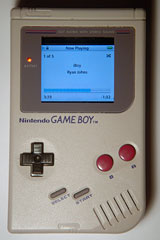
I just want to leave you with this last mod, the iBoy by sirljohns. The iBoy is proof that mods are not limited to computers, so keep that in mind.
On a closing note, if you love your Mac (old or new) in it's stock form, shoot me an email and tell me why you wouldn't change anything about it.
Good luck and happy modding! 
About LEM Support Usage Privacy Contact
Follow Low End Mac on Twitter
Join Low End Mac on Facebook
Favorite Sites
MacSurfer
Cult of Mac
Shrine of Apple
MacInTouch
MyAppleMenu
InfoMac
The Mac Observer
Accelerate Your Mac
RetroMacCast
The Vintage Mac Museum
Deal Brothers
DealMac
Mac2Sell
Mac Driver Museum
JAG's House
System 6 Heaven
System 7 Today
the pickle's Low-End Mac FAQ
Affiliates
Amazon.com
The iTunes Store
PC Connection Express
Macgo Blu-ray Player
Parallels Desktop for Mac
eBay

