
Recycled Computing
Taking Apart the 12" PowerBook
- 2010.03.17
In the movie TheConeheads, Baldar is tasked to "snarful the garflax"when he returns to Remulak, the planet of his origin. Using a Titleistgolf ball and an improvised 5 iron, Baldar defeats the garflax (sort ofa Star Wars monster on a smaller scale), enabling his return toEarth.
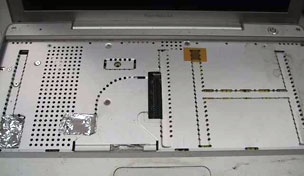
12" PowerBook with keyboard removed.
When you go to strip apart an Apple laptop, you have to remove thekeyboard.
Now once you remove the keyboard from my old Pismo, you have access to theprocessor, AirPort Card, RAM, and hard drive.
Not so with the 12" PowerBook G4.First, you have to take out the battery (not so tough, since mine isminus the battery cover) and take out the RAM. The RAM is located undera door on the bottom of the unit. Four screws hold it in place, andvoilà! RAM upgrades are possible.
I happened to have a 256 MB chip lying around and was able toupgrade to 384 MB. This will not be enough to run Leopard, so I mighthave to spend money! Shock! (So far, I have not had to buy athing.)
Good news, though. A 1 GB chip is available for the PowerBook G4,and combined with the 128 MB chip soldered on the board, it shouldallow for some frisky operation under Leopard.
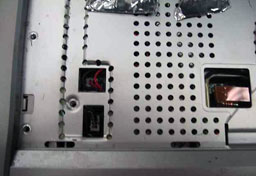 Off comes thekeyboard, and here comes the critical part.
These two connectors handle the power to the on/off switch above thekeyboard and the lead from the speakers to the mainboard. Yes, this isthe garflax! Proceed with caution from this point on: If you ruin theconnector on the board, you will render the computer useless. (I know,you could buy a new mainboard, but really, that costs money!) Do notpull on the leads going into the connector. Be very, very afraid.
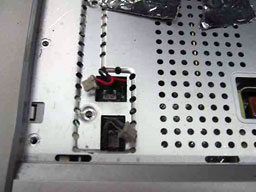 I use the smallest (and it istiny) flat blade jeweler's screw driver to get the male half of theconnection out of the female half, which is anchored to the board. I dothis very slowly and gently. This is the garflax of the wholeprocess.
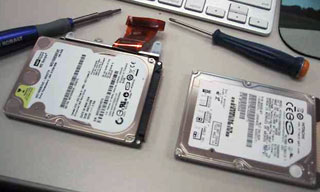 Nowyou can breath. The top cover comes off (more careful prying), and thisreveals the guts of the PowerBook. Wow, is everything packed in there!Replacing the hard drive is pretty easy. I'm going to take thisopportunity to swap out the old 80 GB drive with a new 160 GBdrive.
At this point, I am going to give you one more vital tip. There aretwo "studs" (yes, I am revealing my automotive past) that hold the heatsink to the mainboard. 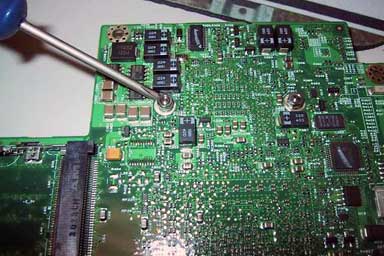 If the bolts they screw onto (on the board) areloose, removing the studs is next to impossible. Yes, I removed them,but it was not a joyful moment. When you remove the mainboard from thebottom of the case, make sure that you tighten these bolts.
This is where I stopped figuring things out myself. From this pointon, I used the teardown instructions at iFixit and a handy video at PowerBook Medic to tear apart theG4 the rest of the way. If it wasn't for sites like these, DIYers likemyself would be lost in the woods.
My original plan was to use the LCD from a 12" iBook to replace thedead one in the PowerBook. However, the wires going from the LCD on theiBook to the inverter on the PowerBook are too short. Mr. Muzzy and Imay resort to adding some extension wires onto the LCD. However,über-editor Dan Knight is shipping me a stripped 12" PowerBookwith a working screen. I am watching the mail like a hawk! 
Join us on Facebook, follow us on Twitter or Google+, or subscribe to our RSS news feed
Today's Links
- Mac of the Day: PowerBook 500 Series, introduced 1994.05.16. 'Blackbird' includes a 25 to 33 MHz 68040 along with smart batteries and grayscale or color displays.
- Support Low End Mac
Recent Content
About LEM Support Usage Privacy Contact
Follow Low End Mac on Twitter
Join Low End Mac on Facebook
Favorite Sites
MacSurfer
Cult of Mac
Shrine of Apple
MacInTouch
MyAppleMenu
InfoMac
The Mac Observer
Accelerate Your Mac
RetroMacCast
The Vintage Mac Museum
Deal Brothers
DealMac
Mac2Sell
Mac Driver Museum
JAG's House
System 6 Heaven
System 7 Today
the pickle's Low-End Mac FAQ
Affiliates
Amazon.com
The iTunes Store
PC Connection Express
Macgo Blu-ray Player
Parallels Desktop for Mac
eBay

