
Recycled Computing
Why the 20" iMac Is Perfect for Home or School
- 2009.09.29
It's a computer.
It's a television
Actually, it's both!
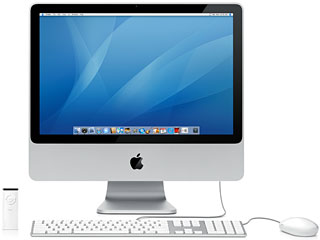
I have been using a new (to me) iMac as mydesktop at work, and it is an impressive computer. It has the 20"screen, 2 gigabytes of RAM, and a 2.0 GHz Intel Core 2 Duo processor.Wow! Talk about your screen real estate! I can easily run twoapplications side by side on the 1680 x 1050 display. Videos areamazing, and my eyes (which are not the eyes that they used to be) havelittle trouble reading web pages and such.
It's really hard to call this thing a desktop computer, because youcan easily throw it into a bag (I've seen iMac bags on the Internet),move it to another location, and set it up. Apple calls it anAll-in-One computer, and I suppose that makes sense.
Perfect for Schools
What is very good from an education viewpoint is the complete lackof protrusions on the unit. I have mentioned the old adage "idle handsare the devil's workshop", and it is true. Not to generalize, but PCcomputers always have some sort of fiddly bit or tiny door that myrambunctious students pry off or vandalize. I have noticed a lot lessdamage on this model of computer (as well as the "old" white 17"iMacs).
The fact that the iMac is an "All-in-One" unit makes it a favoritein terms of moving it. (If I have to disconnect a CPU and monitor onemore time!) Things are just "cleaner" in terms of wiring.
From a system standpoint, Mac OS X10.5 "Leopard" is easy to network. I also have Apple Remote Desktopinstalled and can monitor each screen in both labs. (This is notpopular feature among our students.) I can't help but feel that Applehas established the lead in desktop computers in the K-12 environmentand shows no sign of letting up.
I'm Lovin' It
I am personally enjoying the 20" brushed aluminum iMac. It's fast,it's furious, and I would recommend it to anyone just starting out whois in the market for a desktop. In fact, the 24" model would be anexcellent television substitute as well as a powerful computer.
Imagine returning to your humble abode and firing up the iMac. Iimagine it would be mounted to one of those pivoting arms that you canget for widescreen TVs. You could check your email, visit a fewblogsites, buy that Steve Marriott T-shirt you've always wanted, pop ina DVD, listen to your iTunes collection, or watch some network news.The center of your life!
You will have to go out to work and buy food, but that's pretty muchit. I am assuming that your social life is a) nonexistent; b) not thatimportant.
Minor Complaints
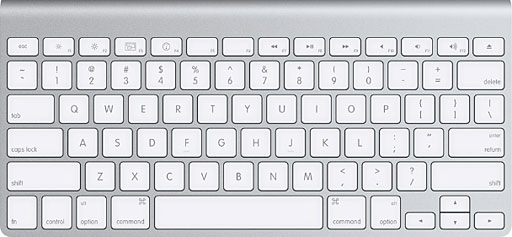
Apple's standard keyboard has no numeric keypad.
I do have some bones to pick about the brushed aluminum iMacs. The"L" shaped display stand does not adjust enough for me, and Apple hasstarted to ship "small" keyboards with them. I know how to touch typeon a number pad, and not having one on the keyboard is very disturbing.[Editor's note: Apple does sell the iMac with its extended keyboard,but the small keyboard is what you get if you don't specify the fullsized keyboard. dk] 
Join us on Facebook, follow us on Twitter or Google+, or subscribe to our RSS news feed
Today's Links
- Mac of the Day: PowerBook 500 Series, introduced 1994.05.16. 'Blackbird' includes a 25 to 33 MHz 68040 along with smart batteries and grayscale or color displays.
- Support Low End Mac
Recent Content
About LEM Support Usage Privacy Contact
Follow Low End Mac on Twitter
Join Low End Mac on Facebook
Favorite Sites
MacSurfer
Cult of Mac
Shrine of Apple
MacInTouch
MyAppleMenu
InfoMac
The Mac Observer
Accelerate Your Mac
RetroMacCast
The Vintage Mac Museum
Deal Brothers
DealMac
Mac2Sell
Mac Driver Museum
JAG's House
System 6 Heaven
System 7 Today
the pickle's Low-End Mac FAQ
Affiliates
Amazon.com
The iTunes Store
PC Connection Express
Macgo Blu-ray Player
Parallels Desktop for Mac
eBay

