
Recycled Computing
Up-to-Date or Low-end, We Need Technology in Our Schools
- 2008.05.14
Recently there have been several excellent articles in Low End Mac about the use of computers in schools. I enjoyed reading iMac DVs in Action, Old Computers in Our Schools, and Apple's eMate Still a Great Tool in the Classroom. There is nothing like reading about tech departments using it up, wearing it out, and repurposing computers to meet student's educational needs. There is never enough money for schools in general - and for technology in particular.
Like the dualist I am, I must make a case for both cutting edge technology and low-end technology in public high schools. I am receiving a whole new set of iMacs for both the graphics lab and writing center that I watch over. I can monitor both labs using Apple Remote Desktop (ARD), and this is a really good thing to do. Using ARD means that I can restart, login, shut down, and open applications on all these computers at once. I can also help users without having to leave my desk.
It also means I can find students doing things they shouldn't be on the Internet.
Time for today's rant: You and I and educators everywhere think that computers can be used for academic purposes. Silly adults. Teenagers look at the World Wide Web and immediately head for the red light district. Or a number of game sites. Or YouTube. So instead of using their computing skills for good, they have gone over to the dark side.
We have a firewall, and we block sites, but since the students have nothing else to do (and parents who have no clue what they are doing), they are always one step ahead of us. They are very adept at closing windows when caught visiting a spot they are not supposed to visit. ARD allows me to take a screen print (from my computer) and do a CIS number on the guilty party. The wheels of justice grind slow, but....
Having new computers that run the latest (Mac OS X 10.5 "Leopard") software is great. We also can make use of the newest developments in educational software on the latest networking features of OS X.
And, as Mr. Mike, our computer tech says, "There's nothing like the smell of new plastic in the morning". We're geeks; we like new electronic stuff. But there is a need for low tech here in Hormone High as well.
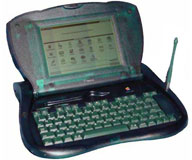 As I
mentioned, students tend to view computers as a gateway to
entertainment, and entertainment is a distraction for today's frenetic
students. There is a need for computers that just work on academic
things - like the eMate. We don't need students surfing the Web while
they supposed to be writing. We need students to learn computer skills,
but not necessarily the ones involved in evading security
restrictions.
As I
mentioned, students tend to view computers as a gateway to
entertainment, and entertainment is a distraction for today's frenetic
students. There is a need for computers that just work on academic
things - like the eMate. We don't need students surfing the Web while
they supposed to be writing. We need students to learn computer skills,
but not necessarily the ones involved in evading security
restrictions.
If you are like me - I own a couple of Newtons (there is a twelve step program for this illness) - one of the advantages of the Newton OS is that it works with Macs and PCs. You can see the purpose of "de-featuring" a small PDA with a keyboard for note taking, word processing, data collection, and editing. The IrDA messaging feature allows communication without side trips to "games, games, games" or inappropriate-pictures.com
Naturally, there is a fly in the ointment. High school students want laptops with Internet access. Not because they can do "research" on them, but because they don't really want to do work on them. (Motto: ABA - Anything But Academics) The real niche for an eMate type product is in the elementary school and middle school markets. Our suave and sophisticated high school students view the AlphaSmart products as too "five minutes ago" to deign to use them. I personally have a bunch of old PowerBooks that can be used as word processors.
The reception of this sort of specialized tool is like introducing students to a sewage treatment plant. Maybe if they had used them in the lower grades....
I digress. When you are a medium sized (for a rural area) school like us, systemization is important, networking is important, and the latest equipment is important. But smaller schools require smaller solutions, and perhaps the best way to introduce computers into a student's toolbox is with a simpler tool.
While next year I look forward to my new toys, I'm going to hang on
to the PowerBook 500s and
180s for another year.

Join us on Facebook, follow us on Twitter or Google+, or subscribe to our RSS news feed
Today's Links
- Mac of the Day: PowerBook 500 Series, introduced 1994.05.16. 'Blackbird' includes a 25 to 33 MHz 68040 along with smart batteries and grayscale or color displays.
- Support Low End Mac
Recent Content
About LEM Support Usage Privacy Contact
Follow Low End Mac on Twitter
Join Low End Mac on Facebook
Favorite Sites
MacSurfer
Cult of Mac
Shrine of Apple
MacInTouch
MyAppleMenu
InfoMac
The Mac Observer
Accelerate Your Mac
RetroMacCast
The Vintage Mac Museum
Deal Brothers
DealMac
Mac2Sell
Mac Driver Museum
JAG's House
System 6 Heaven
System 7 Today
the pickle's Low-End Mac FAQ
Affiliates
Amazon.com
The iTunes Store
PC Connection Express
Macgo Blu-ray Player
Parallels Desktop for Mac
eBay

