
Recycled Computing
Wouldn't Life Be Great with an iSlate?
- 2008.07.04
While I find myself recycling old hardware a lot, in this column I'd like to recycle an idea: Translating handwriting into text.
I admit that I own a couple of Newtons and used them when my job required taking notes in a classroom. I had the tiny serial keyboard and could combine text with drawings - great for Algebra class!
I'm not going to go into the many virtues of this yet-another-Apple-product-far-far-ahead-of-its-time, since better writers and Newton fans have already done so.
What I miss most about the Newton is it's ability to gather data. Ever have someone give you their business card and place it in your pocket, only to have it disappear into that black hole where your missing socks go? As rule, the older I get, the quicker I have to record something.
PDAs Are Too Small
Have you tried to use either a PDA or smartphone with a tiny fingers keyboard or your cellphone keypad? Yes, the LolliPop Gang can do it, but the rest of us have issues.
To me, the Newton's stylus and large screen allow me to instantly enter that business card info before I lose it. I can also gather and store data at remote locations and sync the data with either my laptop or desktop computer. Despite the early horror stories about Newton's handwriting recognition, the MessagePad 2100 (last in the series) works fine for me. Granted, the MessagePad has to "learn" your handwriting style, but once it has seen enough of your writing, it does a very good job for address entry, calendars, to do lists, and short notes.
Ebook Readers Are Too Limited
The reason I bring this up is the recent development of a revolutionary screen from E Ink Corporation in Cambridge, Mass. Both Sony's $299 Reader and Amazon's $359 Kindle use this technology to produce an electronic book. The advantage of such a device is it's storage capacity. The Sony can hold 160 books, and the Kindle can hold 200. Imagine college students being able to hold all of their textbooks (and supplemental reading) in a form factor slim enough to slip into a backpack, purse, or coat pocket (both are roughly 7" x 5" and less than 1" thick). Imagine being able to write a paper with all of your reference material available in one spot. It would basically be "text for the rest of us".
I am borrowing the technological description of the E Ink display from Scientific American ("Library to Go" by Stuart F. Brown, pages 108-109, June 298, Volume 298, Number 6):
Basically, microcapsules the size of a diameter of a human hair are placed between two thin sheets that work as electrodes. The microcapsules contain positively charged white particles and negatively charged black particles. When a negative charge is applied to the top sheet, the white particles are attracted to it and the black particles are drawn to the positive sheet on the bottom.
This screen uses very little power, and it is estimated that 7500 pages can be turned on a single charge of the Sony Reader battery. If you are interested in examining the Sony Reader, they are being sold at the Borders bookstores. They are expensive, but the reading experience is delightful. (Especially being able to make the text size larger.)
Apple Has the Technology
Combine this with touch screen tech from the iPhone and the iPod touch, and you can see how this device would also be able to collect information and notes for data collections. Doctor's, technicians, lawyers, inventory control, teachers, scientists, and the "rest of us" could use customized software to fill out forms to fax, text, and email from remote locations.
Paperless bureaucracy. The mind boggles.
For those of you who worry about color, E Ink is working on a screen using red, green, and blue filters, and prototypes are already capable of displaying thousands of colors.
For those of you thinking that you need a stylus to use these devices, you are correct. I know that Steve Jobs is opposed to using a stylus, since he feels that a stylus is easily lost, but if the guy would stop wearing those black turtlenecks and start using a pocket protector like any self respecting nerd....
I even have a name for this text device, the iSlate. Wouldn't life be great with an iSlate?
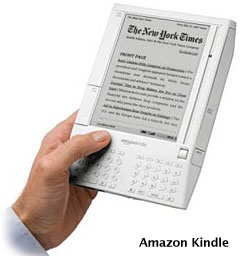
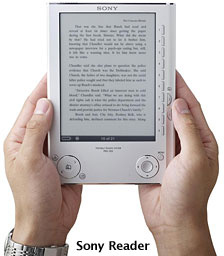
Apple is just the company to produce such a device. First of all, it would look cool. The Sony Reader and Amazon Kindle look kind of frumpy. Apple could distribute ebooks through the iTunes Store. If you are a publisher, I would think you would jump at the change to sell media through this established Internet business.
The secondary function of a data collector is a larger field than one with think - business, academic, medical, and military uses come to mind immediately.
Only one thing - don't call it Newton II.

Join us on Facebook, follow us on Twitter or Google+, or subscribe to our RSS news feed
Today's Links
- Mac of the Day: PowerBook 500 Series, introduced 1994.05.16. 'Blackbird' includes a 25 to 33 MHz 68040 along with smart batteries and grayscale or color displays.
- Support Low End Mac
Recent Content
About LEM Support Usage Privacy Contact
Follow Low End Mac on Twitter
Join Low End Mac on Facebook
Favorite Sites
MacSurfer
Cult of Mac
Shrine of Apple
MacInTouch
MyAppleMenu
InfoMac
The Mac Observer
Accelerate Your Mac
RetroMacCast
The Vintage Mac Museum
Deal Brothers
DealMac
Mac2Sell
Mac Driver Museum
JAG's House
System 6 Heaven
System 7 Today
the pickle's Low-End Mac FAQ
Affiliates
Amazon.com
The iTunes Store
PC Connection Express
Macgo Blu-ray Player
Parallels Desktop for Mac
eBay

