
Recycled Computing
Taking Apart a PowerBook G3 (Lombard or Pismo) Battery
- 2008.09.24
This is not for the foolhardy and clumsy, but that didn't stop me! I happened to have a spare PowerBook G3 (Pismo) battery that was holding an ever decreasing number of milliamps, so I figured why not? I'd always wanted to see the inside. (The Lombard battery is identical to the Pismo's.)
A word of caution. All I'm going to do at this point is take apart the battery. Since it involves lithium batteries, please be careful if you decide that you want to follow in my footsteps. I assume no liability for you or your battery. Neither does Low End Mac. So let's be careful!
Using a sharp edge, score along the seam that separates the two halves of the battery case.
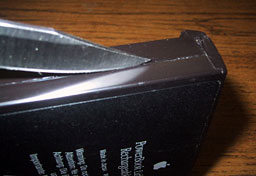
Slow and steady. Don't try to force anything. Since this is an "intelligent" battery, there are circuit boards at the front and back of the case, so if you forcefully try to pry it apart, bad things could happen!
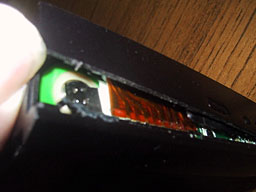
My battery case was more strongly fastened at the back than at the front. As a result, I was very careful on the rear of the case.
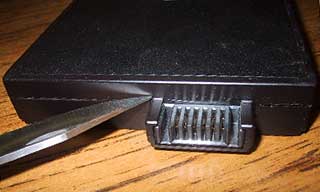
Watch the area around the power coupling as well. I very slowly pried the case apart at this point in the process.
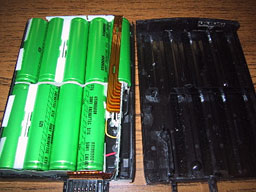
There you are - the battery case is split in two, and 9 lithium-ion 4400 mAh cells are visible. You can pry out the cells and unsolder them, but I am going to wait until I can lay my hands on some cheap cells.
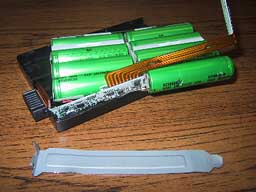
You should be sure to get cells with the tabs soldered on. Soldering tabs onto regular batteries is not something you can do yourself. I'm waiting to try to find a supplier who has a good price on the cells. When I do, I will post another article on how to solder the new cells into place and how to get the whole thing back together.
Until then, happy Pismoing! 
Join us on Facebook, follow us on Twitter or Google+, or subscribe to our RSS news feed
Today's Links
- Mac of the Day: PowerBook 500 Series, introduced 1994.05.16. 'Blackbird' includes a 25 to 33 MHz 68040 along with smart batteries and grayscale or color displays.
- Support Low End Mac
Recent Content
About LEM Support Usage Privacy Contact
Follow Low End Mac on Twitter
Join Low End Mac on Facebook
Favorite Sites
MacSurfer
Cult of Mac
Shrine of Apple
MacInTouch
MyAppleMenu
InfoMac
The Mac Observer
Accelerate Your Mac
RetroMacCast
The Vintage Mac Museum
Deal Brothers
DealMac
Mac2Sell
Mac Driver Museum
JAG's House
System 6 Heaven
System 7 Today
the pickle's Low-End Mac FAQ
Affiliates
Amazon.com
The iTunes Store
PC Connection Express
Macgo Blu-ray Player
Parallels Desktop for Mac
eBay

