
Recycled Computing
Reconfiguring and Repurposing a Power Mac G4
- 2008.09.18
 After all the
changes at my school, we have been reusing some "older computers" to
fit different needs. There are some pieces of technology that we are
abandoning: no more mechanical mice (students like to take out the
little roller balls) and no more single-button mice. We have also
disposed of any Mac that doesn't have FireWire. With FireWire, PowerPC
Macs can use FireWire Target Disc
Mode and use an external drive to boot the computer.
After all the
changes at my school, we have been reusing some "older computers" to
fit different needs. There are some pieces of technology that we are
abandoning: no more mechanical mice (students like to take out the
little roller balls) and no more single-button mice. We have also
disposed of any Mac that doesn't have FireWire. With FireWire, PowerPC
Macs can use FireWire Target Disc
Mode and use an external drive to boot the computer.
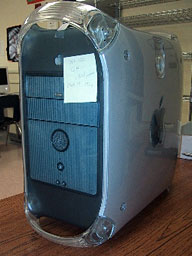
That is our current line in the sand. However, we did have some G4 towers left over from a keyboarding class.
Most of these venerable warriors,"Sawtooth" Power Macs from 1999, had been running Mac OS X 10.3.9 and had little over 256 MB in RAM plus 10 GB hard drives. The science classroom we were sending them to needed a little bit more modern operating system and larger hard drives.
I got to pop the old G4s open and remove the hard drives. This was on top of my other duties.
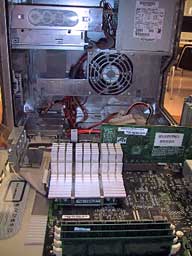
This is what the old gal looks like when it's open. The 3.5" hard drive is located near the rear on the bottom of the unit (behind the green video card).
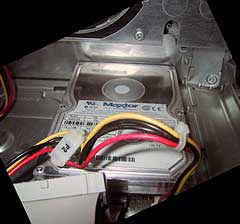
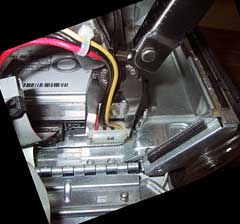
I like to place a pair of pliers on the plastic housing for the power cable leading into the hard drive. I gently grip the white plastic and gently rock it back and forth. I then "worry" the plug out.
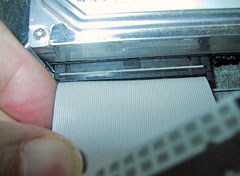 The gray
ribbon data cable is best removed by gripping the black plug and
wiggling it out of the hard drive. I know it can be done, but I do not
recommend pulling them out by their cables as its possible wires will
pull lose.
The gray
ribbon data cable is best removed by gripping the black plug and
wiggling it out of the hard drive. I know it can be done, but I do not
recommend pulling them out by their cables as its possible wires will
pull lose.
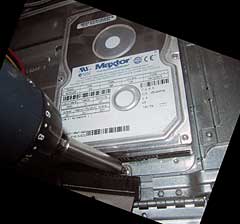 After these cables are unplugged,
you need to remove the one screw that frees the hard drive sled from
the computer. Then you unscrew the sled from the hard drive.
After these cables are unplugged,
you need to remove the one screw that frees the hard drive sled from
the computer. Then you unscrew the sled from the hard drive.
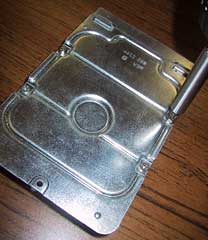 When you're are all done removing the hard drive,
you can put its replacement in the drive sled and reverse the
process.
When you're are all done removing the hard drive,
you can put its replacement in the drive sled and reverse the
process.
I don't assume any liability for your own repairs on your own computer. Neither does Low End Mac. I highly recommend searching the Internet for more detailed instructions, but as you can see from my photos, these computers are very simple to access and work on.
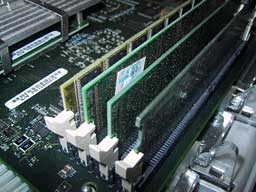 Mr. Mike, our tech genius, will put in enough RAM
to reach 512 MB and install a 20 GB drive with our Mac OS X 10.4
"Tiger" disk image on it. As you can see in the photo, there are 4 RAM
slots, which means the there are a lot of options in terms of placing
different RAM chip amounts to make up the 512 MB that will be
installed. (Some G4 Power Macs only have 3 RAM slots.)
Mr. Mike, our tech genius, will put in enough RAM
to reach 512 MB and install a 20 GB drive with our Mac OS X 10.4
"Tiger" disk image on it. As you can see in the photo, there are 4 RAM
slots, which means the there are a lot of options in terms of placing
different RAM chip amounts to make up the 512 MB that will be
installed. (Some G4 Power Macs only have 3 RAM slots.)
After that, the towers will be equipped with monitors, mice, and keyboards, then be placed in a science lab. There the G4s will continue to live happy and productive lives.
There is still a great deal of life in a computer so old that would
have been discarded in the PC world. 
Join us on Facebook, follow us on Twitter or Google+, or subscribe to our RSS news feed
Today's Links
- Mac of the Day: PowerBook 500 Series, introduced 1994.05.16. 'Blackbird' includes a 25 to 33 MHz 68040 along with smart batteries and grayscale or color displays.
- Support Low End Mac
Recent Content
About LEM Support Usage Privacy Contact
Follow Low End Mac on Twitter
Join Low End Mac on Facebook
Favorite Sites
MacSurfer
Cult of Mac
Shrine of Apple
MacInTouch
MyAppleMenu
InfoMac
The Mac Observer
Accelerate Your Mac
RetroMacCast
The Vintage Mac Museum
Deal Brothers
DealMac
Mac2Sell
Mac Driver Museum
JAG's House
System 6 Heaven
System 7 Today
the pickle's Low-End Mac FAQ
Affiliates
Amazon.com
The iTunes Store
PC Connection Express
Macgo Blu-ray Player
Parallels Desktop for Mac
eBay

