
Fruitful Editing
Ubuntu 11.10 Oneiric Ocelot a Real Alternative to Commercial Operating Systems
- 2011.11.16
The newest cat on the operating system block may not be the king of the jungle, but it's certainly sleek, fast, and ready to land on it's feet. Ubuntu 11.10 "Oneiric Ocelot", released on October 13, is a solid update that includes the Linux 3.0 kernel plus the latest version of the controversial Unity shell interface that Canonical introduced earlier this year with Ubuntu 11.04 "Natty Narwal".
Unity
One of the hottest issues Ubuntu has faced this year has been the introduction of the Unity interface over GNOME 2.x. (GNOME 3 has some serious critics as well.) Unity was first introduced in the netbook edition of Ubuntu and in the full release of 11.04 earlier this year.
It's a desktop familiar to Mac users, functioning similar to the Mac OS X look and feel, though it's not an exact copy.
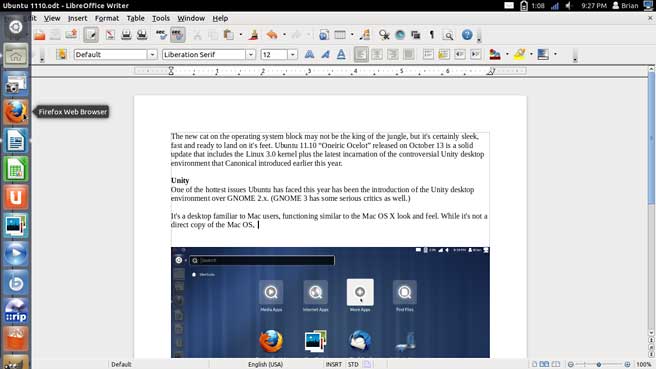
Ubuntu 10.10 with Unity running Libre Office Writer.
At the left hand side of the screen sits the application launcher. This launcher functions similarly to the Mac OS X Dock in that users can drag application icons, folders, and files for quick access - or to move them around. This pseudo "dock" will disappear after about a second and reappear with a simple mouse over. Unfortunately, this dock/launcher cannot be be moved to any other area of the screen; it always stays to the left.
You can add alternative "docks" from the software store.
GNOME 3
If you don't like the Unity desktop environment, switching to back to GNOME is as simple as going to the Ubuntu Software Center and downloading it. Upon startup, you just choose the desktop you want; it's very simple.
GNOME 3 and Unity share some similar features, but when it comes to usability I prefer GNOME for the general flexibility it provides over Unity. Of course, you can also download the Kubuntu (KDE) or Xubuntu (Xfce) desktops if those appeal to you.
Switching desktops is relatively easy, but removing them can create some issues. I installed Xfce just fine, but when I removed it, some of my installed apps disappeared for no reason. I re-downloaded the missing apps, but it still shouldn't happen in the first place.
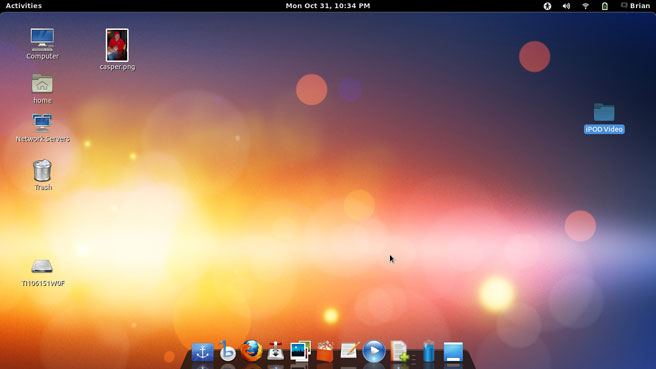
Ubuntu 10.10 GNOME desktop.
Notice the dock in the screenshot? This is Docky, an application easily installed from the Ubuntu Software Center. It functions similarly to the Mac OS X dock in most ways and seems much easier to use than the other docks available.
One thing that is quite irritating in GNOME 3 is minimizing and maximizing windows of applications. In Unity, it is a smooth process, much like Mac OS X - the app's main controls exist in a menu on the top bar, with the controls relative to the working window (File, Edit, View, etc.). In GNOME, app windows are minimized/maximized by a contextual menu.
Music, Photos, and Work
Included in the basic install of Ubuntu 11.10 is the Banshee music player, photo manager Shotwell, and Libre Office.
Banshee is a music and video manager that functions similarly to iTunes. It can import music from CDs, organize your all your music, and even connect directly through the player to the Ubuntu One Music Store, Amazon, and other music stores.
On the plus side, Banshee imported my entire iTunes library with no problems and updated the album artwork correctly for music that didn't have it. And, unlike iTunes, Banshee's art service actually pulled the correct artwork. (iTunes never got my album artwork 100% right. It famously gave me album artwork for 90s dance artist Haddaway for my Beatles albums.)
Where Banshee has not done so well is interacting with my 5G iPod nano (the video recording Nano). Ubuntu recognizes the iPod as a mass storage device and puts a folder called "iPod Control" on the iPod's hard drive. I could drag songs and albums directly to the iPod through Banshee, but I was unable to put new playlists on it.
Also of note, Banshee's default format for ripping CDs is the open source audio codec Vorbis, which the iPod does not support. In order to play any restricted formats (MP3, AAC, etc.), you have to install "Ubuntu Restricted Extras" from the the Ubuntu Software Center.
Shotwell
Ubuntu 11.10 includes the photo management program Shotwell by default rather than F-spot from previous releases.
Shotwell will feel very familiar to iPhoto users. Photos are imported into a pictures folder, separated into "Events", just like iPhoto does. I imported my iPhoto backup with ease, and within minutes Shotwell had my 6 GB of photos and personal videos neatly organized.
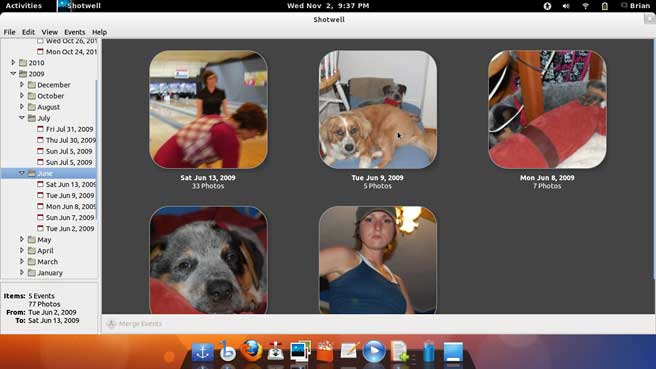
Ubuntu 10.10 running Shotwell.
Office
Libre Office replaces Open Office in this release (and in many other major Linux distributions as well).
I typed this article in Libre Write, but that's about as much as I've used it. My word processor of choice has always been TextEdit in Mac OS X.
Libre Office includes a word processor, spreadsheet, basic drawing, and a presentation program.
Ubuntu Software Center
Of course, if you want to explore the vast world of Linux software, you simply have to open the Ubuntu Software Center and search or browse for what you need.
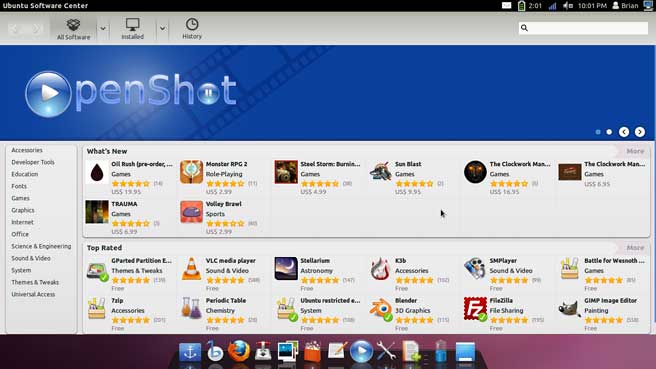
Ubuntu Software Center.
Categories are clearly defined, and there are even paid apps available for purchase. Paid apps are primarily games at this point, but that could expand in the future. Applications can be easily downloaded or removed through the software center.
Ubuntu One
Signing up for the Ubuntu One cloud service is incredibly easy and can also be installed on Windows systems (but oddly not Mac OS X).
You get 5 GB of free storage space for your documents, photos, music, or whatever you need to store in the cloud. All computers that can use Ubuntu One will sync to the service, like other comparable services (such as Dropbox , which supports Macs and also iOS devices). You can even stream music and gain more space with a monthly fee ($29.99 a year for 20 GB of storage, $39.99 for music streaming and 20 GB of storage).
Final Thoughts
Ubuntu 11.10 is solid. Like previous releases, installation is easy, hardware (in general) just works with little configuration, and finding new software is both fun and easy on the wallet. You'll have to explore Open Source software to see if it's right for you. I've spent a full month using Oneiric Ocelot and have no desire to go back to commercial operating systems.
If OS X Lion or Snow Leopard has left you behind, I would highly recommend you give Ubuntu a spin.
Ubuntu 11.10 is available for for x86, AMD64, and PowerPC.
Recommended hardware for the x86 and AMD64 versions of Ubuntu 10.10
is a 1 GHz Pentium 4 with 512 MB of system memory (RAM) and 5 GB
of available hard drive space. For the PowerPC version, any Mac with
NewWorld ROMs (that is, every new PPC Mac since the original iMac), 256
MB of RAM, and 3 GB of hard drive space. As with Mac OS X, a
faster processor, more memory, and a faster hard drive will improve
performance. 
About LEM Support Usage Privacy Contact
Follow Low End Mac on Twitter
Join Low End Mac on Facebook
Favorite Sites
MacSurfer
Cult of Mac
Shrine of Apple
MacInTouch
MyAppleMenu
InfoMac
The Mac Observer
Accelerate Your Mac
RetroMacCast
The Vintage Mac Museum
Deal Brothers
DealMac
Mac2Sell
Mac Driver Museum
JAG's House
System 6 Heaven
System 7 Today
the pickle's Low-End Mac FAQ
Affiliates
Amazon.com
The iTunes Store
PC Connection Express
Macgo Blu-ray Player
Parallels Desktop for Mac
eBay

