
Apple, Tech, and Gaming
Teaching an Old iMac Some New Tricks
- 2009.10.02 - Tip Jar
To give some background - I have a summer 2001 600 MHz Graphite iMac G3 (CD-RW) that I bought new in 2001 for $1,299 while in college. If only I had waited about four months until January 2002, when the flat panel G4s were introduced and this unit dropped $300 in price (grumble, grumble).
At any rate, this machine has seen better years in light of many technological advances since 2001 - and I've desired for some time to do something fun with the old G3, since it has taken a back seat to my 1.42 GHz eMac G4 and 1.67 GHz hi-res 15" PowerBook G4.
This iMac has a bigger place in my heart than my hi-res PowerBook (this iMac, after all, is the only system I've ever purchased new). Some guys want to hang on to their first car and tinker with it until it dies. To this Mac enthusiast and gamer, this is definitely the equivalent!
After making the decision to revive the iMac, I had to decide what to do. I decided that there would be no better use for my former workhorse than as a classic gaming hub, file server, and iTunes jukebox - located right within my entertainment center to show my love for and the joy of Macs to all the guests in my home. Here's the perfectly positioned iMac:
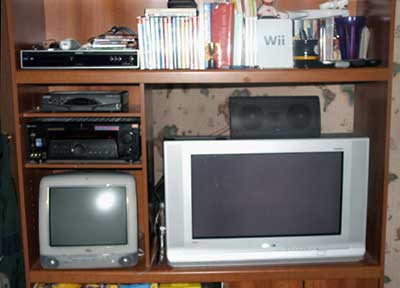
The iMac has a place in the home entertainment center.
The Challenge: Control the iMac Remotely
As a man on a tight budget and a firm believer in utilizing low-end Macs, I was to determined make use of the old iMac and control it remotely as a simple entertainment device without investing much. After all, these units are now 8 years old and have very little residual value. An original AirPort Card with the iMac adapter is probably worth more than the iMac itself!
At this point, I would like to give my thanks to Low End Mac's Adam Rosen for helping me discover a great old application called Chicken of the VNC. It's a funny name for an app, but the price is right - free (it's open source). Adam wrote a great article, Remotely Control Your OS 9 or OS X Mac, back February 2008, which I found extremely useful. It pointed me in the right direction of the aforementioned application.
Chicken of the VNC lets you view a Mac's display from another machine, as well as control it with your mouse and keyboard. It is easy to set up and use. Other discussion boards recommended it too, so I installed the client on both my hi-res PowerBook (running Mac OS X 10.5 "Leopard"), and on the iMac in the entertainment center running Mac OS X 10.4 "Tiger" and gave it a shot.
Why not just use a wireless keyboard?
The reason for going through all this trouble: In true low-end Mac fashion, I didn't want to bother spending the cash for a wireless Apple compatible keyboard and mouse to control the machine remotely, since I don't really need one just yet (yeah, they're cheap - but so am I). Additionally, it's kind of awkward to have to pull out a wireless keyboard to control your music and such at a gathering.
Connecting the Machines
At any rate, after installing the software on both machines, I connected them by routing a 25' ethernet cable, which I happened to have lying around, behind my couch from the iMac in the entertainment center to my workstation located in the corner of the room. I restarted both machines and kept my fingers crossed.
Success!
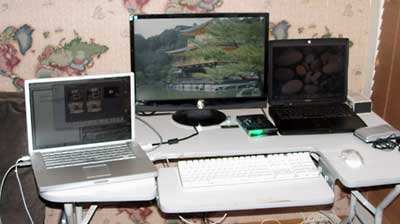
My Workstation: 22" HD monitor with 400 MHz Pismo connected
via VGA and 15" 1.67 GHz PowerBook connected via DVI.
To my excitement, the iMac indeed showed up in the available shared devices list in Leopard on my PowerBook (after setting up the remote access privileges with password on the iMac). Now all I have to do is turn on the iMac, make sure the ethernet cable is connected, fire up Chicken of the VNC on my hi-res PowerBook, select the iMac, enter the password, and voilà - I have control of my iMac from across the room at my main workstation:
I also ran a stereo Y cable I had from the iMac to my receiver to test the sound output, and it's perfect. Now I can go to my workstation and command the iMac to play music discretely. It really gives you a better sense of control!
More Work to Do
A couple challenges persist:
- Getting the video sent to my old 1080i CRT HDTV that just has component, composite, and S-video (the iMac has a full sized VGA output for mirroring)
- Find a wireless gaming controller that works in both OS 9 and OS X.
I've looked at some VGA-to-Component Video converter boxes that aren't too bad (about $30). To my readers - feel free to email me with suggestions if you have any experience with these converter boxes (or if you have a better idea), along with wireless OS 9/OS X controller suggestions.
Thanks again to Adam Rosen for writing the article that helped me discover the tools I needed to teach that old Mac a new trick or two! Hopefully I'll be gaming on it again soon with a wireless controller on my CRT HDTV.
If this isn't practical, I was probably going to upgrade that beast
to a flat panel this holiday season anyway....

About LEM Support Usage Privacy Contact
Follow Low End Mac on Twitter
Join Low End Mac on Facebook
Favorite Sites
MacSurfer
Cult of Mac
Shrine of Apple
MacInTouch
MyAppleMenu
InfoMac
The Mac Observer
Accelerate Your Mac
RetroMacCast
The Vintage Mac Museum
Deal Brothers
DealMac
Mac2Sell
Mac Driver Museum
JAG's House
System 6 Heaven
System 7 Today
the pickle's Low-End Mac FAQ
Affiliates
Amazon.com
The iTunes Store
PC Connection Express
Macgo Blu-ray Player
Parallels Desktop for Mac
eBay

