
Apple, Tech, and Gaming
The Last PowerBooks Have Plenty of Life Left
- 2009.07.31 - Tip Jar
Released in 2005 - and discontinued as late as May 2006 (replaced by the MacBook Pro) - the final revision Aluminum PowerBook G4 was an amazing end to an era of a professional line of PowerPC notebook computers. These models were the pinnacle of their product line and the last before the introduction of the MacBook Pro.
What makes them so special, and why are these models sought after still today?
The final PowerBook G4s were special machines. Just consider once again that they are the final revision of a product line, which means that most flaws and bugs had been worked out. They were perfected to a degree and are sought out by collectors for these reasons.
The 12" PowerBook
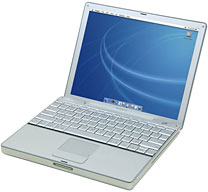 The fact that they are still
sought after for everyday use today is a bit more complex, and the
reasons vary. You should consider that many of us love the 12" PowerBook G4 for its
ultra small 8.6" x 10.9" footprint. There are few models in this size
range that have ever compared to it in terms of overall power, weight,
and portability, and since the final revision was the last of its kind,
it was also the most powerful. At 1.5 GHz with 64 MB of dedicated VRAM,
sudden motion sensor hard drive, and Bluetooth 2.0 EDR, it provides the
most features of the 12" PowerBook G4
line, extending its useful service life considerably.
The fact that they are still
sought after for everyday use today is a bit more complex, and the
reasons vary. You should consider that many of us love the 12" PowerBook G4 for its
ultra small 8.6" x 10.9" footprint. There are few models in this size
range that have ever compared to it in terms of overall power, weight,
and portability, and since the final revision was the last of its kind,
it was also the most powerful. At 1.5 GHz with 64 MB of dedicated VRAM,
sudden motion sensor hard drive, and Bluetooth 2.0 EDR, it provides the
most features of the 12" PowerBook G4
line, extending its useful service life considerably.
15" and 17" PowerBooks
The 15" and 17" 1.67 GHz models are equally impressive, especially the high-resolution models (M9969LL/A - 15" and M9970LL/A - 17"). Due to the video capabilities and screen resolution, these 15" and 17" high-resolution models can hold their own against an early MacBook Pro (MBP) - for up to half of the current average used MBP price.
To elaborate more on the high-resolution models (hi-res), released in October 2005, a.k.a. Dual Layer SuperDrive (DLSD, SD-DL), the features that separate them from their January 2005 counterparts should be noted. The obvious features of the hi-res models, as stated, denote increased screen resolution and dual-layer DVD burning. The screen resolution is truly breathtaking. The 15" has a screen resolution of 1440 x 960, while the 17" packs a huge punch at 1680 x 1050. This boost to resolution is an amazing - in fact 26% greater than the previous model, and sharp enough to easily edit high definition video and high-resolution images! I highly recommend a hi-res. I'm typing on my 15" hi-res right now!
The more subtle differences between the January 2005 models and the October 2005 models were the type of RAM used, the video options, and - most notably - an extra hour of battery life! The January models used PC2700 DDR SDRAM, while the October models used PC4200 DDR2 SDRAM. The faster memory had a small speed advantage, which was limited by the 167 MHz system bus, otherwise the memory speed difference would have made a much larger impact. The PC4200 SODIMMs were much cheaper, though, and that's what most likely prompted the change in the final revision. The memory in both the January and October 2005 models can be maxed out at 2 GB, plenty to handle most of today's apps.
In terms of video processing, the difference between the January 2005 15" and 17" models and the October revision was optional versus standard equipment. The January revision came standard with a 64 MB version of the ATI Mobility Radeon 9700. There was a 128 MB dual-link DVI video option at the time, but was a build to order option only and cannot be later upgraded outside of a full swap of the logic board. On the other hand, the hi-res models came standard with the 128 MB dual-link DVI version.
The 128 MB dual-link DVI video will mean a lot to you if you want to drive a 30" high resolution monitor or want to do any 3D gaming. To give you an idea of the graphics capabilities of a 1.67 GHz PowerBook, play Doom 3. It runs very smoothly on the hi-res at about 27 FPS on "low". It will run just fine on the other models too, but not as fast.
Upgrade Options
In terms of upgrading - well, to put it kindly, upgrading some components is not easy on an Aluminum PowerBook. In fact, the Aluminum PowerBooks are notorious for being among the most difficult portable Macs to upgrade, aside from a simple change of RAM or battery. If your hard drive starts to gets corrupt, it's a tedious operation (compared to a 10-minute swap on the Pismo). The optical drive is not too bad, and there are even internal slot-loading Blu-ray drives for as little as $200 now. Too bad there is no workaround yet for Blu-ray playback in OS X.
Also, in terms of upgrading, at one point there were XLR8 G4 processor upgrades from Daystar for the 1.67 GHz models - coming in at 1.83 and 1.92 GHz. These were not a huge bump over the stock processor, but both were loaded with a full 1 MB L2 cache, compared to the standard 512 KB, which reportedly increased overall performance up to 50% on the 1.83 GHz and 60% on the 1.92 GHz! These upgrades were discontinued some time ago, and I'm very sure that these are extremely scarce. I've never seen a processor upgraded PowerBook G4 for sale on eBay - or anywhere else for that matter. I poked around and read some very good reports on the 1.83 GHz upgrade, but I also noticed some reports of stability and heat issues with the 1.92 GHz version. It's too bad these got phased out and aren't still available.
These models also boast a ton of expansion options. For example, on the 15" and 17" models, there are two USB 2.0 ports, one FireWire 400, one FireWire 800, one stereo audio/headphone out, one stereo audio in, DVI video out, S-video out, one CardBus slot, and gigabit ethernet, not to mention built in AirPort Extreme and Bluetooth 2.0 EDR. There's even a phone jack on the Aluminum PowerBook G4s to the internal 56k modem for fax or good old-fashioned dial-up. These models were the last to include a built-in modem.
There are a few noticeable differences between the larger 'Books and their 12" little brother. The 12" model loses the CardBus slot and FireWire 800 port in order to keep the unit in its compact form. The full sized DVI port on the 15" and 17" is exchanged for a mini-DVI port. Truly a small price to pay for lightweight and ultra portability!
Finally, from a compatibility standpoint, these PowerBook G4 machines are still current and run most of today's applications. Although, with the end of the line in sight for PowerPC Macs and future releases of OS X with the forthcoming "Snow Leopard", OS X 10.5 "Leopard" will be the end of the OS road - but there is no need to despair. Leopard will always be plenty for these machines and should continue to see support for quite some time. OS X 10.4 "Tiger" is even better in some ways (less demand on RAM, less space on hard drive, and, of course, support for the "classic" environment) and is still supported in many apps.
These PowerBook G4s were simply the best - and the last of a great line of Apple machines. Their quality, power, and useful time in service should last for many years to come. To compare it in terms of impact, I would put it right beside the Pismo.
Pismo vs. Aluminum PowerBook
Many of us love our Pismos, including myself as an owner of a stock 400 MHz G3, but sadly for the $239 price (plus shipping) at FastMac for the G4 upgrade (the last place I know still selling the upgrades outside of eBay) you are basically halfway home to a gently used hi-res 15" Aluminum PowerBook G4 with a processor running 3 to 4 times faster, and with video capabilities far beyond that of the Pismo.
The Pismo is simply the best Apple portable ever made in terms of serviceability, upgradeability, expandability, and durability, but it's age does show on the Web, especially when streaming video is present. The G4 upgrades help, but again with the paltry 8 MB of VRAM, it's just more logical to upgrade to a hi-res PowerBook G4.
I've made the jump and don't regret it. I still use the Pismo to
write, do email, and anything I still need to handle in OS 9. The
Pismo still has its place, but the last revision of the Aluminum
PowerBook G4 truly has plenty of life left to handle all of today's
needs, and it should be extremely functional well into the future.

About LEM Support Usage Privacy Contact
Follow Low End Mac on Twitter
Join Low End Mac on Facebook
Favorite Sites
MacSurfer
Cult of Mac
Shrine of Apple
MacInTouch
MyAppleMenu
InfoMac
The Mac Observer
Accelerate Your Mac
RetroMacCast
The Vintage Mac Museum
Deal Brothers
DealMac
Mac2Sell
Mac Driver Museum
JAG's House
System 6 Heaven
System 7 Today
the pickle's Low-End Mac FAQ
Affiliates
Amazon.com
The iTunes Store
PC Connection Express
Macgo Blu-ray Player
Parallels Desktop for Mac
eBay

