
The Webb Chronicles
Hasta la Vista, Hello Again eMac
- 2008.07.10 - Tip Jar
Ah, the corporate environment: water coolers, copiers, and those ugly Dell workstations marking the landscape. Using Windows in most corporate environments is pretty much the norm, and Dell has solidified itself as the de-facto PC, due primarily to low prices.
For three years I've been a system admin at my current company and have been dealing with Windows PCs the whole time, returning to the comfort of my Macs at night. Over the past two years, we've been transitioning to Dell workstations, servers, and peripherals, a welcome sight from the drab beige econoboxes the company had been using for years. Admittedly, the Precision line that our engineers use aren't too bad, but they come with a price tag to reflect this and are nowhere close to a Mac Pro in terms of quality and power, while the Optiplex and Vostros are hit or miss.
Being the company's computer guy, I always ordered myself refurbished IBM Thinkcentre machines to use for admin purposes, typically small form factor machines, since I despise large towers when I don't need the expandability. But when my last purchase (a 2.8 GHz, 1 GB RAM, Windows XP I found on NewEgg for $250) started getting too slow, I gave in and ordered a Vostro as my personal workstation.
I didn't need much - I wasn't using 3D modeling programs or anything that demanding, just admin utilities and other little experiments. My machine was a Vostro 200 (2.2 GHz Core 2 Duo, 2 GB RAM, 250 GB hard drive), but the most dreadful thing of all was that it came with Vista Business installed. I figured it was powerful enough to run the new OS, and since no one else was running it the company, I might as well give it a test drive in a corporate environment.
My previous experience with Vista is with the machine I bought my dad a few months earlier (he refused a Mac). His machine, a Dell Dimension desktop with an AMD 5200+ dual core, 5 GB of RAM, and 200 GB hard disk, was running Vista Home Premium 64-bit. Needless to say that the 64-bit incarnation is a nightmare when looking for drivers or compatible software and still ran rather slow regardless of CPU power, video power (256 MB ATI X1600), or memory.
The Vostro came in rather quickly, and my misgivings where accurate. The system (loaded with the usual Dell junk on the hard drive) was intolerably slow. I wiped the system, reinstalled the OS, optimized settings (virtual memory, USB drive for caching, turning off indexing, etc.). For some time it ran fine, but it had a host of other problems. Admin utilities, such as HP Procurve monitor and few others, didn't work under Vista.
I hated having to bring in my MacBook Pro just to run Windows with VMware Fusion, but I had no choice.
My Dell workstation had just enough features to keep me going; I could remote into servers and type up my procedures. But alas, it started slowing down again. I threw another 2 GB of RAM at it (maxing it out to 4 GB), but system slowdowns still occurred, along with the occasional crashes and incompatibilities.
I remembered what a friend said to me after he got his new Alienware gaming tower: "I've been happy with Vista, it only blue screened 3 times in the past 2 weeks." The sad thing was, he was serious. Enough is enough. I didn't want to take the time to downgrade to XP, so I came up with a brilliant idea.
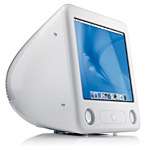 The next day, I brought in my
old eMac (1 GHz,
1 GB RAM, 32 MB ATI, 200 GB hard drive, Mac OS X 10.4.11). As
I cleared my desk of the ugly 3-month-old Dell, I was dreaming of much
more the 5-year-old eMac could do.
The next day, I brought in my
old eMac (1 GHz,
1 GB RAM, 32 MB ATI, 200 GB hard drive, Mac OS X 10.4.11). As
I cleared my desk of the ugly 3-month-old Dell, I was dreaming of much
more the 5-year-old eMac could do.
As much as I hate CRT displays nowadays, I couldn't help but admire the quality of the eMac's old flat 17" CRT. Although limited in power, the Mac met all my spreadsheet, word processing, remote desktop, and Internet requirements much faster than the Dell could. Although processor intensive apps, such as YouTube, run somewhat slow on a G4 as compared to a Core 2 Duo, I'm really satisfied with this new setup. I didn't have to bring my MacBook Pro in with me every morning (I hate bringing it to work, since it's my personal machine and has my life on it), and as for those admin tools that didn't work under Vista, well short of use a web terminal (firewall, switches, etc.), I loaded the rest on the old IBM Thinkcentre and put it in a corner on the other side of the IT room.
The Dell now serves as a reminder why this company will not under any circumstances switch to Vista. XP will be the only Windows OS here until Windows 7 emerges and proves its worth. But no matter what, the eMac stands the test of time, slaying the mighty Dell Goliath - and I'm sure it'll be at my desk until I convince my boss to order me a 24" iMac.
A man can dream, can't he? 
Join us on Facebook, follow us on Twitter or Google+, or subscribe to our RSS news feed
Today's Links
- Mac of the Day: PowerBook 1400, introduced 1996.10.01. Considered by many the best pre-G3 PowerBook with a small footprint and great keyboard.
- Support Low End Mac
Recent Content
About LEM Support Usage Privacy Contact
Follow Low End Mac on Twitter
Join Low End Mac on Facebook
Favorite Sites
MacSurfer
Cult of Mac
Shrine of Apple
MacInTouch
MyAppleMenu
InfoMac
The Mac Observer
Accelerate Your Mac
RetroMacCast
The Vintage Mac Museum
Deal Brothers
DealMac
Mac2Sell
Mac Driver Museum
JAG's House
System 6 Heaven
System 7 Today
the pickle's Low-End Mac FAQ
Affiliates
Amazon.com
The iTunes Store
PC Connection Express
Macgo Blu-ray Player
Parallels Desktop for Mac
eBay

