
The Webb Chronicles
Is That Old Power Mac G3 Still Useful in the Workplace?
- 2006.01.10
The Blue and White PowerMac G3 is now seen as a relic of the early iMac age, when semi-translucent plastics in various colors where hip and putting the letter i in front of product name implied it was technologically advanced
After seven years, can this engineering marvel still be useful as an everyday machine?
The short answer is yes.
Before I elaborate on my conclusion, let me describe how the company I work for is organized. We have roughly 100 computers: all but three are running some version of Windows (98% NT Based), and the remaining three are Unix based (Macs included).
All of these access one file server, one Microsoft Exchange (email) server, and one SQL database server. The entire network is laced together by a series of three HP 10/100/1000 (gigabit) ethernet switches, a Cisco firewall, and two Linksys wireless routers (soon to be replaced, since they do a sub-par job).
The primary purpose of all these machines varies widely. Some function as office machines, some run CAD software, and others are controllers for larger manufacturing machines.
The Problem
Our problem was simple: What was the easiest way to manage all of these computers from one central location without the threat of viruses and spyware commonly associated with Windows PCs?
The simple answer was to use my PowerBook. However, since it's my main computer, I needed a constant presence and a way to have access to my systems even if called to a remote office in another building.
Enter my trusty old Blue and White 300 MHz G3.
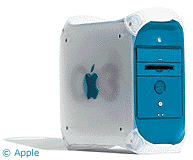 At the time of its
launch, the G3 Power Mac was one of the fastest machines on the planet,
a feature that was matched only by its beautiful and practical case
design. A successor to the beige G3 Power Macs, the Blue and White did
away with onboard SCSI, Apple's RS-422 serial ports, and the floppy
drive. It was the first computer to include FireWire, along with two
USB ports and a legacy ADB keyboard/mouse connector.
At the time of its
launch, the G3 Power Mac was one of the fastest machines on the planet,
a feature that was matched only by its beautiful and practical case
design. A successor to the beige G3 Power Macs, the Blue and White did
away with onboard SCSI, Apple's RS-422 serial ports, and the floppy
drive. It was the first computer to include FireWire, along with two
USB ports and a legacy ADB keyboard/mouse connector.
I was about to sell this machine or donate it to a school, since its original purpose as a video editing machine had ended when I purchased the G4 PowerBook, but I kept having second thoughts about parting with this gorgeous machine.
I had even been asked by an acquaintance if I could turn the it into a Windows PC, an offer I was disgusted by and refused, since doing so would be almost blasphemous.
The Solution
Then I decided that my office would be the best place for this classic Power Mac, and it would serve as a companion to my PowerBook.
Over the years I had made several modifications to the system's hardware: Its 300 MHz PPC 750 CPU was overclocked to 400 MHz with no problems, memory was boosted to 768 MB, and it's gone through many hard drives in the past few years. Its final configuration is a 20 GB 7200 rpm Western Digital Caviar, more than enough given its task.
System software was my next concern. This machine had been quite unstable under OS X 10.3.x, for reasons unknown, but it functions flawlessly in OS X 10.4.3, so the choice was obvious.
Next I needed remote access software that would function in conjunction with the Cisco VPN (virtual private network) we had at work, and that would allow me to control Windows PCs, and vise versa.
The only option I found was Timbuktu Pro by Netopia. This software is nothing short of spectacular, allowing me access any computer on the local and virtual network with ease, even with my Dell tower back at home.
Next I needed a good FTP program, and I was divided between Captain FTP and Rumpus FTP by Maxum. I liked Captains' interface and overall features, but I had problems connecting with Windows XP in some cases, so I had to go with the latter.
I also wanted the B&W to download email from all our major accounts on our Exchange Server and be able to delete any virus infected messages that the server didn't screen. For this I needed Microsoft Entourage 2004.
Until now, I had used Apple Mail included with OS X Tiger, but I've switched to Microsoft Entourage with overall satisfaction. I've noticed a dramatic increase of spam filtering in Entourage compared to Mail, although its calendar appears to be incompatible with Microsoft Outlook 2003's calendar at the moment.
Conclusion
It's been about a week that I've had this configuration running, and it hasn't let me down yet. The Blue and White can't compete with a $3,000 Power Mac G5, but it performs its job with little or no slow down, if you bear in mind its hardware limitations.
The next step is going to be adding a CD-RW drive (preferably internal) and possibly upgrade its CPU to a G4.
I haven't been able to find good network monitoring software, although I confess that I haven't been looking too hard at this point.
Overall, it's an adequate machine for the office and a good
supplement for my PowerBook G4. The Blue and White G3 is a great buy
for any Macintosh aficionado. 
Join us on Facebook, follow us on Twitter or Google+, or subscribe to our RSS news feed
Today's Links
- Mac of the Day: PowerBook 1400, introduced 1996.10.01. Considered by many the best pre-G3 PowerBook with a small footprint and great keyboard.
- Support Low End Mac
Recent Content
About LEM Support Usage Privacy Contact
Follow Low End Mac on Twitter
Join Low End Mac on Facebook
Favorite Sites
MacSurfer
Cult of Mac
Shrine of Apple
MacInTouch
MyAppleMenu
InfoMac
The Mac Observer
Accelerate Your Mac
RetroMacCast
The Vintage Mac Museum
Deal Brothers
DealMac
Mac2Sell
Mac Driver Museum
JAG's House
System 6 Heaven
System 7 Today
the pickle's Low-End Mac FAQ
Affiliates
Amazon.com
The iTunes Store
PC Connection Express
Macgo Blu-ray Player
Parallels Desktop for Mac
eBay

