
The 'Book Beat
10 Things New Classic Mac Owners Should Know
- 2005.12.06
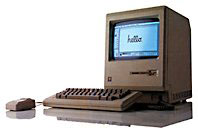
With a nod to 10 Things Every New Mac Owner Should Know over at 123macmini.com, here's a Low End Mac version of what Classic Mac owners should know.
1. 256 Won't Cut It
256 KB of memory may seem a lot to Mac 128k users, but if you're planning on getting some serious work done you'll need at least half a meg.
2. No Need to Defrag
 When a
Windows PC starts running slowly, the first thing you'll hear is, "Have
you defragmented the hard drive?" Problems like this are rare if you
don't have a hard drive.
When a
Windows PC starts running slowly, the first thing you'll hear is, "Have
you defragmented the hard drive?" Problems like this are rare if you
don't have a hard drive.
3. Closing Unresponsive Applications
One switch solves all problems. It's called the reset button, and it makes you appreciate the "save often" mantra which you may have heard colleagues chanting. That said, you're less likely yo have unresponsive applications - there's only so much that could go wrong on System 6 with Word Perfect 3.
4. Where Did That Window Go?
It's right there. Just keep clicking on the floating menu bar, and it will reappear, courtesy of Windowshade. Either that or you closed it by accident, in which case you really should go and clean your mouse's ball.
5. Updates
Updating your operating system is very simple on Classic Macs. You choose the one you want and install it. Nor surprise updates. It's been years since Apple released any security fixes for any version of the Mac OS other than OS X.
And they say OS X is the future....
6. System Profiler
Want to know more about your Mac? Click on the Apple in the top left of the screen and click on the first link.
Want to know more? You can find a Torx T-15 screwdriver at your hardware store.
7. Exposé
Once you've got that Torx driver, you can make your Mac very "Exposé-d" indeed.
8. Login Items
Just add any programs you want to the Launcher, and they'll be easily accessible at start up. System extensions can easily be installed by dragging them to the Extensions folder - just don't get too carried away or there'll be trouble in store.
9. Eject Optical Media
If you've got a true classic Mac, what you may find problematic is getting optical media in there in the first place. CDs don't tend to fold up neatly to fit in that floppy disk slot - write to the CD manufacturer to complain.
10 Keyboard Shortcuts
Somewhat amazingly, they're just about the same as with any modern
Mac. And if you've come over to the Classic Mac from the Windows world,
just replace "Control" in a shortcut with the command (Apple) key.
Simple. 
About LEM Support Usage Privacy Contact
Follow Low End Mac on Twitter
Join Low End Mac on Facebook
Favorite Sites
MacSurfer
Cult of Mac
Shrine of Apple
MacInTouch
MyAppleMenu
InfoMac
The Mac Observer
Accelerate Your Mac
RetroMacCast
The Vintage Mac Museum
Deal Brothers
DealMac
Mac2Sell
Mac Driver Museum
JAG's House
System 6 Heaven
System 7 Today
the pickle's Low-End Mac FAQ
Affiliates
Amazon.com
The iTunes Store
PC Connection Express
Macgo Blu-ray Player
Parallels Desktop for Mac
eBay

