
The 'Book Review
SSD RAID in MacBook Pro, MacBooks Sweep Consumer Reports, New SSD Drives from Imation, and More
This Week's MacBook, PowerBook, and iBook News
Compiled by Charles Moore and edited by Dan Knight - 2009.05.11
All prices are in US dollars unless otherwise noted.
General Apple and Mac desktops is covered in The Mac News Review. iPod, iPhone, and Apple TV news is covered in The iNews Review.
News & Opinion
- 'Wicked Fast' SSD RAID Boot Drive in MacBook Pro
- MacBooks Sweep Consumer Reports Laptop Ratings
- How to Build the OS X Dell Mini 9 Hackbook
- Apple Prepping 3G Laptops?
- New Technology Could Instantly Wake Shut-down Laptops
- MagSafe Unsafe? Apple Sued
- Cellist Finds Classical Music and MacBook Synergy Hits a Sweet Note
- Pro Apps and MacBooks to See Update at WWDC?
- How to Turn Off Trackpad Zooming for Safari/Firefox on Unibody MacBooks
Tech Trends
- Netbook vs. Notebook Performance: You Get What You Pay For
- Netbook Shipments Rise 7x During Q1
- China's Netbook Market Gears Up
- Interest in Netbooks Seen Trailing Off in 2010
- Netbooks and Emerging Form Factors: PC Saviors?
Products
- Imation Ships New M-Class and S-Class SSD Drives and Upgrade Kit
- KB Covers Application-Dedicated Keyboard Covers for Apple Notebooks
- Computer Intelligence Redesigns Intelligels Wrist Rests
- OWC Announces 8x Internal SuperDrives for MacBook & 15" MacBook Pro
- TechRestore Launches Antiglare, Matte Finish Screen for Polycarbonate MacBooks
- Sumdex Introduces Aircube Notebook Sleeve
- HyperMac External Battery Pack for MacBooks
- Logitech Notebook Cooling Pad $30 from Amazon.com
- Western Digital Scorpio Blue SATA Notebook Drives from $49
- MagSafe Power Adapters, $79
Software
Bargain 'Books
News & Opinion
'Wicked Fast' SSD RAID Boot Drive in MacBook Pro
Bare Feats' rob-ART Morgan says he's always been jealous of the AlienWare Area 51 extreme laptops, with, among other power-user delights, their dual drive RAID 0 boot option, but notes that happily for MacBook Pro users MaxUpgrades has come up with a kit that enables you to pretty much the same thing in a MacBook Pro without the AlienWare unit's hulking thickness and weight with a solution called the MaxConnect Optical Bay kit.
Rob tried this out with a mini-RAID setup of dual, super-fast Intel X25-E SSDs, comparing their speed to that of the single 7200 rpm 320G factory boot drive, and for added perspective including included results for a single and double Seagate Momentus 7200.4 (500G) boot set that totals one terabyte when striped (you have to be willing to give up the MacBook Pro's internal optical drive in order to accommodate the second hard drive or SSD).
Rob concludes that the Dual X25-E SSDs using the MaxConnect Optical Bay kit really rock as an extreme boot volume for the MacBook Pro in both small random transfers and large sustained transfers, but they're ultra-expensive and limited in capacity, and that while not as swift as the SSDs, the Momentus 7200.4 hard drive RAID is a speedy and more practically attractive alternative.
Link: Dual SSD RAID 0 Boot Drive in MacBook Pro 'Unibody'
MacBooks Sweep Consumer Reports Laptop Ratings
Macworld's Dan Moren reports that the June issue of Consumer Reports gives Apple's MacBook family of notebooks top ranking in the 13", 14-inch to 16-inch, and 17-inch categories, for pretty much a clean sweep, even though many of their competitors cost less, and the 17" MacBook Pro got the highest rating of any notebook reviewed by Consumer Reports, scoring 80 points out of 100 point and rated "Excellent" or "Very Good" in all tested categories.
Link: MacBooks Sweep Consumer Reports Laptop Ratings
How to Build the OS X Dell Mini 9 Hackbook
Testfreaks Blog's Tomas Ratas has posted an illustrated tutorial on how to install Mac OS X Leopard onto a Dell Mac Mini 9 netbook to create a "MacBook mini" or "MacBook nano." Ratas notes that most guides to this process involve the creation of a USB installation drive or the use of an external DVD drive, but he endeavors to explain how to avoid those ponderous steps, suggesting that:
"Building the fastest and most responsive Dell Mini 9 Mac for a price less than the stock Dell Mini 9 with the same specs and lower grade components from Dell is really quite simple and should take less than an hour. The one caveat is you will need to have access to a genuine Intel Mac machine."
Editor's note: The Dell Inspiron Mini 9 is essentially the same as the Vostro A90, which is currently available for $249. dk
Link: How to Build the OS X Dell Mini 9 Hackbook - The Easy Way
Apple Prepping 3G Laptops?
The Register's Rik Myslewski says:
"Apple may be planning to add 3G wireless broadband capabilities to all or part of its laptop line - including possibly the oft-rumored tablet Mac.
"The evidence supporting this rumor is tenuous at best - although intriguing."
Link: Apple Prepping 3G Laptops?
New Technology Could Instantly Wake Shut-down Laptops
Macworld UK's Agam Shah reports that scientists from Pennsylvania State University, Cornell University, and Northwestern University have developed a technology that could allow laptops to wake up instantly from a shut-down state without draining battery life the way sleep states do.
"'It would be instant-on, meaning as soon as the power comes back on, your computer would be in exactly the same state it was when you turned it off and ready for action,' said Darrell Schlom, principal investigator and professor at the department of materials science and engineering at Pennsylvania State University."
Link: New Technology Could Instantly Wake Shut-down Laptops
MagSafe Unsafe? Apple Sued
The Register's Rik Myslewski reports that three plaintiffs have filed a class action suit against Apple, charging that Apple's MagSafe Adapters - both the 85 watt (for the MacBook Pro) and 60 watt (for the MacBook) - have been negligently designed and manufactured with a cable that, according to the suit, "dangerously frays, sparks, and prematurely fails to work" - "flawed and dangerous Adapters which prematurely fail and present fire hazards," also contending that the way that the cable is designed to wrap around the adapter and clamp onto itself for neatness and security "causes undue stress, wear, and degradation."
Link: Apple Power Brick Sparks Lawsuit - MagSafe Isn't?
Cellist Finds Classical Music and MacBook Synergy Hits a Sweet Note
Macworld's David Dahlquist says he likes to call himself both a musician and a geek, but sometimes encounters people that make him feel like a downright poseur.
A case in point is Zoe Keating, an accomplished classical cellist who has used AppleScript skills on her her MacBook Pro along with popular music software Ableton Live and SuperLooper in aid of creating "hypnotic, layered, musical compositions that sound like a cross between Steve Reich and Kronos Quartet"
Link: Cellist Finds Classical Music and MacBook Synergy Hits a Sweet Note
Pro Apps and MacBooks to See Update at WWDC?
9 to 5 Mac's Cleve Nettles says:
"We just got a call in from our favorite Apple source who says that Apple is going to have a minor update at WWDC for MacBooks and MacBook Pros...."
Link: Pro Apps and MacBooks to See Update at WWDC?
How to Turn Off Trackpad Zooming for Safari/Firefox on Unibody MacBooks
Macsimum News' Dave Merten says:
"Some people are having problems zooming webpages in and out as they scroll with the new trackpad on unibody Apple laptops. Unfortunately, Apple had no way to turn this function off in any preferences, but I came across a solution for the problem...."
Link: How to Turn Off Safari/Firefox 'Trackpad Zooming' on Unibody Apple Laptops
Tech Trends
Netbook vs. Notebook Performance: You Get What You Pay For
PCMag's Cisco Cheng thinks it's safe to say that netbooks are here to stay, and they could even come to dominate the laptop landscape in a couple of years, but set against the obvious netbook virtues of low purchase price and convenient portability are limitations like small screens and undersized keyboards (still a lot better on both counts than a smartphone, though), and their lack of a built-in optical drive, perhaps their biggest shortcoming of all compared with standard sized laptops is performance.
 Cheng asks rhetorically how netbooks fare at more
rigorous tasks such as resizing photos, transcoding videos, or ripping
an audio CD stacked up against mainstream laptops, and proceeds to
check it out, using an Acer Aspire One (10-inch) and a Dell Inspiron
Mini 12, priced at $350 and $500 respectively, as test mules to
determine exactly how netbooks stack up to more standard laptops, in
this case a $700 Gateway TC7804u and HP Pavilion dv3z HP Pavilion dv3z
($980), and a $1,200 Lenovo IdeaPad Y650 ($1,299), Dell Studio 15
($1,229), and ASUS F6Ve-B ($1,249), finding that laptops three to four
times as expensive as netbooks yield a performance advantage roughly
commensurate to their price disadvantage, but that the netbooks
acquitted themselves surprisingly well, and are capable of being used
as primary laptops, provided that you can live with to their
limitations.
Cheng asks rhetorically how netbooks fare at more
rigorous tasks such as resizing photos, transcoding videos, or ripping
an audio CD stacked up against mainstream laptops, and proceeds to
check it out, using an Acer Aspire One (10-inch) and a Dell Inspiron
Mini 12, priced at $350 and $500 respectively, as test mules to
determine exactly how netbooks stack up to more standard laptops, in
this case a $700 Gateway TC7804u and HP Pavilion dv3z HP Pavilion dv3z
($980), and a $1,200 Lenovo IdeaPad Y650 ($1,299), Dell Studio 15
($1,229), and ASUS F6Ve-B ($1,249), finding that laptops three to four
times as expensive as netbooks yield a performance advantage roughly
commensurate to their price disadvantage, but that the netbooks
acquitted themselves surprisingly well, and are capable of being used
as primary laptops, provided that you can live with to their
limitations.
Link: Comparing Netbook and Laptop Performance
Netbook Shipments Rise 7x During Q1
IDG News Service's Agam Shah reports that while Apple may dismiss netbooks as junky with cramped keyboards, shipments of these inexpensive laptops show no sign of slowing, with IDC reporting worldwide netbook shipments increasing sevenfold to roughly 4.5 million during Q1 2009 year over year and accounting for approximately 8% of all PC shipments during the first quarter.
Link: Netbook Shipments Rise 7x During Q1
China's Netbook Market Gears Up
iSuppli's Kevin Wang reports:
"iSuppli Corp. expects that China's domestic netbook market will expand to 2.6 million units in 2009, up by a factor of five from 2008. Although the annual growth rate is impressive, the market size is still quite small compared to China's 16.5 million unit notebook market. However, the global netbook market is gaining momentum and is expected to top 26 million units in 2009."
Link: China's Netbook Market Gears Up
Interest in Netbooks Seen Trailing Off in 2010
Electronista says:
"Despite currently strong interest, the netbook industry is likely to cool off sharply in as little as a year, an iSuppli estimate said today...."
Link: Interest in Netbooks Seen Trailing Off in 2010
Netbooks and Emerging Form Factors: PC Saviors?
Matthew Wilkins, Principal Analyst and Peter Lin, Senior Analyst, say:
"The Netbook market is the leading growth segment within the PC market today. iSuppli expects the Netbook segment to report 2009 unit growth in excess of 3X the size of any other segment in the Notebook market.
"Aside from examining the position the Netbook will achieve in the Notebook PC market over the next five years, this report examines the technical aspects of the platform, competing offerings from semiconductor suppliers, as well as a detailed analysis of how the Netbook and Mobile Broadband represent opportunities for new market entrants along with new sales channels."
Link: Netbook and Emerging Form Factors: PC Saviors?
Products
Imation Ships New M-Class and S-Class SSD Drives and Upgrade Kit
PR: Imation Corp. has announced it is shipping its M-Class and S-Class Solid State Drives (SSDs) in the Americas, boasting lightning-fast performance in an energy efficient, affordable solution. Also available are Imation's M-Class and S-Class SSDs with Upgrade Kits, offering progressive users a complete, easy way to upgrade an existing hard drive computer system to one that is SSD-based without buying a new computer. The Upgrade Kit provides PC users an affordable solution from a trusted brand for improving performance and extending the life of their PCs, a much-needed boost in today's economic environment.
 Imation's second-generation SSD products combine powerful
technology with an elegant design that helps users upgrade from
traditional computing performance. Both the Imation M-Class and S-Class
SSD products deliver fast boot times, enable applications to load in a
fraction of the traditional time, and harness the power to run graphics
and design programs the way they were intended. Along with the unique
Imation Upgrade Kit, users can take advantage of the latest SSD
technology without replacing system hardware and while preserving their
current applications and data.
Imation's second-generation SSD products combine powerful
technology with an elegant design that helps users upgrade from
traditional computing performance. Both the Imation M-Class and S-Class
SSD products deliver fast boot times, enable applications to load in a
fraction of the traditional time, and harness the power to run graphics
and design programs the way they were intended. Along with the unique
Imation Upgrade Kit, users can take advantage of the latest SSD
technology without replacing system hardware and while preserving their
current applications and data.
"We recognize that users have many choices when it comes to SSDs. Those who demand speed and performance in a high-quality, rugged solution can trust Imation SSD drives to enable the computer to keep pace with the latest applications and enhance the user experience," said Subodh Kulkarni, vice president, Global Commercial Business, Imation. "However, we are also very aware that today's users want to extend the life of their computers, both for environmental and economic reasons. A computer that uses SSD consumes less power and gives off less heat, making it more environmentally-friendly. Therefore, Imation makes it easy to retrofit a traditional hard drive system with an SSD drive for a fraction of the cost, extending the life of the system, but still enabling the user to consistently get better performance from their computer."
Designed for the power user who demands faster performance; the custom developer designing systems for kiosks, mobile applications or harsh environments; and the IT manager looking to leverage their current systems but increase power; the advantages of Imation's high-quality SSD technology over traditional hard drives are clear. Featuring balanced superior performance without motors or moving parts, Imation SSDs deliver faster and more reliable storage and retrieval than traditional hard drives with reduced heat and noise generation. The energy-efficient controller technology runs on about half the power needed to run an hard drive, and less heat requires less energy to keep it cool.
 For
hard drive users who want a simple way to push the performance edge,
Imation's SSD with Upgrade Kit enables an easy retrofit of an existing
system to a high-performance machine at a fraction of the cost of
replacing the entire system. The kit includes everything needed to make
the transition to the latest SSD technology a snap. Laptop kits include
the 2.5" SSD drive, Acronis True Image HD™ imaging software for
fast data transfer and backup and easy-to-follow instructions, along
with a USB-to-SATA or SATA-to-SATA connector cable, power cable or
power adapter. Desktop kits include the 3.5" SSD drive, the Acronis
True Image HD™ imaging software power, and easy-to-follow
instructions, along with a SATA connector and power cable or
adapter.
For
hard drive users who want a simple way to push the performance edge,
Imation's SSD with Upgrade Kit enables an easy retrofit of an existing
system to a high-performance machine at a fraction of the cost of
replacing the entire system. The kit includes everything needed to make
the transition to the latest SSD technology a snap. Laptop kits include
the 2.5" SSD drive, Acronis True Image HD™ imaging software for
fast data transfer and backup and easy-to-follow instructions, along
with a USB-to-SATA or SATA-to-SATA connector cable, power cable or
power adapter. Desktop kits include the 3.5" SSD drive, the Acronis
True Image HD™ imaging software power, and easy-to-follow
instructions, along with a SATA connector and power cable or
adapter.
Imation's M-Class and S-Class SSD drives are now available in 2.5" and 3.5" configurations through authorized Imation distributors, wholesalers, resellers, and e-tailers in the Americas. Imation SSD drives are available in 32 GB, 64 GB and 128 GB capacities for a starting MSRP of US $189.99 for M-Class and US $659.99 for S-Class. Imation SSD Upgrade Kits including a 64 GB or 128 GB SSD drive are available for a starting MSRP of US $299.99 for M-Class and US $1,299.99 for S-Class.
Editor's note: The difference between M-Class and S-Class is that M-Class drives have a higher sequential read speed, a lower sequential write speed, and a shorter warranty (2 years vs. 5 years). Overall, the S-Class can handle a lot more I/O per second. Imation M-Class drives are available from Amazon.com with free ground shipping: 32 GB, $154.46; 64 GB, $222.49; 128 GB, $358.78. dk
Link: Imation SSD
KB Covers Application-Dedicated Keyboard Covers for Apple Notebooks
PR: KB Covers are designed to fit all Apple/Mac keyboard layouts around the world, including US keyboard, European ISO keyboard, and Japanese JIS keyboard layouts. Since each cover is designed to fit the Mac keyboard you own, they will not slip or move around when typing
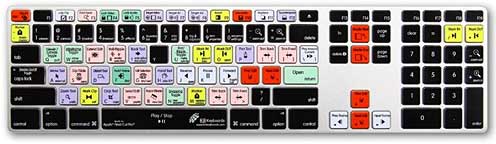
KB Covers is dedicated to providing the finest quality keyboard covers for Apple/Mac desktop and laptop computers. All covers are ultra-thin and made with the highest quality silicone available. These keyboard covers are made with stringent Quality Assurance methods, which help to ensure a tight fit, long-lasting durability, no paint cracking/chipping, a soft-feel, and ultimately a happy customer.
KB Covers are designed to fit all Apple/Mac keyboard layouts around the world, including US keyboard, European ISO keyboard, and Japanese JIS keyboard layouts. Since each cover is designed to fit the Mac keyboard you own, they will not slip or move around when typing.
KB Keyboard for Avid Media Composer
Work faster and more efficiently with a KB Keyboard for Avid Media Composer. Designed in conjunction with Certified Avid Trainers and Experts, KB Keyboards include over 70 of the most important and commonly used keyboard shortcuts for Avid Media Composer.
KB Keyboards are a must for experts and beginners alike, this full-size, Apple ultra-thin USB aluminum keyboard is a great way improve your knowledge and productivity with Avid Media Composer.
KB Keyboards utilize both icons and colors to make using keyboard shortcuts easier to find and use. Master Avid Media Composer by using a keyboard from KB Keyboards. Your shortcut to genius.
This keyboard can be used with both Apple Computers and PCs.
Price: $119.95
KB Keyboard for Final Cut Pro
Work faster and more efficiently with a KB Keyboard for Final Cut Pro.
Designed in conjunction with Certified Final Cut Trainers and Experts, KB Keyboards include over 90 of the most important and commonly used keyboard shortcuts for Final Cut Pro.
KB Keyboards are a must for experts and beginners alike, this full-size, Apple ultra-thin USB aluminum keyboard is a great way improve your knowledge and productivity with Final Cut Pro.
KB Keyboards utilize both icons and colors to make using keyboard shortcuts easier to find and use. Master Final Cut Pro by using a keyboard from KB Keyboards. Your shortcut to genius.
This keyboard is also compatible with Final Cut Express.
KB Keyboards
Price: $119.95
KB Keyboard for Logic Pro
Work faster and more efficiently with a KB Keyboard for Logic Pro. Designed in conjunction with Certified Logic Pro Trainers and Experts, KB Keyboards include over 130 of the most important and commonly used keyboard shortcuts for Logic Pro.
KB Keyboards are a must for experts and beginners alike, this full-size, Apple ultra-thin USB aluminum keyboard is a great way improve your knowledge and productivity with Logic Pro.
KB Keyboards utilize both icons and colors to make using keyboard shortcuts easier to find and use. Master Logic Pro by using a keyboard from KB Keyboards. Your shortcut to genius.
This keyboard is also compatible with Logic Express.Price: $119.95
KB Keyboard for Pro Tools
Work faster and more efficiently with a KB Keyboard for Pro Tools. KB Keyboards include over 80 of the most important and commonly used keyboard shortcuts for Pro Tools.
KB Keyboards are a must for experts and beginners alike, this full-size, Apple ultra-thin USB aluminum keyboard is a great way improve your knowledge and productivity with Pro Tools.
KB Keyboards utilize both icons and colors to make using keyboard shortcuts easier to find and use. Master Pro Tools by using a keyboard from KB Keyboards. Your shortcut to genius.
This keyboard can be used with both Apple Computers and PCs.
Price: $119.95
KB Keyboard with Black Keys (Midnight)
Customize the look of your Apple desktop with the KB Keyboard with Black Keys.
This full-size, Apple ultra-thin USB aluminum keyboard makes your desktop keyboard look like the new MacBook and MacBook Pro unibody notebook keyboards.
Using a special printing process to ensure a high quality and long lasting product, each key on the KB Keyboard with Black Keys is black with white lettering for the US keyboard. The result is beautiful.
This keyboard can be used with both Apple Computers and PCs.
Price: $119.95
NOTICE: All New MacBook and MacBook Pro notebooks (announced Late 2008 and Early 2009) are only compatible with MacBook and MacBook Pro (New Design) keyboard covers.
Link: KB Covers
 Computer Intelligence Redesigns Intelligels Wrist Rests
PR: Intelligels are a comfortable laptop companion for 12" to 18" wide screen laptops - all brands and models.
Intelligels work with laptops, desktops, and even netbooks.
Intelligels Features:
- One-size-fits-all for 12"-18" wide screens and any brand or model laptop.
 Soft foam
provides cool, soothing ergonomic comfort for improved typing and
proper wrist support.
Soft foam
provides cool, soothing ergonomic comfort for improved typing and
proper wrist support.- Places wrists in proper neutral position to reduce strain and may help prevent Carpal Tunnel Syndrome (CTS). No more typing on hot, hard computer cases.
- Works seamlessly with integrated touch pads and click buttons.
- Super-grip neoprene bottom stays in place on laptop cases.
- Prevents accidental brushing of touchpads and protects cases from jewelry, watches and wear.
- Also makes an excellent wrist rest for desktop computer keyboards.
- Extremely lightweight and truly portable, carry anywhere.
- Handy custom-fit carry cases available.
Link: Intelligels (currently available from Amazon.com for $15.99)
OWC Announces 8x Internal SuperDrives for MacBook & 15" MacBook Pro
PR: Other World Computing (OWC), has announced new OWC Mercury SuperDrive Internal Upgrade Kits for MacBook 13" and MacBook Pro 15" notebook computers. The new OWC Mercury SuperDrives offer faster burn speeds than factory - up to 8x DVD, 6x DVD-DL (Dual-Layer 8.5 GB), 5x DVD-RAM, and 24x CD burn speeds with support for DVD±R/RW, DVD±R DL (Dual-Layer), DVD-RAM, and CD-R/RW media. OWC Mercury SuperDrive Upgrade Kits add the fastest optical drive performance available to new and existing MacBook/MacBook Pro notebooks.
 "The new OWC Mercury SuperDrive Internal
Upgrade Kits offer faster read/write performance than our previous
upgrade kits, as well as burning several media types (including the
widely popular Dual Layer DVDs) faster than the factory installed
drive," said Larry O'Connor, President, Other World Computing. "Whether
you have an original MacBook or MacBook Pro from 2006 or a
non-"Unibody" from 2008, our Mercury SuperDrive Kits will make your
Mac's optical drive provide higher performance and more media support
too."
"The new OWC Mercury SuperDrive Internal
Upgrade Kits offer faster read/write performance than our previous
upgrade kits, as well as burning several media types (including the
widely popular Dual Layer DVDs) faster than the factory installed
drive," said Larry O'Connor, President, Other World Computing. "Whether
you have an original MacBook or MacBook Pro from 2006 or a
non-"Unibody" from 2008, our Mercury SuperDrive Kits will make your
Mac's optical drive provide higher performance and more media support
too."
New OWC Mercury SuperDrive Internal Upgrade Kits for MacBook and MacBook Pro notebooks available immediately:
OWC Mercury SuperDrive Dual-Layer Internal Drive Kit for MacBook 13" and MacBook Pro 15" (Non-"Unibody"): features up to 8x DVD±R burn, 6x DVD-R DL burn, 5x DVD-RAM, 24x CD-R burn, and 1 year OWC warranty. Priced at $147.99.
"Value Bundle" of this same SuperDrive Kit, priced at $159.99, also includes 10 pieces of 8x DVD-R media in jewel case, ProSoft Data Backup 3 software, and NTI DragonBurn CD/DVD authoring software.
 The new OWC Mercury SuperDrive Internal
Upgrade Kits have been fully tested for compatibility with Apple and
Windows built-in and third party DVD/CD tools and players, including
Apple iTunes, Apple Disc Burner, Apple iDVD, Apple DVD Studio Pro, EMC
Retrospect Express, NTI DragonBurn, Roxio Toast, Roxio Easy Media
Creator, and Nero Burning. Printed instructions and online installation
videos show how easy it is to install and use OWC Mercury
SuperDrives.
The new OWC Mercury SuperDrive Internal
Upgrade Kits have been fully tested for compatibility with Apple and
Windows built-in and third party DVD/CD tools and players, including
Apple iTunes, Apple Disc Burner, Apple iDVD, Apple DVD Studio Pro, EMC
Retrospect Express, NTI DragonBurn, Roxio Toast, Roxio Easy Media
Creator, and Nero Burning. Printed instructions and online installation
videos show how easy it is to install and use OWC Mercury
SuperDrives.
SuperDrive Upgrades for Almost Every Mac Desktop, Tower, & Notebook Introduced in the Last Decade - Priced Starting at $28.99
In addition to the new SuperDrive upgrades for MacBook 13" and MacBook Pro 15" notebooks, OWC also offers internal and external SuperDrive upgrades for nearly every Mac desktop, tower and notebook computer introduced over the last decade, including Mac Pro, PowerMac G3/G4/G5, iMac G4/G5, Mac mini, eMac, PowerBook G4 Titanium 15", PowerBook G4 12/15/17" Aluminum, and iBook G4. If you would like to upgrade from a factory-installed CD, CD-RW, and/or DVD read-only drive; replace a slower or inoperative SuperDrive; or expand drive capabilities, OWC has the best solutions with prices starting at $28.99 for Internal SuperDrives and $69.99 for External FireWire+USB 2.0 SuperDrives. OWC SuperDrive upgrades feature faster read/write DVD, Dual-Layer DVD, and CD burn speeds up to 22x for DVDs and 48x for CDs. In addition to support for DVD±R/RW, CD-R/RW, DVD-DL formats, OWC SuperDrives are also available with new features, including support for Blu-ray, LightScribe laser labeling, DVD-RAM, and more.
Rebates up to $25 for Old Optical Drives
OWC offers rebates of up to $25 to users who send in any older working Apple or Apple compatible optical drive after upgrading to a new, faster SuperDrive purchased from OWC. Complete rebate details are available at: http://www.macsales.com/rebatecenter.
Link: SuperDrive Upgrades from OWC
TechRestore Launches Antiglare, Matte Finish Screen for Polycarbonate MacBooks
PR: TechRestore, Inc. announce that they have begun offering the only Matte Finish screen replacement service for classic white and black 13" MacBook systems.
The new service offers an option for owners of the original 13" white and black MacBook systems, that for personal or professional reasons, do not wish to use the high-gloss, shiny screen that is factory installed. The Overnight Classic MacBook 13" Matte Finish Screen Replacement Service has a 24-hour turnaround time and flat-rate pricing of $169 that includes installation of a new replacement LCD screen, free return shipping and a 1-year warranty on parts and labor.
Unlike simple anti-glare covers, which can distort images and skew colors, the TechRestore upgrade involves replacing the glossy LCD with a matte-finish screen that has the exact same specifications as the original; same resolution, same color depth, same viewing angle. The customers original plastic back case and front bezel are retained and reused during the upgrade.
"The response to our Matte Finish screen replacements has been fantastic", said Shannon Jean, Founder and President of TechRestore. "Our customers continue to request non-glare, matte screens for their Mac systems and we are happy to oblige with this exclusive service."
The first Matte screen service was previewed at Macworld Expo 2009, the TechRestore Overnight MacBook Pro 15-inch Unibody Matte Finish Screen Replacement Service won the Ziff-Davis (ZD Net) Best of Show award and received high praise by numerous publications, including Macworld magazine that stated "This is, quite honestly, the machine I feel Apple should have launched as the new Unibody MacBook Pro. The engineering of the new bezel (in a nice matte black finish) is perfect; it looks just as good as the one on the stock MacBook Pro machine sitting next to it in Tech Restore's booth."
The service is available immediately, with over 2,000 convenient local drop-off locations throughout the country. Interested parties can learn more by visiting the TechRestore website at the link below or by calling 1-888-572-7372.
Link: MacBook Unibody 13" Matte Finish Screen Upgrade
Sumdex Introduces Aircube Notebook Sleeve
PR: Traveling with your notebook computer should make life easier, not more inconvenient. Sumdex announces the Aircube Notebook Sleeve that features air cell technology for protection and its Quick-Check functionality for getting through safety checkpoints as fast as possible.
 Safety has become a top priority when traveling these days and
its apparent with the number of checkpoints and inspection processes
that is now a necessity. But this has also led to longer waiting times
and inconveniences especially when bringing the electronic gadgets that
are also necessary for everyone's business and personal lives as they
need to be removed from their bags and cases. So how can travelers
overcome some of these necessary inconveniences?
Safety has become a top priority when traveling these days and
its apparent with the number of checkpoints and inspection processes
that is now a necessity. But this has also led to longer waiting times
and inconveniences especially when bringing the electronic gadgets that
are also necessary for everyone's business and personal lives as they
need to be removed from their bags and cases. So how can travelers
overcome some of these necessary inconveniences?
The Sumdex Aircube Netbook and Notebook Sleeves feature a semitransparent system of air cells that utilizes small channels to transfer air back and forth between the cells for overall protection. Wrapped in stretchable, form fitting neoprene, this sleeve is high-tech protection and looks the part. The semitransparent air cells not only looks stunning, but it is the key to the Sumdex's Quick-Check system. With the checkpoint personnel being able to see exactly what is inside the case and designing the sleeve to have nothing obstruct an x-ray scan, the computer can be left inside the case during the scanning process, speeding up the checkpoint process and keeping the computer scratch, ding, and dent free. In conjunction with the Quick-Check system and logo, the sleeve has been tested and proven to move through checkpoints quicker and safer. The Aircube Sleeve is available in Netbook and Notebook PC sizes, and also in Apple specific sizes for MacBook and MacBook Pros.
Link: Sumdex
HyperMac External Battery Pack for MacBooks
 PR: Sanho Corp., the company behind
the HyperDrive photo backup devices introduces HyperMac - external
MacBook battery packs that work with the entire Apple MacBook family of
notebook computers, including all MacBook, MacBook Pro and MacBook Air
models.
PR: Sanho Corp., the company behind
the HyperDrive photo backup devices introduces HyperMac - external
MacBook battery packs that work with the entire Apple MacBook family of
notebook computers, including all MacBook, MacBook Pro and MacBook Air
models.
Available in 4 different capacities of 60Wh, 100Wh, 150Wh and 222Wh (compared to MacBook Air 37Wh only internal battery), the external battery is capable of powering the MacBook for up to 32 hours - allowing for long haul flights, extended outdoor shoots, expeditions to remote locations or any situation where electricity is simply not an option. When on the road, there is also the HyperMac car charger which powers and recharges the MacBook directly from the automobile cigarette slot.
 Every HyperMac battery is
compatible with all MacBook, MacBook Pro and MacBook Air models
courtesy of proprietary variable power technology which enables the
battery to adjust the charging power automatically when connected to
different MacBook models. For maximum compatibility, HyperMac charging
cables are spliced with the original Apple MagSafe connectors. Not only
does HyperMac provides power for the MacBook, it charges the internal
battery as well.
Every HyperMac battery is
compatible with all MacBook, MacBook Pro and MacBook Air models
courtesy of proprietary variable power technology which enables the
battery to adjust the charging power automatically when connected to
different MacBook models. For maximum compatibility, HyperMac charging
cables are spliced with the original Apple MagSafe connectors. Not only
does HyperMac provides power for the MacBook, it charges the internal
battery as well.
Users can check the HyperMac battery level anytime with the built-in 4-stage lighted LED indicator. HyperMac battery also comes with a USB power port to charge any USB device including the latest iPhone 3G individually or simultaneously with the MacBook.
Daniel Chin, President of Sanho Corporation, states, "HyperMac allows the MacBook user to easily extend their MacBook battery life." He adds, "With the MacBook moving towards unibody designs with built-in batteries, HyperMac is the only viable option to extend the unibody MacBook's mobile computing time beyond the power grid." "Using HyperMac external batteries will also help to reduce the strain on the MacBook internal batteries and extend the overall life span of these difficult to replace batteries," he concludes.
 HyperMac batteries use the
same high-end lithium ion cells that are supplied to the US military.
It is rechargeable up to 1000 times and comes with a ONE-year warranty
- comparing to industry standards of only 300 recharges and 3 months
warranty. With a great attention to detail, HyperMac batteries' silver
color aluminum housing are color matched to the MacBook. With clean
lines, laser engraved logo and all-white accessories completing the
Applesque look.
HyperMac batteries use the
same high-end lithium ion cells that are supplied to the US military.
It is rechargeable up to 1000 times and comes with a ONE-year warranty
- comparing to industry standards of only 300 recharges and 3 months
warranty. With a great attention to detail, HyperMac batteries' silver
color aluminum housing are color matched to the MacBook. With clean
lines, laser engraved logo and all-white accessories completing the
Applesque look.
Features:
- The first and only battery pack and car charger that powers and recharges the entire Apple MacBook family of notebook computers.
- Available in 4 different battery capacities of 60Wh ($199.95), 100Wh ($299.95), 150Wh ($399.95) and 222Wh ($499.95) - compared to MacBook Air 37Wh only internal battery.
- Allows MacBook users to easily extend their mobile computing time, especially with newer unibody MacBooks featuring built-in batteries that are nonuser replaceable.
Proprietary technology adjust battery charging power automatically according to the connected MacBook model. Charging cables use original MagSafe connectors for maximum compatibility.
- MacBook matching silver color aluminum housing, laser engraved logo and all-white accessories complete the Applesque look.
The HyperMac battery and car charger are now available for pre-order at HyperMac.com and will be shipping later this month for $149.95 (car charger), $199.95 (60-watt-hour battery), $299.95 (100Wh), $399.95 (150Wh) and $499.95 (222Wh).
Specifications
- Dimensions: 4.92 x 3.78 x 0.83" (60Wh); 7.48 x 4.92 x 0.8" (100Wh); 8.9 x 4.92 x 0.83" (150Wh); 10.1 x 5.91 x 1.34" (222Wh)
- Weight: 0.8 lb. (60Wh); 1.6 lb. (100Wh); 2.4 lb. (150Wh); 4.7 lb. (222Wh)
- Battery: Lithium ion
- 4 stage LED battery level indicator lights
- USB 5V/1A power out
Link: HyperMac
Logitech Notebook Cooling Pad $30 from Amazon.com
 PR: Improve airflow around your notebook. Some things
are better with a little heat - like salsa or a day at the beach.
However, your trusted and beloved notebook computer is definitely not
one of them. Whether set up on your desk - with or without an external
keyboard and mouse - or on your lap, the USB-powered Logitech Cooling
Pad N100 distributes air quietly and evenly under the case of your
notebook, helping to protect you from the heat.
PR: Improve airflow around your notebook. Some things
are better with a little heat - like salsa or a day at the beach.
However, your trusted and beloved notebook computer is definitely not
one of them. Whether set up on your desk - with or without an external
keyboard and mouse - or on your lap, the USB-powered Logitech Cooling
Pad N100 distributes air quietly and evenly under the case of your
notebook, helping to protect you from the heat.
The cooling pad looks good in any room of your home, as the colors and shape were inspired by nature.
Its versatile design with rear air intake allows for steady, unobstructed airflow. The enclosed, durable construction protects the internal fan from dust and damage. Plus, it's designed for efficiency, with minimal impact on your notebook's battery power.
Features
- Cooling pad distributes air quietly and evenly under your laptop
- The slotted surface, with virtually silent airflow, allows the USB-powered fan to distribute air quietly and evenly under your notebook.
- Pad can be used on your desk or on your lap
- Versatile design, with colors and shape of pad inspired by nature
- Built for low-power consumption with minimal impact on your notebook battery
- The rear air intake allows for steady, unobstructed airflow - whether on your lap or on a desk.
 Product Dimensions: 15 x 1.9 x 11.2 inches ; 2.1 pounds
- Shipping Weight: 3 pounds (View shipping rates and policies)
- Shipping: Currently, item can be shipped only within the US
- Three-year limited hardware warranty
System Requirements: Can be used with Mac or PC notebooks with up to a 15.4" display
Price: $29.99 from Amazon.com with free with Super Saver Shipping.
Western Digital Scorpio Blue SATA Notebook Drives from $49
PR: Up to 500 GB capacity, this 2.5", 8 MB Cache, 5400 RPM SATA II, the WD Scorpio Blue drive offers high-performance, low power consumption, and cool operation, perfect for notebooks and other portable devices.
Features
- Massive capacity - WD's 2.5" drives offer the most available capacity for space-hungry operating systems like Windows VistaTM, plus plenty of room for photos, music, and video.
- Fast and efficient - With 5400 RPM spin speed, 12 ms access time, even the most demanding customer will appreciate the performance achieved by WD Scorpio drives.
- Quiet - WD's exclusive WhisperDrive combines state-of-the-art seeking algorithms to yield one of the quietest 2.5" hard drives on the market.
- Product Dimensions: 3.9 x 2.8 x 0.4 inches ; 4.2 ounces
- Shipping: Currently, item can be shipped only within the US
Prices from Amazon.com:
- 160 GB: $48.99 (Parallel ATA version, $77.85)
- 250 GB: $54.97 (Parallel ATA version, $88.05)
- 320 GB: $61.97
- 400 GB: $74.99
- 500 GB: $94.98
MagSafe Power Adapters, $79
PR: Use an extra adapter for home or work. Apple's new, innovative AC adapter is made specifically for your MacBook.
 The
60 Watt MagSafe Power Adapter features a magnetic DC connector that
ensures your power cable will disconnect if it experiences undue strain
and helps prevent fraying or weakening of the cables over time. In
addition, the magnetic DC helps guide the plug into the system for a
quick and secure connection.
The
60 Watt MagSafe Power Adapter features a magnetic DC connector that
ensures your power cable will disconnect if it experiences undue strain
and helps prevent fraying or weakening of the cables over time. In
addition, the magnetic DC helps guide the plug into the system for a
quick and secure connection.
When the connection is secure, an LED located at the head of the DC connector will light; an amber light lets you know that your portable is charging, while a green light tells you that you have a full charge. An AC cord is provided with the adapter for maximum cord length, while the AC wall adapter (also provided) gives users an even easier and more compact way to travel.
Designed to be the perfect traveling companion, the adapter has a clever design which allows the DC cable to be wound neatly around itself for easy cable storage.
This power adapter recharges the lithium polymer battery while the system is off, on, or in sleep mode. It also powers the system if you choose to operate without a battery. Available from the online Apple Store:
- 60W MagSafe Power Adapter for MacBook, $79
- 45W MagSafe Power Adapter for MacBook Air, $79
- 85W MagSafe Power Adapter for MacBook Pro, $79
Software
GMABooster Enhances Intel GMA Graphics Performance on Macs
PR: GMABooster facilitates overclocking Intel GMA (Graphics Media Accelerator) integrated graphics chips in your Mac mini, MacBook, or iMac, for faster graphics and video performance
The developer says:
"Let's consider an Intel Graphics Media Accelerator 950 (GMA 950). This integrated solution, while not fully supporting the latest and the most demanding games, still allows a user to enjoy the mass of brilliant gaming hits of all genres. GMA 950 does also fully support Aero and QuartzGL (enhanced GPU-driven user interfaces of Windows Vista and Mac OS X). It features a basic video playback acceleration, as well. However, if You have own a laptop/netbook/nettop computer built on Intel 945GM/GME/GMS or GSE943/940GML/GU Express chipset, the above statements may not be truth for You. These all chipsets are LV (low voltage) versions of what we normally call Intel 945. Thus, integrated graphics core has been underclocked dramatically: 166/133 MHz instead of 400 MHz (default GMA clock in a "normal" Intel 945 chipset).
"But the truth is, the indicated devices could handle up to 400 MHz with ease: at a nominal low voltage, without the loss of system stability, and with minimal to none impact on thermal specifications/battery life (proven by preliminary testing). Here the GMABooster comes! It allows a user, not a manufacturer to choose the desired GMA speed. It combines a sophisticated assembler-level technology and the user-friendly graphic user interface, offering You to near double the GMA core perfomance without even a need to restart a computer. GMABooster may be considered as a safe, free, "software-level" GPU core upgrade."
Supported operating systems: Mac OS X 10.5 (Leopard) or higher.
Prerequisite: free Apple CHUD Tools 4.6 (needed to enable raw hardware access).
Program usage: Unzip, then double-click a GMABoosterX_CLI icon and follow the simple on screen instructions.
Important! Please make sure you logged in as root (or just run the program with administrative privileges).
Supported chipsets: Intel 945GM/GME/GMS/GSE and 943/940GML/GU Express featuring GMA 950.
Supported Apple devices: Mac Mini, MacBook family (models built on a compatible chipset).
Supported PC devices: Any device built on a compatible chipset with Mac OS X 10.5 (Leopard) or higher installed.
Link: GMABooster
Bargain 'Books
Bargain 'Books are used unless otherwise indicated. New and refurbished units have a one-year Apple warranty and are eligible for AppleCare.
PowerBook, iBook, and MacBook profiles linked in our Portable Mac Index.
Apple Store
- refurb 1.6 GHz MacBook Air, 2 GB/80, $999
- refurb 1.6 GHz MacBook Air, Nvidia, 2 GB/120, $1,549
- refurb 1.8 GHz MacBook Air, 2 GB/80, $1,099
- refurb 2.0 GHz Nvidia MacBook White, 1 GB/160/SD, $849
- refurb 2.1 GHz MacBook White, 1 GB/120/Combo, $849
- refurb 2.0 GHz Unibody MacBook, 2 GB/128 SSD/SD, $1,699
- refurb 15" 2.4 GHz Core 2 MacBook Pro, 2 GB/250/SD, $1,699
- refurb 15" 2.53 GHz Unibody MacBook Pro, 4 GB/320/SD, $1,999
- refurb 15" 2.8 GHz Core 2 MacBook Pro, 4GB/320/SD, $2,299
- refurb 17" hi-res 2.5 GHz Core 2 MacBook Pro, 2 GB/200/SD, $1,899
- refurb 17" 2.6 GHz Core 2 MacBook Pro, 2 GB/200 GB @ 7200 rpm/SD, $1,899
GainSaver
Macintosh Stimulus Sale on Certified Pre-owned Macintosh Computers Extended
GainSaver is extending the duration of its Macintosh Stimulus Sale, as well as lowering promotional prices even further.
GainSaver, an online reseller of used Macintosh computers has announced it is extending its Stimulus Sale on Certified Pre-owned Macintosh computers. Hundreds more used Macs are arriving daily, and GainSaver is facing a logistical problem of where to put them all. The company has too many units in stock right now of every Macintosh model: iMac, iBook, Macbook, Macbook Pro and Mac Pro systems.
"Top priority is selling units on hand at whatever price we have to, "said Steve Harper, director of sales at GainSaver. "I think we now have the most used Macs for sale anywhere under one roof. We need to clear some out just to make some room. It is a buyer's market."
GainSaver announced the company's lowest prices ever on every used Mac in stock.
- $494 - MacBook 13.3" 1.83 GHz Intel Core Duo White (MA254LL/A)
- $557 - MacBook 13.3" 2.0 GHz Intel Core 2 Duo Black (MA701LL/A)
- $548 - MacBook 13.3" 2.0 GHz Intel Core 2 Duo White (MA700LL/A)
- $530 - MacBook 13.3" 2.0 GHz Intel Core Duo White (MA255LL/A)
- $575 - MacBook 13.3" 2.16 GHz Intel Core 2 Duo Black (MB063LL/A)
- $593 - MacBook 13.3" 2.16 GHz Intel Core 2 Duo White (MB062LL/A)
- $683 - MacBook Pro 15.4" 1.83 GHz Intel Core Duo (MA463LL/A)
- $710 - MacBook Pro 15.4" 2.0 GHz Intel Core Duo (MA600LL/A)
- $773 - MacBook Pro 15.4" 2.16 GHz Intel Core Duo (MA601LL/A)
- $836 - MacBook Pro 15.4" 2.16 GHz Core 2 Duo (MA609LL/A)
- $863 - MacBook Pro 15.4" 2.33 GHz Core 2 Duo (MA610LL/A)
- $584 - 17" PowerBook G4/1.0 GHz (M8793LL/A)
- $629 - 17" PowerBook G4/1.33 GHz (M9110LL/A)
- $719 - 17" PowerBook G4/1.67 GHz (M9970LL/A)
- $1,169 - MacBook Pro 17' 2.33 GHz Core 2 Duo (MA611LL/A)
GainSaver customers can build their own customized Macintosh system at the GainSaver website using the System Configurator. They can choose the components they need from a range of hard drives, optical drives and memory configurations. All components are installed and tested before shipping.
The Certified Pre-Owned Macintosh computers sold by GainSaver have been fully tested and certified by the company's trained Apple technicians. Every major component is verified to be in 100% working order before shipment. Certified Pre-Owned Macs from GainSaver come ready to boot up and use with Apple OS X and Apple iLife installed.
Stimulus Sale pricing will continue until inventory is reduced to manageable levels.
MacMall
- 1.6 GHz MacBook Air, 2 GB/80, $1,099.99
- 2.0 GHz Core 2 MacBook White, 2 GB/120/SD, $929
- 2.0 GHz Core 2 Unibody MacBook, 2 GB/160/SD, $1,214.99
- 2.4 GHz Core 2 Unibody MacBook, 2 GB/250/SD, $1,489.99
- 15" 2.4 GHz Core 2 MacBook Pro, 2 GB/250/SD, $1,799.99
- 15" 2.53 GHz Unibody MacBook Pro, 4 GB/320/SD, $2,199.99
Beta Macs
- 2 GHz Core Duo Macbook, black, 1 GB/80/SD, $879
- Lombard PowerBook G3/400 MHz, 256/6/DVD, Mac OS 9, $179
- Pismo PowerBook G3/400 MHz, 512/10, AirPort, $299
- 15" PowerBook G4/1.67 GHz, 1 GB/80/SD, $599
- 17" 2.16 GHz Core Duo MacBook Pro, 1 GB/120/SD $1,399
Wegener Media - G3 iBooks - 15" Titanium PowerBook - 15" Aluminum PowerBook - MacBook - 17" MacBook Pro
- 12" iBook G3/500, 128/10/CD, $169.99
- 12" iBook G3/600, 128/15/CD, $249.99
- 12" iBook G3/700, 128/20/Combo, $329.99
- 12" iBook G3/800, 256/30/Combo, $399.99
- 12" iBook G3/900, 256/40/Combo, $489.99
- 12" PowerBook G4/867, 256/40/Combo, $489.99
- 1.83 GHz Core Duo MacBook, white, 512/60/Combo, $594.99
- 2.0 GHz Core Duo MacBook, white, 512/60/Combo, $659.99
- 2.0 GHz Core Duo MacBook, black, 512/80/SD, $719.99
- 2.0 GHz Core 2 MacBook, white, 1 GB/80/SD, $769.99
- 2.0 GHz Core 2 MacBook, black, 1 GB/120/SD, $799.99
- 15" Titanium PowerBook G4/867 MHz, 256/30/Combo, $549.99
- 15" Titanium PowerBook G4/1 GHz, 256/60/Combo, $699.99
- 15" Aluminum PowerBook G4/1.25 GHz, 256/60/Combo, $599.99
- 15" Aluminum PowerBook G4/1.33 GHz, 256/60/Combo, $639.99
- 15" Aluminum PowerBook G4/1.5 GHz, 1 GB/80/Combo, $679.99
- 15" Aluminum PowerBook G4/1.67 GHz, 1 GB/80/SD, APX, $729.99
- 15" hi-res Aluminum PowerBook G4/1.67 GHz, 512/80/SD, APX, $799.99
- 17" 2.16 GHz MacBook Pro, 1 GB/120/SD, $1,329.99
ExperCom
- 12" PowerBook G4/1 GHz, 1.25 GB/40/Combo, $449
- 1.83 GHz MacBook, white, 2 GB/60/Combo, $599
- 2.0 GHz MacBook, white, 1 GB/60/Combo, $589
- 2.0 GHz MacBook, white, 1 GB/60/SD, $629
- 2.0 GHz MacBook, black, 1 GB/160/SD, $679
- 14" iBook G4/1.33 GHz, 1 GB/40/SD, APX, $449
- 15" 1.83 GHz MacBook Pro, 2 GB/80/SD, $849
- 15" 2.0 GHz MacBook Pro, 2 GB/80/SD, scratched, $799
- 15" 2.0 GHz MacBook Pro, 2 GB/80/SD, $899
- 15" 2.16 GHz MacBook Pro, 2 GB/100/SD, $999
- 17" PowerBook G4/1.33 GHz, 1 GB/80/SD, scratched, $649
- 17" PowerBook G4/1.5 GHz, 1 GB/80/SD $799
- 17" PowerBook G4/1.67 GHz, 1 GB/120/SD $899
Baucom Computers
- 15" hi-res PowerBook G4/1.67 GHz, 1 GB/80/SD, $609
For more deals on current and discontinued 'Books, see our MacBook, MacBook Air, 15" MacBook Pro, 17" MacBook Pro, 12" PowerBook G4, 15" PowerBook G4, 17" PowerBook G4, titanium PowerBook G4, iBook G4, PowerBook G3, and iBook G3 deals.
We also track iPod touch, iPod classic, iPod nano, and iPod shuffle deals.
Join us on Facebook, follow us on Twitter or Google+, or subscribe to our RSS news feed
Links for the Day
- Mac of the Day: PowerBook 500 Series, introduced 1994.05.16. 'Blackbird' includes a 25 to 33 MHz 68040 along with smart batteries and grayscale or color displays.
- Support Low End Mac
Recent Content
About LEM Support Usage Privacy Contact
Follow Low End Mac on Twitter
Join Low End Mac on Facebook
Favorite Sites
MacSurfer
Cult of Mac
Shrine of Apple
MacInTouch
MyAppleMenu
InfoMac
The Mac Observer
Accelerate Your Mac
RetroMacCast
The Vintage Mac Museum
Deal Brothers
DealMac
Mac2Sell
Mac Driver Museum
JAG's House
System 6 Heaven
System 7 Today
the pickle's Low-End Mac FAQ
Affiliates
Amazon.com
The iTunes Store
PC Connection Express
Macgo Blu-ray Player
Parallels Desktop for Mac
eBay

