
The 'Book Review
MacBook Slowdown without Battery, DisplayPort and DRM, 256 GB SSD, MagSafe Solutions, and More
This Week's MacBook, PowerBook, and iBook News
Compiled by Charles Moore and edited by Dan Knight - 2008.11.26
We began covering DRM issues on the new MacBooks last week, and the story has really gained momentum since then. This week we link to six more articles on the issue, so we've given DisplayPort & DRM its own heading. Bear in mind that this issue isn't going to be limited to MacBooks - forthcoming desktop Macs will include DisplayPort and have the same restrictions.
Low End Mac will be closed Nov. 27 through 30 for the Thanksgiving holiday, so we're posting our news roundups on Wednesday this week. We'll be back on Monday with new content.
All prices are in US dollars unless otherwise noted.
General Apple and Mac desktops is covered in The Mac News Review. iPod, iPhone, and Apple TV news is covered in The iNews Review.
News & Opinion
- Unibody MacBooks Slow Down When Battery Removed
- Apple Netbook Coming Next Year?
- Apple Offers SSD to Some MacBook Air Purchasers at No Charge
- How Would You Change Apple's Unibody MacBook/MacBook Pro?
- Mini DisplayPort to Dual-DVI Delayed Until December 23
DisplayPort & DRM
- Apple Downgrades MacBook Video with DRM
- DRM and MacBooks
- MacBook Buyers Bite Apple Over Copy Protection
- Apple Bends to Studios, Adds Copyright Protection to MacBooks
- MacBook Owners Up in Arms About New Copyright Software
- Apple Cripples MacBooks with Hollywood-Mandated DRM
Tech Trends
Products
- New Laptop Cool Table with 2 Built-in USB Fans
- The Mikegyver Power Travel Kit MacBook MagSafe DC Car/Airline Adapter
- The MacBook Kensington MagSafe 120w AC/DC Car/Airline Adapter
- Axiotron Adds New Modbook Providers to Network
- Fusion Canvas/Leather Solar Messenger Bag
- Speck SeeThru Satin Soft-Touch Hard Shell Case for MacBook
- Speck SeeThru Satin Soft-Touch Hard Shell Case for MacBook Pro
Bargain 'Books
News & Opinion
Unibody MacBooks Slow Down When Battery Removed
Electronista reports:
"Apple's newer MacBook range continues to exhibit an unusual design behavior that slows the system down when the battery isn't attached, testing by Gearlog confirms. Although only publicized in a support article from August that predates the late 2008 refresh, the unibody systems deliberately throttle back the processor when relying only on AC power. The company argues that the move is necessary to protect the system from an unintended shutdown if the system demands more energy than a wall outlet can provide by itself."
For the full report visit here:
Link: MacBooks Slow Down with Battery Removed
Apple Netbook Coming Next Year?
Computerworld's Gregg Keizer reports:
"Apple Inc. will roll out a lower-priced and lighter-weight laptop in the first half of 2009 to compete in the growing 'netbook' category, an analyst said today.
"The slipping economy will force Apple to address a glaring omission in its line-up: the lack of a lower-priced laptop, said Ezra Gottheil, an analyst with Technology Business Research Inc....
"Apple won't compete directly with netbooks on price or form factor, Gottheil maintained, but will have to respond with something he characterized as an 'entry-level notebook' that could compete with the $300-500 price tags of most netbooks....
"Gottheil pegged the debut of a lower-priced laptop at sometime in the first six months of 2009, and said that the most likely price point would be $599...."
Link: Low-Price Apple Netbook Coming Next Year?
Apple Offers SSD to Some MacBook Air Purchasers at No Charge
Hardmac's Lionel reports:
"Several members from MacRumors Forums report to have seen their order for a MacBook Air modified by Apple, changing the originally 120 GB HD by a 128 GB SSD, at no extra cost!"
Link: Apple Offers SSD to Some MacBook Air Purchasers - No Charge
How Would You Change Apple's Unibody MacBook/MacBook Pro?
Engadget's Darren Murph says:
"Now that you've had well over a month to toy with Apple's latest MacBook and MacBook Pro, we're just dying to know what your impressions are. Has the glass trackpad turned you off (or just turned you off to every other trackpad on the planet)? Is the inability to order the MBP with a matte display still grating your nerves? Are you happy with the performance? Is your 'S' key randomly popping off at the most inopportune times? You just spent a load of cash on what essentially amounts to a first-generation product - you've every right to make your voice heard. Do just that in comments below...."
Link: How Would You Change Apple's Unibody MacBook/MacBook Pro?
Mini DisplayPort to Dual-DVI Delayed Until December 23
The Apple Blog's Darrell Etherington reports:
"As if it wasn't aggravating enough that new MacBook owners had to go out and replace all of their video adapters since Mini-DVI has been phased out and Mini DisplayPort introduced, today those lucky enough to have a 30-inch external monitor are now out of luck . . . again.
"In an email to customers who'd purchased the Apple Mini DisplayPort to Dual-DVI adapter, which is required to get full-resolution support on 30-inch external monitors, Apple regrettably informed those affected that they wouldn't see delivery of their items until December 23. At least it's before Christmas, right? Still leaves you time to wrap it and stuff it in that stocking...."
Link: Mini DisplayPort to Dual-DVI Delayed Until December 23
DisplayPort & DRM
Apple Downgrades MacBook Video with DRM
The Electronic Frontier Foundation's Fred von Lohmann says:
"Once again, thanks to DRM, a new product ends up less useful than the one it replaces. This time, it's the new family of Apple MacBook laptop computers that gets the downgrade.
"When it launched the new MacBooks, Apple announced that they would sport a new digital video output connector, known as Mini DisplayPort. What Apple failed to mention, however, is that those connectors allow movies studios to force the computer to authenticate any external monitor before allowing playback of programs purchased or rented from the iTunes Store (Microsoft's Windows Vista does something similar). In other words, the HDTV monitor or projector that worked for you yesterday, won't work with your new computer tomorrow if Hollywood has embedded a flag in the iTunes content you paid for.
"This is a remarkably short-sighted move for both Apple and Hollywood. This punishes existing iTunes customers: several have reported that iTunes purchases that played on external monitors on their old MacBooks no longer will play on their new MacBooks. In other words, thanks to the MacBook 'upgrade,' Apple just 'downgraded' everyone's previous investment in iTunes content (if we've told you once, we've told you a dozen times - when you buy DRMd content, the vendor can snatch your investment from you at any time)...."
Link: Apple Downgrades MacBook Video with DRM
DRM and MacBooks
The Mac Observer's John Martellaro says:
"Apple has clearly been struggling with how to manage the demands of Hollywood and the networks on the handling of high definition (HD) content, DRM, within iTunes, their current hardware and new hardware. It wasn't hard to see all this coming, especially when one looks at how the Apple TV works.
"However, with the new MacBooks and DisplayPort, it's fairly clear that, in general, HD content is going to be restricted to paired devices that respect HDCP, or its follow-on, DPCP. (High-bandwidth Digital Content Protection and Display Port Content Protection)
"The basic issue is that, in general, high definition content in iTunes has to be protected from pilfering. To do that, a source (Mac + iTunes) and a display must handshake, then create an encrypted connection. The Apple TV does that via the HDMI physical connector and protocol plus HDCP.
"On an older Mac, however, with just DVI out, there is no way to support the modern DPCP protection used with DisplayPort or the HDCP used with HDMI. As a result, Apple is going to have to gingerly move into these protected pairings. That's why the new MacBooks were also announced with a companion display that also has DisplayPort."
Link: DRM and MacBooks
MacBook Buyers Bite Apple Over Copy Protection
Register Hardware's Tony Smith reports:
"Apple's decision to adopt the DisplayPort digital monitor connector is pissing off punters, all thanks to the technology's incorporation of a copyright protection mechanism.
"DisplayPort, like HDMI, mandates copy prevention technology. DisplayPort's system is called DisplayPort Content Protection (DPCP), but it's essentially the same as the High-bandwidth Digital Content Protection (HDCP) mechanism used by HDMI.
"Both systems were designed to ensure that digital video streams are not tapped and duplicated once they've been decoded and transmitted to a screen....
"It will only be a problem if you connect a DisplayPort connector via an adaptor to a VGA or DVI monitor. Right now, no one's doing this but Mac users because, firstly, hardly anyone has a DisplayPort monitor and, secondly, with the other connectors available, no one needs to use an adaptor.
"The only people who do are folk who own a new MacBook, MacBook Pro or MacBook Air. Apple's one-port strategy for monitors has come to bite it on the bum, big time."
Link: MacBook Buyers Bite Apple Over Copy Protection
Apple Bends to Studios, Adds Copyright Protection to MacBooks
Wired's Brian X. Chen reports:
"Appearing to cave to Hollywood demands, Apple has quietly added a restrictive copyright protection mechanism to its new MacBooks that is preventing customers from watching movies on external displays.
"Apple has secretly included a copy protection scheme called High-bandwidth Digital Content Protection (HDCP) in the external display ports on the latest models of it MacBooks, released in the middle of October.
"Apple has not disclosed the new anti-copying mechanism, and now increasing numbers of customers are discovering that they cannot play movies bought from the iTunes online store on many external monitors, TVs or projectors."
Link: Apple Bends to Studios, Adds Copyright Protection to MacBooks
MacBook Owners Up in Arms About New Copyright Software
A Yahoo! News story by Tameka Kee reports:
"Apple is bundling a form of copyright protection software into new MacBooks that has some buyers up in arms. Called High-bandwidth Digital Content Protection (HDCP), the technology prevents MacBook owners from playing movies they've purchased through iTunes on many external monitors, TVs or projectors - meaning they're stuck watching flicks they've paid for on much smaller screens....
"Wired says *Intel* bowed the technology back in 2001, but Apple began quietly embedding it in new MacBooks this year as a way to appease Hollywood studios wary of licensing content to iTunes...."
Link: MacBook Owners Up in Arms About New Copyright Software
Apple Cripples MacBooks with Hollywood-Mandated DRM
InformationWeek's Mitch Wagner reports:
"Users of brand-new aluminum MacBooks are being blocked from playing movies on some external displays because of DRM built into the devices at the behest of Hollywood, according to reports. External displays used to play the movies need to be compliant with the High Definition Content Protection standard....
"Apple plans to adopt the technology across its entire product line, meaning buyers of future Macs will likely experience the same problems, according to Sam Oliver at AppleInsider, who provides more background on the technologies.
"Even monitors and TVs that support HDCP might not work, apparently due to buggy implementations, according to The Unofficial Apple Weblog's Michael Rose. Apple TV users have been struggling with these problems for a while...."
Link: Apple Cripples MacBooks with Hollywood-Mandated DRM
Tech Trends
Samsung Producing 256 GB Solid State Drive
PR: Samsung Electronics Co., Ltd. has announced that it has begun mass producing 256 gigabyte (GB) solid state drives for use in notebooks and desktop PCs. With the addition of the high-speed 256 GB drive, Samsung now offers the most extensive line of SSDs in the industry with 8, 16, and 32 GB SSDs for low-density designs and 64, 128 and 256 GB alternatives for the higher densities.
The new 256 GB SSD more than doubles the performance rates of Samsung 64 GB and 128 GB SSDs to become the SSD with the highest overall performance in the personal computer industry, combining sequential read rates of 220 MB/s (megabytes per second) with sequential write rates of 200 MB/s. This sharply narrows the performance gap between read and write operations to only 10 percent, compared to a read-write speed difference of between 20 and 70 percent for other SSDs. In addition, erase cycles are a rapid 100 GBs per minute, allowing the entire drive to be rewritten much faster, when needed.
"While SSD's have always been touted for their performance, Samsung is turning the storage industry upside down now with an SSD that delivers truly disruptive performance," said Jim Elliott, vice president, memory marketing, Samsung Semiconductor, Inc. "Getting our exceptionally high performing 256 GB SSD in a notebook is analogous to having a 15,000 rpm drive, without all of its size, noise, power and heating drawbacks."
The Samsung 256 GB SSD expedites data transfer when large multimedia files are simultaneously read and stored. It can store 25 high-definition movies* in just 21 minutes, a significant advancement over a 7200 rpm hard disk drive (HDD), which takes about 70 minutes. Furthermore, the 256 GB SSD launches applications 10 times faster than the fastest 7200 rpm notebook HDD.
The 256 GB SSD's advanced performance can be attributed to a new, optimized, single platform design consisting of a chip controller, NAND flash and special drive firmware all developed by Samsung. This single platform is designed to easily adapt to Samsung's 40nm class NAND flash memory.
Also offering a high degree of energy efficiency, the new drive consumes 1.1 watts of power versus two or more watts for a comparable HDD, while delivering outstanding reliability and durability. The high operating speed of the 256 GB SSD translates into longer periods in either standby or idle mode resulting in up to 40 minutes of extended operation on a single battery charge.
Similar in weight to a 128 GB SSD (81 grams), the 2.5" multilevel cell (MLC) 256 GB SSD retains the standard 9.5 millimeter (mm) drive thickness.
Samsung's 256 GB SSD is also available with optional proprietary encryption programming that provides full disk encryption, a key feature for many corporate users.
* Each HD movie has approximately 10 GB of data storage.
1 Based on PC Mark05 test results
Link: Samsung
Products
New Laptop Cool Table with 2 Built-in USB Fans
 PR: Arbella Enterprises, Inc. ( www.mycooltable.com )
has announced the availability of their new laptop table called the
"Laptop Cool Table." It is a unique product that combines a cooling pad
with a laptop table. It quickly turns a laptop into a portable desktop
by raising the computer to a comfortable level.
PR: Arbella Enterprises, Inc. ( www.mycooltable.com )
has announced the availability of their new laptop table called the
"Laptop Cool Table." It is a unique product that combines a cooling pad
with a laptop table. It quickly turns a laptop into a portable desktop
by raising the computer to a comfortable level.
The marquee feature of the Laptop Cool Table is its cooling ability. Laptop batteries can get very hot during use. The table houses two built-in USB fans which help to cool the laptop's battery for optimal performance and prolonged life. The table's USB cord easily connects to the laptop USB port which powers the table's fans. The user has the option of using the table as a flat cooling pad by leaving the legs folded.
 The
flexible design enables users to easily place their laptop in the most
comfortable position. Raising the laptop reduces sore wrists/back and
keeps the hot battery from burning the user's legs. The unit requires
no assembly and adjusts in seconds. The legs extend vertically and
horizontally and work independently. This enables the user to adjust
the unit, regardless of the surface, i.e. the desk, the bed, the couch
or the floor.
The
flexible design enables users to easily place their laptop in the most
comfortable position. Raising the laptop reduces sore wrists/back and
keeps the hot battery from burning the user's legs. The unit requires
no assembly and adjusts in seconds. The legs extend vertically and
horizontally and work independently. This enables the user to adjust
the unit, regardless of the surface, i.e. the desk, the bed, the couch
or the floor.
Lightweight and compact construction make's the table ideal for traveling wherever you take your laptop. Unlike many other laptop tables that have lengthy assembly steps, the Laptop Cool Table sets up and folds down quickly. Also with no parts to assemble there are never missing or lost pieces. This versatile table is ready for the indoors, outdoors, home or office. It is constructed of sturdy tubular aluminum and Plexiglas that will last for many years.
Arbella Enterprises has produced many unique inventions and does not compromise on quality. The company's focus is to provide the highest quality of products at affordable prices. They are located in Los Angeles, Calif., and they have been in business for 15 years.
 Dimensions
- Size: 18"L, 10.75"W, 1.125"D
- Weight: 2.5 lb.
Price: $49.95
Shipping in the continental US: $12
Alaska, Hawaii, international or rush and multiple orders, call for quote: (818) 882-1919
Link: Laptop Cool Table
The Mikegyver Power Travel Kit MacBook MagSafe DC Car/Airline Adapter
PR: The Mikegyver Power Kit is a direct power solution with MagSafe cable. You can charge your MacBook/MacBook Pro/MacBook Air on the airplane (empower plug included), car, truck, boat, and house. No more wasted energy using inverters. By using our conversion process, you ensure that you continue to use the Apple MagSafe connector and performance you've come to expect (orange for charging, and Green light for charged).
 The Mikegyver Power Travel kit with MagSafe Airline Adapter
works with in-seat DC power ports available on many commercial
airliners - both EmPower ports and car ports with the included adapter
that actually charges the battery in flight. Check with your airline
regarding availability of in-seat power ports.
The Mikegyver Power Travel kit with MagSafe Airline Adapter
works with in-seat DC power ports available on many commercial
airliners - both EmPower ports and car ports with the included adapter
that actually charges the battery in flight. Check with your airline
regarding availability of in-seat power ports.
Because it's a MagSafe Adapter, you'll continue to enjoy MagSafe convenience just as you're already enjoying at home or work. The magnetic DC plug both ensures a tight connection and enables a clean break from the power port if there is undue tension - preventing your MacBook from being pulled off of your tray table if someone accidentally yanks the cord. -Apple Computer
The Mikegyver Power Travel Kit includes the Apple Adapter and a Car/Airline DC adapter with genuine Apple MagSafe connector.
Important Note:
- It WILL charge the battery in Airlines/car while you use it.
- It IS compatible with automobile power ports & Empower ports.
- You will maintain FULL functionality of your Apple adapter & DC car/airline adapter
- Users will be able to use optional accessories such as external Batteries
A few options when choosing this order:
You just buy our Apple adapter and DC car/Airline adapter straight out (No exchange).
Exchange option:
- You order conversion process.
- MCT sends you one Apple power adapter and one Car/Airline adapter with a converted plug with MagSafe
- You send back your old unmodified Apple power adapter with MagSafe connector (As New working condition) and MCT refunds $90.00 retainer.
$75 after return of Apple adapter.
User supplied option:
You send in your Apple adapter first, then MCT sends back your converted Apple adapter and the DC car/Airline adapter.
$60
No Exchange option. MCT sends send a brand new Apple "brick" adapter and a Car/Airline DC adapter.
$165
DC car/air adapter has the following specs:
- Input 11-15 VDC
- 63mm x 34mm x 94mm
- 6.3 oz.
- Maximum Power: 90W
- Empower plug built-in.
- Genuine MagSafe included.
- 90-day warranty.
Link: Mikegyver Power Travel Kit MacBook MagSafe DC Car/Airline Adapter
 MagSafe iGo Everywhere130 Adapter
The iGo everywhere130 and the included iGo dualpower accessory provide an all-in-one power solution for your mobile gear from any power source - auto, air or standard wall outlets.
- It WILL charge your MacBook, MacBook Pro, MacBook Air ANYWHERE while in use
- Includes 2 power cords: one for standard wall outlets(AC), and one for power-enabled airline seats and power outlets found in cars, boats and RVs(DC).
- Includes notebook tips S1,S4,S5, S7,S35,T1,T5,T6, & Genuine MagSafe connector with color indication LED.
- Powers and charges your notebook plus a mobile electronic device such as a iPhone, mobile phone, or MP3 player- even at the same time!
- Utilizes rapid charge technology for the fastest charge
- Compact power- 6.1" x 2.5" x 1.3"
- 120-240 VAC ~3A 50/60 Hz input & 12-30 VDC 10A input.
- Weighs 17 oz.
Read more about the iGo at iGo.com, keep in mind that iGo Do not offer a MagSafe tip.
Link: MagSafe iGo Everywhere130 Adapter
The MacBook Kensington MagSafe 120w AC/DC Car/Airline Adapter
PR: Apple's MagSafe Airline adapter is limited to only powering your MacBook in airlines (no Charge) and does not work in cars.
Using inverters is not the answer, because they typically use too much power and are very inefficient. This could mean a dead car battery sooner than you think. This is also the reason why you can't use inverters on airplanes - because they supply limited power. Also, Apple has a patent on MagSafe, no one is legally allowed to copy the MagSafe connector, so this is the only other option (without infringing on Apple's patent).
 Solution: The All-in-one AC/DC Car/Airline (Empower plug
included) adapter is a direct power solution with MagSafe cable. You
can charge your MacBook/MacBook Pro/MacBook Air on the airplane, car,
truck, boat and house. No more wasted energy using inverters.
Solution: The All-in-one AC/DC Car/Airline (Empower plug
included) adapter is a direct power solution with MagSafe cable. You
can charge your MacBook/MacBook Pro/MacBook Air on the airplane, car,
truck, boat and house. No more wasted energy using inverters.
Because it's a MagSafe Adapter, you'll continue to enjoy MagSafe convenience just as you're already enjoying at home or work. The magnetic DC plug both ensures a tight connection and enables a clean break from the power port if there is undue tension - preventing your MacBook from being pulled off of your tray table if someone accidentally yanks the cord. -Apple Computer
All Your Mobile Power Needs in One Slim Package
Packed with 120 watts of power, the Kensington Notebook AC/DC Power Adapter uses patented technology to deliver all the power you need in a size that is 40% smaller and lighter than other power supplies. With its AC and DC power options, you always have the right adapter - whether in the office, on the road, or in the air. The Kensington Notebook AC/DC 120w Power Adapter is the ideal replacement for your existing power supply. It is designed to provide reliable power for today's larger, high-performance notebooks as well as other small mobile electronics such as iPods, cell phones, DVD players, and PDAs.
 Features:
- It will charge the battery anywhere while you use it.
- Up to 40% smaller and lighter than other chargers for easy portability
- Powers and charges from any AC (home/office) or DC (Car/Airline) source (Includes Empower plug)
- Provides the right power for your MacBook, MacBook Pro, MacBook Air & Provides the right power for iPods, iPhone, cell phones, DVD players, and PDAs.
- 120 watts
- An ideal replacement or upgrade for your existing power supply
- Includes: N1B, N2B, N3B, N5B, N9B, N15B, N19B, N29B, N30B, N27B, USB1B adapter tips
- Includes NEW USB tip for all your USB devices including the new iPhone 3G.
- Includes genuine MagSafe cable for either MacBook/MacBook Pro or MacBook Air.
- It is compatible with automobile power ports and extremely more efficient than inverters.
- Low power safety automatic shut off so that it will not completely drain your car battery.
- Users will be able to use optional accessories such as external Batteries with just MagSafe cable.
- Carry pouch.
- 120 VAC 2.2A / 240 VAC 1.3A, 60/50 Hz input & 12-16 VDC 11A input.
- 2 Year Kensington Warranty. 90-day warranty on MagSafe conversion from MCT, inc.
Dimensions:
- Weight 6 oz.
- 5.6"L X 0.66"H X 3.1"W
Model K33197US ships with USB smart tip not pictured
Read more about the Kensington AC/DC at kensington.com, keep in mind that Kensington do not offer MacBook (Pro) MagSafe tip.
Our MagSafe cable is compatible with a wide range of external batteries such as the Powerpad, Valence N-Charge, and Lind batteries.
MCT is also running a special on the 70w AC/DC refurbished adapter for the MacBook Air.
- New Model (K33197US) - sale $214.95 (reg. $229.95)
- New Model (33403) - SALE $204.95 (reg. $219.95)
One adapter you can use anywhere for MacBook Air, MacBook, MacBook Pro.
Comes with Car plug, AC plug, Empower Plug, Built-in USB power port on side of adapter, & MagSafe connector. Powers and Charge your MacBook, MacBook Pro or MacBook Air.
2-year warranty from Kensington, 90-day on MagSafe cable.
Axiotron Adds New Modbook Providers to Network
PR: Modbook manufacturer Axiotron has announced an expansion of its US retail and service network. Fourteen new Axiotron Authorized Resellers and Axiotron Authorized Service Providers located in Florida, Georgia, North Carolina, Pennsylvania, Ohio, Missouri, Texas, and California will offer the Modbook and Modservice, Axiotron's innovative service that enables customers to transform their existing Apple MacBook computer into an Axiotron Modbook tablet solution.
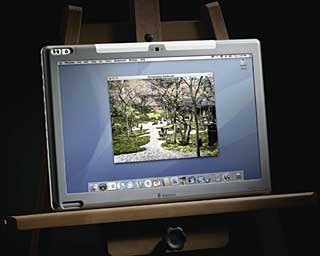 The world's only
tablet Mac computer, the award-winning Modbook employs state-of-the-art
pen tablet input so users can draw, sketch and write directly on the
screen and control the Mac OS X operating system without a keyboard or
mouse. Most non-aluminum Intel Core 2 Duo-based Apple MacBooks are
eligible for conversion into an Axiotron Modbook through
Modservice.
The world's only
tablet Mac computer, the award-winning Modbook employs state-of-the-art
pen tablet input so users can draw, sketch and write directly on the
screen and control the Mac OS X operating system without a keyboard or
mouse. Most non-aluminum Intel Core 2 Duo-based Apple MacBooks are
eligible for conversion into an Axiotron Modbook through
Modservice.
Modservice starts at $1,299. The Modbook has a manufacturer's suggested retail price of $2,199. Customers can place an order request for Modservice or the Modbook online.
Besides selling Axiotron Modbooks built from new Apple MacBook base systems, Axiotron's service providers will carry out the Modservice conversion process. The service provider can also perform upgrades to the Apple MacBook base system prior to conversion such as additional memory or a larger hard drive, as well as offer servicing and repair of Axiotron Modbooks produced through Modservice.
"We're excited to welcome these experienced resellers and service providers to our growing network," said Axiotron CEO Andreas E. Haas. "Axiotron's new partners have the tools, training and resources to support the Modbook and to make our Modservice a great experience for customers."
In addition to Other World Computing (macsales.com) in Woodstock, Illinois, and Carbon Computing (carbonation.com) with three locations in Ottawa, Kitchener-Waterloo and Toronto, Ontario, Canada, the fourteen new retail locations are:
- Computer Advantage, Sarasota, Florida. Website: computeradv.com. Tel: (941) 351-2415.
- AIS Computers, Fayetteville, Georgia. Website: aiscomputers.com. Tel: (770) 461-2147.
- AIS Computers, Savannah, Georgia. Website: aiscomputers.com. Tel: (912) 920-3440.
- MicroComputer Support Services, Winterville, North Carolina. Website: mcss-nc.com. Tel: (252) 353-2808.
- Double Click Computers, Bethlehem, Pennsylvania. Website: dclick.com. Tel: (610) 865-4999.
- Double Click Computers, West Reading, Pennsylvania. Website: dclick.com. Tel: (610) 374-3355.
- MacTown, Dayton, Ohio. Website: applesales.com. Tel: (937) 435-0134.
- MacHeadQuarters, St. Louis, Missouri. Website: machq.com. Tel: (314) 647-6647.
- MacResource Computers, Bryan, Texas. Website: mac-resource.com. Tel: (888) 622-7376.
- Create More, San Francisco, California. Website: createmore.com. Tel: (415) 896-9622.
- MacHollywood, Hollywood, California. Website: machollywood.com. Tel: (866) 957-9557.
- MacEnthusiasts, Los Angeles, California. Website: macenthusiasts.com. Tel: (800) 448-1892.
- Advanced Micro Systems, Redondo Beach, California. Website: amsus.com. Tel: (888) 912-7753.
- L.A. Computer Company, Anaheim, California. Website: lacomputercompany.com. Tel: (714) 630-8200.
"We are pleased to be a part of Axiotron's service provider and reseller network," said Bryan Murray, President of MacHollywood. "The Modbook and Modservice are exactly the kind of cutting-edge product offerings that our customers are looking for."
Axiotron will continue to add additional service providers and resellers to its network.
Link: Modbook
Fusion Canvas/Leather Solar Messenger Bag
PR: Keeping your batteries charged and ready to go is an obsession for many consumers of personal electronics. The original patented Eclipse Solar Gear product line is designed to trickle charge the batteries of many types and brands of electronics including cell phones, smart phones, handheld GPS units, and MP3 players with a convenient solar charging solution. Basically anything you can plug into your car using a 12V auto adapter can be trickle charged using solar bags by Eclipse Solar Gear.
 The selection of Fusion Messenger Bags are made of
durable 1680D, 800D nylons, and recycled materials as well as natural
heavy canvas with leather trim. The feature rich messenger bags include
a large main compartment, a padded laptop compartment, file
compartments, organizer pockets, a padded shoulder strap, accessory
pockets, side pockets, and of course the solar charging module.
The selection of Fusion Messenger Bags are made of
durable 1680D, 800D nylons, and recycled materials as well as natural
heavy canvas with leather trim. The feature rich messenger bags include
a large main compartment, a padded laptop compartment, file
compartments, organizer pockets, a padded shoulder strap, accessory
pockets, side pockets, and of course the solar charging module.
The integrated flexible solar charging module can be utilized by plugging in your existing 12V auto adapter (cigarette lighter adapter). There are no extra adapters needed. The thin film flexible solar panel is made to withstand the environment and provide a long lasting source of personal solar energy for your gadgets.
The Fusion Messenger Bags are now available in gray, black, and natural heavy canvas with leather trim. The Fusion Messenger Bags carry a limited lifetime warranty for materials and workmanship. If a product fails due to a manufacturing defect and/or material defect, Eclipse Solar Gear will repair or replace the product.
The new canvas and leather Fusion Messenger Bags are available online at eclipsesolargear.com. The Fusion Messenger Bags in gray/black are now available at select Macy's stores.
Link: Eclipse Solar Gear
Speck SeeThru Satin Soft-Touch Hard Shell Case for MacBook
 PR: Silky-soft to the touch with the same
protection as the trusted SeeThru line; introducing SeeThru Satin. Give
your MacBook a smooth, semi-translucent frosted finish that easily
slips in and out your bag while retaining a grippy edge. Allows you
access to all your important plugs and drives while highlighting the
unique look of your new MacBook 13" (aluminum unibody/black
keyboard.)
PR: Silky-soft to the touch with the same
protection as the trusted SeeThru line; introducing SeeThru Satin. Give
your MacBook a smooth, semi-translucent frosted finish that easily
slips in and out your bag while retaining a grippy edge. Allows you
access to all your important plugs and drives while highlighting the
unique look of your new MacBook 13" (aluminum unibody/black
keyboard.)
Silky-smooth soft-touch hard shell protection
- Protects your MacBook from scrapes and scratches
- Smooth yet grippy rubberized exterior texture
- Allows MacBook to be open all the way
- Fully vented for safe heat disbursement
- Access to all ports, battery check button and CD/DVD drive
- Totally removable - easy to put on and take off
- Built-in rubberized feet keep your notebook stable and secure
- Includes soft cleaning cloth
 Installing your SeeThru Satin case on your MacBook
is simple and easy. First, gently dust off your MacBook before putting
on your new SeeThru Satin. Close your MacBook and place the bottom
shell on a table or hard surface. Press your notebook gently down into
the shell until it snaps into the small tabs. Next, take the top shell
and press it evenly down onto the top of your MacBook, applying
pressure to the corners until it snaps snugly into place. To remove,
pull the small tabs away from your notebook. If you are experiencing
any difficulty, simply slip a credit card in the slot between your case
and MacBook and pop off the tabs. We recommend removing the case
periodically to dust or clean your MacBook
Installing your SeeThru Satin case on your MacBook
is simple and easy. First, gently dust off your MacBook before putting
on your new SeeThru Satin. Close your MacBook and place the bottom
shell on a table or hard surface. Press your notebook gently down into
the shell until it snaps into the small tabs. Next, take the top shell
and press it evenly down onto the top of your MacBook, applying
pressure to the corners until it snaps snugly into place. To remove,
pull the small tabs away from your notebook. If you are experiencing
any difficulty, simply slip a credit card in the slot between your case
and MacBook and pop off the tabs. We recommend removing the case
periodically to dust or clean your MacBook
This SeeThru Satin case is engineered specifically to fit onto the new 13-inch MacBook (aluminum/black keyboard). If you have a "white or black" MacBook, this case will not fit.
The smart design lets you open and close your notebook all the way, and access all keys, sensors, ports and plugs through specifically engineered cutouts. To access the battery door, easily snap off the bottom panel.
SeeThru Satin is made of special hard polycarbonate plastic with an added soft-touch rubberized exterior coating to give it it's silky and grippy feel. the cases work with your computer's internal cooling system to keep your MacBook cool and safe. There are ventilation slots on the bottom of the case designed specifically for this purpose.
Price $49.95
Link: Speck SeeThru Satin Soft-Touch Hard Shell Case for MacBook
Speck SeeThru Satin Soft-Touch Hard Shell Case for MacBook Pro
 PR: Silky-soft to the touch with the same
protection as our trusted SeeThru line; introducing SeeThru Satin. Give
your MacBook Pro a smooth, semi-translucent frosted finish that easily
slips in and out your bag while retaining a grippy edge for your peace
of mind. Allows you access to all your important plugs and drives while
highlighting the unique look of your MacBook Pro 15" (unibody/black
keyboard.)
PR: Silky-soft to the touch with the same
protection as our trusted SeeThru line; introducing SeeThru Satin. Give
your MacBook Pro a smooth, semi-translucent frosted finish that easily
slips in and out your bag while retaining a grippy edge for your peace
of mind. Allows you access to all your important plugs and drives while
highlighting the unique look of your MacBook Pro 15" (unibody/black
keyboard.)
- Silky-smooth soft-touch hard shell protection
- Protects your MacBook Pro from scrapes and scratches
- Smooth yet grippy rubberized exterior texture
- Allows MacBook to be open all the way
- Fully vented for safe heat disbursement
- Totally removable - easy to put on and take off
- Built-in rubberized feet keep your notebook stable and secure
- Access to all ports, battery check button and CD/DVD drive
- Includes soft cleaning cloth
 Installing your SeeThru Satin case on your MacBook
Pro is simple and easy. First, gently dust off your MacBook Pro before
putting on your new SeeThru Satin. Close your MacBook Pro and place the
bottom shell on a table or hard surface. Press your MacBook gently down
into the shell until it snaps into the small tabs. Next, take the top
shell and press it evenly down onto the top of your MacBook, applying
pressure to the corners until it snaps snugly into place. To remove,
pull the small tabs away from your notebook. If you are experiencing
any difficulty, simply slip a credit card in the slot between your case
and MacBook and pop off the tabs. We recommend removing the This
SeeThru Satin was engineered specifically to fit onto the new
generation of MacBook Pro 15" (unibody/black keyboard.)
Installing your SeeThru Satin case on your MacBook
Pro is simple and easy. First, gently dust off your MacBook Pro before
putting on your new SeeThru Satin. Close your MacBook Pro and place the
bottom shell on a table or hard surface. Press your MacBook gently down
into the shell until it snaps into the small tabs. Next, take the top
shell and press it evenly down onto the top of your MacBook, applying
pressure to the corners until it snaps snugly into place. To remove,
pull the small tabs away from your notebook. If you are experiencing
any difficulty, simply slip a credit card in the slot between your case
and MacBook and pop off the tabs. We recommend removing the This
SeeThru Satin was engineered specifically to fit onto the new
generation of MacBook Pro 15" (unibody/black keyboard.)
The smart design lets you open and close your MacBook Pro all the way, and access all keys, sensors, ports and plugs through specifically engineered cutouts. To access the battery door, easily snap off the bottom panel.
SeeThru Satin is made of special hard polycarbonate plastic with an added soft-touch rubberized exterior coating to give it it's silky and grippy feel.
These hard shells work with your computer's internal cooling system to keep your MacBook Pro cool and safe. Ventilation slots on the bottom of the case are designed specifically for this purpose.
Price $49.95
Link: Speck SeeThru Satin Soft-Touch Hard Shell Case for MacBook Pro
Bargain 'Books
Bargain 'Books are used unless otherwise indicated. New and refurbished units have a one-year Apple warranty and are eligible for AppleCare.
PowerBook, iBook, and MacBook profiles linked in our Portable Mac Index.
Apple Store
- refurb 1.6 GHz MacBook Air, 2 GB/80, $1,199
- refurb 1.8 GHz MacBook Air, 2 GB/80, $1,399
- refurb 1.8 GHz MacBook Air, 2 GB/64 SSD, $1,699
- refurb 2.1 GHz Penryn MacBook, white, 1 GB/120/Combo, $849
- refurb 2.2 GHz Santa Rosa MacBook, white, 1 GB/160/SD, $949
- refurb 2.4 GHz Santa Rosa MacBook, black, 2 GB/160/SD, $949
- refurb 2.4 GHz Penryn MacBook, black, 2 GB/250/SD, $1,049
- refurb 15" 2.4 GHz Core 2 MacBook Pro, 2 GB/200/SD, $1,349
- refurb 15" 2.6 GHz Core 2 MacBook Pro, 2 GB/160/SD, $1,499
- refurb 15" 2.6 GHz MacBook Pro, 2 GB/200/SD, $1,799
- refurb 17" 2.5 GHz Core 2 MacBook Pro, 2 GB/250/SD, $1,799
- refurb 17" 2.5 GHz Penryn MacBook Pro, 2 GB/250/SD, $2,099
- refurb 17" 2.5 GHz hi-res Penryn MacBook Pro, 2 GB/250/SD, $2,199
- refurb 17" 2.6 GHz hi-res Penryn MacBook Pro, 2 GB/250/SD, $2,299
Previous Generation - New
- new 1.6 GHz MacBook Air, 2 GB/80, $1,399
- new 2.4 GHz Penryn MacBook, white, 2 GB/160/SD, $1,149
- new 2.4 GHz Penryn MacBook, black, 2 GB/250/SD, $1,199
- new 15" 2.4 GHz Penryn MacBook Pro, 2 GB/200/SD, $1,599
- new 15" 2.5 GHz Penryn MacBook Pro, 2 GB/250/SD, $1,799
ExperCom
- 15" 2.4 GHz Core 2 MacBook Pro, 4 GB/200/SD, AppleCare, $1,789
Wegener Media - 15" Aluminum PowerBook - MacBook - 15" MacBook Pro
- 1.83 GHz Core Duo MacBook, white, 512/60/Combo, 60 day warranty, $594.99
- 2.0 GHz Core Duo MacBook, white, 512/60/Combo, 60 day warranty, $659.99
- 2.0 GHz Core Duo MacBook, black, 512/80/SD, 60 day warranty, $719.99
- 2.0 GHz Core 2 MacBook, white, 1 GB/80/SD, 60 day warranty, $769.99
- 2.0 GHz Core 2 MacBook, black, 1 GB/120/SD, 60 day warranty, $799.99
- 15" PowerBook G4/1.25 GHz, 256/60/Combo, $599.99
- 15" PowerBook G4/1.33 GHz, 256/60/Combo, $639.99
- 15" PowerBook G4/1.5 GHz, 1 GB/80/Combo, $679.99
- 15" PowerBook G4/1.67 GHz, 1 GB/80/SD, $729.99
- 15" hi-res PowerBook G4/1.67 GHz, 512/80/SD $799.99
- 15" 1.83 GHz MacBook Pro, 512/80/SD, 90 day warranty, $899.99
- 15" 2.0 GHz MacBook Pro, 512/80/SD 90 day warranty, $979.99
- 15" 2.0 GHz MacBook Pro, 512/100/SD 90 day warranty, $1099.99
- 15" 2.16 GHz MacBook Pro, 1 GB/100/SD, 90 day warranty, $1179.99
MacMall
- 2.0 GHz Unibody MacBook, 2 GB/160/SD, $1,238.97
- 15" 2.4 GHz Core 2 MacBook Pro, 2 GB/160/SD, $1,399.99
- 15" 2.4 GHz Core 2 MacBook Pro, 2 GB/200/SD, $1,443.99
- 15" 2.4 GHz Unibody MacBook Pro, 2 GB/200/SD, $1,964.96 - $100 rebate = $1,864.96
- 15'' 2.5 GHz Core 2 MacBook Pro, 4 GB/250/SD, $1,598.99
- 15" 2.53 GHz Unibody MacBook Pro, 4 GB/320/SD, $2,308.97
Mac Connection
- 17" 2.4 GHz Santa Rosa MacBook Pro, 2 GB/160/SD, matte, $1,849.95 less $150 mail-in rebate = $1,699.95
TechRestore
- 1.6 GHz MacBook Air, 2 GB/80, $1,299.99
Baucom Computers
- 15" PowerBook G4/1.5 GHz, 1 GB/80/Combo, $640
- 15" hi-res PowerBook G4/1.67 GHz, 1 GB/80/SD, $715
- 15" hi-res PowerBook G4/1.67 GHz, 1.5 GB/100/SD, $805
PowerBook Guy
- 12" iBook G4/1 GHz, 512/30/Combo, $499.95
- 12" iBook G4/1.33 GHz, 768/40/Combo, AP, AppleCare, $549.95
- 15" PowerBook G4/1.5 GHz, 1 GB/80/Combo, APX, $799.95
- 15" 2.16 GHz Core 2 MacBook Pro, 1 GB/120/SD, APX, $1,499.95
For deals on current and discontinued 'Books, see our 13" MacBook and MacBook Pro, MacBook Air, 13" MacBook Pro, 15" MacBook Pro, 17" MacBook Pro, 12" PowerBook G4, 15" PowerBook G4, 17" PowerBook G4, titanium PowerBook G4, iBook G4, PowerBook G3, and iBook G3 deals.
We also track iPad, iPhone, iPod touch, iPod classic, iPod nano, and iPod shuffle deals.
Join us on Facebook, follow us on Twitter or Google+, or subscribe to our RSS news feed
Links for the Day
- Mac of the Day: PowerBook 500 Series, introduced 1994.05.16. 'Blackbird' includes a 25 to 33 MHz 68040 along with smart batteries and grayscale or color displays.
- Support Low End Mac
Recent Content
About LEM Support Usage Privacy Contact
Follow Low End Mac on Twitter
Join Low End Mac on Facebook
Favorite Sites
MacSurfer
Cult of Mac
Shrine of Apple
MacInTouch
MyAppleMenu
InfoMac
The Mac Observer
Accelerate Your Mac
RetroMacCast
The Vintage Mac Museum
Deal Brothers
DealMac
Mac2Sell
Mac Driver Museum
JAG's House
System 6 Heaven
System 7 Today
the pickle's Low-End Mac FAQ
Affiliates
Amazon.com
The iTunes Store
PC Connection Express
Macgo Blu-ray Player
Parallels Desktop for Mac
eBay

