
The 'Book Review
New 'Books Likely in September, 17" PowerBook Display Fault Site, SSD Security, and More
This Week's MacBook, PowerBook, and iBook News
Compiled by Charles Moore and edited by Dan Knight - 2008.08.29
All prices are in US dollars unless otherwise noted.
General Apple and Mac desktops is covered in The Mac News Review. iPod, iPhone, and Apple TV news is covered in The iNews Review.
News & Opinion
- September MacBook, MacBook Pro Updates Likely
- PowerBook G4 Display Manufacturing Defect Cover-up?
- 17" PowerBook Display Fault Site Posted
- 6 Ways to Speed Up Your MacBook for Free
- Why Apple Is Becoming the Leader in Notebook Technology
- Keeping MacBooks Snug at Security
- Solid State Drives Not Without Security Risks
- Intel Quietly Rolls Out Small Core 2 Duo 'S'
- Next-gen MacBook Air CPU
- Intel Fills in Details on MacBook Air Chip
- Ultraportable Laptops: Their Rise and Possible Fall
- ExpressCard/34 Buyers' Guide
Apple Updates
Products
- LapStrap Minimalist Checkpoint Friendly Laptop Carry Solution
- NewerTech Batteries for Clamshell iBook
- ExpressAdapt CardBus to USB Mode ExpressCard Adapter
Bargain 'Books
News & Opinion
September MacBook, MacBook Pro Updates Likely
Switch to a Mac says:
"Whenever someone considers purchasing something new one of the initial reactions is to determine if the current model(s) will be updated in the near future. This true for automobiles, gadgets, electronics and of course computers. This post will provide insight into how Apple updates and refreshes their line of Macintosh computers with particular emphasis on the MacBook and MacBook Pro lines."
Editor's note: The article includes some excellent timeline charts of MacBook and MacBook Pro product introduction/revision history and observes that Apple's current Back-To-School promotion ends on Monday September 15, 2008, and while Apple has never released MacBook or MacBook Pro updates in the midst of a Back-To-School promotion, that doesn't mean that they won't.
Best guesses: September 9, 2008 or the week of September 15, 2008 (Tuesday September 16, 2008 highly likely).
Link: MacBook and MacBook Pro Release Cycle Analysis - September 2008 Updates Likely
PowerBook G4 Display Manufacturing Defect Cover-up?
The Apple Core's Jason D. O'Grady says:
"Apple appears to be censoring discussion of a display manufacturing defect in the PowerBook G4 17-inch and have not acknowledging that the defect even exists. Notebook computers, especially 17s, are an expensive investment to have just go belly-up shortly after they come out of warranty. Some people have had their machines die right after the one-year warranty expires...."
Link: PowerBook G4 Display Manufacturing Defect Coverup?
17" PowerBook Display Fault Site Posted
Disgruntled PowerBook owner David Hudd has posted an information site about an allegedly defective batch of 17" PowerBooks manufactured in Shanghai in April 2005:
"This site has been made available to the owners of 17" PowerBooks that are suffering from the one pixel wide, vertical lines problem. The majority of the PowerBooks that were posted on Apple's site before being deleted, were manufactured in the W8 factory based in Shanghai around April of 2005, model: M9689 PowerBook G4 1.67 GHz.

"I encourage you to post your information and photographs here as Apple constantly close down, lock or delete any threads containing manufactoring information, photographs or links to external sites discussing this problem on their forums!
"This kind of action by Apple suggests to me that they are aware of a known defect, do not want to address it and are scared of the bad publicity that would result from a recall or repair extension program. Let's not forget the recent battery recall!
"If, like me, you find Apple's blatant censorship and refusal to address this problem unpalatable (bear in mind that when launched this machine was the top of the line PowerBook and cost around $3000 US), then post your PowerBook's information here and together we will hopefully get Apple to face up to the fact that they sold 17" PowerBooks that have a serious manufactoring defect and should be repaired or replaced at once with no cost to the owners."
 Editor's note: The website
currently has 318 substantiated claims. (Bridget Riley is an
English painter who is one of the foremost proponents of op art.)
Editor's note: The website
currently has 318 substantiated claims. (Bridget Riley is an
English painter who is one of the foremost proponents of op art.)
Link: 17" 'Bridget Riley' G4 PowerBooks
6 Ways to Speed Up Your MacBook for Free
GeekMalaya's Tao Schencks says:
"We all know that installing 4 GB of RAM will speed up a MacBook and make the whole experience that little bit more smoother and quicker - but what can you do NOW for FREE that will help speed your bundle of joy along and keep it's user happier? I will tell you 6 things that will help...."
Link: 6 Ways to Speed Up Your MacBook for Free
Why Apple Is Becoming the Leader in Notebook Technology
Light in Asia reports:
"When you're looking for the leaders and front runners in technology, you can be assured to find Apple's name there. They certainly have amazing products and lots of innovative machines and it has totally expanded into the arena of computer manufacturing. refurbished Apple laptops have been a major player in computer technology since years back.
"All of their computers are great, but their latest laptops are highly advanced and efficient. These computers give you better performance and their efficiency is excellent...."
Link: Why Apple Is Becoming the Leader in Notebook Technology
Keeping MacBooks Snug at Security
IDG News Service's Agam Shah reports:
"Apple's laptops have had some interesting encounters at airport security checkpoints. The wafer-thin design of the MacBook Air befuddled one security officer earlier this year in the US, who asked to give some 'special attention' to the 'fine piece of machinery,' according to Bob, who blogs for the US Transportation Security Administration (TSA). After inspection, the laptop was returned to the owner.
"Users don't have to remove their MacBooks from their bags anymore, thanks to new 'checkpoint-friendly' laptop bags. It's a hassle to remove laptops and place them in bins, so these bags allow X-ray machines to screen laptops from inside bags. The bags are designed using guidelines provided by the TSA, which wants a clear view of the laptop through the bag...."
Link: Keeping MacBooks Snug at Security
Solid State Drives Not Without Security Risks
IDG News Services' Agam Shah reports:
"Solid-state drives are fast becoming popular replacements for hard drives, especially in laptops, but experts caution that SSDs aren't as secure as commonly thought.
"SSDs may offer better data security than traditional hard drives, but they do not completely erase data and are vulnerable to physical hacks from light sources like an ultraviolet laser, experts say....
"Overall, it's easier to delete data from SSDs than from hard drives, which can be a good or bad. Data is stored on electrons in SSDs, and getting rid of electrons flushes out the data . . . In hard drives, the data has to be overwritten or physically damaged to prevent it from being read."
Link: SSDs Are Hot, But Not Without Security Risks
Intel Quietly Rolls Out Small Core 2 Duo 'S'
Electronista reports:
"Although declining a separate announcement, Intel at its Developer Forum has formally introduced the Core 2 Duo 'S', its first factory-stock processor based on the same small package technology that was rushed into use for the MacBook Air and similar systems. The chipmaker confirms numerous leaks and reveals that the switch to a 45 nanometer process lets it improve performance while reducing the size and power use.
"Although running on the same 1,066 MHz system bus and with the same 6 MB of Level 2 cache as newer Core 2 Duos, the 'S' and its accompanying chipset are 60 percent smaller overall while the processor itself uses 17 watts at its thermal design peak versus 20 watts for its Apple-focused ancestor. Both also keep the same hardware virtualization and trusted execution as for their larger counterparts."
Link: Intel Quietly Rolls Out Small Core 2 Duo 'S'
Next-gen MacBook Air CPU
AppleInsider's Aidan Malley reports:
"Intel's Developer Forum has revealed the processors likely to underpin the first refresh of the MacBook Air ultraportable....
"Slipping underneath the radar amidst talk of Nehalem and other next-generation technology, Intel at the San Francisco edition of its Developer Forum this week announced its first regularly available processor based on the same, very small chip packaging that made the MacBook Air possible.
"Nicknamed the Core 2 Duo S, the 1.6 GHz and 1.86 GHz parts share the same basic architecture as chips released in July but consume about 60 percent less surface area through both a smaller main processor and smaller bridge chips used to interface with memory and peripherals."
Link: Next-gen MacBook Air CPU
Intel Fills in Details on MacBook Air Chip
Digital Trends' Nick Mokey reports:
"The Core 2 Duo S, which first appeared in Apple's MacBook Air, trims both size and power consumption by a significant degree.
"The shrunken Core 2 Duo processor that Apple dropped into its iconic Air is now available for public consumption. Intel finally slipped out specs on the "Core 2 Duo S" at developer conference in San Francisco this week...."
Link: Intel Fills in Details on MacBook Air Chip
Ultraportable Laptops: Their Rise and Possible Fall
Computerworld's David Haskin reports:
"For some users, the new generation of ultraportable notebooks comes close to embodying the Holy Grail for road warriors. Their laptop-like keyboards make them more usable for typing tasks than smart phones, but they are lighter and cheaper than traditional laptops. The original Asus Eee PC, for instance, cost about $400 and weighed about two pounds when it was introduced last October.
"However, while pundits and technology journalists have lavished attention on these products, skeptics have raised questions. For instance, is there anything really special about these devices, or do they just represent old technology in new packaging? Are users as enthusiastic about these tiny laptops as the pundits are? Will they fade away like so many other 'next big things'? And perhaps the oddest question: What do we call these things, anyway?"
Link: Ultraportable Laptops: Their Rise and Possible Fall
ExpressCard/34 Buyers' Guide
Macworld's Jeff Carlson reports:
"With the MacBook Pro, Apple discarded the old PC Card slot in favor of ExpressCard/34, a more compact expansion slot that offers greater transfer speeds and an increasing array of uses. The ExpressCard format has a couple of advantages over the old PC Card format.
"First, it's narrower: ExpressCard/34 cards are 34mm wide, compared with the 54mm PC Cards. (ExpressCard/54 cards do exist, but they don't fit in the MacBook Pro.) ExpressCards also require less power - 1.5 volts, compared with 3.3 volts for the PC Card. But their biggest advantage is speed. An ExpressCard passes data to the system at up to 2.5 Gbps; PC Cards supported speeds of only 1.06 Gbps.
"Here is just a sampling of the ExpressCards available. It's by no means encyclopedic, but it should give you an idea of how you can expand your laptop's powers...."
Link: ExpressCard/34 Buyers' Guide - Add-ons That Make Your MacBook Pro Do Even More
Apple Updates
Apple Releases MacBook Air Update
Late on Friday, Apple released a small firmware update for the MacBook Air notebook. It's just a 368 KB download, so should only take seconds even over dialup.
- New in this Version
- This update is recommended for all MacBook Air computers, and addresses issues with video playback and processor core idling.
- Third-party software that modifies processor operating characteristics such as frequency and voltage is not supported and should be removed before installing this update.
File Size: 368 KB
System Requirements: Mac OS X 10.5.4
Link: MacBook Air Update
Products
LapStrap Minimalist Checkpoint Friendly Laptop Carry Solution
PR: The LapStrap makes carrying your laptop easier than ever before. Simply place the LapStrap over your laptop, close the lid and you instantly have a shoulder strap. By attaching LapStrap to your laptop you can continue the use of your existing travel bag and navigate the security checkpoint with ease.
 The Transportation Safety Agency has
implemented a new rule allowing Checkpoint Friendly laptop bags to be
utilized in security scanners. TSA stated that it will not endorse or
approve any one bag design or manufacturer. This requires TSA Officers
to individually identify checkpoint friendly criteria for every laptop
bag. Two results: upset travelers who are asked to remove their laptop
from what was thought to be a checkpoint friendly bag, or decreased
security as bags and laptops are not required to be exposed.
The Transportation Safety Agency has
implemented a new rule allowing Checkpoint Friendly laptop bags to be
utilized in security scanners. TSA stated that it will not endorse or
approve any one bag design or manufacturer. This requires TSA Officers
to individually identify checkpoint friendly criteria for every laptop
bag. Two results: upset travelers who are asked to remove their laptop
from what was thought to be a checkpoint friendly bag, or decreased
security as bags and laptops are not required to be exposed.
As many manufacturers are getting in line to produce the next Checkpoint Friendly laptop bag, there is one product that has taken a different route. As most of these "checkpoint friendly" bags are $100 or more, issues may arise with travelers who are being asked to remove their laptops from their new bag which was purchased to resolve such situations.
For $24.95, the new LapStrap not only allows continued use of your existing laptop bag, but through company testing has not resulted in a single request by TSA Officers to be removed from the laptop. The innovative LapStrap is a simple accessory that creates a shoulder strap for your laptop computer.
 The LapStrap makes carrying your laptop
easier than ever before. Simply place the LapStrap over your laptop,
close the lid and you instantly have a shoulder strap. By attaching
LapStrap to your laptop you can continue the use of your existing
travel bag and navigate the security checkpoint with ease. LapStrap
allows the computer to be secured over your shoulder which frees both
hands to gather additional items such as keys, cell phone, and boarding
pass. Even with the disclosed "Checkpoint Friendly" criteria, the
Transportation Security Administration states that Officers reserve the
right to have any laptop removed from its bag, even if the bag is
considered "checkpoint friendly" by the manufacturer.
The LapStrap makes carrying your laptop
easier than ever before. Simply place the LapStrap over your laptop,
close the lid and you instantly have a shoulder strap. By attaching
LapStrap to your laptop you can continue the use of your existing
travel bag and navigate the security checkpoint with ease. LapStrap
allows the computer to be secured over your shoulder which frees both
hands to gather additional items such as keys, cell phone, and boarding
pass. Even with the disclosed "Checkpoint Friendly" criteria, the
Transportation Security Administration states that Officers reserve the
right to have any laptop removed from its bag, even if the bag is
considered "checkpoint friendly" by the manufacturer.
Another issue arises with laptop travelers if requested to check bags planeside. Many have faced this scenario and find themselves scrambling to remove their laptop as they board the plane. By having LapStrap attached to the laptop, the laptop now becomes easily secured for transporting.
LapStrap is available in both adult and youth sizes. Constructed with durable nylon, LapStrap also includes a neoprene shoulder pad for comfort. Heavy-duty buckles allow LapStrap to be adjusted to secure all laptop sizes.
LapStrap can be custom colored and branded for your company, school, or organization. LapStrap is a great promotional item as your logo can be "front and forward" on the shoulder of everyone who carries a LapStrap.
Whether faced with a security line, a coffee shop, a quick meeting, or a class LapStrap offers the flexibility to decide to carry your full bag or simply your laptop. LapStrap can be purchased online for $24.95.
Link: TheLapStrap
NewerTech Batteries for Clamshell iBook
PR: Listen to more music, watch more videos, and get more work done with more run time between recharges! The NewerTech NuPower 74 watt-hour replacement battery delivers up to 56% greater capacity than the stock Apple® iBook® G3 'Clamshell' battery. Upgrade or replace your battery with a high capacity NuPower battery today . . . it's better than the your other battery when it was new.
Up to 56% Higher Capacity vs. Original!
Features:
- Ideal replacement for any iBook G3 'Clamshell' system
- Up to 56% more capacity than the Apple® original 3200mAh battery that shipped with the iBook G3 'Clamshell' systems
- More capacity = more running time!
Designed, Engineered, and Manufactured in the USA
NuPower Li-Ion batteries are top tier and are designed, engineered, and manufactured in the USA! The actual Li-Ion cells used in ALL NuPower batteries for PowerBooks and iBooks are of the best quality and made either in Japan or Canada. This is in stark contrast to the arguably inferior battery products produced overseas with cheaper battery cells.
Not only do NewerTech batteries provide more run time vs. stock Apple and other brands, NewerTech batteries are also built to last longer - providing more use cycles before a replacement is needed.
Each new battery also includes a free label to return your old battery for proper recycling or disposal. more info.
As the premier provider of high capacity replacement batteries for PowerBooks, iBooks, and iPods, NewerTech is committed to helping your older batteries find their way to recycling stations instead of into waste dumps where the heavy metals leach out to contaminate the environment.
When you purchase a NewerTech battery, we will cover the cost for you to ship your old battery from the same system the new NewerTech NuPower battery was purchased for. We will then ensure the battery is properly recycled/disposed of.
Compatible Systems:
Apple iBook G3 Systems
- 300 or 366 MHz
- FireWire - 366 or 466 MHz
Product Specifications:
- 65.1 Watt-Hour
- 14.8V
- Lithium-Ion Technology
- 4400 mAh
- Replaces Apple Original battery model M2453
- RoHS Compliant
- 1 year NewerTech Warranty
- 74 Watt-Hour
- 14.8V
- Lithium-Ion Technology
- 5000 mAh
- Replaces Apple Original battery model M6392
- RoHS Compliant
- 1 year NewerTech Warranty
NuPower 65.1 Watt-Hour Battery - $99.95
NuPower 74 Watt-Hour Battery - $119.99
Link: NewerTech Batteries for Clamshell iBook
ExpressAdapt CardBus to USB Mode ExpressCard Adapter
PR: ExpressAdapt represents the second generation of CardBus to ExpressCard adapters, combining benefits of previous generation 16-bit and 32-bit adapters. Integrating the latest NEC ECOUSB controller with Synchrotech's advanced voltage regulating circuitry gives ExpressAdapt major advantages over competing devices.
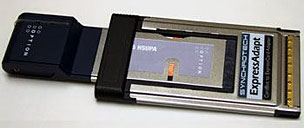
Utilizing ECOUSB provides ExpressAdapt with significant compatibility and performance features. First ExpressAdapt needs no drivers on contemporary mainstream operating systems, it is recognized and supported automatically. Second, it harnesses the fastest USB 2.0 throughput to complement the latest HSDPA and EVDO Rev. A ExpressCards. Lastly, ExpressAdapt's integrated controller allows for low power consumption and price.
ExpressAdapt overcomes power considerations of earlier 32-bit PC CardBus adapters providing 1000mA at 3.3V and 650mA at 1.5V. With the ability to supply power on both ExpressCard rails, newer cards like the Option Wireless GT Max 3.6 Express are fully supported. Crafted with the highest quality connectors and frame materials, ExpressAdapt meets or exceeds the requirements of every standards body it falls under.
 ExpressAdapt is a PCMCIA PC CardBus to USB ExpressCard Adapter.
It works with
USB 2.0 Mode ExpressCards only. This includes WWAN Wireless
broadband cards like the Kyocera KPC680 and the Sierra Wireless AC597E.
Like all PC Card to ExpressCard adapters, ExpressAdapt does NOT work
with PCIe based ExpressCards. ExpressCards using the PCI Express (PCIe)
portion of the ExpressCard standard include very high performance
devices like FireWire 800 and eSATA host adapters.
ExpressAdapt is a PCMCIA PC CardBus to USB ExpressCard Adapter.
It works with
USB 2.0 Mode ExpressCards only. This includes WWAN Wireless
broadband cards like the Kyocera KPC680 and the Sierra Wireless AC597E.
Like all PC Card to ExpressCard adapters, ExpressAdapt does NOT work
with PCIe based ExpressCards. ExpressCards using the PCI Express (PCIe)
portion of the ExpressCard standard include very high performance
devices like FireWire 800 and eSATA host adapters.
Features and Specifications
Features
- PCMCIA PC Card Standard Version 8.0 Compliant
- No drivers needed for Windows 2000, XP and Vista and Mac OS X 10.4 and later
- Compatible with all USB-mode ExpressCards including many WLAN, WiMax, 3G (HSDPA and EVDO) and memory
- Prevents obsolescence purchases of 3G cards, buy an ExpressCard based device for current PC Card equipped notebook, use without ExpressAdapt once notebook is replaced by modern ExpressCard model
- Advanced Power Regulating circuits supports widest range of ExpressCards
- Allows use of USB based ExpressCards between different computers
- Supports Plug and Play and Hot Plug features
- Limited One Year Warranty
Host Card: 32-bit PC CardBus Card Type II
Media Accepted
- USB 2.0 based ExpressCard/34 form factor (listing)
- Not compatible with any PCIe based ExpressCards - examples include eSATA, FireWire, GigE, etc.
- Not compatible with ExpressCard/54 devices
System Requirements
- Any computer or PC Card Reader with a 32-bit PC CardBus Type II Slot
- No drivers needed for The Windows 2000, XP and Vista
- No drivers needed for Mac OS X 10.4 and later
- Only works with USB 2.0 mode ExpressCards
- Unsupported, but known to work with many BSD and Linux distributions
PowerBook: Models That Work With CardBus PC Cards
- PowerBook G3 Series (WallStreet)
- PowerBook G3 (Lombard)
- PowerBook (Pismo)
- 15-inch PowerBook G4 (all models)
- 17-inch PowerBook G4 (all models)
Transfer Rate: Supports USB 2.0 throughput of High Speed 480 Mbps, Full Speed 12 Mbps, and Low Speed 1.5 Mbps
Physical Characteristics
- Dimensions: 85.6 x 54 x 5mm (not including extended portion of card)
- Weight: 14g (approximate)
Price - $45
Link: ExpressAdapt CardBus to USB Mode ExpressCard Adapter
Bargain 'Books
Bargain 'Books are used unless otherwise indicated. New and refurbished units have a one-year Apple warranty and are eligible for AppleCare.
There are two different versions of WallStreet running at 233 MHz, the cacheless MainStreet version and the later Series II with a level 2 cache. It's not always possible to determine from the vendor's listing which is being offered, so we've included links within this paragraph to the two models. The same goes for the PowerBook G4/667 (VGA) and G4/667 (DVI), the titanium vs. aluminum 15" PowerBook G4 at 1 GHz, and 1.25 GHz to 1.5 GHz 15" PowerBooks.
PowerBook, iBook, and MacBook profiles linked in our Portable Mac Index.
Apple Store
Almost no changes from last week except the 2.6 GHz 15" MacBook Pro for $1,849 is sold out. Each model comes with an Apple one-year warranty, and ground shipping is free.
- refurb 1.6 GHz MacBook Air, 2 GB/80, $1,499
- refurb 1.8 GHz MacBook Air, 2 GB/80, $1,699
- refurb 1.6 GHz MacBook Air, 2 GB/64 SSD, $2,099
- refurb 1.8 GHz MacBook Air, 2 GB/64 SSD, $2,299
- refurb 2.1 GHz Penryn MacBook, white, 1 GB/120/Combo, $899
- refurb 2.4 GHz Penryn MacBook, white, 2 GB/160/SD, $1,099
- refurb 2.4 GHz Penryn MacBook, black, 2 GB/250/SD, $1,299
- refurb 15" 2.4 GHz Santa Rosa MacBook Pro, 2 GB/160/SD, $1,649
- refurb 15" 2.5 GHz Penryn MacBook Pro, 2 GB/250/SD, $1,999
- refurb 15" 2.6 GHz Penryn MacBook Pro, 2 GB/200/SD, $2,299
- refurb 17" 2.4 GHz Santa Rosa MacBook Pro, 2 GB/160/SD, $1,899
- refurb 17" 2.5 GHz Penryn MacBook Pro, 2 GB/250/SD, $2,299
- refurb 17" 2.5 GHz hi-res Penryn MacBook Pro, 2 GB/250/SD, $2,499
- refurb 17" hi-res 2.6 GHz Santa Rosa MacBook Pro, 2 GB/250/SD, $2,499
- refurb 17" 2.6 GHz Santa Rosa MacBook Pro, 2 GB/200/SD, $2,649
- refurb 17" 2.6 GHz hi-res Penryn MacBook Pro, 2 GB/250/SD, $2,699
ExperCom
- 13.3" 1.83 GHz MacBook, white, 1 GB/60/Combo, $799
TechRestore
- 1.6 GHz MacBook Air, 2 GB/80, $1,499.99
Wegener Media
- 12" iBook G3/500, 128/10/CD, $169.99
- 12" iBook G3/600, 128/15/CD, $249.99
- 12" iBook G3/700, 128/20/Combo, $329.99
- 12" iBook G3/800, 256/30/Combo, $399.99
- 12" iBook G3/900, 256/40/Combo, $489.99
- 14" iBook G3/600, 256/20/Combo, 359.99
- 14" iBook G3/800, 256/30/Combo, $469.99
- 14" iBook G3/900, 256/40/Combo, $499.99
Baucom Computers
- 15" PowerBook G4/1.5 GHz, 1 GB/80/Combo, APX, $719
- 15" PowerBook G4/1.67 GHz, 1 GB/80/Combo, APX, $785
- 15" 2.1 GHz Core Duo MacBook Pro, 512/80/SD, APX, $1,129
Power Max
- open box 1.6 GHz MacBook Air, 2 GB/80, $1,699
- open box 2.4 GHz Core 2 MacBook, white, 2 GB/160/SD, $1,249
- open box 15" 2.4 GHz Core 2 MacBook Pro, 2 GB/160/SD, $1,899
- refurb 17" 2.4 GHz Core 2 MacBook Pro, 2 GB/160/SD, $1,988
- open box 17" 2.4 GHz Santa Rosa MacBook Pro, 2 GB/160/SD, $2,188
- open box 17" 2.6 GHz Core 2 MacBook Pro, 2 GB/160/SD, $2,649
PowerBook Guy
- 12" iBook G3/500, 128/10/CD, $219.95
- 12" iBook G3/500, 192/40/CD, $239.95
- 12" iBook G3/600, 128/40/CD, $259.95
- 12" iBook G4/1.33 GHz, 768/40/Combo, AP, AppleCare, $599.95
- Pismo PowerBook G3/500, 256/20/Zip 100, $299.95
- 15" PowerBook G4/667 MHz DVI, 256/30/Combo, $499.95
- 15" PowerBook G4/1.5 GHz, 1 GB/80/Combo, APX, $999.95
- 15" 2.16 GHz Core 2 MacBook Pro, 1 GB/120/SD, APX, $1,599.95
- 15" 2.4 GHz Core 2 MacBook Pro, 2 GB/200/SD, APX, $1,799.95
For more deals on current or discontinued models, see our MacBook deals, MacBook Air deals, 15" MacBook Pro deals, 17" MacBook Pro deals, 12" PowerBook G4 deals, 15" PowerBook G4 deals, 17" PowerBook G4 deals, titanium PowerBook G4 deals, iBook G4 deals, PowerBook G3 deals, and iBook G3 deals.
Join us on Facebook, follow us on Twitter or Google+, or subscribe to our RSS news feed
Links for the Day
- Mac of the Day: PowerBook 500 Series, introduced 1994.05.16. 'Blackbird' includes a 25 to 33 MHz 68040 along with smart batteries and grayscale or color displays.
- Support Low End Mac
Recent Content
About LEM Support Usage Privacy Contact
Follow Low End Mac on Twitter
Join Low End Mac on Facebook
Favorite Sites
MacSurfer
Cult of Mac
Shrine of Apple
MacInTouch
MyAppleMenu
InfoMac
The Mac Observer
Accelerate Your Mac
RetroMacCast
The Vintage Mac Museum
Deal Brothers
DealMac
Mac2Sell
Mac Driver Museum
JAG's House
System 6 Heaven
System 7 Today
the pickle's Low-End Mac FAQ
Affiliates
Amazon.com
The iTunes Store
PC Connection Express
Macgo Blu-ray Player
Parallels Desktop for Mac
eBay

