
The 'Book Review
Firmware 1.5 Screen Blanking, Air Travel Notebook Stand, Battery Calibration, and More
This Week's MacBook, PowerBook, and iBook News
Compiled by Charles Moore and edited by Dan Knight - 2008.04.25
All prices are in US dollars unless otherwise noted.
General Apple and Mac desktops is covered in The Mac News Review. iPod, iPhone, and Apple TV news is covered in The iNews Review.
News & Opinion
- MacBook Pro Displays Blanking Out after Firmware 1.5 Update
- MacBook Pro Customers Report Blank Screens after Firmware 1.5 Upgrade
- The Fix: MacBook Pro EFI Firmware Update 1.5.1
- MacBook Battery Calibration
- Safari 3.1.1 Update Patches MacBook Air Hijack Flaw
- Rumor: Apple Orders Aluminum 13" MacBook Shells
- Something Killed My MacBook Pro
- Are MacBook Pros a Ripoff?
- PowerBook to Desktop Conversion
- Custom Built Apple IIgs Laptop
Reviews
- 15" MacBook Pro 'a Fairly Significant Upgrade'
- MacBook Air Just Might Be Too Breezy
- MacBook Air Superbly Portable
- Shootout: MacBook Air versus MacBook Pro
Tech Trends
- MacBook Air Spurring LED Use in Notebooks
- Battery Prototype May Mean the End of Exploding Laptops
- Notebooks to Outsell Desktops Sooner Than Expected
Apple Updates
- MacBook Pro Unable to Wake in Closed Clamshell Mode after Leopard Graphics Update
- Apple Releases MacBook Pro EFI Firmware Update 1.5.1
- Apple Releases Intel Mac Firmware Restoration CD 1.7
Products
- BatteryTech Laptop Stand for Air Travel
- Orbino Arista Leather Case for the MacBook Air
- MagStay Pro Helps Your MagSafe Adapter Stay Connected
- OWC 500 GB Mercury On-the-Go: Take Your Backup Drive with You
Bargain 'Books
News & Opinion
MacBook Pro Displays Blanking Out after Firmware 1.5 Update
AppleInsider's Aidan Malley reports:
"Early adopters of Apple's latest MacBook Pro EFI update [editor's note: version 1.5, not 1.5.1] are finding themselves without a usable screen, according to a growing discussion in the company's support forums.
"Some users applying the update, particularly those with an external display attached, find that their computer screen refuses to display an image even if the system itself is completely responsive."
Link: MacBook Pro Displays Blanking Out After Update
MacBook Pro Customers Report Blank Screens after Firmware 1.5 Upgrade
InformationWeek's Antone Gonsalves reports:
"Several MacBook Pro users are reporting blank screens on the high-end Apple notebook after deploying the latest firmware upgrade.
"The problem, described in Apple support forums, has left users with machines that still operate, but display no image on the internal display, or on external displays. The extent and cause of the problem is not certain. Apple was not immediately available for comment."
Link: MacBook Pro Customers Report Blank Screens after Firmware Upgrade
MacBook Battery Calibration
The Apple Core's Jason D. O'Grady says:
"Colleague and PowerPage contributor Kenn Marks Sr. contributes some tips on calibrating your MacBook battery.
"A customer's MacBook Pro was shutting down while displaying that it still had 20 percent power remaining. Following are some links to calibrating your battery so that the power remaining indicator is more accurate."
Link: MacBook Battery Calibration
Safari 3.1.1 Update Patches MacBook Air Hijack Flaw
eWeek's Ryan Naraine reports:
"Apple has slapped a Band-Aid on its Safari for Windows browser to cover four vulnerabilities that could lead to code execution, cross-site scripting and URL spoofing attacks.
"The Safari 3.1.1 update includes a patch for the flaw the allowed the hijack of a MacBook Air laptop at this year's CanSecWest 'PWN to OWN' security contest."
Link: Safari 3.1.1 Update Patches MacBook Air Hijack Flaw
Rumor: Apple Orders Aluminum 13" MacBook Shells
AppleInsider's Aidan Malley says:
"Separate reports have revealed that Apple's next wave of products for 2008 is soon to enter various stages of production, with orders placed for aluminum shells for the company's next-generation 13-inch MacBooks and a manufacturer chosen for the iPhone's 3G chipset.
"A worker at a Taiwanese case manufacturer posting to one of the Taiwan's largest technology forums claims (link withheld to protect identity) that his unnamed employer has just this week received orders to produce enclosures for new MacBook systems....
"The report appears to corroborate AppleInsider's source information on the subject, echoing assertions that white cases will disappear from the MacBook lineup, replaced instead by a silver, anodized aluminum enclosures reminiscent of those used in the MacBook Air and latest iMacs."
Link: Apple Orders Aluminum 13-inch MacBook Shells, 3G iPhone Chips - Rumor
Something Killed My MacBook Pro
The Apple Core's Jason D. O'Grady reports:
"Something killed my MacBook Pro hard drive yesterday and I can't figure out what did it.
"The machine in question is a third generation MBP (Core 2 Duo 2.4 GHz, a.k.a. Santa Rosa) originally shipping with OS X 10.4.9 (Tiger), manufactured between May 2007 and October 2007.
"At first I suspected MBP EFI firmware 1.5 (released two weeks ago) caused the problem because it was the last thing I installed, but now I don't think so....
"So, I'm lost on this one. Can connecting an external USB hard drive corrupt my HDD this bad or was it the EFI firmware update?"
Link: Something Killed My MacBook Pro
Are MacBook Pros a Ripoff?
Livejournal blogger psydude says:
"I originally wrote this for my Dell rep position, but the results were so surprising I just had to post it here.
"Keep in mind, I own a HP laptop. I've been an avid supporter of it, until, well, now. And I also favored Apple, but after writing this, I don't believe Apples are worth it anymore....
"So, if you want to get the latest and greatest for the least, do yourself a favor, GO WITH A DELL.
"And if you want to get FREGGIN (sic) RIPPED OFF, have fun with your MacBook Pro. I'll be in a corner laughing at your overhead, with my sweet Dell."
Editor's note: For Charles W. Moore's take on this, see Is Dell kicking Apple's Butt in the Notebook Value Equation? on MacOpinion.
Link: Are MacBook Pros a Ripoff?
 PowerBook to Desktop Conversion
MacMod's Richard Hunt says:
"My old PowerBook has led a tough life. I bought it a few years ago with the screen hanging off (broken hinges). Having successfully repaired the hinges and resprayed it (the paint was peeling of the Titanium) it was as good as new. However, after a few years of hard use everyday, it eventually developed a screen fault and collected some new knocks and scratches. It seemed a shame to throw out such a tough old machine because of a screen problem. So I decided to join the case modding fraternity.
"So he converted it into a desktop tower Mac which actually looks pretty cool."
Link: PowerBook to Desktop
Custom Built Apple IIgs Laptop
Ben Heck says:
"As many of you know I grew up during the 80's and spent a lot of time with the fun 8-bit computers of those days. One of my favorites was the Apple IIgs, and when someone requested I build a portable version of it I jumped at the chance.
 "Some
quick specs:
"Some
quick specs:
- Large 15" color screen. Much bigger than the ones on my other 8-bit computer projects (thus far)
- Uses an original Apple IIgs motherboard with RAM expansion.
- Custom acrylic keyboard. It uses the original keyboard PCB, but the buttons were custom made for a cool modern look.
- CompactFlash adapter inside unit functions as an original equipment hard drive.
- Glowing backlit "][" logo. Blue for on, with a bit of yellow during disk access.
- Built-in stereo speakers.
- Side port access for floppy drive, joystick and mouse.
- Can play Arkanoid II!"
Link: Apple IIgs Original Hardware Laptop
Reviews
15" MacBook Pro 'a Fairly Significant Upgrade'
Macworld UK's Jackie Dove says:
"These new MacBook Pro models might be classified as speed bumps, implying that the pro laptops' new enhancements constitute a minor, albeit noteworthy update.
"However, the updated models actually represent a fairly significant upgrade - both in terms of technology and performance - over their predecessors, which were last updated in November. Debuting Intel's 45 nanometer Penryn processor (a new generation of speedier chips that top the 65-nanometer Merom chips powering the earlier models), the new 2.5 GHz MacBook Pros achieved the best scores of any laptop in Macworld's Speedmark 5 benchmark tests....
"If you've been waiting to buy a new Apple laptop, or hesitating about upgrading, wait no longer. The new MacBook Pros are Apple's speediest laptops ever. The higher-end models are loaded with both system and video RAM and better L2 cache capacities, which directly affect performance...."
MacBook Air Just Might Be Too Breezy
The Chicago Tribune's Eric Benderoff says:
"I adore Apple's MacBook Air so much I'm starting to think I can live with its shortcomings. At 3 pounds and about as thick as a weekly magazine, this is the most endearing laptop I've ever used.
"But if you've read anything about this remarkably thin beauty, you know it achieved its fine figure because it lacks an optical disc drive, offers only one USB port and, perhaps its biggest blemish, has a hard drive of only 80 gigabytes.
"Those are serious sacrifices, especially when you consider how we use computers and laptops today. We store so many songs, photos and video for personal use that there would be precious little space on the Air for vital work content."
Link: MacBook Air from Apple Just Might Be Too Breezy
MacBook Air Superbly Portable
PC World Canada's Darren Gladstone reports:
"The Air's looks can't be denied, but its performance and expandability are whole other matters.
"The MacBook Air is a super-slim ultraportable laptop computer that you can slip into very thin spaces. Like anything else that Apple crafts, the Air's industrial design is phenomenal. But its beauty is little more than skin deep....
"Despite having a 1.6-GHz Intel Core 2 Duo L7500 (that's a relatively powerful CPU for an ultraportable), the Air scored behind some of the ultraportable notebooks in its 3-pound weight class - even ones that had slower processors...
"It has decent performance for an ultraportable, but few standout features to speak of beyond the superficial. And yet, I still can't help wanting to stop and touch it."
Link: Apple MacBook Air Ultraportable Laptop Review
Shootout: MacBook Air versus MacBook Pro
Bare Feats' rob-ART Morgan reports:
"We paid more for the 1.8 GHz MacBook Air than we did for the 2.6 GHz 15" MacBook Pro. After spending time using both side by side, we've decided to sell the MacBook Air. We'll explain but first, take a look at how they compare in performance."
Link: Shootout: MacBook Air versus MacBook Pro
Tech Trends
MacBook Air Spurring LED Use in Notebooks
IDG News Service's Dan Nystedt reports:
"The MacBook Air has become the best advertisement for why companies should use LED (light-emitting diode) backlights in notebook screens, and is driving adoption, according to market researcher DisplaySearch.
"LED backlights in display screens are an improvement over old CCFL (cold-cathode florescent lamps) technology for several reasons, including a stunning picture due to more vibrant contrasts, better power savings, and they're easier on the environment because they contain no mercury and last longer."
Link: MacBook Air Spurring LED Use in Screens: DisplaySearch
Battery Prototype May Mean the End of Exploding Laptops
Ars Technica's Jacqui Cheng reports:
"The Great Laptop Battery Recall of 2006 had everyone paranoid that their MacBooks or ThinkPads could catch fire and cause havoc at any moment. Although that string of incidents appears to be over, the most commonly-found batteries can still catch fire under the right conditions. Researchers at the Fraunhofer Institute for Silicate Research ISC in Germany hope to eliminate that concern, though, by developing lithium-ion batteries with no flammable materials....
"According to ISC, the polymer is derived from an inorganic compound that allows organic side chains to attach to it, called Ormocer. The challenge, however, is to create a non-flammable polymer that retains its shape, but doesn't suffer when it comes to actually transmitting the energy...."
Link: New Battery Prototype May Mean the End of Exploding Laptops
Notebooks to Outsell Desktops Sooner Than Expected
Register Hardware's Tony Smith reports:
"Intel will sell more mobile CPUs than desktop processors this year, the chip giant's CEO claimed this week.
"'The crossover from the desktop to the notebook [is] happening essentially a year sooner than we first had thought,' said Paul Otellini at Intel's earnings conference."
Link: Intel: Laptop/Desktop Crossover Coming Sooner Than Expected
Apple Updates
MacBook Pro Unable to Wake in Closed Clamshell Mode after Leopard Graphics Update
A new Apple Knowledge Base article says:
"After installing the Leopard Graphics Update for Mac OS X 10.5.2, customers may report they are unable to wake their MacBook Pro from sleep in closed clamshell mode.
"Products Affected: MacBook Pro (15-Inch 2.4/2.2 GHz) , Mac OS X 10.5.2
"Resolution: Apply the MacBook Pro EFI Firmware Update 1.5.1."
Link: MacBook Pro: Unable to Wake in Closed Clamshell Mode after Leopard Graphics Update
Apple Releases MacBook Pro EFI Firmware Update 1.5.1
This update fixes several issues to improve the stability of MacBook Pro computers.
After the firmware is successfully applied to your Mac, your Boot ROM Version will be:
MBP21.00A5.B08 or MBP31.0070.B07
You can confirm the version of the Boot ROM installed on your computer using System Profiler.
To complete the firmware update process, please follow the instructions in the updater application (/Applications/Utilities/MacBook Pro EFI Firmware Update.app). The updater will launch automatically when the Installer closes.
System Requirements
- Mac OS X 10.4.11 or later
- Mac OS X 10.5.2 or later
You can Download the 4.9 MB updater from Apple.
Link: MacBook Pro EFI Firmware Update 1.5.1
Apple Releases Intel Mac Firmware Restoration CD 1.7
The Firmware Restoration CD can restore the firmware of an Intel-based Macintosh computer.
Note: Restoring your firmware will reset some of your computer's preferences to defaults.
You can only use this to restore the firmware after an interrupted or unsuccessful update. If your computer is already in this state, you'll need to download the software and create the CD on another Macintosh computer, or you can take your computer to an Apple Store or Apple Authorized Service Provider to restore your firmware. This CD can be created on either a PowerPC- or Intel-based Mac, but only works with Intel-based Macs.
Note: This CD cannot be used to return an Intel-based Macintosh computer's firmware to a previous version if a successful update has already been performed.
Different computers use different versions of the Restoration CD. Please reference the table below to determine if this version of the Firmware Restoration CD is correct for your machine. If you do not see your computer in this table you may need Firmware Restoration CD 1.4:
Computer Model Identifier
- iMac (Early 2006 17 and 20-inch) iMac4,1
- iMac (Mid 2006 17-inch) iMac4,2
- Mac mini (Early 2006) MacMini1,1
- Mac mini (Late 2006) MacMini1,1
- MacBook MacBook1,1
- MacBook Pro (15-inch) MacBookPro1,1
- MacBook Pro (17-inch) MacBookPro1,2
- MacBook Pro (2.4/2.2 GHz 15-inch and 17 inch) MacBookPro3,1
To see your Mac's model information (Model Identifier), follow these steps on the computer you will be using the CD with:
- From the Apple menu, choose About this Mac.
- Click the "More Info" button. This opens System Profiler.
- The Model Identifier is located in the Hardware Overview, which is the first window you should see. It looks something like this: "MacBookPro 2,1".
- Compare the model information to the table above to choose the correct Restoration CD image to download for your computer.
You must first agree to the Software License Agreement before downloading or using this update.
System requirements:
- Mac OS X 10.5.2
- Intel-based Mac.
The 22.5 MB updater can be downloaded from Apple.
Link: Firmware Restoration CD 1.7
Products
BatteryTech Laptop Stand for Air Travel
 PR: The BTI laptop travel stand by addresses a common
problem faced by online business travelers - there is limited space in
a coach or business class seat to work comfortably on a notebook
computer (or watch a movie on a personal DVD player).
PR: The BTI laptop travel stand by addresses a common
problem faced by online business travelers - there is limited space in
a coach or business class seat to work comfortably on a notebook
computer (or watch a movie on a personal DVD player).
The laptop travel stand is designed to create a better working environment and reduce neck strain by raising the notebook computer monitor by over three inches. It also places the keyboard at an angle for improved ergonomics and wrist comfort. It adds a two-and-a-half inch overhang off the front of the seatback tray table to provide better working space, especially when the forward seat is reclined.
Perfect for travel, the one piece design "folds flat" for easy storage and is adjustable to fit notebook computers of all sizes. There are non-skid pads incorporated into the design to prevent both the stand and laptop from slipping due to turbulence or from being bumped by a passenger or flight attendant. Elevating the laptop provides better air flow to keep a laptop computer running cooler. Business travelers can also use the Laptop Travel Stand for their hotel room (the mobile office).
 Features and specifications:
- Reduced the neck/back strain: increases monitor height for improved ergonomics
- Ultra-portable: foldable and lightweight for flat easy storage
- Keeps laptop running cooler: raises laptop or better ventilation
- Prevents screen damage: positions laptop to "I avoid the crush" from a reclining forward seat
Size: 10.2" x 3.8" x 1.3"
Weight 0.25 pounds (4.0 ounces)
Price $19.95
Link: BatteryTech LTS-001 Laptop Stand for Air Travel
Orbino Arista Leather Case for the MacBook Air
 PR: Orbino Arista is an ultra slim premium leather case
for the MacBook Air.
PR: Orbino Arista is an ultra slim premium leather case
for the MacBook Air.
Crafted entirely by hand. Carry your MacBook Air and essential accessories in style.
Despite it's super slim contours, the Arista offers optimal protection for your MacBook Air. The case is surrounded by a 1/4 inch (5mm) rigid leather edge that absorbs day to day bumps. Furthermore, the MacBook pocket features and cushioned lining, protecting your MacBook Air on all sides.
 The gusseted front pocket accommodates the MacBook Air and also
has a small cellphone/iPhone pocket.
The gusseted front pocket accommodates the MacBook Air and also
has a small cellphone/iPhone pocket.
Orbino offers a custom service (delivery from time of order averages 6-8 weeks). To request a custom case, please fill out a request at the "contact us" section of the Orbino website.
Prices starting at $349
Link: Orbino Arista Leather Case for the MacBook Air
MagStay Pro Helps Your MagSafe Adapter Stay Connected
PR: Keep MagSafe power connections while using your laptop on your lap or other casual positions, including your laptop bag while charging.
 Overview
features:
Overview
features:
- MagSafe protective cap storage area (MagSafe connector cap not included)
- Small form-factor - store in USB port or attach to power cord
- Viewport - charge light.
- Works with MagSafe Airline Power Adapter too.
- Prevents known electrical mishaps.
- Made in the USA
Works with:
- MagStay Pro - for all 15"/17" MacBook Pro models
- Also work with MagSafe Airline Power Adapter
Link: MagStay Pro
OWC 500 GB Mercury On-the-Go: Take Your Backup Drive with You
PR: Other World Computing (OWC) has announced their highest capacity portable, bus-powered storage drive to date - the OWC Mercury On-The-Go 500 GB, 5400 RPM portable storage drive. The Mercury On-The-Go 500 GB offers blazing-fast FireWire 800, FireWire 400, and USB 2.0 connections, now available with 56% more data capacity than the previous award-winning Mercury On-The-Go model.
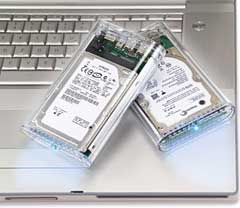 Immediately available and priced at $359.99, the Mercury
On-The-Go 500 GB portable drive is a palm-sized performer with huge
capacity that fits in a shirt pocket. Built with the latest reliable,
high-performance drive mechanisms and interfaced with OWC's custom
bridge solution featuring the Oxford 924 chipset, the Mercury On-The-Go
is ready for your largest projects yet.
Immediately available and priced at $359.99, the Mercury
On-The-Go 500 GB portable drive is a palm-sized performer with huge
capacity that fits in a shirt pocket. Built with the latest reliable,
high-performance drive mechanisms and interfaced with OWC's custom
bridge solution featuring the Oxford 924 chipset, the Mercury On-The-Go
is ready for your largest projects yet.
Built for the "On-The-Go" Road Warrior
Geared to the demanding "on-the-go" professional road warrior that requires dependable, high-performance storage, the OWC Mercury On-The-Go 500 GB portable drive is compatible with virtually all computers with an available FireWire or USB port, including all Macs and PCs. It also works with all FireWire and USB digital cameras, camcorders, and other gadgets, for an instant on-the-go portable storage solution to quickly and safely store all your digital photos and video while on the road.
With Mercury On-The-Go, you can back-up your entire desktop computer and bring it with you everywhere you go. For easy backup, the portable drive also includes the full retail software versions of the latest award-winning Prosoft DataBackup III for OS X and NovaStor NovaBackup for Windows.
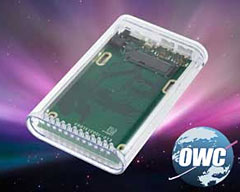 The Mercury On-The-Go is "Time Machine" ready, meaning
that it keeps an up-to-date copy of all of your files and documents
under OS X Leopard™, so you can go back in time, anytime, to
recover anything with ease.
The Mercury On-The-Go is "Time Machine" ready, meaning
that it keeps an up-to-date copy of all of your files and documents
under OS X Leopard™, so you can go back in time, anytime, to
recover anything with ease.
In addition to the Mercury On-The-Go 500 GB drive with 5400 RPM performance, OWC also offers a full line of On-The-Go models with USB 2.0, USB 2.0+eSATA, FireWire 400+USB 2.0, as well as additional FireWire 800/400+USB 2.0 models in capacities of 120 GB to 320 GB, priced from $97.99; and 7200 RPM Mercury On-The-Go models in capacities of 100 GB to 200 GB, priced from $119.99.
All Mercury On-The-Go portable drives are available immediately through OWC and other retailers. The drives ship with a carrying case; cables for all interfaces specific on-the-go model supports; Prosoft DataRescue III for OS X; and NovaStor NovaBackup for Windows. All drives are covered by a one-year warranty and are compatible with Apple OS Versions 8.5 through 9.2.x; Apple OS X 10.0.3 and higher (including the latest OS 10.5.x); and Microsoft Windows 98SE, ME, 2000, XP, Vista.
Link: Mercury On-The-Go
Bargain 'Books
Bargain 'Books are used unless otherwise indicated. New and refurbished units have a one-year Apple warranty and are eligible for AppleCare.
There are two different versions of WallStreet running at 233 MHz, the cacheless MainStreet version and the later Series II with a level 2 cache. It's not always possible to determine from the vendor's listing which is being offered, so we've included links within this paragraph to the two models. The same goes for the PowerBook G4/667 (VGA) and G4/667 (DVI), the titanium vs. aluminum 15" PowerBook G4 at 1 GHz, and 1.25 GHz to 1.5 GHz 15" PowerBooks.
PowerBook, iBook, and MacBook profiles linked in our Portable Mac Index.
Apple Store
Slim pickin's in 15" refurb MacBook Pros this week, although the single model available is probably the best deal of the bunch, being as the 15" Santa Rosa 2.2 GHz model comes with an LED display for just $1,449. There is also a fairly flush selection of 17" Pros and 13" MacBooks. Each model comes with an Apple one-year warranty, and ground shipping is free.
- refurb 2.0 GHz Core 2 MacBook, white, 1 GB/80/Combo, $849
- refurb 2.16 GHz Core 2 MacBook, white, 1 GB/120/SD, $949
- refurb 2.2 GHz Core 2 MacBook, white, 1 GB/120/SD, $999
- refurb 15" 2.2 GHz Core 2 MacBook Pro, 2 GB/120/SD, $1,449
- refurb 17" 2.4 GHz Core 2 MacBook Pro, 2 GB/160/SD, $1,899
- refurb 17" 2.4 GHz hi-res Core 2 MacBook Pro, 2 GB/160/SD, $2,299
- refurb 17" 2.6 GHz Core 2 MacBook Pro, 2 GB/160/SD, $2,299
- refurb 17" 2.6 GHz hi-res Core 2 MacBook Pro, 2 GB/160/SD, $2,499
TechRestore
- 15" PowerBook G4/667 (VGA), 256/30/Combo, $619.99
- 15" PowerBook G4/667 (DVI), 256/30/Combo, $629.99
- 15" PowerBook G4/1.67 GHz, 512/80/SD, APX, $899
Wegener Media
- 12" PowerBook G4/1 GHz, 256/40/Combo, $489.99
- 15" 1.83 GHz MacBook Pro, 512/80/SD, $1099.99
- 15" 2.0 GHz MacBook Pro, 512/80/SD, $1154.99
- 15" 2.0 GHz MacBook Pro, 512/100/SD, $1199.99
- 15" 2.16 GHz MacBook Pro, 1 GB/100/SD $1399.99
Baucom Computers
- 12" iBook G4/800, 640/30/Combo, $379
- 12" iBook G4/800, 640/30/Combo, APX, $410
- 12" iBook G4 1.07 GHz, 640/30/Combo, APX, $505
- 12" iBook G4 1.2 GHz, 512/30/Combo, APX, $599
Power Max
- open box 2.1 GHz Core 2 MacBook, white, 1 GB/120/Combo, $1,049
- open box 2.16 GHz Core 2 MacBook, white, 1/120/SD, warranty started, $1,099
- 2.16 GHz Core 2 MacBook, white, 1/120/SD, warranty started, $1,149
- open box 2.2 GHz Core 2 MacBook, black, 2 GB/160/SD, $1,299
- open box 2.4 GHz Core 2 MacBook, black, 2 GB/250/SD, $1,449
- open box 1.6 GHz MacBook Air, 2 GB/80, $1,749
- open box 15" 2.2 GHz Core 2 MacBook Pro, 2/120/SD, $1,599
- open box 15" 2.4 GHz Core 2 MacBook Pro, 2/160/SD, $1,799
- open box 17" 2.33 GHz Core 2 MacBook Pro, 2 GB/160/SD, $2,288
- refurb 17" 2.4 GHz Core 2 MacBook Pro, 2 GB/160/SD, warranty started, $2,088
- open box 17" 2.4 GHz Core 2 MacBook Pro, 2 GB/160/SD, warranty started, $2,399
- open box 17" 2.5 GHz Core 2 MacBook Pro, 2 GB/160/SD, $2,688
- 17" 2.6 GHz Core 2 MacBook Pro, 2 GB/160/SD, $2,699
PowerBook Guy
- clamshell iBook G3/300, Blueberry, 64/3/CD, $149.95
- clamshell iBook G3/300, Tangerine, 64/3/CD, $169.95
- clamshell iBook G3/366 SE, Graphite, 128/10/CD, $199.95
- 12" iBook G3/500, 128/10/CD, $199.95
- 12" iBook G3/500, 256/10/Combo, $279.95
- 12" iBook G3/800, 256/30/CD, $289.95
- Pismo PowerBook G3/400, 192/6/Zip, $269.95
- Pismo PowerBook G3/500, 256/15/Zip, $299.95
For deals on current and discontinued 'Books, see our 13" MacBook and MacBook Pro, MacBook Air, 13" MacBook Pro, 15" MacBook Pro, 17" MacBook Pro, 12" PowerBook G4, 15" PowerBook G4, 17" PowerBook G4, titanium PowerBook G4, iBook G4, PowerBook G3, and iBook G3 deals.
We also track iPad, iPhone, iPod touch, iPod classic, iPod nano, and iPod shuffle deals.
Join us on Facebook, follow us on Twitter or Google+, or subscribe to our RSS news feed
Links for the Day
- Mac of the Day: PowerBook 500 Series, introduced 1994.05.16. 'Blackbird' includes a 25 to 33 MHz 68040 along with smart batteries and grayscale or color displays.
- Support Low End Mac
Recent Content
About LEM Support Usage Privacy Contact
Follow Low End Mac on Twitter
Join Low End Mac on Facebook
Favorite Sites
MacSurfer
Cult of Mac
Shrine of Apple
MacInTouch
MyAppleMenu
InfoMac
The Mac Observer
Accelerate Your Mac
RetroMacCast
The Vintage Mac Museum
Deal Brothers
DealMac
Mac2Sell
Mac Driver Museum
JAG's House
System 6 Heaven
System 7 Today
the pickle's Low-End Mac FAQ
Affiliates
Amazon.com
The iTunes Store
PC Connection Express
Macgo Blu-ray Player
Parallels Desktop for Mac
eBay

