
The 'Book Review
Graphic Glitches Plague Penryn 'Books, MacBook Air Reassuringly Solid, 3D Notebook Mouse, and More
This Week's MacBook, PowerBook, and iBook News
Compiled by Charles Moore and edited by Dan Knight - 2008.04.18
All prices are in US dollars unless otherwise noted.
General Apple and Mac desktops is covered in The Mac News Review. iPod, iPhone, and Apple TV news is covered in The iNews Review.
News & Opinion
- Penryn-based 'Books Plagued with Graphics Glitches
- Mac OS X 10.5.3 to Fix QuickTime Distortion in Early 2008 MacBooks
- How to Add RAM to a MacBook Pro
- JP Morgan Ups Q2 Estimates for Apple on Strong MacBook Shipments
- MacRumors Buyer's Guide Updated
- Mossberg's Notebook Buyers Guide Recommends MacBooks
- MacBook Air Love Affair
- What to Expect in the New MacBooks
- Intel Builds Software Engine to Shrink Laptops and Mobiles
Reviews
Tech Trends
Products
- SpaceNavigator 3D Mouse for Notebooks
- LapWorks Combats Colorless Accessories with Bright Futura Laptop Desks
- Wegener Media Drops Prices on PowerBook Optical Drives, Combo Bundles
- Canon PIXMA iP100 Mobile Printer Appeals to On-the-Go Lifestyle
Bargain 'Books
News & Opinion
Penryn-based 'Books Plagued with Graphics Glitches
APC Magazine's Dan Warne reports:
"Apple's latest raft of MacBooks and MacBook Pros, based on Intel Penryn CPUs, are giving owners grief with frequent onscreen display corruption.
"Apple's latest notebooks - the MacBook and MacBook Pro with Penryn-class Core 2 Duo processors - should be the latest and greatest. Instead, many customers who've bought them are finding they're getting endless onscreen corruption and flickering.
"A long discussion thread on Apple's discussion forums describes the problem, which so far, has not been publicly acknowledged by Apple....
"The problems occur across both MacBooks - with Intel's GMA3100 graphics chipset - and MacBook Pros, with the Nvidia 8600M GT chipset."
Link: Apple's Latest Notebooks Plagued with Graphics Glitches
Mac OS X 10.5.3 to Fix QuickTime Distortion in Early 2008 MacBooks
MacFixIt reports:
"Numerous users of early 2008 MacBooks are reporting an issue in which video played back via QuickTime flickers or exhibits other distortion. This issue is appearing on factory-fresh systems running Mac OS X 10.5.2, indicating a potential bug in OS revision....
"...MacFixIt has learned that Mac OS X 10.5.3 will include specific fixes aimed at resolving this issue, specifically eliminating a 'graphics corruption issue.'"
Link: QuickTime Distortion in Early 2008 MacBooks; Mac OS X 10.5.3 to Fix (subscription required)
How to Add RAM to a MacBook Pro
Maria Langer says:
"I bought a 15-inch MacBook Pro about a year ago. I use it primarily as my 'test mule' - the computer I run software on when I'm writing about the software. But recently, I signed a contract to create a video training course for macPro Video. I'd record the video on my MacBook Pro using some high-end recording hardware. The hardware's install guide requires a minimum of 1 GB of RAM, which my MacBook Pro had. But it also recommended 2 GB of RAM. More RAM is always better than less, so I looked into upgrading.
"I found compatible RAM on the 4AllMemory.com Web site. Like most RAM suppliers, 4AllMemory makes it easy to find the right RAM for your computer by letting you tell it exactly which computer you have. In my case, I have a MacBook Pro 2.16 GHz 15.4-inch computer. The page for that computer offered a bunch of options.
"I was shocked by the price. And, as usual, I must digress to explain why."
Link: How to Add RAM to a MacBook Pro
JP Morgan Ups Q2 Estimates for Apple on Strong MacBook Shipments
Reuters reports:
"J.P. Morgan Securities raised its second quarter and 2008 estimates for Apple Inc., saying stronger-than-expected MacBook shipments in the quarter will offset softer iPhone and iPod sales....
"Mac shipments in the quarter are now expected to be 2.11 million, above prior expectations of 1.97 million...."
Link: JPM Ups Q2, '08 Estimates for Apple on Strong MacBook Shipments
MacRumors Buyer's Guide Updated
PR: The MacRumors Buyer's Guide provides a product summary for each Apple model. The intent is to provide best-guess recommendations regarding current product cycles, and to provide a summary of currently available rumors for each model.
Note that the page is based on rumors and speculation and MacRumors provide no guarantee to its accuracy.
Link: MacRumors Buyer's Guide Updated
Mossberg's Notebook Buyers Guide Recommends MacBooks
The Apple Core's Jason D. O'Grady says:
"The Wall Street Journal's Walt Mossberg has changed the focus of his twice-a-year computer buyer's guides from desktop PCs to notebooks because portables have been outselling desktops since May 2004.
"In his recent installment (which focuses on 'mainstream, nontechnical consumers' and not 'heavy gamers, video producers or corporate buyers') he recommends a Mac over a PC."
Link: Surprise! Mossberg's Notebook Buyers Guide Recommends Macs
MacBook Air Love Affair
The Chicago Tribune's Eric Benderoff says:
"I adore Apple's MacBook Air so much I'm starting to think I can live with its shortcomings. At 3 pounds and about as thick as a weekly magazine, this is the most endearing laptop I've ever used.
"But if you've read anything about this remarkably thin beauty, you know it achieved its fine figure because it lacks an optical disc drive, offers only one USB hub and, perhaps its biggest blemish, has a hard drive of only 80 gigabytes....
"I use a laptop as a primary home computer. Now I'm starting to think that with some discipline and a modest spending spree on auxiliary storage gear, I can change my computing habits.
"That's the magic of the Air. You're willing to make life-changing sacrifices, like moving across the country for a woman, to have one.
"But can I afford to fall in love with a computer?....
"I don't think I'm ready for the commitment the Air wants."
Link: Apple's MacBook Air Love Affair
What to Expect in the New MacBooks
Mac360's Ron McElfresh says:
"My PowerBook is showing it's age, now just over five years old. I need a replacement. Buy now? Or, wait awhile?
"This time I'm waiting until the next generation of Mac notebooks. Why? What's coming? Less of the same. Much less.
"Don't get me wrong. My Mac PowerBook, one of the original 17-inch aluminum body machines has been the best Mac I've ever owned. Ever.
"Do I want another Mac notebook? You bet I do....
"I'm waiting for the next new line of Mac notebooks which I expect will be faster, cooler, thinner, lighter....
"Not just thinner, but ultra thin, and probably wedge shaped. Wedge? Yes, the MacBook Air is a wedge, thicker in the back near the screen hinge, and very thin at the front near the touchpad.
"If you think about it, what else can Apple do with the MacBook Pro models?"
Link: What to Expect with the New Mac Notebooks
Intel Builds Software Engine to Shrink Laptops and Mobiles
The Register Hardware's Phil Manchester reports:
"Intel has given a glimpse of the software its building so mobile computers can detect and communicate with a variety of devices, reducing the size of machine you need to lug about.
"Lester Memmott, a senior architect in Intel's software pathfinding and innovation group, has revealed the existence of an experimental context-aware computing engine that could provide the framework for this next generation of mobile devices and applications."
Link: Intel Builds Software Engine to Shrink Laptops and Mobiles
Reviews
'Reassuring Solidity' of the MacBook Air
The Register Hardware's Tony Smith reports:
"Apple's MacBook Air has polarised opinion, not just between the company's fans and everyone else, but even within the Mac community itself. It's expensive, it's arguably underpowered and certainly has very limited expansion opportunities.
"On the other hand, it's ridiculously thin and is a truly gorgeous-looking object. We were sceptical about the Air when it was announced, back in January. But now it's available there was nothing for it: we had to try it out ourselves.
"...the Air's not without its flaws . . . the very spartan array of ports . . . the design of cooling system. The Air pulls air in through the keyboard and vents it out of a grille on the base, or vice versa. That's fine when you're using the air on a desk, where the airflow will be unimpeded, but it makes it tricky to use perched on your thighs. Do so and you'll block the vents....
"As it turned out, we didn't mind the absence of an optical drive or multiple USB ports either, but that's no excuse for not building either an extra USB or a FireWire port into the Air's array, and an Ethernet socket, for that matter....
"This is style over substance in the very best possible way."
Link: Apple MacBook Air
Tech Trends
'Racetrack Memory' Could Lead to 2 TB MacBook Air
The Times' Jonathan Richards says:
"A new storage technology will pave the way for MP3 players and other gadgets to store a hundred times more information.
"Mobile phones, iPods and other consumer devices may soon be able to hold a hundred times more information than they do at present thanks to a breakthrough in storage technology.
"Scientists at IBM say they have developed a new type of digital storage which would enable a device such as an MP3 player to store about half a million songs - or 3,500 films - and cost far less to produce.
"In a paper published in the current issue of Science, a team at the company's research centre in San Jose, California, said that devices which use the new technology would require much less power, would run on a single battery charge for 'weeks at a time', and would last for decades.
"So-called 'racetrack' memory uses the 'spin' of an electron to store data, and can operate far more quickly than regular hard drives."
"Unlike flash, however, it can 'write data' - or store information - extremely quickly, and does not have the 'wear out' mechanism that means flash memory drives can only be used a few thousand times before they wear out."
"IBM said the technology was still 'exploratory' at this stage, but that it expected devices which used it to be on the market within ten years."
Link: The New Chip That Will Let an iPod Store 500,000 Songs
Products
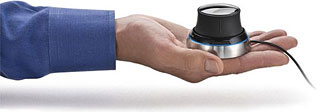
SpaceNavigator 3D Mouse for Notebooks
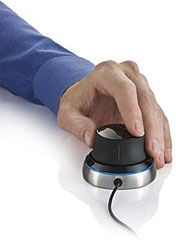 PR: 3Dconnexion, a Logitech
company, has announced the newest addition to its award-winning 3D
mouse product line - the SpaceNavigator for Notebooks. Designed for
on-the-go 3D professionals and enthusiasts, the SpaceNavigator for
Notebooks enables a precise, rich 3D experience in a compact, mobile
design that's only half the weight of its desktop counterpart - the
SpaceNavigator.
PR: 3Dconnexion, a Logitech
company, has announced the newest addition to its award-winning 3D
mouse product line - the SpaceNavigator for Notebooks. Designed for
on-the-go 3D professionals and enthusiasts, the SpaceNavigator for
Notebooks enables a precise, rich 3D experience in a compact, mobile
design that's only half the weight of its desktop counterpart - the
SpaceNavigator.
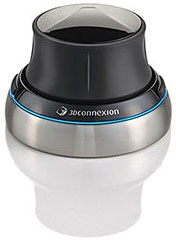 "As the notebook market continues to
grow and more and more people carry their laptops with them, there is a
greater need for advanced mobile input devices," said Dieter Neujahr,
president of 3Dconnexion. "This new 3D mouse encompasses a
sophisticated design to address the need for portability in many
environments, without sacrificing the intuitive 3D navigation and
improved design experience our customers have come to expect from
3Dconnexion's product line."
"As the notebook market continues to
grow and more and more people carry their laptops with them, there is a
greater need for advanced mobile input devices," said Dieter Neujahr,
president of 3Dconnexion. "This new 3D mouse encompasses a
sophisticated design to address the need for portability in many
environments, without sacrificing the intuitive 3D navigation and
improved design experience our customers have come to expect from
3Dconnexion's product line."
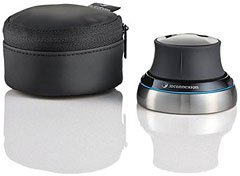
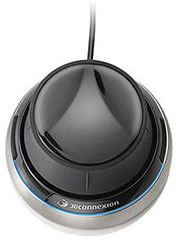
The SpaceNavigator for Notebooks offers the same benefits as the original SpaceNavigator - effortless movement and control within 3D workspaces - but also includes a new cap design for more immersive and natural interactions within 3D applications. Designed to withstand the wear and tear of travel, the SpaceNavigator for Notebooks easily slips into a laptop bag and comes with a convenient travel case for easy transport. Its small footprint makes the device easy to use anywhere - at home, work, or at remote locations.
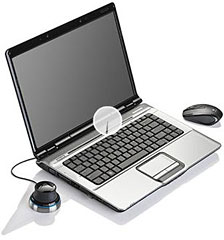 Unlike mice confined to motion on a
flat plane, 3Dconnexion's 3D mice allow effortless movement and control
within 3D workspaces. Gently lift, press and turn the control cap to
fly through 3D space while simultaneously zooming and rotating the view
with fluid and highly intuitive control. An increase in pressure
accelerates motion, while a decrease in pressure slows motion for
precise micro-adjustments.
Unlike mice confined to motion on a
flat plane, 3Dconnexion's 3D mice allow effortless movement and control
within 3D workspaces. Gently lift, press and turn the control cap to
fly through 3D space while simultaneously zooming and rotating the view
with fluid and highly intuitive control. An increase in pressure
accelerates motion, while a decrease in pressure slows motion for
precise micro-adjustments.
 3Dconnexion provides advanced and
affordable 3D mice that are supported by more than 120 of today's most
popular 3D applications, including Adobe Photoshop CS3 Extended and
Acrobat 3D, Autodesk Inventor, AutoCAD, 3ds Max, and Maya, Blender,
CATIA, Google Earth and SketchUp, Microsoft Virtual Earth, NX,
Pro/ENGINEER, SolidWorks, and many other CAD, DCC, AEC, and GIS
applications. For a complete list of applications supported by
3Dconnexion, visit:
3Dconnexion provides advanced and
affordable 3D mice that are supported by more than 120 of today's most
popular 3D applications, including Adobe Photoshop CS3 Extended and
Acrobat 3D, Autodesk Inventor, AutoCAD, 3ds Max, and Maya, Blender,
CATIA, Google Earth and SketchUp, Microsoft Virtual Earth, NX,
Pro/ENGINEER, SolidWorks, and many other CAD, DCC, AEC, and GIS
applications. For a complete list of applications supported by
3Dconnexion, visit:
http://www.3dconnexion.com/solutions/cad/all_sup_app.php
 System requirements:
The SpaceNavigator for Notebooks is supported by all major operating systems, including Windows 2000, Windows XP, Windows Vista, Macintosh OS X 10.4.6 or later, and Linux (Redhat Enterprise Linux WS 3, SuSE 9.0 or later).
- Macintosh
- Dual-Core or Core Duo processor based system, 512 MB RAM
- or 1 GHz G4 or higher, 512 MB RAM
- 10 MB available hard disk space for driver and plug-in installation
- USB 1.1 or 2.0
- Mac OS X 10.4.6 or later
- Windows
- Intel Pentium 4/III or AMD/Athlon processor based system
- 140 Megabytes free disk space for driver and plug-in installation
- USB 1.1 or 2.0
- Windows Vista 32-bit or 64-bit
- Windows XP SP2, x86 or x64
- Windows 2000 SP4
- Linux
- Linux (Redhat Enterprise Linux WS 3, SuSE 9.0 or greater)
 The SpaceNavigator for Notebooks is
backed by a 2-year limited hardware warranty, and is currently
available for the suggested retail price of $129. The entire
3Dconnexion product line, including the SpaceNavigator Personal Edition
(MSRP $59), SpaceNavigator Standard Edition (MSRP $99), SpaceExplorer
(MSRP $299), and SpacePilot (MSRP $399) are available from major online
resellers including Amazon.com,
Buy.com, CDW,
Dell, and PCMall, as well as
directly at3Dconnexion.com. In addition, the SpaceNavigator for
Notebooks will be available in early May at Logitech.com.
The SpaceNavigator for Notebooks is
backed by a 2-year limited hardware warranty, and is currently
available for the suggested retail price of $129. The entire
3Dconnexion product line, including the SpaceNavigator Personal Edition
(MSRP $59), SpaceNavigator Standard Edition (MSRP $99), SpaceExplorer
(MSRP $299), and SpacePilot (MSRP $399) are available from major online
resellers including Amazon.com,
Buy.com, CDW,
Dell, and PCMall, as well as
directly at3Dconnexion.com. In addition, the SpaceNavigator for
Notebooks will be available in early May at Logitech.com.
3Dconnexion, a wholly owned subsidiary of Logitech, is the leading provider of 3D mice for 3D design and visualization. 3Dconnexion devices support today's most popular and powerful 3D applications by offering users a more intuitive and natural way to interact with computer-generated 3D content. 3Dconnexion's award-winning 3D mice serve a wide variety of industries and are used by 3D designers, animators and artists worldwide. 3Dconnexion is headquartered in Fremont, Calif., with European headquarters in Seefeld, Germany, and offices worldwide.
Link: SpaceNavigator for Notebooks
LapWorks Combats Colorless Accessories with Bright Futura Laptop Desks
PR: In a bid to brighten the traditionally gray PC and laptop accessories market, LapWorks Inc. today launched the first eight in its new line of colorful printed Laptop Desk Futura laptop coolers. LapWorks plans to expand the program with a variety of colors and patterns, polling its customers and offering one or more new option every month throughout 2008. The colorful Laptop Desk Futuras are available from LapWorks for $49.95, initially in four solids and four patterns:
- Deep Red
- Bustin' Blue
- Passion Pink
- Tempting Teal
- Largely Leopard
- Desert Camou
- Jungle Camou
- Red Marble
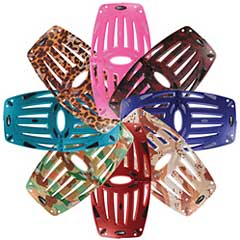 Customers get to choose final touches on their laptop
cooler, such as matte or semi-gloss finish, and black or translucent
no-slip rubber pads. Order turnaround time is approximately five
business days.
Customers get to choose final touches on their laptop
cooler, such as matte or semi-gloss finish, and black or translucent
no-slip rubber pads. Order turnaround time is approximately five
business days.
About the inkjet Printing Process:
"We wanted people to have some fun without having to shell out big bucks," said Jose Calero, LapWorks' president. "So we searched for a top quality graphic process that wouldn't price us out of the ballpark."
Calero continued, "We chose a new, highly specialized UV inkjet printer that applies a heavy coat of industrial-grade ink to both sides of the Futura that hardens when exposed to UV light. We believe LapWorks is the first to print a three-dimensional product using this process. The printer can reproduce any color or pattern on the Futura, giving us an opportunity to provide a wide variety of choices."
The UV-cured ink has a similar hardness to automotive paint, and a final coat of matte or semi-gloss acrylic further protects the colored surface.
Finally, to give each Futura a finished look, LapWorks airbrushes the outside edges with automotive-grade paint to match the printing. This is necessary because the ink jets spray downward only, leaving the 1/2 -inch curved outer edges of the Futura with only a smattering of ink.
Because each Futura is custom-made, LapWorks is offering its customers a two-week window to inspect the product and return it, unused and in original packaging, for a full refund if it isn't to their liking.
In the coming months LapWorks will also accept $69.95 custom printing orders if customers provide a high-resolution 300 dpi image in CMYK at 12" wide by 22" long.
 About the Laptop
Desk Futura:
About the Laptop
Desk Futura:
Like its Laptop Desk 2.0 and UltraLite siblings, the Laptop Desk Futura's dual-purpose design provides an ergonomically sound workspace across the lap, and folds into a wedge-shaped stand for desk use. An oval-shaped burst pattern differentiates the Futura design, which comes standard in 'gunmetal' gray for $29.95.
The Futura features heat-conducting ABS plastic which resists heat buildup, open ventilation slots which allow hot air to rise and escape, and a 1/8-inch air space using rubber pads that lift the laptop from the Futura to allow cool air to circulate under the notebook, all combining to cool a laptop by 15% to 20%.
"Constant overheating will shorten a laptop's life," explained Calero. "You could think of a laptop cooler as an affordable extended warranty for a laptop."
The Laptop Desk Futura is lightweight (16 ounces), and folds in half to 11 x 10 inches and one-half of an inch thick for easy traveling in any computer bag. Soft nonskid rubber keeps portables from slipping. It carries a one-year warranty.
For customers who prefer an external mouse when using a laptop on their lap, LapWorks plans to announce shortly a snap-on MouzPad to expand the Futura's mousing area.
Link: Painted Laptop Desk Futura
Wegener Media Drops Prices on PowerBook Optical Drives, Combo Bundles
PR: David Wegener of Wegener Media writes:
"We've just done a pretty huge price drop on all the opticals (this week), and we've done a bunch of combination offers.
Check them out:
- 8x Combo Drive - 24x CD-R,8x CD-RW, 8x DVD, 24x CD - Complete Drive - just slide in and use - $99.99
- 24x Combo Drive - 24x CD-R,16x CD-RW, 8x DVD, 24x CD- Complete Drive - just slide in and use. Get $40 back when you send your dead unit back - $99.99
- 8x SUPER Drive - 8x DVD-R+/-,24x CD-R,24x CD-RW, 8x DVD, 24x CDROM - Dual-layer. the fastest drive available, now for your Pismo. - Complete Drive - just slide in and use Get $40 back when you send your dead unit back - $159.99
- 2x SUPER Drive 2x DVD-R,16x CD-R,10x CD-RW, 8x DVD, 24x CD - Complete Drive - just slide in and use. Get $40 back when you send your dead unit back - $109.99
- 8x Combo Kit - 24x CD-R,8x CD-RW, 8x DVD, 24x CD kit (Drive with faceplate, installation kit, instructions) - $49.99
- 24x Combo Kit - 24x CD-R,24x CD-RW, 8x DVD, 24x CD kit (Drive with faceplate, installation kit, instructions) - $79.99
- 8x SUPER Drive Kit - 8x DVD-R+/-,24x CD-R,24x CD-RW, 8x DVD, 24x CDROM - Dual-layer the fastest drive available, now for your Pismo (Drive with faceplate, installation kit, instructions) - $139.99
- 2x SuperDrive KIT - 2x DVD-R,16x CD-R,10x CD-RW, 8x DVD, 24x CD kit (Drive with faceplate, installation kit, instructions) - $99.99
Processor & RAM Combo Bundles
G4 Processor upgrade kit and 1 GB RAM. - $275 after rebate ($30 discount).
$60 core charge added - will be rebated after you send the good core back. - $274.99
G4 Processor upgrade kit and 24x Combo Slot Kit - $265 after rebate ($40 discount) - $60 core charge added - will be rebated after you send the good core back. - $264.99
Processor & Battery Combo Bundles
G4 Processor upgrade kit and 6000 mAh Battery - $260 after rebate ($50 discount). - $60 core charge added - will be rebated after you send the good core back to us. - $269.99
Drive Kits with RAM
Buy as a kit, use your old drive frame, and save $$. Requires an easy, 3 minute installation. VERY EASY installation: photo guide is included. All electronics are new-you'll just use your old plastic drive frame (the black plastic on the bottom of your drive. Just remove 4 small screws, slide old out, and new drive set in.
24x Combo Kit & 1 GB 24x CD-RW/8x DVD kit, and 1 GB RAM (save $60) - $159.99
8x DL-SD Drive Kit & 1 GB RAM
8x Dual Layer SD with 1 GB RAM
The fastest optical drive available with a matching faceplate for your Pismo. Now with 1 GB RAM. Save $30 off regular pricing - $219.99
2x SuperDrive KIT & 1 GB RAM 2x DVD-R, 16x CD-RW Combo drive kit, with 1 GB RAM - $179.99
Canon PIXMA iP100 Mobile Printer Appeals to On-the-Go Lifestyle
PR: Today's mobile professional has more pressure than ever to be able to conduct business almost anywhere. The new PIXMA iP100 Mobile Printer from Canon USA, a leader in digital imaging, not only can address printing needs on-the-go, but can also deliver high-quality text and graphics for printing a last-minute business presentation. It affords users the ability to print beautiful borderless color photos from the car or even at the beach. Continuing Canon's history of outstanding quality in the mobile printer category, this printer has increased color resolution with faster printing speeds than previous models, while offering a number of accessories that make it easier to conduct business outside of the office. The lightweight Canon PIXMA iP100 Mobile Printer fits easily onto a desk with limited space or into a carryon making it the perfect laptop companion for business or personal travel. With size being just one-half of the story, today's on-the-go professional demands the highest level of quality and convenience to meet the demands of business.
The PIXMA iP100 Mobile Printer's new sleek and stylish design has a number of new exclusive features including increased color resolution to a maximum 9600 x 2400 dpi, the first-ever mobile printer to have a minimum one picoliter droplet size, and increased print speed as well. In addition, there will be two black inks, one a pigment-based black ink that delivers laser-like sharp text and another for printing rich photos. The overall size of the pigment black ink tank has been increased by 50%, reducing the risk of running out of ink during a last-minute project.
A Canon first in the mobile printer category will be the addition of Auto Image Fix technology. When using a laptop, this technology automatically analyzes and categorizes the scenes in photographs and optimizes print output for each individual scene in accordance with the scene type, such as Portrait, Scenery, Snapshot, etc.
"There has never been a greater need for mobile technology than now. Being able to complete your job during any situation and have it look better than your competition is a very real issue," said Yuichi Ishizuka, senior vice president and general manager of the Consumer Imaging Group at Canon USA "Canon raises the bar in meeting this need with the new PIXMA iP100 Mobile Printer."
This PIXMA iP100 Mobile Printer proves its versatility by providing quality color and monochrome business documents, charts and graphs, as well as stunning photo quality prints. With print speeds of up to 20 pages-per-minute (ppm) for black and up to 14 ppm for color, this new mobile printer can deliver client-ready projects faster than previous models. The PictBridge port allows the busy business professional the option to print high-quality photographs from a compatible digital camera or DV camcorder without a computer. Having the ability to print out borderless, photo-lab quality prints in 4-x 6 inch, 4-x 8 inch, 5-x 7 inch, 8-x 10 inch, and letter size, makes this printer an ideal solution for the real estate professional who is now able to let clients walk away with images of a prospective home, or assist insurance investigators as they document claims faster and more efficiently. Consumers have the option to print wirelessly from the built-in IrDA port or from select Bluetooth enabled cellular phones and computers with the new optional user installable Bluetooth Unit BU-304, which has an estimated selling price of $49.995.
The PIXMA iP100 Mobile Printer features a standard USB 2.0 Hi-Speed connection. To match the new design of the printer, Canon will offer the optional LK-62 Lithium Ion battery with an approximate 290 page life per three-hour charge, along with the battery housing that connects to the printer, for an estimated selling price of $99.99.5 Mobile professionals on-the-go will especially benefit from the optional Automobile Power Unit (PU-200U). Users who frequently work from their car can use the Automobile Power Unit to power their PIXMA iP100 Mobile Printer directly through a car power socket. The Automobile Power Unit has an estimated selling price of $89.995. The PIXMA iP100 Mobile Printer has an estimated selling price of $249.99.
Link: Canon USA
Bargain 'Books
Bargain 'Books are used unless otherwise indicated. New and refurbished units have a one-year Apple warranty and are eligible for AppleCare.
There are two different versions of WallStreet running at 233 MHz, the cacheless MainStreet version and the later Series II with a level 2 cache. It's not always possible to determine from the vendor's listing which is being offered, so we've included links within this paragraph to the two models. The same goes for the PowerBook G4/667 (VGA) and G4/667 (DVI), the titanium vs. aluminum 15" PowerBook G4 at 1 GHz, and 1.25 GHz to 1.5 GHz 15" PowerBooks.
PowerBook, iBook, and MacBook profiles linked in our Portable Mac Index.
Apple Store
New this week: 2.6 GHz 15" and 2.33 GHz 17" MacBook Pros at $1,849 and $1,899 respectively, and just one MacBook model in stock. Each model comes with an Apple one-year warranty, and ground shipping is free.
- refurb 2.2 GHz Core 2 MacBook, white, 1 GB/120/SD, $999
- refurb 15" 2.2 GHz Core 2 MacBook Pro, 2 GB/120/SD, $1,449
- refurb 15" 2.4 GHz Core 2 MacBook Pro, 2 GB/160/SD, $1,649
- refurb 15" 2.6 GHz Core 2 MacBook Pro, 2 GB/160/SD, $1,849
- refurb 17" 2.4 GHz Core 2 MacBook Pro, 2 GB/160/SD, $1,899
- refurb 17" 2.4 GHz Core 2 MacBook Pro, 2 GB/160/SD, $2,099
- refurb 17" 2.4 GHz hi-res Core 2 MacBook Pro, 2 GB/160/SD, $2,299
- refurb 17" 2.6 GHz Core 2 MacBook Pro, 2 GB/160/SD, $2,299
- refurb 17" 2.6 GHz hi-res Core 2 MacBook Pro, 2 GB/160/SD, $2,499
TechRestore
- 15" PowerBook G4/667 (VGA), 256/30/Combo, $619.99
- 15" PowerBook G4/667 (DVI), 256/30/Combo, $629.99
Wegener Media
- 12" PowerBook G4/1 GHz, 256/40/Combo, $489.99
- 17" PowerBook G4/1 GHz, 512/60/SD, $789.99
- 17" PowerBook G4/1.33 GHz, 512/80/SD, $849.99
- 17" PowerBook G4/1.5 GHz, 1 GB/100/SD, $934.99
- 17" PowerBook G4/1.67 GHz, 1 GB/100/SD, $959.99
Baucom Computers
- 12" iBook G4/800, 640/30/Combo, $379
- 12" iBook G4/800, 640/30/Combo, APX, $410
- 12" iBook G4 1.07 GHz, 640/30/Combo, APX, $505
- 12" iBook G4 1.2 GHz, 512/30/Combo, APX, $599

- open box 2.1 GHz Core 2 MacBook, white, 1 GB/120/Combo, $1,049
- open box 2.16 GHz Core 2 MacBook, white, 1/120/SD, warranty started, $1,099
- open box 2.2 GHz Core 2 MacBook, black, 2 GB/160/SD, $1,299
- open box 2.4 GHz Core 2 MacBook, black, 2 GB/250/SD, $1,449
- open box 15" 2.16 GHz Core 2 MacBook Pro, 2 GB/120/SD, $1,749
- open box 15" 2.2 GHz Core 2 MacBook Pro, 2/120/SD, $1,599
- open box 15" 2.2 GHz Core 2 MacBook Pro, 2/120/SD, $1,639
- open box 15" 2.4 GHz Core 2 MacBook Pro, 2/160/SD, $1,799
- open box 17" 2.33 GHz Core 2 MacBook Pro, 2 GB/160/SD, $2,288
- refurb 17" 2.4 GHz Core 2 MacBook Pro, 2 GB/160/SD, warranty started, $2,088
- open box 17" 2.4 GHz Core 2 MacBook Pro, 2 GB/160/SD, warranty started, $2,399
- open box 17" 2.5 GHz Core 2 MacBook Pro, 2 GB/160/SD, $2,688
- 17" 2.6 GHz Core 2 MacBook Pro, 2 GB/160/SD, $2,699

- clamshell iBook G3/300, Blueberry, 64/3/CD, $149.95
- clamshell iBook G3/300, Tangerine, 64/3/CD, $169.95
- clamshell iBook G3/366 SE, Graphite, 128/10/CD, $199.95
- 12" iBook G3/500, 128/10/CD, $199.95
- 12" iBook G3/500, 256/10/Combo, $279.95
- 12" iBook G3/800, 256/30/CD, $289.95
- Pismo PowerBook G3/400, 192/6/Zip, $269.95
For deals on current and discontinued 'Books, see our 13" MacBook and MacBook Pro, MacBook Air, 13" MacBook Pro, 15" MacBook Pro, 17" MacBook Pro, 12" PowerBook G4, 15" PowerBook G4, 17" PowerBook G4, titanium PowerBook G4, iBook G4, PowerBook G3, and iBook G3 deals.
We also track iPad, iPhone, iPod touch, iPod classic, iPod nano, and iPod shuffle deals.
Join us on Facebook, follow us on Twitter or Google+, or subscribe to our RSS news feed
Links for the Day
- Mac of the Day: PowerBook 500 Series, introduced 1994.05.16. 'Blackbird' includes a 25 to 33 MHz 68040 along with smart batteries and grayscale or color displays.
- Support Low End Mac
Recent Content
About LEM Support Usage Privacy Contact
Follow Low End Mac on Twitter
Join Low End Mac on Facebook
Favorite Sites
MacSurfer
Cult of Mac
Shrine of Apple
MacInTouch
MyAppleMenu
InfoMac
The Mac Observer
Accelerate Your Mac
RetroMacCast
The Vintage Mac Museum
Deal Brothers
DealMac
Mac2Sell
Mac Driver Museum
JAG's House
System 6 Heaven
System 7 Today
the pickle's Low-End Mac FAQ
Affiliates
Amazon.com
The iTunes Store
PC Connection Express
Macgo Blu-ray Player
Parallels Desktop for Mac
eBay

