
The 'Book Review
MacBook Apple's Best Yet, Unexpected Performance Differences, Case Discoloration, and SATA Drives
This Week's Mac Notebook News
Compiled by Charles Moore and edited by Dan Knight - 2006.06.15
MacBook Special Report
Reviewers continue to rave about the MacBook, including the sharp display, unusual keyboard, battery life, value, and performance. Macworld has updated their review to cover both black and white MacBooks, and they've uncovered a real performance difference depending on which hard drive is installed.
Some MacBook owners are experiencing case discoloration. We've included a photo, a link, and one suggestion for cleaning up the problem. And Trans Intl has upgrade hard drives available for the MacBook.
General Apple and Mac desktop news is covered in The Mac News Review. News about Apple's transition to Intel CPUs and other Intel developments is covered in The Macintel Report.
- MacBook 'Best Apple Laptop So Far'
- MacBook 'Smashing'
- 'Absolutely My Favorite Laptop Ever'
- Black and White MacBook Performance Differences
- Macworld MacBook Review Updated
- MacBook a Good Choice, Competitively Priced
- New MacBook: Tool or Art Object?
- MacBook Discoloration
- Serial-ATA Mobile Drives for the MacBook
MacBook 'Best Apple Laptop So Far'
MacBookLive says:
"I am certainly willing to admit when I am wrong, and boy was I wrong on this one. After writing about how unimpressed I was with my initial impressions of the new MacBook, I had a chance to play with one at the Apple Store. I left with a black MacBook under my arm.
"I've had a lot of Apple laptops. If I took the time to count them all up, I'm certain I've had at least one of every model since my first, a Duo 230 in 1993. This new MacBook beats 'em all. Soundly.
"As you may recall, I had concerns about the glossy screen on the new MacBooks. At the Apple Store (and now at my home, office, and outside for the last two weeks) I had no real problems with reflectivity issues. And the brightness and crispness of text and images is worlds apart from previous PowerBooks and iBooks. After a long day of working on my PowerBooks in the past, my eyes would more often than not be bloodshot and hurt. I haven't experienced this at all with the new MacBook. The brightness and clarity are very much worth any minor inconvenience of having to shift my position a couple of inches to negate the occasional glare....
"The keyboard is one of my favorite things about the new MacBook. Its firm, crisp, with a short travel and absolutely zero flex. It's just an awesome design. The best keyboard I've ever used on an Apple laptop...
"And the build quality is far and away the best of any Apple laptop ever released."
MacBook 'Smashing'
"With two exceptions, Apple has always made excellent portable computers.
"Ignoring the Apple Portable (over 10 kg) and the 5300 (some caught fire), Apple's laptops have been examples of how to design and build a notebook computer."
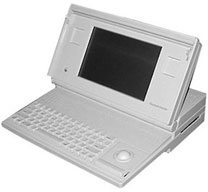 Editor's note: The Mac Portable was a pretty
good computer in the context of its time, just not great as a
laptop at 16 hulking pounds (a lead-acid battery didn't help,
although it did provide a long runtime between charges).
Editor's note: The Mac Portable was a pretty
good computer in the context of its time, just not great as a
laptop at 16 hulking pounds (a lead-acid battery didn't help,
although it did provide a long runtime between charges).
I've only seen one documented account of a PowerBook 5300 catching fire - actually the LiIon battery caught fire, and it was in an Apple test lab. The few 5300s in the distribution pipeline at the time were recalled, and their batteries replaced with NiMH units that were completely reliable. The 5300 had issues, but spontaneous combustion wasn't one of them, urban legend mythology notwithstanding. cm
"With the switch to Intel Core Duo processors, it's now possible to run Windows on these computers as well as the Mac operating system - albeit with the experimental Apple Boot Camp software....
"The MacBook's screen is glossy.... The glossy screen shows off blacks and whites well, but fluorescent lighting also splashes off the screen - we're undecided as to whether this is a better deal.
"The keyboard is pretty odd-looking, with keys mounted individually in the case, but in use is very comfortable. The trackpad is of the same relative proportions as the screen, and dragging two fingers across it instead of one allows you to scroll up, down and sideways."
'Absolutely My Favorite Laptop Ever'
Digital Trends' Jason Tomczak reports:
"The first and most obvious design feature of the MacBook is that it comes in two colors - white and black. Internally, the white and black MacBooks are exactly the same. The only non-customizable difference between the black and white MacBooks is a $200 premium for the black encasing.
"As a matter of genealogy, the white MacBook has the same basic design features as the iBook - glossy white body, standard FireWire, USB 2.0, Ethernet, external video and audio ports. Apple has removed ye olde dialup modem and carrier-pigeon ports from its newest line of portable and desktop computers and in doing so, has ordered us to wake up and smell the broadband. While the MacBook Pro comes with an ExpressCard/34 slot (an upgrade from the PCMCIA slot in PowerBooks), the MacBook does not. The iBook never had a PCMCIA card slot, nor did the 12" PowerBook, so not too many people are losing sleep over the absence of an ExpressCard slot....
"AppleDesigned the MacBook with a very quiet 4x SuperDrive (or Combo drive on the base model). This is the exact same SuperDrive being installed in current MacBook Pros. Even though the SuperDrive is only 4x, it burns CDs and DVDs quickly and stably. The 4x SuperDrive can read dual-layer DVDs, but it can only burn single layer disks."
- Link: Apple MacBook 2.0 GHz
Black and White MacBook Performance Differences
Macworld's James Galbraith reports:
"When we first posted our review of Apple's new MacBooks, we didn't include a mouse rating or benchmark results for the white 2.0 GHz model. The reason for this omission? While we were able to get our hands on the 1.83 GHz and black 2 GHz MacBooks fairly quickly, it took a little longer to track down that third model.
"Well, the white 2 GHz configuration arrived finally, so we put the laptop through our battery of tests. You might think, 'Why did they bother?' After all, aside from the case color, the only other difference between the white and black 2 GHz MacBook is the hard drive - a 60 GB 5,400-rpm drive in the white model and an 80 GB, 5,400-rpm one in the black. And if you were to look at their scores on our overall system performance testing tool, Speedmark, you would find data to back up that position.
"However, the differences in some of the individual tests that make up Speedmark were big enough that we rushed the black the MacBook back from its offsite photo shoot to run some more tests. After testing the white 2 GHz MacBook and comparing the results to the published scores of the black model, we saw small performance differences in many of the tests, with the edge going to the white model in most cases...."
Editor's note: We looked at this issue on Low End Mac yesterday. See Drive Matters for more on the differences between hard drives. dk
Macworld MacBook Review Updated
Macworld's Jonathan Seff reports:
"Even though Apple no longer offers a laptop for less than $1,000, the improvements built into the new MacBooks are well worth the added cost. Despite minor flaws, the MacBooks are a great choice for people who want a laptop, but who don't need the fastest model available, or who don't play 3-D games that require speedy frame rates. And with its first black model in years, Apple has given all laptop users a reason to covet the MacBook....
"The new MacBooks performed well overall, and especially in our processor-intensive native application tests, where they even outperformed the 1.5 GHz 12-inch PowerBook...
"What's more interesting is how little you give up by sticking with the least expensive model - not surprising, perhaps, given the relatively close speeds of the processors inside, but very nice in that Apple hasn't crippled its entry-level laptop.
"As with all Intel-based Macs, however, applications that have not yet been updated to run natively on Intel chips must use Apple's Rosetta dynamic translation technology, and those apps perform much more slowly than they do on older PowerPC-based Macs.
"In our Photoshop CS2 tests, for example, the 1.83 GHz MacBook took almost 68 percent longer to complete our suite of tests than the 12-inch PowerBook, while the 2.0 GHz MacBook took 53 percent longer (this was the biggest difference between the two MacBook speeds in our benchmark tests)."
MacBook a Good Choice, Competitively Priced
The Wall Street Journal's Walter S. Mossberg says:
"I reviewed the MacBook Pro earlier this year, and lately I've been testing the new MacBook, a handsome machine that packs a very good screen and keyboard into a fairly thin enclosure and is surprisingly inexpensive.
"There's a lot to like about the MacBook. It's a very good choice for anyone considering a Mac and operating on a tight budget. Like the other Intel-based Macs, it can even run Windows alongside Apple's own Mac OS X operating system. But it is missing some key features that are standard on Windows-based laptops, and it is heavy compared with its closest Windows competitor.
"The first thing you notice about the MacBook is its sharp, vivid 13.3-inch screen, which is larger than the 12.1-inch displays in the latest rash of relatively small Windows laptops. The MacBook screen is glossy, which makes for sharper contrast. Such screens can be subject to annoying reflections, but I didn't find that to be a problem.
"Another striking feature is the keyboard, which uses widely spaced keys that have flat tops, instead of the usual curved surfaces. It looks great, but I worried it would make typing clumsier. Again, that wasn't a problem....
"Perhaps the most surprising thing about the MacBook is its price. Despite Apple's reputation for charging more, the MacBook is actually less expensive than its closest major Windows competitor...."
New MacBook: Tool or Art Object?
waywest.typepad.com reports:
"There's been much gnashing of teeth on various Mac forums since the new 13" widescreen MacBooks were released earlier this month. One of the things that some folks have fretted about is the new keyboard design. The keys don't have the traditional wider-at-the-bottom, slightly-dished tops of most boards. A fair number of touch typists have declared the machine completely unuseable - some even without ever actually touching the keyboard.
"Hmmm . . . I've been touching typing since I was 14 and I've yet to lose my place on my new MacBook's keyboard. Really, it's not at all like the cheap 'Chicklet' keys of various Jurassic-era computers.
"In fact, it's probably the best Mac laptop I've ever used: the widescreen format and high resolution create a roomy desktop for working with lots of windows simultaneously. The screen is much brighter than previous models. That alone makes it very easy on the eyes, even when working on it for long hours at a stretch."
MacBook Discoloration
 A Flickr.com blog says:
"The spots don't wash off, I've only had the MacBook for two weeks. Genius at Apple Store told me to call Apple about it, as he's never seen anything like it. My iBook didn't discolor in the 3 years I had it - can't be my hands. I don't smoke, don't use latex, etc. And for those who worry about my hygiene habits, thanks. I wash my hands.
"More people are having this issue in the Apple Discussions...."
Image converted to black & white to eliminate weird color artifacts in original. Several postings on the page indicate the Mr. Clean Magic Eraser clears things up nicely. dk
- Link: MacBook Discoloration
Serial-ATA Mobile Drives for the MacBook
Trans international announces worldwide availability of Serial-ATA mobile drives for the new Apple MacBook.
Trans SATA mobile (2.5") hard disk drives delivers a winning combination of characteristics. With the industry's lowest idle power and enhancements to the mechanical and electrical design, these 5400 and 7200 rpm drives with outstanding shock characteristics, extremely efficient power consumption, whisper quiet acoustics, and a range of speeds and capacities are ideal choice for Apple MacBook and MacBook Pro.
Specifications:
- Capacity: 100, 120
- RPM: 5400/7200
- Cache Buffer: 8 MB
- Seek Time: 12.5/10.5ms
- Interface: SATA
- Warranty: 3/5 Years
- Size/Weight: (h) 9.5mm x (w) 70mm x (d) 100mm/ 115g
Join us on Facebook, follow us on Twitter or Google+, or subscribe to our RSS news feed
Links for the Day
- Mac of the Day: PowerBook 500 Series, introduced 1994.05.16. 'Blackbird' includes a 25 to 33 MHz 68040 along with smart batteries and grayscale or color displays.
- Support Low End Mac
Recent Content
About LEM Support Usage Privacy Contact
Follow Low End Mac on Twitter
Join Low End Mac on Facebook
Favorite Sites
MacSurfer
Cult of Mac
Shrine of Apple
MacInTouch
MyAppleMenu
InfoMac
The Mac Observer
Accelerate Your Mac
RetroMacCast
The Vintage Mac Museum
Deal Brothers
DealMac
Mac2Sell
Mac Driver Museum
JAG's House
System 6 Heaven
System 7 Today
the pickle's Low-End Mac FAQ
Affiliates
Amazon.com
The iTunes Store
PC Connection Express
Macgo Blu-ray Player
Parallels Desktop for Mac
eBay

