
The 'Book Review
PowerBook G5 Could Have Been, SuperDrive 8x Media Glitch, iBook Spanning Screen of Death, Boot in a Flash, and More
This Week's PowerBook and iBook News
Compiled by Charles Moore and edited by Dan Knight - 2005.10.28
This Week's PowerBook, iBook, and Notebook News
General Apple and Mac desktop news is covered in The Mac News Review. iPod news is covered in The iNews Review. News about Apple's transition to Intel CPUs and other Intel developments is covered in The Macintel Report.
All prices are in US dollars unless otherwise noted.
News & Opinion
- PowerBook G5 Could Have Existed
- Screen Spanning Doctor Causes Black Screen of Death with New iBook
- Apple Admits SuperDrive 8x Media Glitch
Tech Trends
Benchmarks
- 14" iBook G4/1.42 GHz Beats 12" PowerBook G4/1.5 GHz
- Recent 'Book Benchmarks
- Pretest Briefing: Oct. 2005 PowerBooks
Advice
- Maintaining and Restoring Your 'Book's Battery
- PowerBook G4 HR Ethernet Port Failure After Sleep
- DVD-Audio Discs in PowerBook G4 HR Play Without Sound After Sleep
- About Safe Sleep on PowerBook G4 HR
- PowerBook G4 HR Sleep Indicator Light Status
Products and Services
- Auto/Air Power Adapter for PowerBook G4 and Dual USB iBook
- GlobeTrotter Combo Edge and GPRS PC Data Card for PowerBooks
- ATP's Tough USB Flash Drive
Software
Bargain 'Books
News & Opinion
PowerBook G5 Could Have Existed
Hardmac's Lionel says:
"Now that Apple officially unveiled their 970MP, IBM began to communicate freely about this CPU. That's why we learn in http://www-03.ibm.com/chips/news/2005/0707_power.html a communiqué there now are low consumption PPC 970FX. Two models exist, a 1.4 GHz G5 consuming 13W and another 1.6 GHz consuming 16W. Those are typical, but not maximal consumptions.
"Those who feel that Apple was too quick to abandon PowerPC will find there some argument to feed their resentment...."
Screen Spanning Doctor Causes Black Screen of Death with New iBook
David's Waste of Bandwidth says:
"I've been loving my new iBook G4. It's much faster than my previous iBook (800 MHz, G3 processor), is way quiet, and I love having a faster wireless connection.
"But there have been two glitches that have driven me nuts:
- First, the minor one: some CDs just won't play correctly. This includes both audio CDs and install discs. If I copy the discs to a CD-R, then all is well. For example, I tried to rip a ColdPlay album to iTunes, and iTunes wouldn't play the disc or import anything. The copied disc, however, was fine.
- Now for the big one. Within days of getting the iBook, which came with OS 10.4.2, I connected it up to my 160 GB Fantom Drive via FireWire to do a backup. I slept the computer after unmounting the drive and took the iBook back upstairs to my office. It wouldn't wake up - instead, I got the black screen of death, in which the computer is in a sort of zombie state. If I hit the Num Lock key, it lights up, but the screen won't come on, and nothing will either wake it up or put it back to sleep. Doing a restart doesn't work either, at least on this iBook - I had to either remove the battery or hold the power button down to do a forced shutdown.
"The second time this happened to me, I couldn't load the Finder without a kernal [sic] panic. I had to finally do an archive and install of 10.4.2, and I've never had to reinstall the OS before in order to solve a software issue. But clearly, something screwed up something deep within the BSD subsystem, and my computer simply wouldn't boot. That's also when I learned that the DiskWarrior 3.0.3 CD I had won't boot the new iBook, but that's a separate issue....
"It finally occurred to me that this was only happening when I would disconnect my iBook from a second monitor. I should also add that I span across both monitors using Screen Spanning Doctor, version 0.3.3 (the latest, which is Tiger-compatible). I'd used SSD for probably 2 years on my previous iBook and loved it...."
Apple Admits SuperDrive 8x Media Glitch
The Register's Tony Smith reports:
"Apple has finally coughed to the existence of a glitch numerous PowerBook G4 owners have been pointing out for months.
"Says a recently published Apple Knowledge Base entry: 'Some earlier PowerBook G4 computers that have a SuperDrive with a 2x [sic] DVD-R write speed may not be able to burn 8x DVD-R media reliably. Because of this, you should only use 2x or 4x DVD-R media.'"
Tech Trends
Laptop Boot Time Shortened with Flash Memory
Ars Technica's Eric Bangeman reports:
"Intel showed off its new Robson cache technology yesterday, when it gave a demonstration using a laptop that booted up almost immediately. The laptop in the question was equipped with a nice chunk of NAND flash RAM, which made the super-speedy startup time possible. As part of the demonstration, Intel also launched several applications from the flash drive, including Adobe Reader in 0.4 seconds and Quicken in 2.9 seconds.
"Any seasoned road warrior will tell you that when it comes to draining your laptop battery, there's nothing like a constantly spinning hard drive. Intel's Robson cache technology attempts to ameliorate the problem by moving frequently accessed data over to the flash RAM. According to Intel, Robson is at the point where it could be shared with laptop makers, although the company declined to go into detail about how the technology works."
Notebooks to Get Wider Faster
eWeek's John G Spooner reports:
"The marriage of notebook PCs and televisions may be at hand thanks to a trend toward increasingly larger and wider LCD panels in portable PCs.
"Wide aspect ratio LCD screens, such as the 15.4-inch panel, have been appearing in many notebook lines for consumers and corporations for several years. But now, thanks to increases in both the numbers and sizes of wider panels available, wide-screen notebooks are could begin out shipping standard screen notebooks as soon as the middle of next year, a new report by International Data Corp. says."
Benchmarks
14" iBook G4/1.42 GHz Beats 12" PowerBook G4/1.5 GHz
MacReviewZone's Ask Johnny Appleseed reports:
"PowerBook G4/1.5 GHz 12" vs. iBook G4/1.42 GHz 14"
- PowerBook G4/1.5 GHz (#M9691LL/A) - Released January, 2005
- iBook G4/1.42 GHz (#M9848LL/A ) - Released July, 2005
"This one is a bit of an eye-opener, especially for those pondering which of these machines would make the best choice for their next system upgrade.
"You can read the article for the full story, but despite its 6% faster CPU/cache speed, 18% faster system bus, 100% more Graphics memory, and 29% faster hard drive, the 12" PowerBook tested 21% slower in GPU performance, 52% slower in graphics interface response, 36% slower in graphics gaming, and offered 46% less running time per battery charge. Where it soared ahead was in hard drive performance - 67% faster."
Recent 'Book Benchmarks
MacSpeedZone has posted benchmarks for the late 2004 through July 2005 iBook and PowerBook models
Base Machine - Power Mac G4/1 GHz Dual Processor - M8667LL//A 96 100%
July 2005 iBooks
- iBook 12" G4/1.33 GHz - M9846LL/A 121 126%
- iBook 14" G4/1.42 GHz - M9848LL/A 130 135%
October 2004 iBooks
- iBook 12" G4/1.2 GHz - M9623LL/A 108 112%
- iBook 14" G4/1.33 GHz (Combo) - M9627LL/A 120 125%
- iBook 14" G4/1.33 GHz (Super) - M9628LL/A 118 123%
January 2005 PowerBooks
- PowerBooks 12" G4/1.5 GHz (Combo) - M9690LL/A 135 141%
- PowerBooks 12" G4/1.5 GHz (Super) - M9691LL/A 136 142%
- PowerBooks 15" G4/1.5 GHz - M9676LL/A 136 142%
- PowerBooks 15" G4/1.67 GHz - M9677LL/A 147 153%
- PowerBooks 17" G4/1.67 GHz - M9689LL/A 149 155%
Pretest Briefing: Oct. 2005 PowerBooks
Bare Feats' Rob Morgan says:
"Our initial reaction to the new PowerBooks was 'yawn.'
"Don't me wrong. I love the Aluminum model of PowerBook. I run this website from my 15" 1.5 GHz version. I record all my results on it. I do my article writing and page creation on it. I do all my emailing and web surfing with it. I have my calendar and to-do list on it. I test on it. I play games on it. It goes with me everywhere. I've been thinking it's time to upgrade - more speed, bigger screen. When the announcement was made last week, I was hoping for more than just tweaks. I was hoping for more raw power - faster CPU, faster memory, faster graphics, and fast Serial ATA hard drives....
"The only one big thing missing: competition beating performance. But we get it. This revision is about refinement. (Yawn)"
Advice
Maintaining and Restoring Your 'Book's Battery
MacFixIt has posted a tutorial on the care and feeding of Apple laptop batteries:
"PowerBook and iBook batteries, like all other lithium-ion charge carrying devices, have a limited life-span. After several months to a few years of use (dependent on the number of power cycles), the batteries will start carrying a smaller charge, causing the PowerBooks' usage time to dissipate quickly when not connected to external power.
"Eventually, you may find that your two to three year old PowerBook/iBook lasts for an hour or less - in some cases, going to sleep immediately when disconnected from the power adapter.
"Unfortunately, this behavior is inexorable for lithium-ion batteries. As soon as they leave the manufacturing facility, they are prone to gradually lose capacity as time progresses, whether they are stored or used actively. However, we've gathered a few tips that can help extend the life of your battery, as well as potentially regain some lost capacity for older units. Try them before you buy a replacement."
PowerBook G4 HR Ethernet Port Failure After Sleep
A new Apple Knowledge Base article says:
"Sometimes the Ethernet port on a PowerBook G4 (Double-Layer SD) may not work properly when the computer is running on battery power and has just woken from sleep. If this happens, put the computer back to sleep and wake it up again to resolve the issue."
DVD-Audio Discs in PowerBook G4 HR Play Without Sound After Sleep
A new Apple Knowledge Base article says:
"If you try to play a DVD-Audio disc after waking your PowerBook G4 (Double-Layer SD) computer from sleep, the disc may not play properly. It may appear to be playing, but you don't hear any audio. If this happens, just eject the disc and reinsert it; you should now be able to hear the audio."
About Safe Sleep on PowerBook G4 HR
A new Apple Knowledge Base article says:
"With the PowerBook G4 (15-inch Double-Layer SD) and PowerBook G4 (17-inch Double-Layer SD), you have the support of Safe Sleep, which ensures that data stored in main memory will not be lost should the system shut down due to a loss of power during sleep mode. Prior to your system entering sleep, Safe Sleep automatically saves the contents of main memory - such as desktop settings, open applications, and other work in progress - to the hard drive. In the event the battery becomes completely depleted while the system is asleep, the computer will shut down. But when a power adapter is connected or a freshly charged battery is installed, the PowerBook can be restarted and it will automatically return to the desktop state that existed prior to entering sleep. This means that applications and files will remain exactly as they were prior to the system being put to sleep, making it easy for you to continue on with your work."
PowerBook G4 HR Sleep Indicator Light Status
A new Apple Knowledge Base article says:
"Starting with the PowerBook G4 Double-Layer SD models, the sleep indicator light in the lid button has a new behavior during startup.
"When you first press the power button to turn on the PowerBook G4, the sleep indicator will also turn on. As the computer starts up, the indicator stays on until the display turns on. You can use this light as a diagnostic visual to determine whether the computer is getting power at startup."
Products and Services
Auto/Air Power Adapter for PowerBook G4 and Dual USB iBook
 PR: Compact, lightweight, and extremely portable
travel charger for use in a car, boat, or airplane. Simultaneously
provides power to PowerBook or iBook and charges the computer's
battery! Ruggedly built for long lasting service.
PR: Compact, lightweight, and extremely portable
travel charger for use in a car, boat, or airplane. Simultaneously
provides power to PowerBook or iBook and charges the computer's
battery! Ruggedly built for long lasting service.
Compatible with all PowerBook G4 (12", 15", 17") and all dual-USB iBook (all-white, 12" and 14"). For use in any standard cigarette lighter socket (auto, airplane, etc.) or airline EmPower socket.
Specifications:
- Built-in LED indicates live power source
- Fuse protected for the the safety of your computer
- Input: 11V - 15V DC; Output: 24V DC, 3A Max (72W)
- Transformer Dimensions: 0.8" x 1.7" x 3.7" (20 x 43 x 94mm)
- Length: 4.5 ft (1.37m)
- Weight: 5 oz
- Warranty: 1 Year
Price: $49.95
GlobeTrotter Combo Edge and GPRS PC Data Card for PowerBooks
PR: GlobeTrotter Combo Edge is the ultimate solution for PowerBooks to provide a fast mobile Internet connection from virtually anywhere in the world with support of 850, 900, 1800, and 1900 MHz networks.
GlobeTrotter Combo Edge supports EDGE connections with up to 236 kbit/s download speeds and up to 116 kbit/s upload speeds as well as fast GPRS connections with up to 53,4 kbit/s download speeds and up to 26,8 kbit/s upload speeds.
Easy to install, yet powerful to use Mobile High Speed 3G software included
Mobile High Speed will completely configure your Mac OS X system to use a EDGE or GPRS online connection provided by your mobile network carrier with no pain of searching for such interesting information like APN number, connection parameters and modem scripts.
The supplied Mobile High Speed 3G software includes more than 250 connection settings for most mobile network operators worldwide.
GlobeTrotter Combo Edge "Features"
- Quadband compatible to all 850, 900, 1800, and 1900 MHz mobile networks
- EDGE connections with up 236 kbit/s download speed and up to 116 kbit/s upload speed*
- GPRS connections with up to 53.4 kbit/s download speed and up to 26.8 kbit/s upload speed
- Instant online experience: More than 250 connection settings already included
- Connector for an external antenna to boost reception
- Easy to use SIM card handling
System Requirements:
- Mac OS X (10.3.x, 10.4.x),
- PowerBook with PC Card Slot
Price approximately $410 at current exchange rate.
ATP's Tough USB Flash Drive
PR: ATP Electronics Inc., a global manufacturer of digital flash media products, has announced the release of its rugged USB ToughDrive. The unique, road worthy ToughDrive is a high speed USB 2.0 flash drive that is stylish and functional, featuring a durable rubber housing that is both water and shock resistant. Available today, the ToughDrive family begins at 256 MB and offers capacities up to 2 GB, and can be partitioned and password protected for secure storage. ToughDrives also feature a high performance 30 /s data transfer speed for faster file transfers and seamless multimedia streaming.
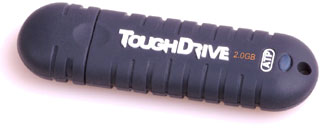 Tough enough for any mobile application, the
ToughDrive is designed to withstand the rigors of everyday,
in-the-field use in order to protect the user's invaluable data. It
is the first ATP product designed with its proprietary DuraSkin
construction. DuraSkin is a protective compound layer which
completely encompasses all internal components, offering a second
layer of protection against extreme temperatures, surrounding
elements including airborne dust, particles, water and moisture, as
well as shock absorption from accidental drops or impact. The
embedded lines also make the ToughDrive extremely tactile and easy
to grip while maintaining a slim, compact size storable in any
pocket, case, backpack or bag.
Tough enough for any mobile application, the
ToughDrive is designed to withstand the rigors of everyday,
in-the-field use in order to protect the user's invaluable data. It
is the first ATP product designed with its proprietary DuraSkin
construction. DuraSkin is a protective compound layer which
completely encompasses all internal components, offering a second
layer of protection against extreme temperatures, surrounding
elements including airborne dust, particles, water and moisture, as
well as shock absorption from accidental drops or impact. The
embedded lines also make the ToughDrive extremely tactile and easy
to grip while maintaining a slim, compact size storable in any
pocket, case, backpack or bag.
The ToughDrive data transfer speed of 200x or 30 /sec is designed for high quality multimedia streaming which yields less lag time for file transfers. Using the same high quality flash components as ATP flash cards, the ToughDrive also offers a read and write lifetime ten times longer than other standard USB flash drives.
"Although USB flash drives are found everywhere in business and consumer markets, the need for data security and integrity in extreme environments is largely untapped," said Danny Lin, ATP VP of Sales and Marketing. "Data capture and transfer is pervasive in almost every computing application. However, when users are working with critical information in highly mobile, remote or severe conditions such as on the water, intolerable heat, high winds or altitudes, or freezing temperatures, data can not be compromised under any circumstance. The ToughDrive is the first flash drive specifically designed for the rugged market, giving mobile professionals the peace of mind they need to get the job done while in the field or in the office."
The ATP USB ToughDrive will be available at retail locations like Microcenter and online at Buy.com, PC Mall and others in capacities of 256 MB, 512 MB, 1 GB, and 2 GB.
Software
Sleep Monitor 2 Power Management Monitor
PR: Casting light onto the difficult expanse of computer power management, Sleep Monitor helps you audit and better understand your Mac.
This software monitors and profiles your Mac's energy use, and can help you identify power management problems.
 With Sleep Monitor you can easily build an energy profile
spanning days, weeks, and months. Your profile will contain a
record of all the power events, battery changes, and energy state
information.
With Sleep Monitor you can easily build an energy profile
spanning days, weeks, and months. Your profile will contain a
record of all the power events, battery changes, and energy state
information.
Your long term battery life monitor
With your profile and Sleep Monitor's reporting application you can see the battery level as it rises and falls over minutes, days, and weeks.
Charted in a beautiful graph, the battery information is colour coded; a green line for when your battery is charging, and an orange line for when it is discharging.
Audit your energy use
With the increasing focus on the environmental cost of our lives it is essential to measure and understand our energy needs. Sleep Monitor provides the easiest way to audit the power use of your computers.
Sleep Monitor demands nothing of you. Once installed the background monitors quietly build your energy profile.
This design makes Sleep Monitor ideal for helping your business or school to better understand the cost and usage patterns of your Macs.
Requires
- Mac OS X 10.3.9 (Panther), Mac OS X 10.4 (Tiger), or later;
- Desktop or laptop Mac.
- Try Sleep Monitor for free;
- 30 day demonstration;
- Quick download - 1 MB (dmg.zip);
- Supports Mac OS X 10.3.9 and above.
Price: € 20 per Mac
MiniBatteryStatus Widget
PR: MiniBatteryStatus is a small Dashboard widget that monitors battery status, charge percentage, and remaining battery life. Integrated with Growl to alert you when it's time to recharge your battery.
 New in version 1.5:
- Fixed Growl detection bug
Requirements: Mac OS X 10.4 or later.
Bargain 'Books
Bargain 'Books are used unless otherwise indicated. New and refurbished units have a one-year Apple warranty and are eligible for AppleCare.
There are two different versions of WallStreet running at 233 MHz, the cacheless MainStreet version and the later Series II with a level 2 cache. It's not always possible to determine from the vendor's listing which is being offered, so we've included links within this paragraph to the two models. The same goes for the PowerBook G4/667 (VGA) and G4/667 (DVI), the titanium vs. aluminum 15" PowerBook G4 at 1 GHz, and 1.25 GHz to 1.5 GHz 15" PowerBooks.
Apple Store
- refurb 12" iBook G4/1.2 GHz, 256/30/CD, $699
- refurb 14" iBook G4/1.42 GHz, 512/60/SuperDrive, AirPort Extreme, Bluetooth 2.0, $1,049
- refurb 12" PowerBook G4/1.33 GHz, 256/60/Combo, AirPort Extreme, $1,099
- refurb 12" PowerBook G4/1.33 GHz, 256/60/SuperDrive, AirPort Extreme, $1,149
- refurb 15" PowerBook G4/1 GHz, 256/60/Combo, $1,299
- refurb 15" PowerBook G4/1.33 GHz, 256/60/Combo, AirPort Extreme, $1,299
- refurb 17" PowerBook G4/1.5 GHz, 512/80/SuperDrive, AirPort Extreme, $1,799
The PowerBook Guy
- 12" iBook G3/800, 256/30/CD, $399.95
- 12" iBook G3/600, 256/20/Combo, $479.95
- 12" iBook G4/1 GHz, 256/30/CD, $649.95
TechRestore
- 14" iBook G3/700, 256/30/Combo, $549.99
- 17" PowerBook G4/1 GHz, 512/60/SuperDrive, Airport Extreme, $1,499.99
For more deals on current or recently discontinued models, see our best aluminum PowerBook G4 deals, best titanium PowerBook G4 deals, best iBook G4 deals, best PowerBook G3 deals, and best iBook G3 deals.
Join us on Facebook, follow us on Twitter or Google+, or subscribe to our RSS news feed
Links for the Day
- Mac of the Day: PowerBook 500 Series, introduced 1994.05.16. 'Blackbird' includes a 25 to 33 MHz 68040 along with smart batteries and grayscale or color displays.
- Support Low End Mac
Recent Content
About LEM Support Usage Privacy Contact
Follow Low End Mac on Twitter
Join Low End Mac on Facebook
Favorite Sites
MacSurfer
Cult of Mac
Shrine of Apple
MacInTouch
MyAppleMenu
InfoMac
The Mac Observer
Accelerate Your Mac
RetroMacCast
The Vintage Mac Museum
Deal Brothers
DealMac
Mac2Sell
Mac Driver Museum
JAG's House
System 6 Heaven
System 7 Today
the pickle's Low-End Mac FAQ
Affiliates
Amazon.com
The iTunes Store
PC Connection Express
Macgo Blu-ray Player
Parallels Desktop for Mac
eBay

