
The 'Book Review
Tiger Tips; Legacy PowerBooks; PowerBook Decay; FlashPoint Share Drive for Car, Camera, and Computer; Bargain 'Books; and More
This Week's PowerBook and iBook News
Compiled by Charles Moore
and edited by
Dan Knight
- 2005.05.06
This Week's PowerBook, iBook, and Notebook News
General Apple and Mac desktop news is covered in The Mac News Review. iPod news is
covered in The iNews
Review.
Tiger Talk
- Tiger Migration Guide Posted
- AppleTalk without TCP/IP No Longer Supported in
Tiger
- CEI Takes a 'Tiger' by Tail, Embracing New Mac
OS
- Daystar Confirms Tiger Compatibility for
Upgrades
News & Opinion
Reviews
New Products
- FlashPoint Share Drive
- Kanguru Solutions
Releases Tiny Kanguru Zipper Pro Hard Drive
- XtraDrive Turns Unused
Flash Memory Cards into USB Drives
- QuickerTek Antennas Boost Wireless Range of New
15" and 17" PowerBooks
- iProtect Micro Screen Saver for PowerBooks and
iBooks
- IOGear Eliminates Wi-Fi 'Dead Spots' With
Powerline Networking
Bargain 'Books
Tiger Talk
Tiger Migration Guide Posted
"The Tiger Migration Guide is available for download now. It
covers only the changed and new features, and is meant to help you
get started quickly without taking away the fun of discovering the
new OS. I sincerely hope you will find this eBooklet worth the -
free - download.
"The low-res, print-disabled version of the Tiger Migration
Guide is a free download of approx. 1.9 MB. If you like the
guide you can buy a high-res, printable version (which also allows
for copying and annotating) for 5 USD / 4 EU.
"If you pay for the Guide you will not only sponsor IT-Enquirer,
and help me earn a living, but you will also receive a Bonus
Chapter containing the new and changed shortcuts.
"As the price for which the Tiger Migration Guide is sold, is
relatively low, and the Guide itself is an electronic file, the
reality is that you can copy it ad infinitum. I therefore appeal to
your honesty, granting you a license in the process to have it read
by up to 5 readers. I hope this will cover most people's needs. If
you need more 'copies', please email me so we can work out a decent
and fair deal."
AppleTalk without TCP/IP No Longer Supported in
Tiger
An updated Apple
Knowledge Base Article says:
"Mac OS 8, Mac OS 9, and Mac OS X 10.1 to 10.3.9 support file
sharing (AFP) connections over AppleTalk. However, Mac OS X
versions 10.0 to 10.0.4 and 10.4 and later can only connect to
AppleShare over TCP/IP.
"If you want to connect from versions 10.1 to 10.3.9 to Mac OS 8
sharing (which is AppleTalk only), be sure to enable AppleTalk....
Mac OS 9 and Mac OS X can both connect over TCP/IP
without AppleTalk, so this step is optional in the absence of Mac
OS 8.
"Mac OS X 10.4 and later don't support Personal File Sharing (or
other AFP) over AppleTalk, though by initiating the connection from
the opposite direction you could still achieve an IP connection
from a Mac OS 8 computer to a sharing Mac OS X computer.
The Network preference pane in Mac OS X 10.4 and later still
offers the AppleTalk checkbox, but it is for browsing
AppleTalk-advertised resources and zones. The subsequent connection
must be over TCP/IP."
In short, this means that Macs with a version of the Mac OS that
don't support AppleTalk using TCP/IP will not be able to use
AppleTalk to connect to Macs running Tiger - and vice versa.
CEI Takes a 'Tiger' by Tail, Embracing New Mac
OS
LocalTechWire's Rick Smith
reports:
"Two Triangle area firms have moved quickly to capitalize on the
latest versions of the Macintosh operating system, and in very
different ways.
"CEI, the very high-end visualization software firm in Apex that
was spun off from supercomputer firm Cray a decade ago, announced
Monday that it would support the new Mac product since it supports
64-bit operations as opposed to less sophisticated 32-bit....
"While Macs have long been the darlings of graphic artists, more
and more engineers are embracing Apple as an alternative to Linux
and Unix....
"Lulu is making the Tiger guide
available in two formats - $14.95 as a downloadable PDF file and
$29.95 in printed form.
Daystar Confirms Tiger Compatibility for
Upgrades
PR: Daystar
Technology, a provider of CPU upgrades, has announced that
it has verified, tested and qualified its upgrades running in the
latest releases of Apple's new version of OS X, 10.4,
Tiger.
According to Gary Dailey, president of Daystar, "The Latest
announcement of Tiger has raised questions on compatibility, given
Apple's official 'upgrade cards are not supported...'
statement.
"First, let me say clearly, there is no problem with our
upgrades and any version of Mac OS 9 or OS X through
Tiger. The statement from Apple (used with every release of Mac
OS X to date) does allow Apple to refuse tech support calls on
systems using upgrade cards. We, however provide toll-free
unconditional support to all of our customers. As always our CPU
upgrades perform at full speed and with full compatibility.
"We have tested Tiger with upgrades on OS X supported systems;
the MAChSpeed ZIFs, G-Celerators, and MAChSpeed Pismo upgrades.
There are no issues with the upgrades themselves. The MACh Carrier
and Lombard upgrades have not been tested with Tiger, as Tiger
cannot install on these systems (unsupported systems). XPostFacto
(the Open-source utility) may solve this problem in the next few
months.
"MAChSpeed Control (the optional XLR8 software package sold with
Daystar upgrades) is being updated to work within the new Tiger
Kernel rules. Currently, they will install, but the utility will
not open in Tiger. Current Daystar customers will be upgraded when
the Tiger compatible revision is released."
Daystar currently distributes/resells Apple, XLR8, Giga Design,
and a variety of leading brand products via its store front and web
store . Daystar offers a wide array of Apple performance products.
It also sells and services Apple products via its storefront in
Buford, Georgia.
Additional information on Daystar Technology and XLR8 can be
found via the Daystar website.
News & Opinion
The Value of Your Legacy Portable
PowerPage's
Garrison Gunter says:
"As new machines continue to roll out of Cupertino, along with
the release of Tiger this week, my old iBook dual USB 500 MHz machine
continues to decline in value. You can't get a portable for what
this little bugger is worth, and it's not the fastest roach on the
track anymore.
"This particular machine has no burner, and is in need of a HD
replacement, making it a bit of a fixer-upper. So, what do you do
with that old ibook/pbook that just isn't worth getting rid
of?"
PowerBook Old Schoolers Club
PowerPage's
Mark Standen says:
"From an Outbound through to a 2004 PowerBook, I dusted off my
laptops and fired them up for a trip down memory lane."
- Outbound Notebook
- PowerBook 140
- PowerBook
Wallstreet
- PowerBook 15" Aluminum
Reviews
PowerBook Decay
collylogic.com has posted a tongue-in-cheek look at
titanium PowerBook durability
"The machine was - and still is - incredible, but on delivery
the casing was disappointingly shiny and new. Thankfully, and with
only minor wear, tear and abuse, my PowerBook iDecay is now
deteriorating nicely....

"At last, the port flap is now bent and losing paint. I'm
delighted that the paint on the top is now being held on by a
collage of stickers. Around the edges, I've finally got the
"eczema" effect that is so desirable these days, with large chunks
of paint falling off regularly. Most importantly, I have the
perfect laptop for important meetings with clients where that "who
the hell are these people?" stare is always welcoming....
"So, I thought I'd share my delight at the way in which my
PowerBook has aged of late. Thanks to Apple, you may be able to
achieve the look and feel of the PowerBook iDecay yourself, without
sifting eBay
for an original model. Simply do nothing to your
machine during normal use, and with a bit of luck, your PowerBook
will also end up looking like a pig's arse in no time."
Review: 15" PowerBook G4
APTM's Chris Lawson
reports:
"As was widely expected, Apple released an update to the
PowerBook line in January. More of an evolutionary step than a
revolutionary one, the new PowerBooks add comparatively little in
the way of new features or specs but, with the 'AlBook' design on
its third revision, there is a higher level of refinement than ever
before.
"The gotta-have-it new feature is the new scrolling trackpad,
letting you use two fingers on the trackpad to scroll and pan about
the screen....
"Unfortunately, the trackpads have had their share of problems.
While scrolling is incredibly improved, basic mousing has taken a
step backwards in reliability. There are countless reports of
people having problems with jumpy cursor movement, overly stiff
buttons, trackpad tapping, etc. Apple has acknowledged the problem,
though a permanent fix has yet to be discovered or
disclosed...."
12" 1.5 GHz PowerBook Plays Well with
Others
eXtensions' Graham K
Rogers reports:
"I had not owned a PowerBook for about 5 years, sticking with
desktops: a 500 MHz iMac
and then the 1.25 GHz eMac.
One concern with my 12"
PowerBook was screen size - several people I know use the 15"
version, but as a primary computer. My screen is not large, of
course, but has a larger display than that earlier laptop, a
5300cs. It is also considerably
faster and has a better ethernet port. Those older machines
required an adapter to fit the standard RJ45 connector."
Good tutorial on PowerBook connectivity.
New Products
FlashPoint Share Drive
PR: Xmultiple Technologies, has come out with a new
product, the FlashPoint
Share Drive. A USB Flash memory pen drive that can both
store data and transfer data without the need of a computer.
For digital camera users, automotive electronics, and the new
wave of cell phones, the FlashPoint will let you transfer images
from the camera/MP3 player/cell phone to the FlashPoint USB Share
Drive anywhere and at anytime without the aid of a computer. Then
if you wish, you could copy these to another USB flash drive
through the rear USB female connection of the FlashPoint - again
without the need of a computer. The FlashPoint is a self-powered
USB flash drive that can store data and transfer data from other
peripheral devices. Such as USB flash drives, digital cameras, MP3
players, PDAs, cell phones, etc.
The FlashPoint Share Drive will play a larger roll in the auto
industry with more and more cars are being equipped with
sophisticated electronics. The automotive industry can retrieve
data or transfer data to a cars intelligence system without the
need of a laptop computer or cumbersome cables. The consumer can
transfer data (mapping data, MP3 files, etc.) from the home/office
computer to the car, in a form factor small enough to fit on a key
chain.
The device is powered by an internal battery, which allows it to
be used to copy data from the shared folder without the need of
external power. It works with Windows 98/Me/2000 and XP or
Macintosh OS 9.x and 10.x. Buttons for power control, load and dump
of data, controls the process.
FlashPoint comes in 1 GB, 2 GB, and 4 GB flash
memory configurations.
The FlashPoint will make sharing on-the-go a simple and
convenient task. Teachers will be able to download class
assignments and lectures away from a computer by simply plugging
the FlashPoint into the students USB flash drive or MP3 device and
hitting the transfer button - all accomplished away from the
computer, sharing on-the-go.
Kanguru Solutions Releases Tiny Kanguru
Zipper Pro Hard Drive
PR: Kanguru Solutions has announced the release of their
latest in portable and low cost hard drives, the 20 GB Kanguru Zipper
Pro.
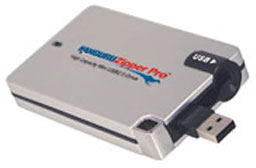 The Kanguru Zipper Pro offers the perfect blend of storage
and portability in a USB 2.0 hard drive. It provides a greater
storage capacity than competing Flash drives, while remaining more
compact than a 2.5" external hard drive. In fact weighing just 40g,
the miniature Kanguru Zipper Pro is lightweight and small enough to
fit comfortably in your shirt pocket, yet capable of storing up to
20 GB of data!
The Kanguru Zipper Pro offers the perfect blend of storage
and portability in a USB 2.0 hard drive. It provides a greater
storage capacity than competing Flash drives, while remaining more
compact than a 2.5" external hard drive. In fact weighing just 40g,
the miniature Kanguru Zipper Pro is lightweight and small enough to
fit comfortably in your shirt pocket, yet capable of storing up to
20 GB of data!
A USB 2.0 swivel-style plug unfolds neatly from the side of the
Kanguru Zipper Pro and fits directly into any available USB port
for instant plug and play access. The exterior alloy enclosure of
the Kanguru Zipper Pro is extremely rugged, as the unit is able to
withstand up to 1500Gs of shock.
This high speed, high quality USB 2.0 hard drive excels in
mobilizing and sharing data. Inside this unit is a 1" mini hard
drive, similar to the IBM Microdrive, offers a rotational speed of
4200 rpm and works with Windows and Macintosh, most without any
device drivers. As an external drive, it can be used for saving or
backing up data, storing photos, MP3s, or important documents for
home and office use.
A division of Interactive Media Corporation, Kanguru Solutions
manufactures high quality, secure and portable computer storage
peripherals that have provided consumers with secure back-up
solutions for more than a decade. Interactive Media Corp. was
established in Massachusetts in 1992.
XtraDrive Turns Unused Flash Memory
Cards into USB Drives
PR: MediaGear announced the next generation of its
popular keychain drives called XtraDrive,
to help satisfy the growing consumer demand for convenient extra
USB flash drives created from unused memory cards.
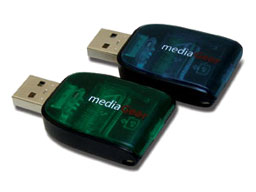 XtraDrives have a
colored, transparent cap that allows the user to see if a media
card is installed. Also, to eliminate crowding of several drives
together on a PC or notebook, the XtraDrive package also includes a
USB adapter cable.
XtraDrives have a
colored, transparent cap that allows the user to see if a media
card is installed. Also, to eliminate crowding of several drives
together on a PC or notebook, the XtraDrive package also includes a
USB adapter cable.
"Photographers have an abundance of old memory cards that are no
longer used because of their low megabyte storage. The new
XtraDrive gives these outdated memory cards a brand new life,"
noted Terry Smith, VP of Marketing at MediaGear.
"Most new cameras come with a 16 or 32 MB card and the
photographer quickly moves up to higher capacities - especially now
that prices are dropping. The digital camera user can pop these
outdated flash memory cards into a compatible XtraDrive and easily
load and transfer data or photos from computer to computer via the
USB ports," continued Smith.
An added bonus of this new generation of keychain drives is the
inclusion of an 18" USB cable for use when slots on the computer
are too cramped for space.
"The new XtraDrives are great looking too. We went for
see-through colorful, gem tone caps that are visually appealing,
but more importantly allows the user to see if a memory card is
already inserted into the drive," added Smith.
The drives can accommodate most card formats including Secure
Digital (SD), MultiMediaCard, Sony Memory Stick, Compact Flash
Types I and II, MicroDrives, SmartMedia, and xD.
Retail pricing is: $14.95 MSRP. The new USB-compatible
XtraDrives is currently available at
Office Depot, MicroCenter and
Fry's Electronics, and from the MediaGear website.
QuickerTek Antennas Boost Wireless Range of New
15" and 17" PowerBooks
PR: QuickerTek has announced the first AirPort
antenna upgrades for the new PowerBooks. The new high-speed
1.5 GHz and 1.67 GHz notebooks feature AirPort Extreme wireless
networking built in and the QuickerTek antennas extend the wireless
range dramatically. The new antennas are $99.95 from QuickerTek
dealers.
While the thin metallic chassis used in modern PowerBooks is
lightweight, it constricts the available wireless signal range of
the internal AirPort antenna. QuickerTek's solution is to mount a
more powerful antenna outside the PowerBook case, free from the
case RF restrictions. These new antennas are similar to the
previous QuickerTek PowerBook antenna designs, but the internal
connector has been updated for compatibility with the latest
PowerBook models.
"Again QuickerTek is first with AirPort antennas for the latest
Apple computers. Our PowerBook customers are delighted with the
improvement in wireless range and signal strength. Now that AirPort
Extreme is built in, these new antennas are hugely popular," said
Rick Estes, president, QuickerTek.
QuickerTek is a recognized leading innovator of antennas and RF
products for Apple desktop and portable computers. QuickerTek
products can be purchased at Mac dealers such as Small Dog
Electronics, TechnoWarehouse, PowerBook Medic, Di-No Computers and
many others.
iProtect Micro Screen Saver for PowerBooks and
iBooks
PR: MaxUpgrades
iProtect Micro Screen Savers provides protection against
dust, scratches , grease, and oil that gradually get deposited on
the laptop keyboard and palm rest area by everyday use. iProtect
Micro Screen Savers is made with ultrafine microfibers effectively
protect and removes dust particles, grease and finger prints that
gets deposited on the the laptop, it also provides protection for
laptop LCD Screen from keyboard and track pad indentation caused by
the keyboard keys touching the display when the laptop is
closed.
iProtect Micro Screen Savers prevents the series of faint white
lines that correspond to the edges of the keys on the keyboard to
appear on the the LCD Screen when the laptop is closed and keyboard
key edges come in contact with the display. This oil accumulation
can leave permanent marks on the screen.
iProtect Micro Screen Savers have two different surfaces
designed to clean and protect laptop LCD screens. The soft
vanquished surface (front surface) is designed for fine particle
removal and dust cleaning. The rough and interlacing strands of the
knitted surface (reverse side) is designed to clean fingerprints,
grease and marks.
The iProtect Micro Screen Savers features a fringe wave design
that will not scrape the LCD panel compared to the fringe stitch
found commonly on most cleaning cloths.
IOGear Eliminates Wi-Fi 'Dead Spots'
With Powerline Networking
PR: IOGear has launched its
Powerline Networking Kit, a connectivity tool that
allows users to access home computers as networking and gaming
devices, share Internet connections, printers, transfer files, play
games, and more through the most pervasive medium in the house -
the electric power lines.
By connecting two computers with a 10/100 Base-T adapter through
power lines, it improves the file transfer speed and quality of
broadband access. This device marks the arrival of a long-awaited
tool for gamers who play with a remote partner by connecting gaming
devices to the broadband router. With an improved Internet
connection and smooth broadband streaming, gamers can now have
online access in isolated parts of the home to prepare for and
participate in online gaming tournaments.
With no extra wires, 56-bit DES hardware encryption, bandwidth
up to 14 Mbps, and a range of 990 feet, the Powerline Networking
Kit is an easy-to-use tool for every connected home. It can also be
used to extend a Wi-Fi network to the furthest part of the house or
facility.
"Users often experience the loss of a Wi-Fi signal when moving
away from the room that has the router. A well connected home
should allow people to work or play from any room in the house,
while maintaining their space and privacy," said Miranda Su, vice
president of sales and marketing at IOGear Inc. "By introducing the
Powerline Networking Kit, we are giving users the ability to stay
connected, whether they are working on an important email or
playing their favorite online game."
IOGear's Powerline Networking Kit is priced at $99.95 (MSRP) and
is available immediately from all major catalog resellers, online
resellers and selected retail outlets. It is compliant with
HomePlug Powerline Specifications 1.0 and worldwide compatible. The
only requirement for a successful installation is the 10/100
Base-connection. The Kit also comes with IOGear's standard
three-year warranty.
Bargain 'Books
Bargain 'Books are used unless otherwise indicated. New and
refurbished units have a one-year Apple warranty and are eligible
for AppleCare.
There are two different versions of WallStreet running at 233
MHz, the cacheless MainStreet
version and the later Series II
with a level 2 cache. It's not always possible to determine from
the vendor's listing which is being offered, so we've included
links within this paragraph to the two models. The same goes for
the PowerBook G4/667 (VGA) and
G4/667 (DVI), the titanium vs.
aluminum 15" PowerBook G4 at 1 GHz, and 1.25 GHz to 1.5 GHz
15" PowerBooks.
Apple Store
- refurb 12" iBook G4/1.2 GHz, 256/30/CD-ROM, $799
- refurb 12" iBook G4/1 GHz, 256/30/Combo, $799
- refurb 12" iBook G4/1.2 GHz, 256/30/Combo, AirPort Extreme,
$849
- refurb 14" iBook G4/1.33 GHz, 256/60/SuperDrive, AirPort
Extreme, $1,299
- refurb AirPort Extreme Card, $69
- refurb iPod 40 GB (non-Click Wheel), $329
Small Dog Electronics
- new 12" iBook G4/1.2 GHz, 256/30/Combo, AirPort Extreme,
$999
- new 12" PowerBook G4/1.33 GHz, 256/60/SuperDrive, Bluetooth,
AirPort Extreme, PC2700 SO DIMM 256 MB DDR 333, AirPort Express
Base Station, Kensington Pocketmouse Bluetooth, $1,729
Baucom Computers
- used 12" PowerBook G4/867 MHz, 512/40/Combo, $839
Wegener
Media
- PowerBook Pismo G3/400, 128/10/DVD, $499.99
- PowerBook Pismo G3/500, 128/10/DVD, $549.99
- PowerBook Pismo G3/400, 256/40/DVD, $649.99
- PowerBook Pismo G3/500, 256/40/DVD, $699.99
- Add PCMCIA wireless card with purchase of Pismo, $10
- Add an AirPort Wireless card, $89.99 installed
- G4/550 MHz upgrade card, $249.99
- Add a Targus laptop bag, 99¢
- One Year Extended Service Guarantee, $99.99
- OS X Jaguar for $19.99 with purchase of your Pismo
TechRestore
- 12" iBook G3/800 Combo, $649.99
- 12" iBook G3/900 Combo, $689.99
- 15" PowerBook G4/667 MHz, 256/30/Combo, $889.99
- 15" PowerBook G4/1.25 GHz 512/80/SuperDrive, Bluetooth
$1,749.99
For more deals on current or recently discontinued models, see
our Best PowerBook G4 Deals,
Best iBook G4 Deals, Best PowerBook G3 Deals, and Best iBook G3 Deals.
Compiled by Charles Moore and edited by Dan Knight - 2005.05.06
This Week's PowerBook, iBook, and Notebook News
General Apple and Mac desktop news is covered in The Mac News Review. iPod news is covered in The iNews Review.
Tiger Talk
- Tiger Migration Guide Posted
- AppleTalk without TCP/IP No Longer Supported in Tiger
- CEI Takes a 'Tiger' by Tail, Embracing New Mac OS
- Daystar Confirms Tiger Compatibility for Upgrades
News & Opinion
Reviews
New Products
- FlashPoint Share Drive
- Kanguru Solutions Releases Tiny Kanguru Zipper Pro Hard Drive
- XtraDrive Turns Unused Flash Memory Cards into USB Drives
- QuickerTek Antennas Boost Wireless Range of New 15" and 17" PowerBooks
- iProtect Micro Screen Saver for PowerBooks and iBooks
- IOGear Eliminates Wi-Fi 'Dead Spots' With Powerline Networking
Bargain 'Books
Tiger Talk
Tiger Migration Guide Posted
"The Tiger Migration Guide is available for download now. It covers only the changed and new features, and is meant to help you get started quickly without taking away the fun of discovering the new OS. I sincerely hope you will find this eBooklet worth the - free - download.
"The low-res, print-disabled version of the Tiger Migration Guide is a free download of approx. 1.9 MB. If you like the guide you can buy a high-res, printable version (which also allows for copying and annotating) for 5 USD / 4 EU.
"If you pay for the Guide you will not only sponsor IT-Enquirer, and help me earn a living, but you will also receive a Bonus Chapter containing the new and changed shortcuts.
"As the price for which the Tiger Migration Guide is sold, is relatively low, and the Guide itself is an electronic file, the reality is that you can copy it ad infinitum. I therefore appeal to your honesty, granting you a license in the process to have it read by up to 5 readers. I hope this will cover most people's needs. If you need more 'copies', please email me so we can work out a decent and fair deal."
AppleTalk without TCP/IP No Longer Supported in Tiger
An updated Apple Knowledge Base Article says:
"Mac OS 8, Mac OS 9, and Mac OS X 10.1 to 10.3.9 support file sharing (AFP) connections over AppleTalk. However, Mac OS X versions 10.0 to 10.0.4 and 10.4 and later can only connect to AppleShare over TCP/IP.
"If you want to connect from versions 10.1 to 10.3.9 to Mac OS 8 sharing (which is AppleTalk only), be sure to enable AppleTalk.... Mac OS 9 and Mac OS X can both connect over TCP/IP without AppleTalk, so this step is optional in the absence of Mac OS 8.
"Mac OS X 10.4 and later don't support Personal File Sharing (or other AFP) over AppleTalk, though by initiating the connection from the opposite direction you could still achieve an IP connection from a Mac OS 8 computer to a sharing Mac OS X computer. The Network preference pane in Mac OS X 10.4 and later still offers the AppleTalk checkbox, but it is for browsing AppleTalk-advertised resources and zones. The subsequent connection must be over TCP/IP."
In short, this means that Macs with a version of the Mac OS that don't support AppleTalk using TCP/IP will not be able to use AppleTalk to connect to Macs running Tiger - and vice versa.
CEI Takes a 'Tiger' by Tail, Embracing New Mac OS
LocalTechWire's Rick Smith reports:
"Two Triangle area firms have moved quickly to capitalize on the latest versions of the Macintosh operating system, and in very different ways.
"CEI, the very high-end visualization software firm in Apex that was spun off from supercomputer firm Cray a decade ago, announced Monday that it would support the new Mac product since it supports 64-bit operations as opposed to less sophisticated 32-bit....
"While Macs have long been the darlings of graphic artists, more and more engineers are embracing Apple as an alternative to Linux and Unix....
"Lulu is making the Tiger guide available in two formats - $14.95 as a downloadable PDF file and $29.95 in printed form.
Daystar Confirms Tiger Compatibility for Upgrades
PR: Daystar Technology, a provider of CPU upgrades, has announced that it has verified, tested and qualified its upgrades running in the latest releases of Apple's new version of OS X, 10.4, Tiger.
According to Gary Dailey, president of Daystar, "The Latest announcement of Tiger has raised questions on compatibility, given Apple's official 'upgrade cards are not supported...' statement.
"First, let me say clearly, there is no problem with our upgrades and any version of Mac OS 9 or OS X through Tiger. The statement from Apple (used with every release of Mac OS X to date) does allow Apple to refuse tech support calls on systems using upgrade cards. We, however provide toll-free unconditional support to all of our customers. As always our CPU upgrades perform at full speed and with full compatibility.
"We have tested Tiger with upgrades on OS X supported systems; the MAChSpeed ZIFs, G-Celerators, and MAChSpeed Pismo upgrades. There are no issues with the upgrades themselves. The MACh Carrier and Lombard upgrades have not been tested with Tiger, as Tiger cannot install on these systems (unsupported systems). XPostFacto (the Open-source utility) may solve this problem in the next few months.
"MAChSpeed Control (the optional XLR8 software package sold with Daystar upgrades) is being updated to work within the new Tiger Kernel rules. Currently, they will install, but the utility will not open in Tiger. Current Daystar customers will be upgraded when the Tiger compatible revision is released."
Daystar currently distributes/resells Apple, XLR8, Giga Design, and a variety of leading brand products via its store front and web store . Daystar offers a wide array of Apple performance products. It also sells and services Apple products via its storefront in Buford, Georgia.
Additional information on Daystar Technology and XLR8 can be found via the Daystar website.
News & Opinion
The Value of Your Legacy Portable
PowerPage's Garrison Gunter says:
"As new machines continue to roll out of Cupertino, along with the release of Tiger this week, my old iBook dual USB 500 MHz machine continues to decline in value. You can't get a portable for what this little bugger is worth, and it's not the fastest roach on the track anymore.
"This particular machine has no burner, and is in need of a HD replacement, making it a bit of a fixer-upper. So, what do you do with that old ibook/pbook that just isn't worth getting rid of?"
PowerBook Old Schoolers Club
PowerPage's Mark Standen says:
"From an Outbound through to a 2004 PowerBook, I dusted off my laptops and fired them up for a trip down memory lane."
- Outbound Notebook
- PowerBook 140
- PowerBook Wallstreet
- PowerBook 15" Aluminum
Reviews
PowerBook Decay
collylogic.com has posted a tongue-in-cheek look at titanium PowerBook durability
"The machine was - and still is - incredible, but on delivery the casing was disappointingly shiny and new. Thankfully, and with only minor wear, tear and abuse, my PowerBook iDecay is now deteriorating nicely....
"At last, the port flap is now bent and losing paint. I'm delighted that the paint on the top is now being held on by a collage of stickers. Around the edges, I've finally got the "eczema" effect that is so desirable these days, with large chunks of paint falling off regularly. Most importantly, I have the perfect laptop for important meetings with clients where that "who the hell are these people?" stare is always welcoming....
"So, I thought I'd share my delight at the way in which my PowerBook has aged of late. Thanks to Apple, you may be able to achieve the look and feel of the PowerBook iDecay yourself, without sifting eBay for an original model. Simply do nothing to your machine during normal use, and with a bit of luck, your PowerBook will also end up looking like a pig's arse in no time."
Review: 15" PowerBook G4
APTM's Chris Lawson reports:
"As was widely expected, Apple released an update to the PowerBook line in January. More of an evolutionary step than a revolutionary one, the new PowerBooks add comparatively little in the way of new features or specs but, with the 'AlBook' design on its third revision, there is a higher level of refinement than ever before.
"The gotta-have-it new feature is the new scrolling trackpad, letting you use two fingers on the trackpad to scroll and pan about the screen....
"Unfortunately, the trackpads have had their share of problems. While scrolling is incredibly improved, basic mousing has taken a step backwards in reliability. There are countless reports of people having problems with jumpy cursor movement, overly stiff buttons, trackpad tapping, etc. Apple has acknowledged the problem, though a permanent fix has yet to be discovered or disclosed...."
12" 1.5 GHz PowerBook Plays Well with Others
eXtensions' Graham K Rogers reports:
"I had not owned a PowerBook for about 5 years, sticking with desktops: a 500 MHz iMac and then the 1.25 GHz eMac. One concern with my 12" PowerBook was screen size - several people I know use the 15" version, but as a primary computer. My screen is not large, of course, but has a larger display than that earlier laptop, a 5300cs. It is also considerably faster and has a better ethernet port. Those older machines required an adapter to fit the standard RJ45 connector."
Good tutorial on PowerBook connectivity.
New Products
FlashPoint Share Drive
PR: Xmultiple Technologies, has come out with a new product, the FlashPoint Share Drive. A USB Flash memory pen drive that can both store data and transfer data without the need of a computer.
For digital camera users, automotive electronics, and the new wave of cell phones, the FlashPoint will let you transfer images from the camera/MP3 player/cell phone to the FlashPoint USB Share Drive anywhere and at anytime without the aid of a computer. Then if you wish, you could copy these to another USB flash drive through the rear USB female connection of the FlashPoint - again without the need of a computer. The FlashPoint is a self-powered USB flash drive that can store data and transfer data from other peripheral devices. Such as USB flash drives, digital cameras, MP3 players, PDAs, cell phones, etc.
The FlashPoint Share Drive will play a larger roll in the auto industry with more and more cars are being equipped with sophisticated electronics. The automotive industry can retrieve data or transfer data to a cars intelligence system without the need of a laptop computer or cumbersome cables. The consumer can transfer data (mapping data, MP3 files, etc.) from the home/office computer to the car, in a form factor small enough to fit on a key chain.
The device is powered by an internal battery, which allows it to be used to copy data from the shared folder without the need of external power. It works with Windows 98/Me/2000 and XP or Macintosh OS 9.x and 10.x. Buttons for power control, load and dump of data, controls the process.
FlashPoint comes in 1 GB, 2 GB, and 4 GB flash memory configurations.
The FlashPoint will make sharing on-the-go a simple and convenient task. Teachers will be able to download class assignments and lectures away from a computer by simply plugging the FlashPoint into the students USB flash drive or MP3 device and hitting the transfer button - all accomplished away from the computer, sharing on-the-go.
Kanguru Solutions Releases Tiny Kanguru Zipper Pro Hard Drive
PR: Kanguru Solutions has announced the release of their latest in portable and low cost hard drives, the 20 GB Kanguru Zipper Pro.
The Kanguru Zipper Pro offers the perfect blend of storage
and portability in a USB 2.0 hard drive. It provides a greater
storage capacity than competing Flash drives, while remaining more
compact than a 2.5" external hard drive. In fact weighing just 40g,
the miniature Kanguru Zipper Pro is lightweight and small enough to
fit comfortably in your shirt pocket, yet capable of storing up to
20 GB of data!
A USB 2.0 swivel-style plug unfolds neatly from the side of the Kanguru Zipper Pro and fits directly into any available USB port for instant plug and play access. The exterior alloy enclosure of the Kanguru Zipper Pro is extremely rugged, as the unit is able to withstand up to 1500Gs of shock.
This high speed, high quality USB 2.0 hard drive excels in mobilizing and sharing data. Inside this unit is a 1" mini hard drive, similar to the IBM Microdrive, offers a rotational speed of 4200 rpm and works with Windows and Macintosh, most without any device drivers. As an external drive, it can be used for saving or backing up data, storing photos, MP3s, or important documents for home and office use.
A division of Interactive Media Corporation, Kanguru Solutions manufactures high quality, secure and portable computer storage peripherals that have provided consumers with secure back-up solutions for more than a decade. Interactive Media Corp. was established in Massachusetts in 1992.
XtraDrive Turns Unused Flash Memory Cards into USB Drives
PR: MediaGear announced the next generation of its popular keychain drives called XtraDrive, to help satisfy the growing consumer demand for convenient extra USB flash drives created from unused memory cards.
XtraDrives have a
colored, transparent cap that allows the user to see if a media
card is installed. Also, to eliminate crowding of several drives
together on a PC or notebook, the XtraDrive package also includes a
USB adapter cable.
"Photographers have an abundance of old memory cards that are no longer used because of their low megabyte storage. The new XtraDrive gives these outdated memory cards a brand new life," noted Terry Smith, VP of Marketing at MediaGear.
"Most new cameras come with a 16 or 32 MB card and the photographer quickly moves up to higher capacities - especially now that prices are dropping. The digital camera user can pop these outdated flash memory cards into a compatible XtraDrive and easily load and transfer data or photos from computer to computer via the USB ports," continued Smith.
An added bonus of this new generation of keychain drives is the inclusion of an 18" USB cable for use when slots on the computer are too cramped for space.
"The new XtraDrives are great looking too. We went for see-through colorful, gem tone caps that are visually appealing, but more importantly allows the user to see if a memory card is already inserted into the drive," added Smith.
The drives can accommodate most card formats including Secure Digital (SD), MultiMediaCard, Sony Memory Stick, Compact Flash Types I and II, MicroDrives, SmartMedia, and xD.
Retail pricing is: $14.95 MSRP. The new USB-compatible XtraDrives is currently available at Office Depot, MicroCenter and Fry's Electronics, and from the MediaGear website.
QuickerTek Antennas Boost Wireless Range of New 15" and 17" PowerBooks
PR: QuickerTek has announced the first AirPort antenna upgrades for the new PowerBooks. The new high-speed 1.5 GHz and 1.67 GHz notebooks feature AirPort Extreme wireless networking built in and the QuickerTek antennas extend the wireless range dramatically. The new antennas are $99.95 from QuickerTek dealers.
While the thin metallic chassis used in modern PowerBooks is lightweight, it constricts the available wireless signal range of the internal AirPort antenna. QuickerTek's solution is to mount a more powerful antenna outside the PowerBook case, free from the case RF restrictions. These new antennas are similar to the previous QuickerTek PowerBook antenna designs, but the internal connector has been updated for compatibility with the latest PowerBook models.
"Again QuickerTek is first with AirPort antennas for the latest Apple computers. Our PowerBook customers are delighted with the improvement in wireless range and signal strength. Now that AirPort Extreme is built in, these new antennas are hugely popular," said Rick Estes, president, QuickerTek.
QuickerTek is a recognized leading innovator of antennas and RF products for Apple desktop and portable computers. QuickerTek products can be purchased at Mac dealers such as Small Dog Electronics, TechnoWarehouse, PowerBook Medic, Di-No Computers and many others.
iProtect Micro Screen Saver for PowerBooks and iBooks
PR: MaxUpgrades iProtect Micro Screen Savers provides protection against dust, scratches , grease, and oil that gradually get deposited on the laptop keyboard and palm rest area by everyday use. iProtect Micro Screen Savers is made with ultrafine microfibers effectively protect and removes dust particles, grease and finger prints that gets deposited on the the laptop, it also provides protection for laptop LCD Screen from keyboard and track pad indentation caused by the keyboard keys touching the display when the laptop is closed.
iProtect Micro Screen Savers prevents the series of faint white lines that correspond to the edges of the keys on the keyboard to appear on the the LCD Screen when the laptop is closed and keyboard key edges come in contact with the display. This oil accumulation can leave permanent marks on the screen.
iProtect Micro Screen Savers have two different surfaces designed to clean and protect laptop LCD screens. The soft vanquished surface (front surface) is designed for fine particle removal and dust cleaning. The rough and interlacing strands of the knitted surface (reverse side) is designed to clean fingerprints, grease and marks.
The iProtect Micro Screen Savers features a fringe wave design that will not scrape the LCD panel compared to the fringe stitch found commonly on most cleaning cloths.
IOGear Eliminates Wi-Fi 'Dead Spots' With Powerline Networking
PR: IOGear has launched its Powerline Networking Kit, a connectivity tool that allows users to access home computers as networking and gaming devices, share Internet connections, printers, transfer files, play games, and more through the most pervasive medium in the house - the electric power lines.
By connecting two computers with a 10/100 Base-T adapter through power lines, it improves the file transfer speed and quality of broadband access. This device marks the arrival of a long-awaited tool for gamers who play with a remote partner by connecting gaming devices to the broadband router. With an improved Internet connection and smooth broadband streaming, gamers can now have online access in isolated parts of the home to prepare for and participate in online gaming tournaments.
With no extra wires, 56-bit DES hardware encryption, bandwidth up to 14 Mbps, and a range of 990 feet, the Powerline Networking Kit is an easy-to-use tool for every connected home. It can also be used to extend a Wi-Fi network to the furthest part of the house or facility.
"Users often experience the loss of a Wi-Fi signal when moving away from the room that has the router. A well connected home should allow people to work or play from any room in the house, while maintaining their space and privacy," said Miranda Su, vice president of sales and marketing at IOGear Inc. "By introducing the Powerline Networking Kit, we are giving users the ability to stay connected, whether they are working on an important email or playing their favorite online game."
IOGear's Powerline Networking Kit is priced at $99.95 (MSRP) and is available immediately from all major catalog resellers, online resellers and selected retail outlets. It is compliant with HomePlug Powerline Specifications 1.0 and worldwide compatible. The only requirement for a successful installation is the 10/100 Base-connection. The Kit also comes with IOGear's standard three-year warranty.
Bargain 'Books
Bargain 'Books are used unless otherwise indicated. New and refurbished units have a one-year Apple warranty and are eligible for AppleCare.
There are two different versions of WallStreet running at 233 MHz, the cacheless MainStreet version and the later Series II with a level 2 cache. It's not always possible to determine from the vendor's listing which is being offered, so we've included links within this paragraph to the two models. The same goes for the PowerBook G4/667 (VGA) and G4/667 (DVI), the titanium vs. aluminum 15" PowerBook G4 at 1 GHz, and 1.25 GHz to 1.5 GHz 15" PowerBooks.
Apple Store
- refurb 12" iBook G4/1.2 GHz, 256/30/CD-ROM, $799
- refurb 12" iBook G4/1 GHz, 256/30/Combo, $799
- refurb 12" iBook G4/1.2 GHz, 256/30/Combo, AirPort Extreme, $849
- refurb 14" iBook G4/1.33 GHz, 256/60/SuperDrive, AirPort Extreme, $1,299
- refurb AirPort Extreme Card, $69
- refurb iPod 40 GB (non-Click Wheel), $329
Small Dog Electronics
- new 12" iBook G4/1.2 GHz, 256/30/Combo, AirPort Extreme, $999
- new 12" PowerBook G4/1.33 GHz, 256/60/SuperDrive, Bluetooth, AirPort Extreme, PC2700 SO DIMM 256 MB DDR 333, AirPort Express Base Station, Kensington Pocketmouse Bluetooth, $1,729
Baucom Computers
- used 12" PowerBook G4/867 MHz, 512/40/Combo, $839
Wegener Media
- PowerBook Pismo G3/400, 128/10/DVD, $499.99
- PowerBook Pismo G3/500, 128/10/DVD, $549.99
- PowerBook Pismo G3/400, 256/40/DVD, $649.99
- PowerBook Pismo G3/500, 256/40/DVD, $699.99
- Add PCMCIA wireless card with purchase of Pismo, $10
- Add an AirPort Wireless card, $89.99 installed
- G4/550 MHz upgrade card, $249.99
- Add a Targus laptop bag, 99¢
- One Year Extended Service Guarantee, $99.99
- OS X Jaguar for $19.99 with purchase of your Pismo
TechRestore
- 12" iBook G3/800 Combo, $649.99
- 12" iBook G3/900 Combo, $689.99
- 15" PowerBook G4/667 MHz, 256/30/Combo, $889.99
- 15" PowerBook G4/1.25 GHz 512/80/SuperDrive, Bluetooth $1,749.99
For more deals on current or recently discontinued models, see our Best PowerBook G4 Deals, Best iBook G4 Deals, Best PowerBook G3 Deals, and Best iBook G3 Deals.
Join us on Facebook, follow us on Twitter or Google+, or subscribe to our RSS news feed
Links for the Day
- Mac of the Day: PowerBook 500 Series, introduced 1994.05.16. 'Blackbird' includes a 25 to 33 MHz 68040 along with smart batteries and grayscale or color displays.
- Support Low End Mac
Recent Content
About LEM Support Usage Privacy Contact
Follow Low End Mac on Twitter
Join Low End Mac on Facebook
Favorite Sites
MacSurfer
Cult of Mac
Shrine of Apple
MacInTouch
MyAppleMenu
InfoMac
The Mac Observer
Accelerate Your Mac
RetroMacCast
The Vintage Mac Museum
Deal Brothers
DealMac
Mac2Sell
Mac Driver Museum
JAG's House
System 6 Heaven
System 7 Today
the pickle's Low-End Mac FAQ
Affiliates
Amazon.com
The iTunes Store
PC Connection Express
Macgo Blu-ray Player
Parallels Desktop for Mac
eBay

