
The 'Book Review
Calibrate Your 'Book's Battery, Capacity Meter 1.0, FireWire 400/800 CardBus Card, Maxtor OneTouch Backup, and More
This Week's PowerBook and iBook News
Compiled by Charles Moore and edited by Dan Knight - 2004.09.24
- Calibrate Your 'Book's Battery for Best Performance
- Capacity Meter 1.0 Displays and Tracks PowerBook Battery Capacity
- WiebeTech FireWire 800/400 CardBus Host Adapter
- New Maxtor OneTouch II Drive Raises the Bar in Consumer Backup
- Targus Toughens Notebook Protection with Aluminum Carrying Case
- BetterRAM.com Brings New RAM Store Online
- LaCie Combines Speed and Versatility in the New d2 Extreme with Triple Interface
- Toshiba Introduces Industry's Fastest Double-Layer, Dual-Format DVD Recordable Drive
- NewerTech and OWC Introduce RoadTrip! FM Transmitter for iPod and Other Audio Devices
- Bargain 'Books
Calibrate Your 'Book's Battery for Best Performance
An Apple Knowledge Base Article says:
"You can calibrate your iBook or PowerBook computer's lithium ion battery for best performance.
"The battery has an internal microprocessor that provides an estimate of the amount of energy in the battery as it charges and discharges. The battery needs to be recalibrated from time to time to keep the onscreen battery time and percent display accurate. You should perform this procedure when you first use your computer and then every few months thereafter."
Capacity Meter 1.0 Displays and Tracks PowerBook Battery Capacity
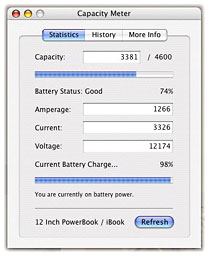 Capacity Meter displays
and tracks information about your PowerBook's battery, including
capacity, amperage, current, and voltage. Using this information
and your machine's specifications, Capacity Meter will let you know
the current status of your battery and track degradation over
time.
Capacity Meter displays
and tracks information about your PowerBook's battery, including
capacity, amperage, current, and voltage. Using this information
and your machine's specifications, Capacity Meter will let you know
the current status of your battery and track degradation over
time.
New in this version:
- Completed Helper application integration
- Added support for older machines (e.g. PowerBook G3)
- Added Feedback / Bug Reporting window
- Added Support site and better documentation
- Made various fixes
System requirements:
- Mac OS X 10.1 or later
- PowerBook G3 or later
Capacity Meter is freeware.
WiebeTech FireWire 800/400 CardBus Host Adapter
Add three FireWire ports to your laptop computer with the WiebeTech FireWire 800/400 CardBus Host Adapter.
- Two 9 pin ports and one 6 pin port.
- 9 pin ports deliver up to 800 Mbs (400 Mbs compatible)
- 6 pin port delivers 400 Mbs (200 Mbs/100 Mbs compatible)
- Plug and play
System requirements: Supported by Windows XP and Mac OS X built in drivers
CardBus FireWire 800 + 400 triple port sells for $89.95
Maxtor OneTouch II Drive Raises the Bar in Consumer Backup
Simple, safe and powerful describe the new Maxtor OneTouch II drive, the next generation of Maxtor Corporation's award-winning external drive family that allows consumers to easily back up family photos, MP3 music collections, and other important personal and business data with a simple touch of a button. No high tech knowledge is required to set up the new drive, giving consumers no excuse to not backup their computers.
Leveraging the company's first-to-market leadership and proven expertise in external storage and push button backup, the new Maxtor OneTouch II drive offers an exclusive version of Dantz Retrospect software for easy backup, a Maxtor DriveLock security feature for added data protection and more powerful restore capabilities, including historical backup recovery.
"Combine all this with a new, consumer-friendly user interface, and now the most difficult part of a backup solution may be choosing which capacity Maxtor OneTouch II drive to buy," said Mike Williams, vice-president of marketing for Maxtor's Branded Products.
"The new Maxtor OneTouch II drive is unequaled in its intuitive functionality," he said. "We listened to our customers and incorporated features and functions that improve upon our existing solution. The Maxtor OneTouch family continues to be the leading external hard drive for consumers, creative professionals, mobile warriors and small-business users."
New features of the Maxtor OneTouch II external drive include:
- Simpler backup: No complex menus or commands or in-depth technical knowledge are required to set up the Maxtor OneTouch II drive. The new click-through installation asks a few simple questions such as the user's name and preferred language, while configuring the software in the background to automatically back up all locally connected drives and files on the computer every day. This powerful, yet simple, default setting backs up virtually everything on the local drives including all Microsoft Outlook emails, address books, Internet favorites, My Documents folder, operating system, applications and more. Once installed, the Maxtor OneTouch II drive runs quietly and automatically. Users do not even have to close an application or a file for the drive to back up the saved versions.
- DriveLock security: The Maxtor OneTouch II also offers Maxtor's new DriveLock feature for added data protection. This feature allows users to password-protect the contents of the drive, keeping important data safe from unauthorized users. Once a consumer powers down the computer, or the drive is removed from the system, access to the drive will be automatically locked until the correct user defined password is provided.
- More powerful restore: If data is lost, restoring a backed up copy from the Maxtor OneTouch II drive to the source system is simple. With historical backup copies, users can restore their entire system to its backed up status from yesterday, two days ago or even two weeks ago. The user is simply guided though a three-step process that includes clicking on the desired point in time, selecting the files or folders to restore and then choosing the destination for the restore. The drive also self-manages its storage space and deletes older backup versions as the drive fills up.
- New user interface: Maxtor has redesigned the graphical user interface from the ground up so that installation and setup are easier than ever. The wizard has an exclusive design that combines storage, security and backup in a single solution, in contrast to other offerings that only drop in software without integration
- Mac bootability function*: Mac users have the option to create a fully bootable backup copy of their main system drive. Once a bootable backup copy is made, users can restart their system quickly using their Maxtor OneTouch II drive as if it were their system drive. Nothing needs to be moved or disconnected.
- New look - The Maxtor OneTouch II drive sports a new, sophisticated, contemporary look that suits a home or office setting and distinguishes it from competing products.
- *The Mac bootability feature is available using Mac OS X with the FireWire interface only.
The new Maxtor OneTouch II external drive comes with a 7200 rpm 300 GB or 250 GB hard drive with a 16 MB buffer. Both feature a combo FireWire/USB 2.0 interface for easy connection to a Mac or PC. The drives are available through Maxtor's network of leading retailers, distributors and online stores. They are also available at <http://www.maxstore.com>. Suggested retail price is $379.95 for 300 GB and $329.95 for 250 GB. Additional capacities will be rolled out later this year.
Targus Toughens Notebook Protection with Aluminum Carrying Case
Targus Inc. has introduced its new Aluminum Attaché Notebook Case, which fits notebooks with up to 17" screens.
The rugged case weighs 5.6 pounds and measures 18" by 4" by 13". The case includes two adjustable dividers to customize the case for smaller notebooks. For further protection, a restraint strap helps prevent notebooks from moving during transport. The case can be carried using the ergonomic handle or a removable shoulder strap.
"Targus saw a need in the market for a rugged case to accommodate larger and more fragile notebooks," said Chris Hancock, product manager for Targus. "The Aluminum Attaché Notebook Case integrates a gentle lining with ultra-tough exterior construction, making it one of the most protective cases in the Targus line for frequent travelers."
The sleek black exterior of the case is scratch-resistant, protecting it from excessive wear and tear or rough handling at airport security checkpoints. For added safety, the case features two combination locks and a self-locking closure to keep case contents secure. The padded interior includes several features designed to keep users organized, including mobile accessory sleeves, pen loops, a business card holder and an expandable file organizer section.
Targus' Aluminum Attaché Notebook Case is currently available at Best Buy or on Targus' website. The case has a suggested retail price of $99.99 and includes a limited lifetime warranty.
BetterRAM.com Brings New RAM Store Online
BetterRAM.com has put online a new memory store that offers over 16,000 types of RAM and memory products - for Macs, PCs, even Flash Memory for cameras, MP3 players, or flash drives. BetterRAM.com is taking an innovative approach to RAM products. Each memory module is built to order, making sure customers get exactly the module they need, shipped within a few days at up-to-the-minute prices and specifications.
BetterRAM.com's RAM store features an interactive, lightning fast "RAM Locator" that will help customers identify their computer make and model from over 4000 systems. The RAM Locator then presents customers with their systems memory requirements, limitations, and a list of modules available with up-to-the-minute prices.
"The great thing about BetterRAM.com's build to order approach is that customers get exactly what they need, with less overhead and lower costs, and they get the freshest product available at today's market pricing." said Neil Ticktin, CEO of Xplain Corporation, the parent company of BetterRAM.com. "Unlike other vendors, BetterRAM.com is not padding pricing to deal with day to day price fluctuations. There's no guesswork! You know you are getting the right memory for the right machine at the right price." Ticktin continues.
Memory modules are built to exacting factory specs by BetterRAM.com's manufacturing team with over 65 years of combined experience in the computer memory and peripheral industry. Each product is backed by a lifetime guarantee. Customers don't have to ask for, as an example, "DDR PC3200 RAM" that may or may not work in their machine. Instead at BetterRAM.com, customers just look for options for their PowerBook G4 or Dell Dimension 2300 - and know that it's built to work for that specific machine ... including those using the latest firmware updates.
Because modules are built to order, BetterRAM.com is able to offer a huge selection with fast delivery. Most modules ship within a couple of days. Thousands of types of memory for Macs, PCs are available. You can not only find the latest RAM for your Mac, Linux or Windows machine - but also that 10 year old computer hiding in the closet just begging to be used. BetterRAM.com even carries Flash Memory for cameras or MP3 players, as well as flash drives.
LaCie Combines Speed and Versatility in the New d2 Extreme with Triple Interface
LaCie pairs its fastest and most versatile external drives to debut the new d2 Hard Drive Extreme with Triple Interface offering capacities of up to 250 GB and a 7200 rpm 8 MB buffer with larger capacities arriving this winter. Now customers can achieve extreme throughput with FireWire 800 thanks to the fastest and newest Oxford 912 chipset, while also receiving the benefit of additional FireWire 400 and USB 2.0 interfaces for easy data transfer between Windows and Mac platforms.
"This latest series of LaCie drives merges the best of previous generations into a portable solution designed to meet any professional or everyday need," says Olivier Mirloup, LaCie Senior Product Manager. "The LaCie d2 Hard Drive Extreme with Triple Interface offers the cross-platform compatibility and speed needed for storage/backup, graphics/imaging work, and video/audio/photo editing."
The LaCie d2 Hard Drive Extreme with Triple Interface comes in the distinct d2 design made of sturdy aluminum alloy that offers improved heat dissipation to help prolong the life of the drive. These rackmountable, high-performance drives are ideal for professionals working with large audio/video projects. Triple interfaces allow people to quickly swap large files between workstations or daisy chain additional devices to the drive for added convenience.
Product Features
- Auto on/off feature for energy conservation
- Fan free for quiet operation
- Stack upright or place in a standard 19-inch rack
- Hot-pluggable for cross-platform file transfers
- Daisy chain additional devices such as DV/iLink camcorder
- No drivers or software needed for Windows XP/2000 or Mac OS X users
- Compatible with Kensington® locks
Technical Specs
- 7200 rpm and 8 MB buffer on all models
- Interfaces: (Two) FireWire 800, (One) FireWire 400/iLink/DV, (One) Hi-Speed USB 2.0
- Included cables: FireWire 800 (9-to-9 pin), FireWire 400 (6-to-6 pin), iLink/DV (6-to-4 pin), Hi-Speed USB 2.0 (USB 1.1 compatible)
- Included software: LaCie Storage Utilities CD-ROM with Silverkeeper backup software for Mac OS 9.x and Mac OS X and Silverlining Pro for drive management on Mac OS 9.x
- Included accessories: Drive stand for upright desktop use, external power supply
LaCie d2 Hard Drive Extremes with Triple Interface available in the models below beginning September 2004 in the US and November 2004 worldwide, with prices beginning at $199. Larger capacity drives will arrive winter 2004. Optional 19-inch rackmount kit available through LaCie for $49, as well as a $69 FireWire 800 PCI Card for fastest throughput with FireWire 800.
- SKU 300768 160 GB d2 Hard Drive Extreme with Triple Interface $199
- SKU 300769 200 GB d2 Hard Drive Extreme with Triple Interface $249
- SKU 300770 250 GB d2 Hard Drive Extreme with Triple Interface $279
Toshiba Introduces Industry's Fastest Double-Layer, Dual-Format DVD Recordable Drive
Toshiba Storage Device Division (SDD), an industry pioneer in optical storage technology, today introduced a new double-layer, dual-format DVD recordable drive that tops the market in DVD+R double-layer write speeds at 5x, giving consumers the right combination of speed and capacity for video creation and other data-intensive applications.
The first DVD recordable drive from Toshiba Samsung Storage Technologies (TSST), the SD-R5372 also features a speedy 16x DVD+R specification that enables easy DVD creation. The double-layer media capability gives consumers twice the storage capacity of a current DVD and 12 times the capacity of a CD at 8.5 GB for a wide range of video, music, image and data storage applications.
"The popularity of video and music content management is driving the need for more robust optical storage solutions to keep pace with consumer interest," said Maciek Brzeski, vice president of marketing at Toshiba SDD. "This drive is a workhorse - with speed, capacity and multiple formats that make DVD and CD creation a snap for users."
The SD-R5372 incorporates technology advancements that deliver this increased performance, including:
- A power control system that adjusts speeds to create optimum writing conditions on each layer
- A new high-power laser in the pickup head for fast writing to double-layer media
- A unique optimized write strategy that delivers fast writing on both dual-layer and 16x DVD+R media
The SD-R5372 will be available in October through distribution or in a retail kit with video editing, data back-up and CD creation software. To purchase the kit, visit <http://www.shoptoshiba.com>.
NewerTech and OWC Introduce RoadTrip! FM Transmitter for iPod and Other Audio Devices
Newer Technology (NewerTech) and Other World Computing (OWC) have announced a second model of the popular NewerTech RoadTrip! FM transmitter. The new RoadTrip! model allows users of Apple Computer's iPod and other digital music players to listen to their favorite audio files through a car stereo system using the 87.7 FM radio frequency.
The original 'RoadTrip!' model broadcasts using the 107.7 FM frequency. Both are available at http://www.macsales.com for $19.99.
"Offering a second model of the RoadTrip! transmitter is a way for us to give customer's a choice when it comes to where they'll be tuning their FM dial." said Larry O'Connor, president of OWC. "We've had no problems with the 107.7 FM frequency reported, so offering an 87.7 FM choice simply allows another option for our customers when choosing the very best car adapter for the Apple iPod or other audio source device."
Aside from its broadcast frequency, the new RoadTrip! model is exactly the same as the original. It connects to a vehicle's 12-volt cigarette lighter and has a 3.5 mm stereo jack that is compatible with all four generations of iPods, the iPod mini and any other device outputting audio with a standard analog mini-jack (headphone jack).
"The RoadTrip! is already receiving rave reviews and positive customer feedback, especially from those who've used similar devices that didn't get the job done," O'Connor said. "It's satisfying our customers not only because offers the best sound quality and audio stability in its class, but also because it does so for an unbeatable price. You've really got to hear it to believe it, but this product works better and sounds better than products costing two- to even five-times what our RoadTrip! costs."
More information on pricing, ordering and availability for NewerTech's RoadTrip! FM transmitter can be found online at http://www.macsales.com/roadtrip or by calling 1-800-275-4576.
Bargain 'Books
There are two different versions of WallStreet running at 233 MHz, the cacheless MainStreet version and the later Series II with a level 2 cache. It's not always possible to determine from the vendor's listing which is being offered, so we've included links within this paragraph to the two models. The same goes for the PowerBook G4/667 (Gigabit Ethernet/2001) and G4/667 (DVI) and the titanium vs. aluminum 15" PowerBook G4 at 1 GHz.

- 17" PowerBook G4/1 GHz, 512/60/SuperDrive, $1,879.99
- refurb 12" PowerBook G4/1.33 GHz, 256/60/SuperDrive, Airport Extreme, $1,649
- refurb 17" PowerBook G4/1.5 GHz, 512/80/SuperDrive, Airport Extreme, $2,599
Baucom Computers
- PowerBook Pismo G3/400, 192/6/DVD,. $495
- PowerBook G4/500, 256/20/DVD, $865
Wegener Media
- PowerBook 5300cs/100, 8/775 MB, $49.99
- PowerBook 1400cs, 16/775 MB, new battery, AC, floppy, $99.99
Apple Store
- refurb 12" iBook G4/1 GHz, 256/30/CD-ROM, $849
- refurb 14" iBook G4/1 GHz, 256/40/Combo, $1,099
- refurb 12" PowerBook G4/1.33 GHz, 256/60/Combo, AirPort Extreme, $1,349
- refurb 15" PowerBook G4/1 GHz, 256/60/Combo, $1,499
- refurb 15" PowerBook G4/1.33 GHz, 256/60/Combo, AirPort Extreme, $1,699
- refurb 17" PowerBook G4/1.5 GHz, 512/80/SuperDrive, AirPort Extreme, $2,399
For more deals on current or recently discontinued models, see our Best PowerBook G4 Deals, Best iBook G4 Deals, and Best iBook G3 Deals.
Join us on Facebook, follow us on Twitter or Google+, or subscribe to our RSS news feed
Links for the Day
- Mac of the Day: Performa 5200, introduced 1995.04. The first PowerPC all-in-one was also one of the worst Macs ever made.
- Support Low End Mac
Recent Content
About LEM Support Usage Privacy Contact
Follow Low End Mac on Twitter
Join Low End Mac on Facebook
Favorite Sites
MacSurfer
Cult of Mac
Shrine of Apple
MacInTouch
MyAppleMenu
InfoMac
The Mac Observer
Accelerate Your Mac
RetroMacCast
The Vintage Mac Museum
Deal Brothers
DealMac
Mac2Sell
Mac Driver Museum
JAG's House
System 6 Heaven
System 7 Today
the pickle's Low-End Mac FAQ
Affiliates
Amazon.com
The iTunes Store
PC Connection Express
Macgo Blu-ray Player
Parallels Desktop for Mac
eBay

