
The 'Book Review
iBook Repair Program, G5 'Books Possible, Screen Spanning Utility, $35 Zip 250, and More
This Week's PowerBook and iBook News
Compiled by Charles Moore and edited by Dan Knight - 2004.01.30
Except as noted, prices are in US dollars, bold links are to outside sites, and regular links lead to 'Book profiles on Low End Mac.
- Apple Announces iBook Logic Board Repair Extension Program
- Seven iBook Logic Boards Later, He's Free
- G5 PowerBooks Sooner than We Thought?
- Screen Spanning Doctor: An Extended Desktop with Your iBook, iMac, or eMac and OS 9 or X
- Daystar Pismo G4 Upgrade: Making the Impossible Possible
- FingerWorks Announces a Gesture Keyboard for G4 'Books
- Death of a Lombard (and other Logic Board Stories)
- $35 250 MB Zip Drive for WallStreet PowerBooks
- When Your PowerBook G4 Running Panther Behaves Unexpectedly after Changing Display Resolution
- SportFolio Sleeve for iBooks and PowerBooks
- Bargain 'Books
Apple Announces iBook Logic Board Repair Extension Program
Apple have announced a repair extension program for certain dual USB iBook G3 models. The iBook Logic Board Repair Extension Program is a worldwide program covering repair or replacement of the logic board in specific iBook models manufactured between May 2002 and April 2003 that are experiencing specific component failures.
The iBook Logic Board Repair Extension Program covers iBooks that have a particular component failure on the logic board, resulting in the computer starting up but the built-in and attached external displays exhibiting one or more of the following symptoms:
- Scrambled or distorted video
- Appearance of unexpected lines on the screen
- Intermittent video image
- Video freeze
- Computer starts up to blank screen
The program began on January 28, 2004 and covers affected iBooks for three years after the first retail sale of the unit.
The program is available for iBooks with serial numbers in the following range(s): UV220XXXXXX to UV318XXXXXX
iBooks with the serial numbers listed above may be referred to as:
- iBook (16 VRAM)
- iBook (14.1 LCD 16 VRAM)
- iBook (Opaque 16 VRAM)
- iBook (32 VRAM)
- iBook (14.1 LCD 32 VRAM)
Apple will also reimburse customers with eligible iBooks for the cost of repairs previously done that are covered under this program, and will proactively contact affected customers where Apple has their contact information.
To participate in the program, call the appropriate AppleCare Contact Center for the country in which you are located, or contact a local AASP. The U.S. support number is 1-800-275-2273.
Seven iBook Logic Boards Later, He's Free
MacDevCenter's Steve Mallett says:
"I'm one of those poor saps who got the iBook with the craptacular logic board problems. While I was bitter about the whole thing I've instead taken the Zen path of bending like the willow... I'm going to use Linux full-time on it and kiss hardware vendor lock-in forever and unfortunately OS X.
"The replacement iBook comes back today with its fourth logic board (the first iBook had three) and a new hard drive. Here's the plan...."
G5 PowerBooks Sooner than We Thought?
The Register's Tony Smith reports:
"You can see why Apple waited for the 90 nm version of the PowerPC 970 before launching a G5-based Xserve 1U rackmount server: the latter's heat dissipation characteristics.
"While Intel continues to have problems with the power consumed by its 90 nm 'Prescott' processor - 100W at around 3.2 GHz - IBM's own documentation claims the 90 nm 970 eats 24.5W at 2 GHz. By comparison, the 130 nm 970, currently used by Apple in its Power Mac G5 desktop line, consumes 51W at 1.8 GHz.
"The 970fx.... consumes a mere 12.3W at 1.4 GHz, paving the way for PowerBook G5s. That figure is comparable to the 7.5W a 1 GHz consumption of the G4-class Motorola MPC7447 that drives the current PowerBook G4s. The 970fx's SpeedStep-style PowerTune technology will help too. It also lays the foundation for faster desktops, including the 3 GHz version Apple CEO Steve Jobs has promised for next summer."
Screen Spanning Doctor: An Extended Desktop with Your iBook, iMac, or eMac and OS 9 or X
Screen Spanning Doctor's developer writes:
"Ever wondered why your iBook can't display an extended desktop on an external screen even though it has a Radeon chip that does support this feature?
"Well, for some reason Apple decided to lock this function.
"The good news is that I've been working on a solution for some time now.
"At first I discovered how to enable an extended desktop (also called screen spanning or dual head mode) with a trick in Mac OS 9.
"This, however, didn't satisfy me and many others for too long because I like to use Mac OS X. So I went at it and found a solution.
"I assumed that the ATI driver reads the value of a variable defined in the Open Firmware and decides, depending on the value of that variable, whether to limit the external screen to mirroring.
"The key was to find that variable and to change it to a value that would cause the driver to allow the dual head feature. I was lucky and found the variable and came up with a firmware script that changes this variable every time you turn on your iBook.
"Since this hack is done in Open Firmware it works with both Mac OS 9 and Mac OS X. I used my iBook with dual displays for a while in OS X and OS 9 and didn't experience any problems.
"This patch works with current iBooks, which have the ATI Radeon Mobility (sometimes referred to as RageM6) only. According to the Apple Store these are the model numbers of the supported systems: M8600*/A, M8602*/A, M8603*/A. [Editor's note: All 700 MHz and faster iBooks as well as some 600 MHz 12" iBooks have Radeon Mobility chipsets.]
"Please note that the 17" iMac and the new [G4] iBooks with Radeon Mobility 7500 are now also supported. The part numbers above as well as the screen shot are for the 600/700 MHz iBooks with original Radeon Mobility and 16 MB VRAM. See the 12/21/03 update above for details.
"Warning: Don't use this patch with ATI Rage based iBooks! They could possibly die!
"Since the patch didn't enable dual head mode on any Rage iBook (based on reader feedback) it's not worth to take the risk of possibly damaging your iBook.
"This accounts to Rage iBooks only. There haven't been significant problems with the Radeon iBooks. The only problems noted for those iBooks were that it simply didn't enable dual head mode but I suspect that the few who reported this did something wrong in applying the patch. Their iBooks were not damaged."
Sven Sewitz has started a petition asking Apple to include monitor spanning as a regular feature.
Daystar Pismo G4 Upgrade: Making the Impossible Possible
"It has been a dilemma for many Pismo owners to make a decision to either buy a new PowerBook G4 or wait for the long awaited PowerBook G5. There wasn't any question about it I needed more speed, but I wasn't willing to let go of my PowerBook for any length of time. Macworld Expo 2004 was next week. The only place to turn to was Daystar Technology which specializes in Pismo upgrades.
"Gary Dailey the President of Daystar Technology knew how special my Pismo was to me. Pismo owners have an affinity for their PowerBooks, like owners of classic Mustangs. They just love them because they don't make them like they used to. The feel of the keyboard. The round corners and quality that was put into this model. It was the first PowerBook to have FireWire on it. Along with 2 USB ports and an AirPort card. It might be heavy compared to the new PowerBooks but you can't cook eggs on them."
I know exactly where you're coming from, Pierce. My Pismo is on its way back from Daystar as I write this.
FingerWorks Announces a Gesture Keyboard for G4 'Books
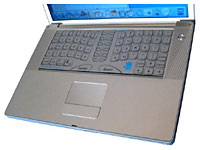 The MacNTouch
Gesture Keyboard replaces the existing mechanical keyboard and
trackpad on all Mac G4 PowerBooks and iBooks
The MacNTouch
Gesture Keyboard replaces the existing mechanical keyboard and
trackpad on all Mac G4 PowerBooks and iBooks
FingerWorks, Inc., the creator of MultiTouch Gesture Recognition technology, announces the MacNTouch Gesture Keyboard for the Mac G4 line of PowerBooks and iBooks.
The MacNTouch Gesture Keyboard is a complete user interface that serves as mouse, standard keyboard, and powerful multi-finger gesture interpreter. Mouse operations like point, click, drag, scroll, and zoom are combined seamlessly with touch-typing and multi-finger gesture everywhere on the MacNTouch's surface. Proprietary hardware and software allows pointing right over the keys, thus eliminating the frequent movement of the hand between the keyboard and the touchpad. The MacNTouch has been designed to minimize stress and it gives users unprecedented control of their computer using hand gestures.
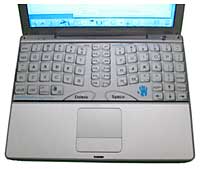 The layout of the keys is both novel and beneficial. The
arch and inward rotation of each key row acts to reduce unhealthy
wrist angles that makes conventional laptop keyboard usage cramped
and uncomfortable. In addition, the mirror-symmetric slant of the
key columns was designed to perfectly fit the fingers' natural
movement, which tends to maximize typing efficiency. Both Qwerty
and Dvorak keyboard layouts are being offered for the
MacNTouch.
The layout of the keys is both novel and beneficial. The
arch and inward rotation of each key row acts to reduce unhealthy
wrist angles that makes conventional laptop keyboard usage cramped
and uncomfortable. In addition, the mirror-symmetric slant of the
key columns was designed to perfectly fit the fingers' natural
movement, which tends to maximize typing efficiency. Both Qwerty
and Dvorak keyboard layouts are being offered for the
MacNTouch.
MacNTouch Keyboards integrate the functions of a large-area super touchpad, a multi-hand, gesture input command station, and a ZeroForce ergonomic keyboard, all on the same smooth surface. The MacNTouch's non-mechanical ZeroForce keys require only the lightest touch, make no sound, and are remappable to suit the needs of the individual user. MacNTouch users never have to move their hands between the ZeroForce keys and the pointing device since the "mouse" is always under their fingertips.
The most exciting and revolutionary aspect of the MacNTouch Keyboard, however, is its ability to interpret the touching and movement of both hands to quickly and effortlessly enter commands normally done by typing hot keys or by mouse pointing and clicking. The MacNTouch Keyboard has a large number of built-in gestures for doing picture, text, and image editing, file operations, and web browsing. These gestures are used to do commonly executed operations like opening and closing files, cutting and pasting text, zooming and rotating objects. They are quick to use and easy to remember. But what really makes the MacNTouch's gesture input powerful is the ability for each user to create customized gestures using the free MyGesture Editor. This means that you can program gesture sets that perfectly match the needs of your favorite applications.
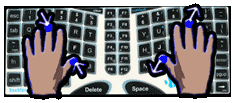 The MacNTouch's large
touch surface is more than big enough for full-range pointing,
touch-typing, and gesture input. The MacNTouch's ergonomic key
layout is split to provide a relaxing and stress-reduced posture
for both hands and body. Simple, reach-reducing modifier chords
round out the unique laptop typing ergonomics.
The MacNTouch's large
touch surface is more than big enough for full-range pointing,
touch-typing, and gesture input. The MacNTouch's ergonomic key
layout is split to provide a relaxing and stress-reduced posture
for both hands and body. Simple, reach-reducing modifier chords
round out the unique laptop typing ergonomics.
"Our TouchStream gesture keyboards pack a lot of power," explains Jeff Green, FingerWorks Mac-Products Sales Manager. "People are amazed by all the things a hand gesture user interface provides. We have a large number of easy- to-use gestures that cover just about every common computer operation. Users don't have to reach for hotkeys because gestures are faster and easier to do. Reaches for the touchpad are also eliminated because the pointing function always stays with the fingers. With our new gesture customization utilities, users are able to map any gesture to any function in their favorite application, and our XWinder utility allows users to move and resize windows in one step with hand rotation."
MultiTouch Technology comprises hardware and software elements for sensing, tracking, and interpreting the motion of multiple hands and multiple fingers on a touch imaging surface. It allows people to use simple and easy- to-remember gestures that make computer use faster, more effective, and more productive. MultiTouch technology was invented and developed in the Electrical and Computer Engineering Department at the University of Delaware by the company founders, Dr. John G. Elias and Dr. Wayne C. Westerman.
Death of a Lombard (and other Logic Board Stories)
Insanely Great Mac's Remy Davison says:
"My Lombard died last week. Actually, it'd been dying for over 6 months. First, the logic board started playing up. It would only boot attached to a terminated SCSI bus (that was a new one to me as well). Which meant that my trusty CD burner became an indispensable part of my booting armory.
"Then, last week, the daughtercard died. Completely. Kaput. No, it wasn't the infamous L2 cache failure (which leaves the processor operable, albeit at greatly-reduced speed).
So what? you say. Time for a new PowerBook. Or iBook....
"The TiBooks were tempting - at a price - because they retain OS 9 boot capability, useful to me in several respects, not least because I use my iRez Capsure PC card a lot. No drivers for OS X, you see.
"Now we come to the issue of Apple Quality Control. Or lack thereof. This Lombard was a December 1999 build, nine months old at time of purchase and still under warranty. It was well kept (apart from the Caps Lock key). Now, barely 3 years after purchase - and barely 4 years after it was built - it was toast....
"A couple of years ago, I wrote an piece called Has Apple Quality Control Bitten the Dust? Given the less-than-isolated cases of iBook logic board failure, an issue Charles Moore at MacOpinion has written of extensively, there is some evidence that Mac quality - for so long taken for granted - has finally gone out to lunch. And it's never come back.
"We still pay a premium for Macs - or, more accurately, for the OS that runs on them. They use industry (low) standard components. The question is, should we really expect our modern Macs to last more than 4 years?"
$35 250 MB Zip Drive for WallStreet PowerBooks
Get a new VST 250 MB Zip drive for your WallStreet PowerBook for just $35 from Power Max.
When Your PowerBook G4 Running Panther Behaves Unexpectedly after Changing Display Resolution
Apple Knowledge Base 25677 article says:
"With Mac OS X Panther, a PowerBook G4 or PowerBook G4 (Gigabit Ethernet) computer may experience issues when the display resolution changes.
"The computer behaves unexpectedly when you or an application changes the display resolution. Some examples of this behavior include:
- A slideshow doesn't advance when played in Keynote.
- The screen turns a solid blue color or the computer stops responding ("crashes") when you turn on full screen Visuals in iTunes or change the resolution in Display preferences.
"Note: This does not affect video on an external display, if one is connected.
"This document will be updated as more information becomes available."
No solution, but at least they're on the case.
SportFolio Sleeve for iBooks and PowerBooks
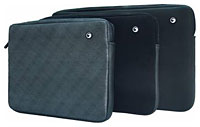 The SportFolio Sleeve
offers rugged, high-tech neoprene construction and minimal bulk.
The exterior features top quality neoprene with a zipper closure.
The zipper is fully lined so it will not scratch your laptop. The
all-black interior features a soft, plush fabric lining. Use the
Sleeve to protect your laptop when placing it in a briefcase or
backpack.
The SportFolio Sleeve
offers rugged, high-tech neoprene construction and minimal bulk.
The exterior features top quality neoprene with a zipper closure.
The zipper is fully lined so it will not scratch your laptop. The
all-black interior features a soft, plush fabric lining. Use the
Sleeve to protect your laptop when placing it in a briefcase or
backpack.
- SportFolio Sleeve, 12" TiG4, SharkSkin $29.95
- SportFolio Sleeve, 14" iBook, BarracudaSkin $29.95
- SportFolio Sleeve, 12" iBook, BarracudaSkin $29.95
- SportFolio Sleeve, 17" TiG4, OrcaSkin $39.95
- SportFolio Sleeve, 15" TiG4, SharkSkin $29.95
The SportFolio Sleeve is available from The ThinkDifferent Store.
Bargain 'Books
There are two different versions of WallStreet running at 233 MHz, the cacheless MainStreet version and the later Series II with a level 2 cache. It's not always possible to determine from the vendor's listing which is being offered, so we've included links within this paragraph to the two models. The same goes for the PowerBook G4/667 (Gigabit Ethernet/2001) and G4/667 (DVI).
MacResQ
- PowerBook G4/400, 256/10/DVD, $949.99
Wegener Media
- PowerBook Pismo G4/500, 384/20/DVD, 60 day guarantee, $979.99
- Upgrade to 1 GB of RAM, $189.99
- Add 512 MB of RAM, $99.99
- Add an AirPort Wireless card, $54.50, installed
Small Dog Electronics
- new 12" iBook 800, 128/30/CD-ROM, AirPort, $799
- new 12" iBook 800, 640/30/CD-ROM, AirPort, $849
- refurb 14" iBook 700, 256/40/Combo, TurboTax Deluxe 2003, $975
- refurb 15" PowerBook G4/1 GHz, 256/60/Combo, also includes SDE leather screen protector with Small Dog logo, $1,799
- refurb 15" PowerBook G4/1 GHz, 256/60/Combo, aluminum, $1,799
Power Max
- 12" PowerBook G4/867, 640/40/Combo, $1,429
The Apple Store Special Deals
Refurbished PowerBooks
- refurb 12" PowerBook G4/867, 256/40/Combo, $1,199
- refurb 12" PowerBook G4/867, 256/40/SuperDrive, $1,399
- refurb 12" PowerBook G4/1 GHz, 256/40/Combo, $1,349
- refurb 12" PowerBook G4/1 GHz, 256/40/SuperDrive, $1,549
- refurb 15" PowerBook G4/1 GHz, 256/60/Combo, $1,699
- refurb 15" PowerBook G4 1.25 GHz, 512/80/SuperDrive, AirPort Extreme, $2,099
- refurb 17" PowerBook G4/1 GHz, 512/60/SuperDrive, AirPort Extreme, $2,199
- refurb 17" PowerBook G4/1.33 GHz, 512/80/SuperDrive, AirPort Extreme, $2,499
Previous Generation iBook G3 (Dual boot, OS X/OS 9 configurations)
These products are new and unopened units.
- new 12" iBook 800, 128/30/CD-ROM, $799
- new 12" iBook 900, 128/40/Combo, $899
Refurbished iBook G3
- refurb 12" iBook 700, 128/20/CD-ROM, $679
- refurb 12" iBook 800, 128/30/CD-ROM, $749
- refurb 12" iBook 800, 128/30/Combo, $799
- refurb 12" iBook 900, 128/40/Combo, $849
- refurb 14" iBook 800, 256/30/Combo, $949
- refurb 14" iBook 900, 256/40/Combo, $999
For more deals on current or recently discontinued models, see our Best PowerBook G4 Deals and Best iBook Deals.
Join us on Facebook, follow us on Twitter or Google+, or subscribe to our RSS news feed
Links for the Day
- Mac of the Day: Performa 5200, introduced 1995.04. The first PowerPC all-in-one was also one of the worst Macs ever made.
- Support Low End Mac
Recent Content
About LEM Support Usage Privacy Contact
Follow Low End Mac on Twitter
Join Low End Mac on Facebook
Favorite Sites
MacSurfer
Cult of Mac
Shrine of Apple
MacInTouch
MyAppleMenu
InfoMac
The Mac Observer
Accelerate Your Mac
RetroMacCast
The Vintage Mac Museum
Deal Brothers
DealMac
Mac2Sell
Mac Driver Museum
JAG's House
System 6 Heaven
System 7 Today
the pickle's Low-End Mac FAQ
Affiliates
Amazon.com
The iTunes Store
PC Connection Express
Macgo Blu-ray Player
Parallels Desktop for Mac
eBay

