
The 'Book Review
FireWire Port Failure, Promising New Battery Technology, 802.11b on a PB 5300, iBook Serial Numbers, and More
This Week's PowerBook and iBook News
Compiled by Charles Moore and edited by Dan Knight - 2003.04.18
Except as noted, prices are in US dollars.
- FireWire Port Failures Subject of WiebeTech White Paper
- Silicon and Graphite, a Materials Match Made in Battery Heaven
- 802.11b PC Card on a PowerBook 5300
- How to Find Your iBook's Serial Number
- Brenthaven Mobile Urban Case
- WiebeTech Introduces USB 2.0/FireWire Combo Version of MicroGB+ Pocket Drive
- Other World Computing Raises Maximum Capacity of Mercury Elite FireWire + USB 2.0/1.1 Combo Series to 250 GB
- DLX185 USB 2.0/FireWire Hard Drive Housing
- Bargain 'Books
FireWire Port Failures Subject of WiebeTech White Paper
WiebeTech has published a white paper, FireWire Port Failures in Host Computers and Peripheral Devices, that provides useful information on the causes and prevention of FireWire port failures, especially in host computers.
"We have seen much interest on the part of FireWire users regarding this subject as judged by recent comments on industry websites. We think users will be interested in reading our analysis of the cause and prevention of port failures," said James Wiebe, CEO of WiebeTech.
Silicon and Graphite, a Materials Match Made in Battery Heaven
Researchers at the Department of Energy's Sandia National Laboratories in Livermore, CA, have developed a new class of composite anode materials composed of silicon and graphite that may double the energy storage capacities currently possessed by graphite anodes, potentially leading to rechargeable lithium-ion batteries with more power, longer life, and smaller sizes.
"Manufacturers of electric automobiles, laptop computers, cell phones, power tools, and other hybrid microsystems will likely all benefit from this kind of technology," said Scott Vaupen of Sandia/California's Business Development Department. Vaupen said Sandia is actively seeking collaborators to further develop the technology for eventual licensing and commercialization.
The marriage of silicon and graphite may improve the specific capabilities of commercial graphite anode materials up to 400 percent, said Jim Wang, Manager of the Analytical Materials Science Department at Sandia.
Wang said researchers have been vexed for years by the capacity limits associated with traditional lithium battery anodes. Sandia turned to silicon, which offers more than 10 times the lithium capacity potential of graphite, but is hampered itself by a rapid capacity loss during the battery cycling phase. When small particles of silicon are combined within a graphite matrix, however, the large capacities are retained.
Sandia researchers acknowledge that some potential vulnerabilities exist with the new material. The complete elimination of fading of long-term cycling capacity in the silicon-based electrodes, Roberts said, may not be possible, though it can likely be minimized by the design of the carbon-silicon composite microstructure.
802.11b PC Card on a PowerBook 5300
A PowerBook 5300 owner sent xlr8yourmac.com a long email with comments and links on using a 802.11b PC Card (Orinoco gold card) with a nearly eight-year-old PowerBook and Mac OS 8.1 and 8.6.
How to Find Your iBook's Serial Number
Apple has posted a Knowledge Base article explaining how to find the serial number on each model of iBook computer - but here's a shortcut if you're running OS X: Open "About This Mac" and click on where it says "Version 10.x.x."
The version of the OS X you're using will appear.
Click on that number, and the the number OS X build you're using will be displayed.
Now, click again on the build number, and your iBook's serial number will appear (this works with most Macs about three years old or newer, but not with older units).
To find the serial number located on the computer:
iBook, iBook (FireWire)
The serial number for these 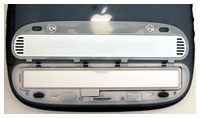 iBook models is located in the battery bay.
- If the computer is on, shut down it down and close the lid.
- Turn the computer over so you are looking at the battery door.
- Remove the battery door.
- The serial number is located near the bottom edge of the battery door.
iBook (Dual USB), iBook (Late 2001), iBook (14.1 LCD), iBook (16 VRAM), iBook (14.1 LCD 16 VRAM), iBook (Opaque 16 VRAM), iBook (32 VRAM), and iBook (14.1 LCD 32 VRAM)
For these models, the serial number 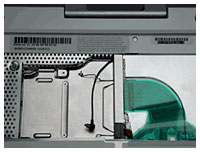 may be located in one or both of two
locations, under the keyboard or in the battery bay.
may be located in one or both of two
locations, under the keyboard or in the battery bay.
Under the keyboard:
- If the computer is on, shut it down and leave the lid open.
- Remove the computer's keyboard. F
- The serial number and Ethernet ID (also called a MAC address) are located underneath the keyboard on the upper ledge. The Ethernet ID is located on the left side of the ledge, and the serial number is to the right.
In the battery bay:
- If the computer is on, shut it down and close the lid.
- Turn the computer over so you are looking at the battery door.
- Remove the battery door.
- The serial number is located on the bottom of the bay.
Brenthaven Mobile Urban Case
The Mobile
Urban is a professional looking wheeled case with good
carrying capacity and maximum 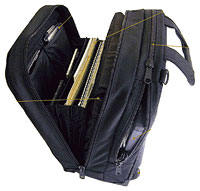 protection from vibration and jarring. The Mobile Urban
has a fully extended height of 39".
protection from vibration and jarring. The Mobile Urban
has a fully extended height of 39".
Features:
- The invisible telescopic handle hides when not in use and is tall enough for someone over six feet tall to use - with a fully extended height of 39-3/4-inches.
- The softdrive wheel suspension system is a pair of skate wheels that minimize the damaging vibration caused by sidewalk seams and other obstructions you roll over.
- The vertically oriented Mobile Urban rolls down the aisle of a commercial aircraft without catching on the seats - something that can't be said for horizontal wheelies.
The Brenthaven computer protection sleeve protects the computer body using an ultra-light, corrugated polyethylene shell. This rigid shell, when combined with a lower bed of proprietary high-density foam, provides the heart of Brenthaven's family of award winning sleeves.
Stage 1 Protection:
Proprietary High-density Foam
Upon initial impact, the computer begins to sink into the bed of high-density foam at bottom of the sleeve. Due to the distinguishing nature of this materials, impact immediately begins to dissipate.
Stage 2 Protection:
Frame Compression
The shell is constructed using vertical corrugated plastic flutes that are lightweight while providing an extreme amount of strength and great energy absorption properties. While the bed of high-density foam is absorbing the shock impact, the rigid walls also begin to flex providing the second level of unmatched computer protection. This rigid wall system also prevents sharp objects from puncturing through the sleeve helping reduce the risk of side impact damage.
The Mobile Urban sells for $379
WiebeTech Introduces USB 2.0/FireWire Combo Version of MicroGB+ Pocket Drive
WiebeTech announces MicroGB+™ Combo, featuring both FireWire and USB 2.0 ports. The compact, rugged case made of anodized aluminum easily fits into a pocket.
The MicroGB+Combo is a sister product to the original MicroGB+. Unlike the original MicroGB+, the Combo version features a FireWire port and a USB 2.0 port, which is also backwards compatible with USB 1.1. The new Combo version is immediately available in capacities to 80 GB.
"The MicroGB+ Combo includes the enclosure, drive, cables, AC adapter and an attractive carrying case," said James Wiebe, CEO of WiebeTech LLC. "We also include a copy of MediaFour's excellent Mac Drive 5™ software, which allows Mac formatted drives to be read on Windows computers. This software has a value of $59.95. The user configurable version of the product also includes a screwdriver for easy installation of any 9.5mm notebook drive.
"The MicroGB+ Combo is based on the popular OXFW911 controller chip, and features extremely fast transfer rates as well compatibility with virtually all computers," continued Wiebe. "MicroGB+ Combo utilizes an ultra thin aluminum case, which is superior to plastic enclosures in size and in heat dissipation."
- MicroGB+Combo basic product, $129.95
- 20 GB, 5400 RPM, $229.95
- 30 GB, 4200 RPM, $249.95
- 40 GB, 4200 RPM, $269.95
- 40 GB, 5400 RPM,8 MB cache, $299.95
- 40 GB, 5400 RPM, 16 MB cache, $349.95
- 60 GB, 4200 RPM, $379.95
- 60 GB, 5400 RPM, 8 MB cache, $429.95
- 80 GB, 4200 RPM, 8 MB cache, $459.95
Basic product includes aluminum enclosure, cables, carrying case and screwdriver for easy installation. A world voltage AC adapter is also included.
In the US and Canada, dealers may purchase the MicroGB+Combo from WiebeTech's distributor, Dr. Bott LLC, and end users may purchase them through local dealers. All configurations are in stock and available directly from WiebeTech. Canadian resellers may purchase products from EMJ.
Other World Computing Raises Maximum Capacity of Mercury Elite FireWire + USB 2.0/1.1 Combo Series to 250 GB
Other World Computing has announced it has increased the capacity of its line of Mercury Elite FireWire + USB 2.0/1.1 Combo storage solutions to as much as 250 gigabytes. In addition, all prices of existing models in the Mercury Elite FireWire + USB 2.0/1.1 Combo series line of storage solutions have been reduced as much as 11 percent.
Previously, the largest capacity drive within the Mercury Elite FireWire + USB 2.0/1.1 Combo line of storage solutions was 120 GB, but the line now includes models with capacities of 160, 180, 200, and 250 GB.
The 7200 RPM combo drives, which feature two FireWire ports and one USB port, are compatible with Apple operating systems v8.5-9.2.x, as well as OS X 10.0.3 and higher; Microsoft Windows 98SE, ME, 2000, and XP; and any other operating system that supports FireWire and/or USB ports. Pricing for the newest Mercury Elite FireWire + USB 2.0/1.1 Combo storage solutions is as follows:
- 250 GB with 8 MB of cache: $479.99
- 200 GB with 8 MB of cache: $389.99
- 180 GB with 8 MB of cache: $339.99
- 160 GB with 2 MB of cache: $339.99
New pricing for the existing products in the Mercury Elite FireWire + USB 2.0/1.1 Combo series is as follows:
- 120 GB with 8 MB of cache: $249.99
- 120 GB with 2 MB of cache: $229.99
- 80 GB with 2 MB of cache: $199.99
- 60 GB with 2 MB of cache: $179.99
- 40 GB with 2 MB of cache: $167.99
OWC also announced a price reduction of up to $20 on all Mercury Elite FW 400 FireWire-only storage solutions. All OWC Mercury Elite FireWire + USB 2.0/1.1 Combo and Mercury Elite FW 400 storage solutions come with a two-year warranty and are shipped with Intech HD SpeedTools.
DLX185 USB 2.0/FireWire Hard Drive Housing
ADS Tech has a new Dual Link drive kit that lets you use existing IDE and ATA drives as external FireWire or USB devices.
Key features
- Add multi-gig storage to your PC or Mac
- Instantly enhance almost any IDE hard drive; ATA-100, ATA-133, or ATA-66 drive
- Convert your DVD or CD drive to FireWire or USB 2.0
- Supports drives up to 250 GB
- Convert your internal hard drive to USB 2.0 or FireWire
- Super fast & reliable external storage
- Make your DVD-R drive portable
- Intech's SpellTools Utilities for Mac OS 9.x and OS X
- Plug in the drive & it mounts automatically. Adding a drive is fast & easy!
- Hot Swappable: Real plug & play for your external drives
- Includes pop-out front bezel to cover a hard drive - or remove for CD drive installation
- Supports sustained data transfer rates up to 35 MB/sec.
- Power supply supplies both 5 volts and 12 volts to your drive.
- Silent ball bearing fan to keep your drive cool and running smooth.
- Micro-Slot security protection. Keep your drive from walking away.
- Compatible with Anchor Pad and Kensington Micro-Slot Locks.
- Lighted rear power toggle switch
- Hard drive activity light
Key FireWire features
- Stackable and daisy-chainable
- Provides (2) two 400 Mbits/sec ports
- Connect one port to host computer
- Use second port for daisy chain to a second drive, your digital camcorder, scanner, or Pyro web cam
Key USB 2.0 features
- Provides (1) 480 Mbits/sec port
Mac requirements: USB 2.0 enabled Mac, FireWire enabled Mac running OS 9 or OS X, or USB 1.1.
Bargain 'Books
There are two different versions of WallStreet running at 233 MHz, the cacheless MainStreet version and the later Series II with a level 2 cache. It's not always possible to determine from the vendor's listing which is being offered, so we've included links within this paragraph to the two models. The same goes for the PowerBook G4/667 (Gigabit Ethernet/2001) and G4/667 (DVI).
Baucom Computers
- 12" iBook 800, 256/20/Combo, $1,205
- PowerBook G4/400, 256/10/DVD, $1,135
- 12" iBook 500, 256/20/Combo, OS 9 & X CDs, $789
- 12" iBook 500, 256/10/CD-RW, OS 9 & X CDs, $735
- PowerBook 3400/200, 144/2/CD, floppy, $290
- PowerBook 3400/200, 48/2/CD, floppy, $248
Wegener Media
- PowerBook Pismo G3/500, 128/10/DVD, $999.99
PowerBook Guy
- PowerBook Pismo G3/400, 256/12/DVD, $799.95
Power Max
- PowerBook WallStreet G3/250, 160/4/CD-ROM, 13.3" screen, $599
- "Clamshell" iBook G3/300, 96/3/CD-ROM, $689
- PowerBook Lombard G3/333, 192/4/CD-ROM, $759
ExperCom/FlyMilesMicro
- refurb PowerBook G4/800, 512/40/Combo, AirPort, $1,999
Small Dog Electronics
- refurb PowerBook G4/800, 512/40/Combo, Airport, one year warranty, InCase large laptop sleeve (leather), $2,119
- 14" iBook 800, 256/30/Combo, leather screen protector (with Small Dog logo), Macally icePad laptop tray and stand, Macally icePad, $1,376
For more deals on current or recently discontinued models, see our Best PowerBook G4 Deals and Best iBook Deals.
Join us on Facebook, follow us on Twitter or Google+, or subscribe to our RSS news feed
Links for the Day
- Mac of the Day: Performa 5200, introduced 1995.04. The first PowerPC all-in-one was also one of the worst Macs ever made.
- Support Low End Mac
Recent Content
About LEM Support Usage Privacy Contact
Follow Low End Mac on Twitter
Join Low End Mac on Facebook
Favorite Sites
MacSurfer
Cult of Mac
Shrine of Apple
MacInTouch
MyAppleMenu
InfoMac
The Mac Observer
Accelerate Your Mac
RetroMacCast
The Vintage Mac Museum
Deal Brothers
DealMac
Mac2Sell
Mac Driver Museum
JAG's House
System 6 Heaven
System 7 Today
the pickle's Low-End Mac FAQ
Affiliates
Amazon.com
The iTunes Store
PC Connection Express
Macgo Blu-ray Player
Parallels Desktop for Mac
eBay

