
Apple Archive
Options for Replacing Your Older iPod
- 2007.11.19
Thinking of replacing your iPod? We'll look at some of the features of past models, as well as reasons why or why not to upgrade.
Full-sized iPods
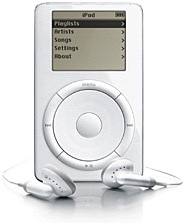 The
first (1G) iPod was released in
2001 and offered 5 GB of storage, as well as the innovative
connection to any Mac by FireWire (much faster than USB 1.1!), and the
ability to store data on the device like an external hard drive.
Considering that a base PowerBook G4 of
the time came with a 10 GB hard drive, 5 GB was not insignificant
in terms of capacity.
The
first (1G) iPod was released in
2001 and offered 5 GB of storage, as well as the innovative
connection to any Mac by FireWire (much faster than USB 1.1!), and the
ability to store data on the device like an external hard drive.
Considering that a base PowerBook G4 of
the time came with a 10 GB hard drive, 5 GB was not insignificant
in terms of capacity.
The second generation (2G) iPod added a touch-sensitive scroll pad instead of a wheel, increased capacity to 10 GB, and eventually gave users the opportunity to connect it to a FireWire equipped PC via RealPlayer - and later iTunes for Windows.
The third generation (3G) iPod was an awkward-looking thing, with four buttons (for play/pause, menu, back, and forward) above the wheel itself. This generation also added the ability to connect to your PC via USB 2.0.
The fourth generation (4G) model was available in two stages: first with a black and white screen, and later with a color screen as the iPod photo. This led people to suspect that the fifth generation (5G) model would feature video capability, which it did, along with a larger screen.
By the fifth generation, USB was the only option to connect your iPod to your Mac or PC. When first released, it was available in 30 GB or 60 GB capacity, later the 60 was replaced with an 80.
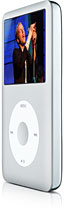 The current iPod classic (right) is
quite similar to the 5G, with the exception that it features a metal
case in gray or black and holds 80 GB or 160 GB.
The current iPod classic (right) is
quite similar to the 5G, with the exception that it features a metal
case in gray or black and holds 80 GB or 160 GB.
iPod mini and nano
The iPod mini was released
in 2004, and featured a 4 GB (later 6 GB) hard drive and a
black and white screen. Its redeeming feature was its availability in a
variety of colors, and it became very popular. 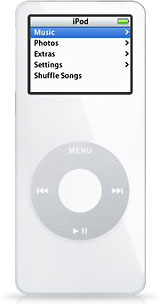 It was replaced with the first-generation
iPod nano (left), which also became popular, but suffered from
manufacturing flaws (specifically the color screen breaking) early on.
Its main feature was that it no longer used a hard drive like the mini,
instead being based on flash memory. It initially was offered in
2 GB and 4 GB capacities.
It was replaced with the first-generation
iPod nano (left), which also became popular, but suffered from
manufacturing flaws (specifically the color screen breaking) early on.
Its main feature was that it no longer used a hard drive like the mini,
instead being based on flash memory. It initially was offered in
2 GB and 4 GB capacities.
The second generation iPod nano adopted the mini's metal casing, which made it seem much more durable. It was available in 2, 4, and 8 GB, though a choice of colors was only available on the 4 GB model.
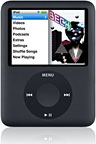 The current generation is
wider than it is tall and allows you to view video. It also comes in a
metal case, and comes in either 4 GB or 8 GB capacity.
The current generation is
wider than it is tall and allows you to view video. It also comes in a
metal case, and comes in either 4 GB or 8 GB capacity.
With such a choice of models, which makes the most sense? Is replacing your old, 3G model with a new iPod classic with 80 GB of storage really the best bet if you only have 4 GB of music that you listen to regularly?
How About Buying Used?
Buying used is a good option if you don't need the features of the latest iPods. It's an especially good option with iPod nanos, since they are flash-based and therefore much more durable. Essentially, there's a better chance that a year-old flash-based iPod has stood up to someone's abuse than a year-old 5G iPod.
Also, since so many were given away with Apple's Back-to-School promotion (buy a Mac, get an iPod), they are plentiful and very reasonably priced on the used market. For about US$100, you can get a decent 4 GB previous-generation iPod nano. Not too bad, since a brand new costs $150.
I would not, however, recommend a used full-size iPod, specifically an older model (2G through 4G). They may be cheap, but they also most likely have worn out batteries and hard drives that could be on their way out. Personally, I'd rather spend an extra $50 or so on something newer and in better condition.
If you're using your older iPod with an older Mac, be aware that most likely that Mac does not have USB 2.0 ports, so transferring songs to a newer device (5G and beyond) will be significantly slower than it was transferring via FireWire.
iPod Batteries
Perhaps your iPod still suits your needs, but a dying battery is it's main issue. iPod batteries are easy to replace, so for about $20-50 (depending where you order it from) you can get a new battery which will most likely have 20-70% greater capacity than the original battery had when new. Not a bad deal; it's like getting a new iPod for next to nothing.
If you either need the additional space, or would just like to have a new iPod, there are a couple of things to keep in mind. The first is obviously that all iPods made today are USB only. The second is that the new iPod touch - the iPod based on the iPhone that features a touch-sensitive screen - does not allow you to use it for disk storage without some hacking. For most people this may not be a huge deal, but for some it can be extremely frustrating, as they may use their iPod as a primary means of storage, backup, or transport for documents.
Power Conservation
The other issue is the restrictions imposed by hard-drive based players like the iPod classic. They use significantly more battery power than flash-based iPods, and forwarding through songs will cause the disk to spin up frequently, thereby reducing your battery life. If I change songs frequently on my 5G iPod, my battery will only last 2-3 hours. If I leave it and let it play, it will last many times that.
By now you can probably tell that I favor flash-based iPods. Not only are they more durable and have better battery life, but they have better performance in general. Skipping through songs is instant, as is playing them again after you pause.
This is where the future lies, and Apple knows it (thus, the touch and iPhone are flash-based). It would seem to me, if you can live with 2-16 GB of capacity, a flash-based iPod like the nano or touch is by far a better bet.
Further Reading
- Low End Mac's best full-sized iPod deals, updated biweekly
- Low End Mac's best iPod nano and shuffle deals, updated biweekly
Join us on Facebook, follow us on Twitter or Google+, or subscribe to our RSS news feed
Today's Links
- Mac of the Day: Motorola StarMax 3000, introduced 1999.09.07. This inexpensive clone used lots of off-the-shelf parts.
- Support Low End Mac
Recent Content
About LEM Support Usage Privacy Contact
Follow Low End Mac on Twitter
Join Low End Mac on Facebook
Favorite Sites
MacSurfer
Cult of Mac
Shrine of Apple
MacInTouch
MyAppleMenu
InfoMac
The Mac Observer
Accelerate Your Mac
RetroMacCast
The Vintage Mac Museum
Deal Brothers
DealMac
Mac2Sell
Mac Driver Museum
JAG's House
System 6 Heaven
System 7 Today
the pickle's Low-End Mac FAQ
Affiliates
Amazon.com
The iTunes Store
PC Connection Express
Macgo Blu-ray Player
Parallels Desktop for Mac
eBay

