
Apple Archive
Picking a Low-End Color PowerBook
- 2000.11.10
Looking for a colour PowerBook? If so, there are many options for you to consider. I will be talking about colour PowerBooks starting with the 165c and ending with the 190cs.
The PowerBook 165c was a 165 (33 MHz '030) with a colour screen attached. The screen was passive matrix and showed only 640 x 400. There was no dedicated VRAM for the internal display (there was 512K for an external monitor). Instead, the 165c used DRAM for video, and, like the IIsi, screen redraws and loading images were slow.
The next colour model, and the first full-featured colour model, was the PowerBook 180c. The 180c used a beautiful active matrix screen, which is bright and shows good solid colour. The 180c featured a 640 x 480 screen resolution, which was required to run many games and gives more space on the desktop. It also makes the icons appear very small.
Being able to run the PowerBook from a battery for only about an hour was the price you had to pay for the colour screens on the 165c and 180c.
The Duo line combined a PowerBook and a desktop machine in one. The Duo could be removed from its dock and used as a portable. It could be later docked and used as a full-featured desktop machine. The 270c was based on the Duo 250, but it was the only Duo to feature an FPU. The 270c's 33 MHz 68030 processor with FPU, its 640 x 480 colour active matrix screen, and its two-hour battery life make this my 68030 PowerBook of choice. The 270c can accept up to 32 MB of RAM (motherboard RAM can't be used if you install a 32 MB card)
The Duo 280c was an upgraded 270c, with a 33 MHz 68LC040 ('040 chip lacking the FPU). The 280c had RAM expansion to 40 MB. For some reason, in the 280c, the motherboard RAM can be used if you install a 32 MB card. The only other difference was that the name was moved from right below the little Apple logo below the screen to the left side of the base above the keyboard. Maybe Apple thought it annoyed people by being where it was?
Anyway, if you need to run a program that requires an '040 (or if the model name annoys you up by the screen) buy the 280c, otherwise go with a 270c. The 270c is almost as fast, will be a bit less expensive to buy, and is actually a bit faster with things that require an FPU.
If you don't want a Duo, there is the PowerBook 500 series to
consider. These were 68LC040 based machines with 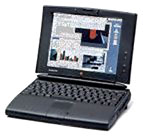 the exception of the 550c which was not sold in the U.S. The base
model colour machine was the 520c. It
was nice with its 25 MHz 68LC040 processor, optional 19.2 modem,
built in ethernet, trackpad (the first Mac to have one), full sized
keyboard with power button, and 16-bit stereo sound with stereo
speakers. It had just one little thing that annoyed me - the
screen! It is another passive matrix colour screen.
the exception of the 550c which was not sold in the U.S. The base
model colour machine was the 520c. It
was nice with its 25 MHz 68LC040 processor, optional 19.2 modem,
built in ethernet, trackpad (the first Mac to have one), full sized
keyboard with power button, and 16-bit stereo sound with stereo
speakers. It had just one little thing that annoyed me - the
screen! It is another passive matrix colour screen.
Passive matrix black and white screens are great, but colour? It just ruins the whole machine. First of all, passive matrix colour screens tend to be very blotchy. Expect white patches all over the screen, and expect to be fiddling with the contrast and brightness controls each time you change the angle of the display. These displays also tend to be a bit blurry, and slow screen redraws are another side effect.
The 540c, on the other hand, which was the top model 500 series sold in the U.S, was an incredible machine. It had a 33 MHz 68LC040 processor, and 640 x 480 active matrix display in addition to the features in the 520. If you want a 500 series PowerBook, go for a 540c.
Next comes the 190cs. Apple did it again - spoiled a nice machine with a bad screen, another passive matrix colour screen. Otherwise, the 190cs was great with its 33 MHz 68LC040, RAM expandable to 40 MB, and newly designed black case which just screamed "professional at work!" The 190 series dropped the 500's built in ethernet, modem, and stereo speakers.
As you can see, there is a wide choice of pre-PowerPC PowerBooks. The PowerBook Duo 270c is by far the best 68030 PowerBook. For '040 models, you have a choice. If you want something reasonably priced, buy a 190cs. If you need something with features, buy a PowerBook 540c. If you need something small and light, the Duo 280c is your only choice.
Don't pay more than US$150 for a 165c or 180c. Don't pay more than $250 for a Duo 270c w/ dock. A 280c shouldn't cost more than $300 w/dock. Don't pay more than $250 for a 520c, $300 for a 540c, or more than $200 for a 190cs.
There are many good deals out there on 68K PowerBooks, check the Low End Mac dealers list and the online auction sites such as eBay. Just keep in mind that these machines are not going to be cutting edge, but if what you are doing is a basic task, one of these PowerBooks may be all that you need.
About LEM Support Usage Privacy Contact
Follow Low End Mac on Twitter
Join Low End Mac on Facebook
Favorite Sites
MacSurfer
Cult of Mac
Shrine of Apple
MacInTouch
MyAppleMenu
InfoMac
The Mac Observer
Accelerate Your Mac
RetroMacCast
The Vintage Mac Museum
Deal Brothers
DealMac
Mac2Sell
Mac Driver Museum
JAG's House
System 6 Heaven
System 7 Today
the pickle's Low-End Mac FAQ
Affiliates
Amazon.com
The iTunes Store
PC Connection Express
Macgo Blu-ray Player
Parallels Desktop for Mac
eBay

