
Apple Archive
iTunes 7 Improves Organization, Adds New Browsing Modes
- 2006.09.22
This past week Apple released an update to iTunes, meant
essentially to give the application better support for video. This
was due to the simultaneous release of movies available for
purchase on the
iTunes Music Store.
Apart from this new video support, what are the differences between iTunes 6 and 7?
The most notable difference is the interface. It's been updated slightly, with a sleeker, more modern look.
The button for burning a CD has been moved to the bottom, and specifically says "Burn Disc" when a playlist is selected. In the past, one had to click the white and black pinwheel in order to burn a disc; while this worked, it was also a bit confusing for first-time users.
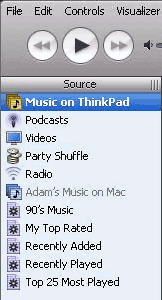 The sidebar in
early versions of iTunes (left) was straightforward - you had your
music library, radio, and playlists. With newer versions came the
Music Store, party shuffle, and podcasts. This started to make the
sidebar a very busy and confusing aspect of the software for any
user, beginner or advanced.
The sidebar in
early versions of iTunes (left) was straightforward - you had your
music library, radio, and playlists. With newer versions came the
Music Store, party shuffle, and podcasts. This started to make the
sidebar a very busy and confusing aspect of the software for any
user, beginner or advanced.
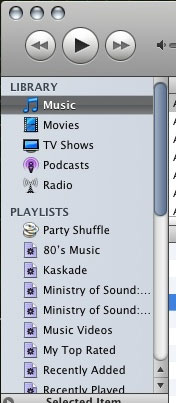 iTunes 7
(right) simplifies it again in a similar way to the way the system
preferences application was simplified, by organizing the items
into categories. This unfortunately means that you can no longer
name your music library. It's a simple complaint and relatively
trivial, but it was a nice feature that I enjoyed to give myself
the ability to personalize the software to an extent. That being
said, dividing the categories into "library", "playlists", and
"devices" (when one is present) really does help streamline the
application to a great extent.
iTunes 7
(right) simplifies it again in a similar way to the way the system
preferences application was simplified, by organizing the items
into categories. This unfortunately means that you can no longer
name your music library. It's a simple complaint and relatively
trivial, but it was a nice feature that I enjoyed to give myself
the ability to personalize the software to an extent. That being
said, dividing the categories into "library", "playlists", and
"devices" (when one is present) really does help streamline the
application to a great extent.
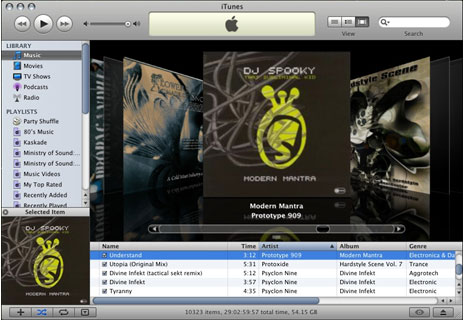
Also new are two new ways to view your music. You can view your tracks in the traditional list format, or one of two formats that focus on being able to see the album art. The first version displays songs grouped by album, horizontally with the album art next to the tracks. The second view displays the CD covers as if they were CDs on a CD rack with the tracks listed below, so that you can see what comes before and after the selected album.
You can scroll through all the CDs in your collection using this method. It's a nice organizational method, especially if you're a fan of album covers, and it provides a different mentality for getting music from the Internet vs. from physical stores - you can still have a "CD collection" even if it's only on your computer's hard drive.
With the features that were added, there are still some that I'd like to have seen.
I'm honestly a little bit disappointed that Apple hasn't introduced skins for iTunes. I know that they want their software to be instantly identifiable - somewhat like how Mac OS X became, with significantly less of an ability to customize the look and feel than other operating systems (notably Windows). That said, Windows XP doesn't give you very many options either (unless you don't mind using the older Windows 9x look where you can change colors and fonts), and for the best customization on both operating systems you must install third-party software. Yes, third party themes can be installed into iTunes, but it's not an elegant solution.
I'd also like to see the ability to control iTunes from the Mac's menu bar. Yes, you can right-click or control click the iTunes icon in the dock to skip ahead or back a song. Yes, there are plugins such as M-Beat that allows you to skip forward, back, or stop a song from the menu bar - but this isn't an ideal situation. Not only does it use up extra RAM (and M-Beat is like Firefox, once it starts using RAM, it keeps taking more and more), it's a bit buggy, and it's separate application provides less than ideal integration with iTunes.
That said, some have mentioned that iTunes 7 is a bit buggy itself. Some have been having problems with having their iPods recognized by iTunes. An article at Ars Technica, iTunes 7 Bug Ridden?, points out a user who had all of his iTunes Music Store purchases disappear after he upgraded to version 7, and another who had issues with songs sounding distorted when played.
Thankfully I've had no issues with it on either my G5 Power Mac
or my Windows XP PC, but I wouldn't be surprised if a 7.0.1 update
is on its way soon. 
Join us on Facebook, follow us on Twitter or Google+, or subscribe to our RSS news feed
Today's Links
- Mac of the Day: Performa 5200, introduced 1995.04. The first PowerPC all-in-one was also one of the worst Macs ever made.
- Support Low End Mac
Recent Content
About LEM Support Usage Privacy Contact
Follow Low End Mac on Twitter
Join Low End Mac on Facebook
Favorite Sites
MacSurfer
Cult of Mac
Shrine of Apple
MacInTouch
MyAppleMenu
InfoMac
The Mac Observer
Accelerate Your Mac
RetroMacCast
The Vintage Mac Museum
Deal Brothers
DealMac
Mac2Sell
Mac Driver Museum
JAG's House
System 6 Heaven
System 7 Today
the pickle's Low-End Mac FAQ
Affiliates
Amazon.com
The iTunes Store
PC Connection Express
Macgo Blu-ray Player
Parallels Desktop for Mac
eBay

