
Apple Archive
Smart Design and Easy Drive Replacement will Make the MacBook a Winner
- 2006.05.19
Somehow the sleek new MacBook, available in black and white (much like the current iPods), didn't surprise anyone. The iBooks were long overdue for updating, and everyone knew the replacements would be Intel-based. Plus the rumor sites had been predicting the MacBook launch for weeks.
That all said, some features of the new models were a bit of a surprise.
The less surprising ones include the Intel processor (which is thankfully a Core Duo, not the single processor found in the low-end Mac mini), iSight video camera, and 13.3" widescreen.
Shiny Screen
The glossy screen was a bit of a surprise (I've read other people's comments that Apple would never release a laptop with this type of a screen). I've generally avoided looking at machines with this type screen, specifically because they tend to reflect light easily and can be hard to see outdoors, as well as make it more difficult to do any Photoshop work where color correctness is a big deal. Sure, it may enhance the contrast, but when working in Photoshop on something for print, what you see on your screen and what gets printed out would be two separate things.
I have yet to look at a new MacBook, though. Perhaps the screen Apple uses is better than those of competing Windows notebooks.
Easy Hard Drive Replacement
The other surprising feature is the user-replaceable hard drive. Apple laptops have historically had difficult-to-replace hard drives (especially the smaller ones, like my current 12" PowerBook), so this feature is a welcome improvement. Since laptops generally come with smaller hard drives, users tend to run out of space quickly. Today, laptops are replacing desktops for many, and a large hard drive and the ability to upgrade it are becoming more of an issue.
My sister's Dell laptop came with a 20 GB drive, which was quickly filled up. Her machine has a slightly more difficult to replace drive, so we opted for an external hard drive to store her non-critical files. This worked, but it was less than convenient. Some Dells from as long as five years ago had user-replaceable drives; it's a shame Apple waited until now.
Being able to actually replace the hard drive yourself with a larger one is something that should be standard in all laptop computers.
Visuals
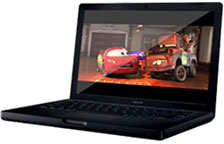 There's
also the look factor, with many people probably opting for the black
case simply because it's cool. That said, Apple has foreseen this and
made the black version the high-end model, charging $200 more than
the midrange white model.
There's
also the look factor, with many people probably opting for the black
case simply because it's cool. That said, Apple has foreseen this and
made the black version the high-end model, charging $200 more than
the midrange white model.
Two screws on the left side of the MacBook's case appear to be present simply for design reasons, not because they hold anything together.
The keyboard has also been redesigned and is hopefully a welcome improvement to the iBook's lousy keyboard. I found the old keyboard to have poor tactile response, and it was just too easy to hit the wrong keys. The MacBook's keyboard supposedly lies flush with the top of the case, preventing marks on the screen.
Unfortunately, it also means that if something happens to the keyboard, the entire top casing may have to be replaced.
Drawbacks
So what's lacking? The video card. Unfortunately, this is where Apple saves money, by installing the same Intel graphics processor featured in the Mac mini. Sure, it's fine for a low-end machine, but in the $1,500 version of the MacBook? It seems a bit underpowered, stealing 64 MB of system memory to use for the video.
MacBook buyers can say "forget it" to high-powered games, video editing, or even heavy Photoshop work.
To make the MacBook the perfect consumer laptop, it needs two options: the option of having a standard matte LCD screen, which would allow those who do much of their work outdoors to feel comfortable purchasing a MacBook, and the option to have an dedicated video system, not one that shares system memory.
Otherwise, the 1.83 GHz and 2.0 GHz processors are more than adequate, the case design is fantastic, and the built-in iSight and magnetic power adapter are both great features pioneered on the MacBook Pro.
The MacBook is still sure to be a sales hit.
Join us on Facebook, follow us on Twitter or Google+, or subscribe to our RSS news feed
Today's Links
- Mac of the Day: PowerBook 500 Series, introduced 1994.05.16. 'Blackbird' includes a 25 to 33 MHz 68040 along with smart batteries and grayscale or color displays.
- Support Low End Mac
Recent Content
About LEM Support Usage Privacy Contact
Follow Low End Mac on Twitter
Join Low End Mac on Facebook
Favorite Sites
MacSurfer
Cult of Mac
Shrine of Apple
MacInTouch
MyAppleMenu
InfoMac
The Mac Observer
Accelerate Your Mac
RetroMacCast
The Vintage Mac Museum
Deal Brothers
DealMac
Mac2Sell
Mac Driver Museum
JAG's House
System 6 Heaven
System 7 Today
the pickle's Low-End Mac FAQ
Affiliates
Amazon.com
The iTunes Store
PC Connection Express
Macgo Blu-ray Player
Parallels Desktop for Mac
eBay

