
Apple Archive
Converting Video and Adding Album Art for Your iPod
- 2006.01.17
Earlier this month I discussed how Apple was cutting costs in their new video iPod without really adding very many features outside of the ability to watch videos.
Transferring videos to the iPod is done by iTunes, much as you'd transfer a song - just drag the video to the iPod icon in the source list.
Videos can be added to iTunes in two ways. You can download them for $1.99 from the iTunes Music Store, or you can import your own videos. Since Apple would prefer if you downloaded and paid for their videos, they make it a bit more difficult to convert and import your own videos into iTunes.
Video to iPod
Apple's way of having you to do it involves using QuickTime 7 and exporting your MPEG file to the iPod format via a menu option (in a break with the past, you no longer need to buy the Pro version of QuickTime to convert to iPod format). However, this seems to take a long time, and on my 867 MHz 12" PowerBook it sometimes stops halfway with a timeout error.

This leads me to standalone applications. The first one I found is MoviesformyPod, which gives you some options for quality as well as the option to rotate the video that you're converting.
I had no problems with it stopping halfway, but I had issues with some of the files not having audio (and the software itself warns that it cannot convert the audio in muxed MPEG files). If you're like me and have a number of these files you want to play on your video iPod, you might try iSquint.

Like MoviesformyPod, iSquint gives you some choice over quality settings, which affects file size. However, it also gives you some advanced settings where you can crop the movie, change the frame rate, and even change the bitrate for the audio.
It also gives you the opportunity to have a list of several files you want converted to the iPod format so you don't need to manually go back and convert each one. And, if you want, iSquint will even automatically add the movie files to iTunes for you.
But you're still not done, because you'll have to tell iTunes whether the video you just converted is a music video or a movie. If it's a music video, "get info" on the video, choose options, and select "music video". The iPod will even play the audio track alone if you access it by going to the "music" menu and not the "video" menu. You can name the file by artist and title like you would any MP3 file.
Album Cover Art
The other thing you can do with color-screen iPods is copy over album artwork - but in order do that, you must first have the artwork applied to the songs in iTunes. To do this you could scan the cover of all of your CDs, but I've found that I can usually find a roughly 300 x 300 JPEG of the cover of any given album by using an image search engine.
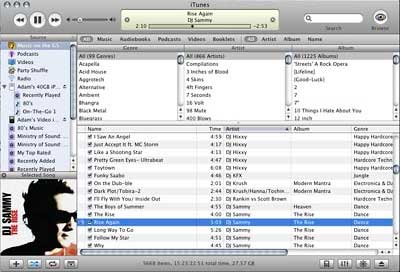
Copy that to your desktop, make sure that Show Artwork is selected in iTunes from the Edit menu (and above the window is showing Selected Song, not Now Playing), select the songs you want the album art to be applied to, and drag the image file into the album artwork window. Now when you copy these songs to your color iPod, you'll be able to see them on the iPod's screen when a song from that album is playing. Push the center button on the iPod's scroll wheel twice, and you'll get a large-sized display of the artwork alone.
Join us on Facebook, follow us on Twitter or Google+, or subscribe to our RSS news feed
Today's Links
- Mac of the Day: Performa 5200, introduced 1995.04. The first PowerPC all-in-one was also one of the worst Macs ever made.
- Support Low End Mac
Recent Content
About LEM Support Usage Privacy Contact
Follow Low End Mac on Twitter
Join Low End Mac on Facebook
Favorite Sites
MacSurfer
Cult of Mac
Shrine of Apple
MacInTouch
MyAppleMenu
InfoMac
The Mac Observer
Accelerate Your Mac
RetroMacCast
The Vintage Mac Museum
Deal Brothers
DealMac
Mac2Sell
Mac Driver Museum
JAG's House
System 6 Heaven
System 7 Today
the pickle's Low-End Mac FAQ
Affiliates
Amazon.com
The iTunes Store
PC Connection Express
Macgo Blu-ray Player
Parallels Desktop for Mac
eBay

