
Apple Archive
Moving Up from a 15" 500 MHz G3 iMac to a 17" 1.6 GHz G5 iMac
, 2005.07.29
As you've probably figured out if you're a regular Apple Archive reader, I've been in the market for a new Mac.
Well, sort of. My blue & white G3 was getting too slow for my taste, and I was unable to read burned CDs in its CD-ROM drive, which was a bit of a problem. Yes, I know I could replace the CD-ROM drive with a modern CD-RW - or even DVD-R drive - but since I'd been thinking of a new machine anyway, why should I put money into the old one?
My cell phone died this past week, so I had to go down to Cingular, which just happens to be right next to CompUSA. I picked up my new phone - a Nokia that has a mini-SD slot, a camera that can capture still and video, and a media player which can play MP3s and videos. Realizing that it did just about as much as my blue & white G3 does in about 1/20th of the package, I decided I might as well have a quick look inside CompUSA - in case they had anything on sale (not that I would buy anything, of course!).
My mom had been having trouble with AOL. She complained that it kept quitting on her - and how her computer was extremely slow and things weren't opening correctly.
Her 500 MHz iMac had gone through various upgrades (not clean installs) of OS X, from 10.0 through 10.3. By the time it had gotten to 10.3, there were bound to be some leftover and corrupt files. I offered to do a clean install of everything, but she felt that it would ultimately be better to buy a more modern machine, such as a Mac mini. The plan was to buy a 1.42 GHz Mac mini and use an extra CRT monitor that had been sitting around the house with it.
While in CompUSA, she looked at the Mac mini and ultimately decided that she needed an LCD screen instead of using the extra CRT we already had. The LCD she wanted was $400. Combined with the $599 Mac mini, that would've added up to $1,000 - except there was another option.
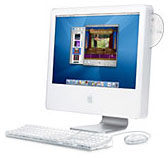 They had an
open-box, leftover 17" 1.6 GHz iMac
G5 on sale for only $849. This was without the AirPort card or
SuperDrive - but then my mom was just basically looking for
something with a bigger screen and a faster processor. Making her
own DVDs was not a priority.
They had an
open-box, leftover 17" 1.6 GHz iMac
G5 on sale for only $849. This was without the AirPort card or
SuperDrive - but then my mom was just basically looking for
something with a bigger screen and a faster processor. Making her
own DVDs was not a priority.
The iMac G5 was the deal of the day (yes, I did walk out the door with something myself). Even with a $69 AirPort Extreme card and the upgrade to Tiger, it came out to be a better value than the Mac mini she had been looking at. Plus it came with a keyboard and mouse, which she would have had to purchase for the Mac mini.
They also had a special promotion where they gave us a free (after $99 rebate) Epson CX4600 all-in-one copier/scanner/printer. Considering my mom's Epson Stylus 740 (first USB printer available for the iMac) was seven years old - and she had been wanting a scanner anyway - we figured we'd take advantage of the offer. It's even got a CompactFlash card slot so she can copy her photos to the computer without using the power in her digital camera's non-rechargeable batteries.
Setting up the new iMac wasn't too big a job. The Tiger install went smoothly, and we transferred her old files to the machine via CD-R. It went well - even AOL installed and ran fine (and hopefully it'll run that way for the next few months).
The startup time is significantly faster than compared to the old iMac. In fact, I just told my mom to leave the machine off if she's not going to use it for a couple days. The 500 MHz iMac would routinely take about 10 minutes to boot, whereas this is on the desktop in a matter of seconds.
Tiger, in all reality, is really not that much different from Panther on the surface. With the exception of the Dashboard (which is a nice feature) and Spotlight - as well as the change of menu selection colors, my mom probably won't notice much of a difference. Yes, some of the windows look slightly different, and system preferences have been redesigned again, but in general it's a lot like Panther.
Whether it's faster or not I don't know, as I haven't used Tiger on anything older than a G5 (it'll be interesting, if I decide to upgrade my PowerBook to Tiger, to see if there is a speed difference at all).
The only upgrade we'll probably want to do for the iMac is add some RAM. 256 MB isn't enough - even Apple's finally acknowledged that with their latest models (they now include 512 MB standard).
Overall I'm impressed with the 17" 1440 x 900 widescreen on the iMac - it's very bright and clear. Even my mom, who doesn't have the best vision, has no trouble reading it.
The iMac's design saves a lot of space on the desk, and I've got to say (even though my friend Tyler bitterly disagrees) that it's much more refined and better looking than the iMac G4s. And it's most certainly nicer than the G3 iMacs.
You'll have to wait until next week to learn what I bought....
Join us on Facebook, follow us on Twitter or Google+, or subscribe to our RSS news feed
Today's Links
- Mac of the Day: Performa 5200, introduced 1995.04. The first PowerPC all-in-one was also one of the worst Macs ever made.
- Support Low End Mac
Recent Content
About LEM Support Usage Privacy Contact
Follow Low End Mac on Twitter
Join Low End Mac on Facebook
Favorite Sites
MacSurfer
Cult of Mac
Shrine of Apple
MacInTouch
MyAppleMenu
InfoMac
The Mac Observer
Accelerate Your Mac
RetroMacCast
The Vintage Mac Museum
Deal Brothers
DealMac
Mac2Sell
Mac Driver Museum
JAG's House
System 6 Heaven
System 7 Today
the pickle's Low-End Mac FAQ
Affiliates
Amazon.com
The iTunes Store
PC Connection Express
Macgo Blu-ray Player
Parallels Desktop for Mac
eBay

