
Apple Archive
With Word 2004, Microsoft Finally Gets Everything Right
- 2004.09.24
I've always been disappointed with Microsoft Word's capabilities when it came to note-taking.
I've used Word 98, 2001, and v.X, and I have been extremely annoyed that Microsoft just couldn't seem to get the automatic bulleted lists to work properly. It almost makes more sense to use an older version that doesn't use automatic bulleted lists just to eliminate some of the frustration involved in trying to type up notes.
In the time that I could have taken down all the notes from the board or all of one or two sentences said by a professor, I end up trying to make the bulleted list feature work correctly so I can get the notes down in the right place!
Until now. that is, because Microsoft Word 2004 actually seems to work when it comes to bulleted lists. It took them six years, but they finally did it.
The notebook layout in Word 2004 works very well. There's a place for the title and date, and you can even add different sections. This simplifies finding things, as I can keep all the notes for one class in the same document - something that wasn't feasible with older versions of Word.
The other nice feature is that you can actually record parts of lectures. For instance, if they're talking faster than I can take notes, I can just push "record" and not miss anything. The best part is that things just seem to work in this version: finally. The really interesting part is that this particular feature, the notebook layout, isn't available in the Windows version of Word.
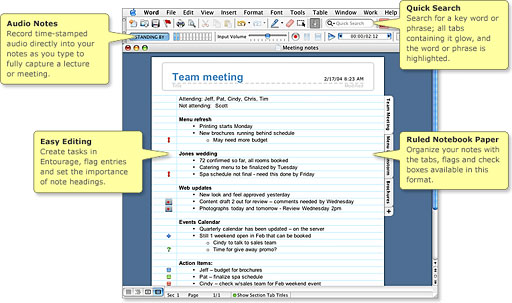
What's still more interesting (on the PC side) is that the only new, useful feature in Office 2003 for Windows seems to be the feature where you can lock down portions of Word documents and only allow people to edit certain sections. Other than the newly styled icons, Office 2003 seems to be much the same as Office XP. This is a bit of a disappointment to me, as it means that documents I create on the Mac in notebook layout can only be viewed correctly on the Mac and only with Office 2004.
This reminds me of an issue I had with PowerPoint a bit over a year ago, where I had created a presentation in Office XP only to find that it wouldn't run correctly in 2000, 2001, or v.X. I guess this is typical of Microsoft and other software companies (think AppleWorks 6 files - they won't open in AppleWorks 5). That's how they get people to upgrade. It's not "Why don't you buy the newest version, it has a lot of nice features!," but rather "In order to even be compatible with the rest of the world, you either buy this new version or else."
Why did I decide to upgrade to Office 2004? Actually, it wasn't a matter of compatibility at all - it was the notebook layout feature that I'd talked about previously. It really interested me, and so far it's been a worthwhile upgrade.
The only bad news is that Office 2004 uses over 400 MB of hard disk space compared with about 200 MB for Office v.X.
The upgrade to Office 2003 on the PC side wasn't something I had wanted to do, given that I liked Office XP enough and saw no reason to have the newer version using up more RAM and hard drive space. However, I'd realised that I left my Office XP CD-ROM back in the US, and if I wanted Office on my new PC (a necessity, really), I'd have to get another copy - and, of course, Office XP isn't what's being sold in stores.
With all that said, Microsoft does seem to be making a quality product these days, for both Macs and Windows PCs. Office 2004 has yet to crash on me, doesn't give me the spinning beach ball like in Office v.X, and the features that I've used have generally worked fairly well, and much the same goes for Office 2003 for Windows.
Join us on Facebook, follow us on Twitter or Google+, or subscribe to our RSS news feed
Today's Links
- Mac of the Day: Performa 5200, introduced 1995.04. The first PowerPC all-in-one was also one of the worst Macs ever made.
- Support Low End Mac
Recent Content
About LEM Support Usage Privacy Contact
Follow Low End Mac on Twitter
Join Low End Mac on Facebook
Favorite Sites
MacSurfer
Cult of Mac
Shrine of Apple
MacInTouch
MyAppleMenu
InfoMac
The Mac Observer
Accelerate Your Mac
RetroMacCast
The Vintage Mac Museum
Deal Brothers
DealMac
Mac2Sell
Mac Driver Museum
JAG's House
System 6 Heaven
System 7 Today
the pickle's Low-End Mac FAQ
Affiliates
Amazon.com
The iTunes Store
PC Connection Express
Macgo Blu-ray Player
Parallels Desktop for Mac
eBay

